Windows 7 Forums


Windows 7: GPU-Z reporting no physx

18 Aug 2011   #1

Windows 7 Ultimate x64
 
 
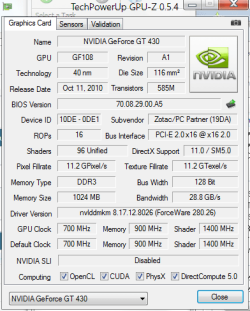
GPU-Z reporting no physx

I think this is down to an error because Nvidia control panel says it is installed - I am just a bit concerned.


My System SpecsSystem Spec

18 Aug 2011   #2

Windows 7 Ultimate x64


Even more concerned now because I just tried to run Cryostasis benchmark and it says PhysXLoader.dll is missing....
My System SpecsSystem Spec
18 Aug 2011   #3

Windows 7 Ultimate x64 Service Pack 1
Doncaster, UK


Try reinstalling the driver (download a fresh copy), and select the option to perform a clean installation and also the option to remove the existing driver. This will first of all remove the existing driver and associated files, reboot and then install a fresh driver and files.
My System SpecsSystem Spec
.


18 Aug 2011   #4

8 Pro x64


It's a issue with the 280 driver. You can download and re-install Physx separately or revert an older driver version.
My System SpecsSystem Spec
18 Aug 2011   #5

Windows 7 Ultimate x64 Service Pack 1
Doncaster, UK


Hmm... I've got that driver installed, and as far as I know, PhysX is installed. I'll check when I get back home this afternoon.
My System SpecsSystem Spec
18 Aug 2011   #6

8 Pro x64


By rights, the installer should simply detect same/higher PhysX version and then leave it alone. However for some reason, some have reported issues where the installer has buggered physx.
My System SpecsSystem Spec
18 Aug 2011   #7

Windows 7 Ultimate x64


Thanks guys I think I will wait before I do anything, Fluid mark is telling me it is installed and there are plenty of references to it in the registry, also the latest physx download ends with 513 whereas my installed version is 514, weird.
My System SpecsSystem Spec
18 Aug 2011   #8

Windows 7 Ultimate x64 Service Pack 1
Doncaster, UK


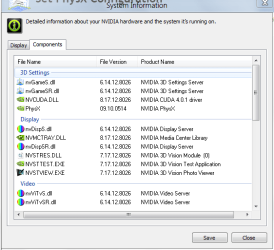
This is mine. Looking at the list of files, it looks as though you have some missing.

GPU-Z reporting no physx-capture.png GPU-Z reporting no physx-capture1.png
My System SpecsSystem Spec
18 Aug 2011   #9

Windows 7 Ultimate x64


Thanks Dwarf, I think the stuff I am missing is the 3D vision stuff, that shouldn't affect PhysX should it?

I am inclined to think PhysX is installed because FluidMark works smoothly, tells me I have it installed and gives me a score for it. But why is the other stuff (Gpu-z, Cryostasis) telling me it isn't installed?

I have to leave the PC for a bit now so I will check back later, thanks for helping.
My System SpecsSystem Spec
18 Aug 2011   #10

Windows 7 Ultimate x64 Service Pack 1
Doncaster, UK


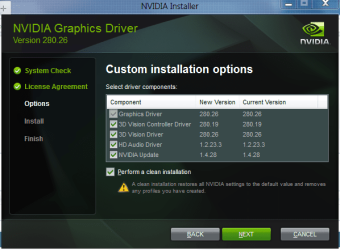
I would still reinstall the driver. After accepting the License Agreement, click on Custom (Advanced), and then Next. Make sure that all components are selected (ticked) and then check Perform a clean installation, as shown below. Click Next and follow subsequent instructions.

GPU-Z reporting no physx-capture.png
My System SpecsSystem Spec
Reply

 GPU-Z reporting no physx problems?


Thread Tools


Similar help and support threads for: GPU-Z reporting no physx
Thread Forum
GPU for Physx: which one? Graphic Cards
Solved Physx on cpu Graphic Cards
GTX 460 768 + BFG Physx Graphic Cards
Solved Physx Graphic Cards
PhysX SLI mix Graphic Cards


All times are GMT -5. The time now is 07:32 AM.


Seven Forums Android App Seven Forums IOS App Follow us on Facebook

Windows 7 Forums is an independent web site and has not been authorized,
sponsored, or otherwise approved by Microsoft Corporation.
"Windows 7" and related materials are trademarks of Microsoft Corp.
© Designer Media Ltd
  

1 2 3 4 5 6 7 8 9 10 11 12 13 14 15 16 17 18 19 20 21 22 23 24 25 26 27 28 29 30 31 32