
Windows 7 Forums


Windows 7: 3 Monitors - ATI eyefinity

07 Sep 2011  
ZenixNet

Windows 7 Home Premium 64-bit
356 posts
Ohio - U.S.A
 
 
3 Monitors - ATI eyefinity

For a while I have been using 3 1600x900 displays, that works fine. Now I have upgrade to 3 1920x1080 displays and I have a problem. 2 displays work at 1920x1080 but the display-port display only works at 1440x900. I have a ATI certified display port adapter. My card is ATI Radeon HD 5770.
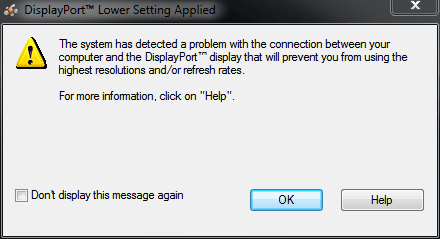
3 Monitors - ATI eyefinity-capture.png

My System SpecsSystem Spec

08 Sep 2011  
hunuok

Windows 7 Ultimate x64
91 posts


Are all 3 monitors the same make/model/resolution?
Have you installed drivers for each monitor? You can check in Device Manager in Control Panel.
My System SpecsSystem Spec
08 Sep 2011  
Zepher

Windows 7 Ultimate 64bit
2,193 posts
Norfolk, VA


get a different adapter.
My System SpecsSystem Spec
.


08 Sep 2011  
ZenixNet

Windows 7 Home Premium 64-bit
356 posts
Ohio - U.S.A


Quote   Quote: Originally Posted by hunuok View Post
Are all 3 monitors the same make/model/resolution?
Have you installed drivers for each monitor? You can check in Device Manager in Control Panel.
2 are 21.5" HP LED same model, the other is a 25" HP led (same model as others, just different size) I have also installed the drivers.
My System SpecsSystem Spec
09 Sep 2011  
ZenixNet

Windows 7 Home Premium 64-bit
356 posts
Ohio - U.S.A


Well, I bought a new adapter and it works. However, every time I reboot the resolution and placement of every monitor changes.
My System SpecsSystem Spec
10 Sep 2011  
profdlp

Main - Windows 7 Pro SP1 64-Bit; 2nd - Windows Server 2008 R2
3,098 posts
Westlake, Ohio


Try removing all but the main monitor, then uninstall them all in Device Mangler.

Reboot.

Add in one monitor (I'd suggest the Display Port one), let it be identified and installed, then reboot and see if the settings hold.

If you are still good with two monitors, add in the third one, let it be identified and installed, then reboot and see if the settings hold.

For what it's worth, my housemate experienced three-monitor weirdness with the latest ATI driver. (As of two weeks ago - they move pretty fast these days...) She never had any trouble before that.

I also have three monitors, and though I didn't have any trouble after I loaded the new video driver I did have to re-sort them all out after the first post-install reboot.
My System SpecsSystem Spec
10 Sep 2011  
ZenixNet

Windows 7 Home Premium 64-bit
356 posts
Ohio - U.S.A


I have one more problem, after screen saver the middle monitor doesn't come on for a few seconds, the left (display port) says 'Input out of range' and I have to wait until the monitor goes to sleep then press a button on the monitor for it to come on. The right works fine.
My System SpecsSystem Spec
10 Sep 2011  
profdlp

Main - Windows 7 Pro SP1 64-Bit; 2nd - Windows Server 2008 R2
3,098 posts
Westlake, Ohio


Have you tried playing around with the Power settings in Control Panel?

What about the other problems, like the resolution changes - any luck there?

You might try a free 30-Day trial of DisplayFusion and see if it helps you sort this stuff out.
My System SpecsSystem Spec
23 Sep 2011  
ZenixNet

Windows 7 Home Premium 64-bit
356 posts
Ohio - U.S.A


I havent had any luck. When I just have one monitor hooked up, its 1080p when it reaches the log in screen but quickly changes to 1600x900.
I think I'm just going to try a clean install. Something I have installed (or maybe ATI drivers are messed up, probably are) is doing something.
My System SpecsSystem Spec
24 Sep 2011  
profdlp

Main - Windows 7 Pro SP1 64-Bit; 2nd - Windows Server 2008 R2
3,098 posts
Westlake, Ohio


Quote   Quote: Originally Posted by hunuok View Post
Are all 3 monitors the same make/model/resolution?
Have you installed drivers for each monitor? You can check in Device Manager in Control Panel.
Have you done the part in bold?
My System SpecsSystem Spec
Reply

 3 Monitors - ATI eyefinity problems?


Thread Tools


Similar help and support threads for: 3 Monitors - ATI eyefinity
Thread Forum
Solved Eyefinity Test - Problem on 2/3 Monitors Graphic Cards
two differant monitors in an Eyefinity settup Graphic Cards
So long, Eyefinity... Graphic Cards
Ati Eyefinity Graphic Cards
Eyefinity question Graphic Cards


All times are GMT -5. The time now is 01:36 AM.


Windows 7 Forums is an independent web site and has not been authorized,
sponsored, or otherwise approved by Microsoft Corporation.
"Windows 7" and related materials are trademarks of Microsoft Corp.
© Designer Media Ltd