| Windows 7: Monitor is listed as generic, can't change resolution. |
20 Sep 2011
|
#1 | | Win 7 Home Premium x64 A suburb of Chicago |
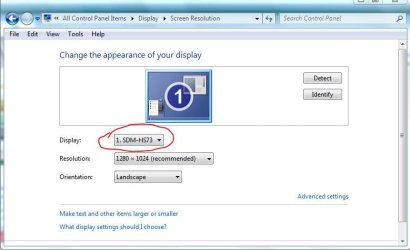
Monitor is listed as generic, can't change resolution. I'm pretty sure the reason I can't change the resolution on my monitor is because it is listed as Generic PnP in Device Manager. Although in Control Panel-->Display the model number is listed.
It's a seven year old monitor. Model Sony SDM-HS73. Should I attempt to install a driver? Will that allow me to change resolution? If so how do I find the driver?
I want to see if going lower than 1280 x 1024 may allow me to see the text on the screen a little better. But if it's more trouble than it's worth... | My System Specs |
| System Manufacturer/Model Number HP p6608f OS Win 7 Home Premium x64 CPU Intel Core i3-540 3.07 GHz Motherboard MS-7613 (Iona-GL8E) Memory 4 GB (2 X 2) Dual-Channel PC-10600 DDR3 @ 665MHz (9-9-9-24) Graphics Card Integrated Intel H57 Sound Card Integrated Realtek ALC888S Audio Monitor(s) Displays 17" SDM-HS73 (a vestige from my old computer) Screen Resolution 1280 X 1024 Keyboard HP USB keyboard Mouse HP USB optical mouse PSU 250W Hard Drives 750GB SATA 7200 RPM Internet Speed 15Mbps/1Mbps |
20 Sep 2011
|
#2 | | Windows 7 SP1, Home Premium, 64-bit |
I just took a quick look at Sony for your monitor: Sony eSupport - SDM-HS73 - News & Alerts
The drop down list under drivers doesn't show anything for Windows 7 or Vista.
I've at times used a generic video driver and did not notice anything inferior about it.
I guess you could experiment with an XP driver, maybe in compatible mode?
It's entirely possible Sony has quit driver development for this monitor and that you have no choice other than the generic driver you are now using. | My System Specs | | System Manufacturer/Model Number Ignatz Special; 4 speed manual gearbox; factory air conditioning; one of one OS Windows 7 SP1, Home Premium, 64-bit CPU Intel Sandy Bridge i5-2500, not overclocked Motherboard Gigabyte H67A-UD3H-B3, full ATX Memory 4 GB Crucial DDR3-1333 Graphics Card none; graphics are integrated on CPU Sound Card onboard: Realtek ALC892; external: USB Behringer UF0-202 Monitor(s) Displays NEC 90GX2-BK 19" LCD Screen Resolution 800 x 640 Keyboard Leopold Tenkeyless with Cherry Blue switches, USB Mouse Logitech or Microsoft optical wired; either USB or PS 2 PSU Seasonic SS-560KM, modular Case Antec Solo II Cooling CPU: Scythe Big Shuriken; Case: Scythe Slipstream 800 & 500 Hard Drives System: Intel 320 Series SSD, 80 GB;
Data: Samsung Spinpoint 103SJ, 1 TB;
Backup: WD Caviar Green WD15EADS-00P8B0, 1.5TB Other Info Power consumption of this system, including monitor: 68 watts at idle; 144 watts at full load |
20 Sep 2011
|
#3 | | Win 7 Home Premium x64 A suburb of Chicago |
When I try to change resolution in Display Properties everything but 1280 x 1024 is greyed out. At least I think that is what is happening. Is there another "generic" driver you are referring to other than the PnP I already have?
Otherwise I think I'll just stay with what I have. | My System Specs | | System Manufacturer/Model Number HP p6608f OS Win 7 Home Premium x64 CPU Intel Core i3-540 3.07 GHz Motherboard MS-7613 (Iona-GL8E) Memory 4 GB (2 X 2) Dual-Channel PC-10600 DDR3 @ 665MHz (9-9-9-24) Graphics Card Integrated Intel H57 Sound Card Integrated Realtek ALC888S Audio Monitor(s) Displays 17" SDM-HS73 (a vestige from my old computer) Screen Resolution 1280 X 1024 Keyboard HP USB keyboard Mouse HP USB optical mouse PSU 250W Hard Drives 750GB SATA 7200 RPM Internet Speed 15Mbps/1Mbps |
20 Sep 2011
|
#4 | | Windows 7 SP1, Home Premium, 64-bit |
No, I was referring to the same generic PnP driver that you mentioned.
You could try updating it through device manager, but there may be nothing available. | My System Specs | | System Manufacturer/Model Number Ignatz Special; 4 speed manual gearbox; factory air conditioning; one of one OS Windows 7 SP1, Home Premium, 64-bit CPU Intel Sandy Bridge i5-2500, not overclocked Motherboard Gigabyte H67A-UD3H-B3, full ATX Memory 4 GB Crucial DDR3-1333 Graphics Card none; graphics are integrated on CPU Sound Card onboard: Realtek ALC892; external: USB Behringer UF0-202 Monitor(s) Displays NEC 90GX2-BK 19" LCD Screen Resolution 800 x 640 Keyboard Leopold Tenkeyless with Cherry Blue switches, USB Mouse Logitech or Microsoft optical wired; either USB or PS 2 PSU Seasonic SS-560KM, modular Case Antec Solo II Cooling CPU: Scythe Big Shuriken; Case: Scythe Slipstream 800 & 500 Hard Drives System: Intel 320 Series SSD, 80 GB;
Data: Samsung Spinpoint 103SJ, 1 TB;
Backup: WD Caviar Green WD15EADS-00P8B0, 1.5TB Other Info Power consumption of this system, including monitor: 68 watts at idle; 144 watts at full load |
20 Sep 2011
|
#5 | | Windows 7 HP 64bit, Windows 8 Pro w/Media Center 64bit Covington, La |
Check this thread. CRT Monitor locked at 60hz.
Check my post#3 and see if that works. If not look at the final post if you are using AMD/ATI drivers for your video card.
Jim | My System Specs | | Computer type PC/Desktop System Manufacturer/Model Number Home Built OS Windows 7 HP 64bit, Windows 8 Pro w/Media Center 64bit CPU Phenom II X6 1100T Motherboard ASUS M5A99X EVO Memory Crucial Balistic 8gb DDR3-1866 CL9 Graphics Card MSI R6850 Cyclone IGD5 PE Sound Card On Board Monitor(s) Displays ASUS VE258Q 25" LED with DVI-HDMI-DisplayPort Screen Resolution 1920 x 1080 Keyboard Logitech K120 Mouse Logitech Marble Mouse USB, Logitech Precision Game Pad PSU Seasonic X650 80 Plus GOLD Modular Case Corsair 400R Cooling Antec Kuhler H2O 620, Two 120mm and four 140mm Hard Drives Two WD Cavier Black 2TB Sata III, WD My Book Essential 2TB USB 3.0 Internet Speed 15MB Antivirus Norton IS 2012, Malwarebytes Pro Browser IE-10, FF-19 Other Info APC UPS ES 750, Netgear WNR3500L Gigabit & Wireless N Router with SamKnows Test Program, Motorola SB6120 Gigabit Cable Modem. Brother HL-2170W Laser Printer, Epson V300 Scanner |
20 Sep 2011
|
#6 | | Win 7 Home Premium x64 A suburb of Chicago |

Quote: Originally Posted by Phone Man Check this thread. CRT Monitor locked at 60hz.
Check my post#3 and see if that works. If not look at the final post if you are using AMD/ATI drivers for your video card.
Jim  Yes, going to Advanced settings->Adapter I am able to see many choices. I repped you, Thanks.
If I switch to any other resolution I get a message saying it's not the optimal display. I was on a different computer today and noticed it's resolution was lower than mine and I liked the way it looked. That's what started me down this path. I'll have to experiment. | My System Specs | | System Manufacturer/Model Number HP p6608f OS Win 7 Home Premium x64 CPU Intel Core i3-540 3.07 GHz Motherboard MS-7613 (Iona-GL8E) Memory 4 GB (2 X 2) Dual-Channel PC-10600 DDR3 @ 665MHz (9-9-9-24) Graphics Card Integrated Intel H57 Sound Card Integrated Realtek ALC888S Audio Monitor(s) Displays 17" SDM-HS73 (a vestige from my old computer) Screen Resolution 1280 X 1024 Keyboard HP USB keyboard Mouse HP USB optical mouse PSU 250W Hard Drives 750GB SATA 7200 RPM Internet Speed 15Mbps/1Mbps Monitor is listed as generic, can't change resolution. problems? All times are GMT -5. The time now is 12:50 AM. | |