Hello.
I have been having this problem of setting my resolution of 1440X900.
I have a 19" Acer monitor and that resolution seemed to be perfect for my monitor but i just restarted my computer and that particular resolution was gone.
I have already installed my graphic card software and tried to change it from there but its not even there.
I even tried restarting my computer several times but the particular resolution was just gone.
I took a screen shot of of the resolution options too.
And I am using Nvidia 8400GS 1Gb graphic card.
Please Help.
Attachments
2011-09-21_102110.png
6.3 KB
· Views: 116
2011-09-21_102138.png
33.9 KB
· Views: 364
My Computer
At a glance
Windows 7 Ultimate 32bitInter Core 2 Duo CPU E4400 @ 2.00GHz2GB DDR2 Ram1GB Nvidia 8400GS
OS
Windows 7 Ultimate 32bit
CPU
Inter Core 2 Duo CPU E4400 @ 2.00GHz
Motherboard
I dont know much about it but its Gigabyte Motherboard.
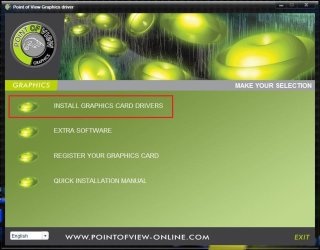
Have you installed the appropriate display driver ? I guess your graphics card is accompanied with a Point Of View Display drivers disk. Run the disk. It is this window ....
Click on the first link, and it is this window . Install 8 series drivers
After restart, it should be the appropriate display automatically.
My Computer
At a glance
Microsoft Windows 10 Pro Insider Preview 64-bitIntel(R) Core(TM) i3-4130 CPU @ 3.40GHzCorsair Vengence 4GB x2 (8.00GB Dual-Channel ...2047MB GeForce GTS 450 (ZOTAC International)
Samsung 830 120GB SSD
Intel 320 120GB SSD
Western Digital Caviar Black WD7501AALS 750GB 7200 RPM SATA 3.0Gb/s
Western Digital Caviar Black WD6401AALS 640GB 7200 RPM SATA 3.0Gb/s
PSU
COOLER MASTER Silent Pro RS850-AMBAJ3-US 850W Modular
Thanks a lot guys... as champ2010 said i created a custom resolution with the help of my display driver and i am not having any problems now.
Thank you.
My Computer
At a glance
Windows 7 Ultimate 32bitInter Core 2 Duo CPU E4400 @ 2.00GHz2GB DDR2 Ram1GB Nvidia 8400GS
OS
Windows 7 Ultimate 32bit
CPU
Inter Core 2 Duo CPU E4400 @ 2.00GHz
Motherboard
I dont know much about it but its Gigabyte Motherboard.
Thanks a lot guys... as champ2010 said i created a custom resolution with the help of my display driver and i am not having any problems now.
Thank you.