| Windows 7: Freezing while playing games, Sapphire HD 2600 Pro |
17 Dec 2011
|
#1 | | |
Freezing while playing games, Sapphire HD 2600 Pro So, my computer freezes when I am playing games, not all of them.
For example in NFS MW, Ice Age 2, Ice Age 3 after 1 minute of playing the screen freezes, I hear the sound skipping then I have to restart, sometimes freezes in menu. In FIFA 09, Extreme Trucker 2 it doesn't freeze, I have the latest driver for my video card, my video card is a Sapphire HD 2600 Pro 512 MB, BUS 128, AGP.
I ran Fur Mark for 6 minutes, the temperatures were 58-61 (not passed this value), i've seen no artifacts, so I guess the video card is not broken.
GPU's temp in idle is 38-40.
GPU's software info: Code: Driver Packaging Version 8.892-110914m-125036E-ATI
Catalyst Version 11.9
Provider ATI Technologies Inc.
2D Driver Version 8.01.01.1186
2D Driver File Path /REGISTRY/MACHINE/SYSTEM/ControlSet001/Control/Class/{4D36E968-E325-11CE-BFC1-08002BE10318}/0000
Direct3D Version 7.14.10.0860
OpenGL Version 6.14.10.11079
Catalyst Control Center Version 2011.0908.1355.23115 My computer is kinda old, but I never had this problem. | My System Specs |
| System Manufacturer/Model Number Made by me OS Windows 7 Ultimate x86 CPU Intel Pentium Dual-Core E5200 @ 3.0GHz Motherboard ASRock P45DE Memory Corsair 2x2GB 800MHz DDR2 CL5 DHX Dual Channel Kit Graphics Card Gainward GTS 250 512MB / 256BITS Sound Card Onboard 7.1 Screen Resolution 1280x1024 Keyboard Genius SlimStar 100 Mouse Genius GM-03022P X-Scroll PSU Sirtec High Power Element 400W Hard Drives Hitachi Deskstar 7k80 80 GB System Manufacturer/Model Number Made by me OS Windows 7 Ultimate x86 CPU Intel Pentium Dual-Core E5200 @ 3.0GHz Motherboard ASRock P45DE Memory Corsair 2x2GB 800MHz DDR2 CL5 DHX Dual Channel Kit Graphics Card Gainward GTS 250 512MB / 256BITS Sound Card Onboard 7.1 Screen Resolution 1280x1024 Keyboard Genius SlimStar 100 Mouse Genius GM-03022P X-Scroll PSU Sirtec High Power Element 400W Hard Drives Hitachi Deskstar 7k80 80 GB |
17 Dec 2011
|
#3 | | Win 7 Ultimate 64-bit. SP1. |
Hello AlexRussel,
It would be nice to be able to see your System Specs.
There are many reasons why a PC " behaves" this way.
These annoying " gliches" may be caused by an overloaded hard drive, overworked CPU, Malware, running 2 AV 's, unnecessary data, Browser addons or you may have unnecessary programs running in the background etc....
What follows is a series of generic troubleshooting steps that you may care to try...
*Make sure all intake/exhausts vents are clean along with all fans.
Get some temp monitoring software for cpu, gpu.
* It could be a hard drive that is going bad or corrupted.
To check a hard drive See Check Disk... Disk Check
* In an administrators account type cmd in search.
In cmd type sfc /scannow.
This will report and fix minor problems.
Take note of what is said at the end.
Should your computer freeze, try to do the tests in safe mode.
* Go to search, type device manager and look for any yellow warning markers.
*Type event viewer, in search (by start button) > Windows Logs > Application
Look for RED critical errors that say app hang, app crash, or anything that relates to the CURRENT problem.
Note the event ID, and the source codes and Google search them.
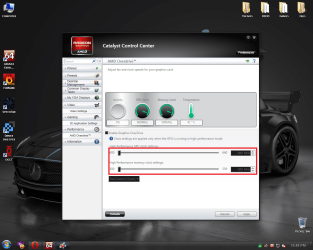
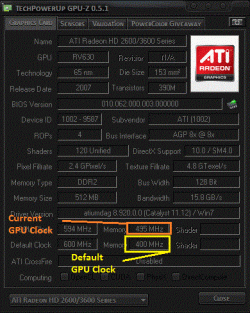
* If overclocking STOP.
Restore to original.
* Try in safe mode; report back if it works properly. Start your computer in safe mode
*Clean boot. You may discover what is causing your problem. Perform a clean startup to determine whether background programs are interfering with your game or program How to troubleshoot a problem by performing a clean boot in Windows Vista or in Windows 7
*Run a scan with Malwarebytes free.
Download, update & run a full system scan. Malwarebytes : Malwarebytes Anti-Malware PRO removes malware including viruses, spyware, worms and trojans, plus it protects your computer
*List all the Security software you have ever had installed & currently have now on your computer please.
* Browser addons can create problems.
Check how many you have on your various browsers.
Is each & every one really needed? | My System Specs | | System Manufacturer/Model Number LAPTOP. HP Pavilion dv7-4010TX . OS Win 7 Ultimate 64-bit. SP1. CPU Intel i7 -720QM.[1.6GHz Turbo Boost 2.8GHz. 6MB Cache.] Memory 8 DDR 3 RAM. 1066MHZ Graphics Card ATI 1024 MB. DDR3. Radeon HD5650 Monitor(s) Displays 17.3" High Definition Brightview LCD. LED Backlit. Screen Resolution 1600 x 900. Mouse Logitech Anywhere mouse. MX. Case Laptop / notebook. Hard Drives 640GB Internet Speed ADSL [ but too slow ] |
18 Dec 2011
|
#4 | | |
Hello JMH,
Thanks for replying me, I gave you a answer for each advice you listed. Quote: Hello AlexRussel,
It would be nice to be able to see your System Specs.
There are many reasons why a PC " behaves" this way. Quote: These annoying " gliches" may be caused by an overloaded hard drive, overworked CPU, Malware, running 2 AV 's, unnecessary data, Browser addons or you may have unnecessary programs running in the background etc....
What follows is a series of generic troubleshooting steps that you may care to try... I removed the avast antivirus, CPU is not overclocked the lifetime of any CPU is longer right?; I have no malwares, I stopped the unnecessary programs running in background from msconfig. Quote: *Make sure all intake/exhausts vents are clean along with all fans.
Get some temp monitoring software for cpu, gpu. The fans are clean, I've cleaned them already.
The temps are good I think.
Please take a look on my PSU wattage, are they good?
Or my PSU is failing?
Sensor info with Aida64: Code: Field Value
Sensor Properties
Sensor Type ITE IT8705F (ISA 290h)
GPU Sensor Type Diode (ATI-Diode)
Temperatures
Motherboard 31 °C (88 °F)
CPU 28 °C (82 °F)
Aux 30 °C (86 °F)
GPU Diode 39 °C (102 °F)
HDS728080PLAT20 34 °C (93 °F)
Cooling Fans
CPU 2679 RPM
GPU 20%
Voltage Values
CPU Core 1.360 V
+2.5 V 2.992 V
+3.3 V 2.784 V
+5 V 4.838 V
+12 V 9.728 V
+5 V Standby 3.924 V
VBAT Battery 3.344 V Quote: * It could be a hard drive that is going bad or corrupted.
To check a hard drive See Check Disk... Disk Check Checked it, no bad sectors. Quote: * In an administrators account type cmd in search.
In cmd type sfc /scannow.
This will report and fix minor problems.
Take note of what is said at the end.
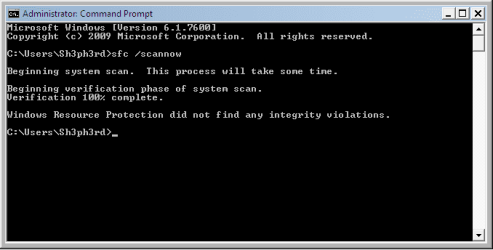
Should your computer freeze, try to do the tests in safe mode. I did the test in safe mode:  Quote: * Go to search, type device manager and look for any yellow warning markers.
*Type event viewer, in search (by start button) > Windows Logs > Application
Look for RED critical errors that say app hang, app crash, or anything that relates to the CURRENT problem.
Note the event ID, and the source codes and Google search them. I have critical errors...
Most of them are Source: LoadPerf, Event ID: 3011 and 3012.
Less of them are Source: CAPI2, Event ID: 4107
Only from those 2 sources/event IDs I have critical errors. Quote: * If overclocking STOP.
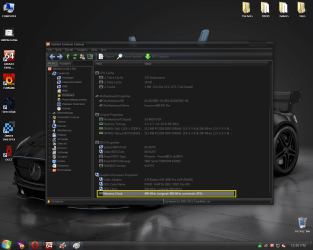
Restore to original. I never overclocked any hardware on this computer. Safe mode works fine, it loads up perfectly. I did this, still the same problem. It's a fresh install of Windows 7, I don't think I got viruses or anything, also this problem were present on XP SP 2 too, so I don't think the viruses are the problem. Quote: *List all the Security software you have ever had installed & currently have now on your computer please. avast! Free Antivirus 6, had it installed, but I removed it now I have no antivirus. Quote: * Browser addons can create problems.
Check how many you have on your various browsers.
Is each & every one really needed? I only have Opera and Internet Explorer 8 installed.
I never install tool bars. | My System Specs | | System Manufacturer/Model Number Made by me OS Windows 7 Ultimate x86 CPU Intel Pentium Dual-Core E5200 @ 3.0GHz Motherboard ASRock P45DE Memory Corsair 2x2GB 800MHz DDR2 CL5 DHX Dual Channel Kit Graphics Card Gainward GTS 250 512MB / 256BITS Sound Card Onboard 7.1 Screen Resolution 1280x1024 Keyboard Genius SlimStar 100 Mouse Genius GM-03022P X-Scroll PSU Sirtec High Power Element 400W Hard Drives Hitachi Deskstar 7k80 80 GB |
18 Dec 2011
|
#5 | | Win 7 Ultimate 64-bit. SP1. |

Quote: Originally Posted by AlexRussel Hello JMH,
Thanks for replying me, I gave you a answer for each advice you listed. Quote: *List all the Security software you have ever had installed & currently have now on your computer please. avast! Free Antivirus 6, had it installed, but I removed it now I have no antivirus.
Alex unfortunately I am only here for a minute or so.
I have real life commitments to attend to.
Am I to understand from what you wrote just above that you now HAVE NO Anti Virus protection installed? | My System Specs | | System Manufacturer/Model Number LAPTOP. HP Pavilion dv7-4010TX . OS Win 7 Ultimate 64-bit. SP1. CPU Intel i7 -720QM.[1.6GHz Turbo Boost 2.8GHz. 6MB Cache.] Memory 8 DDR 3 RAM. 1066MHZ Graphics Card ATI 1024 MB. DDR3. Radeon HD5650 Monitor(s) Displays 17.3" High Definition Brightview LCD. LED Backlit. Screen Resolution 1600 x 900. Mouse Logitech Anywhere mouse. MX. Case Laptop / notebook. Hard Drives 640GB Internet Speed ADSL [ but too slow ] |
18 Dec 2011
|
#6 | | |

Quote: Originally Posted by JMH 
Quote: Originally Posted by AlexRussel Hello JMH,
Thanks for replying me, I gave you a answer for each advice you listed. Quote: *List all the Security software you have ever had installed & currently have now on your computer please. avast! Free Antivirus 6, had it installed, but I removed it now I have no antivirus.
Alex unfortunately I am only here for a minute or so.
I have real life commitments to attend to.
Am I to understand from what you wrote just above that you now HAVE NO Anti Virus protection installed? It's all good mate, thanks for taking your time to answer me.
Yup, I removed it, someone told me it occurs BSODs, now I'll install the essentials. | My System Specs | | System Manufacturer/Model Number Made by me OS Windows 7 Ultimate x86 CPU Intel Pentium Dual-Core E5200 @ 3.0GHz Motherboard ASRock P45DE Memory Corsair 2x2GB 800MHz DDR2 CL5 DHX Dual Channel Kit Graphics Card Gainward GTS 250 512MB / 256BITS Sound Card Onboard 7.1 Screen Resolution 1280x1024 Keyboard Genius SlimStar 100 Mouse Genius GM-03022P X-Scroll PSU Sirtec High Power Element 400W Hard Drives Hitachi Deskstar 7k80 80 GB |
18 Dec 2011
|
#7 | | Win 8 Release candidate 8400 |
Alex
There are some malware applications that do cause more BSOD's than others. Microsoft Security Essentials is one that causes the fewest. Microsoft Security Essentials - Free Antivirus for Windows
Since you have been without any malware protection for some period of time I would also download Malwarebytes and run it just to be sure Malwarebytes : Download free malware, virus and spyware tools to get your computer back in shape!
For the future, it is a really bad idea to run without malware protection for no matter what the cost malware can (and do) cause BSOD's, make you system laggy, and in some cases render a computer in-operable. Read that DEAD.
Dont run without it. | My System Specs | | System Manufacturer/Model Number HP Pavillion dv-7 1005 Tx OS Win 8 Release candidate 8400 CPU 2@2.4 Memory 4 gigs Graphics Card Nvidia 9600M Sound Card HD built-in Monitor(s) Displays 17" Wxga Screen Resolution 1440x900 Cooling none Internet Speed 45Mb down 5Mb up |
18 Dec 2011
|
#8 | | |
Thank you, Zigzag; I will do what you said.
Do you think the power supply is nearly dead?; please take a look at it's wattage values. | My System Specs | | System Manufacturer/Model Number Made by me OS Windows 7 Ultimate x86 CPU Intel Pentium Dual-Core E5200 @ 3.0GHz Motherboard ASRock P45DE Memory Corsair 2x2GB 800MHz DDR2 CL5 DHX Dual Channel Kit Graphics Card Gainward GTS 250 512MB / 256BITS Sound Card Onboard 7.1 Screen Resolution 1280x1024 Keyboard Genius SlimStar 100 Mouse Genius GM-03022P X-Scroll PSU Sirtec High Power Element 400W Hard Drives Hitachi Deskstar 7k80 80 GB |
18 Dec 2011
|
#9 | | Win 8 Release candidate 8400 |

Quote: Originally Posted by AlexRussel Thank you, Zigzag; I will do what you said.
Do you think the power supply is nearly dead?; please take a look at it's wattage values. Unsure for there are no "wattage" values listed.
What model is the PSU, and what are the system specs? | My System Specs | | System Manufacturer/Model Number HP Pavillion dv-7 1005 Tx OS Win 8 Release candidate 8400 CPU 2@2.4 Memory 4 gigs Graphics Card Nvidia 9600M Sound Card HD built-in Monitor(s) Displays 17" Wxga Screen Resolution 1440x900 Cooling none Internet Speed 45Mb down 5Mb up |
18 Dec 2011
|
#10 | | |

Quote: Originally Posted by zigzag3143 
Quote: Originally Posted by AlexRussel Thank you, Zigzag; I will do what you said.
Do you think the power supply is nearly dead?; please take a look at it's wattage values. Unsure for there are no "wattage" values listed.
What model is the PSU, and what are the system specs? Scroll up, I listed them. | My System Specs | | System Manufacturer/Model Number Made by me OS Windows 7 Ultimate x86 CPU Intel Pentium Dual-Core E5200 @ 3.0GHz Motherboard ASRock P45DE Memory Corsair 2x2GB 800MHz DDR2 CL5 DHX Dual Channel Kit Graphics Card Gainward GTS 250 512MB / 256BITS Sound Card Onboard 7.1 Screen Resolution 1280x1024 Keyboard Genius SlimStar 100 Mouse Genius GM-03022P X-Scroll PSU Sirtec High Power Element 400W Hard Drives Hitachi Deskstar 7k80 80 GB Freezing while playing games, Sapphire HD 2600 Pro problems? All times are GMT -5. The time now is 06:36 AM. | |