Windows 7 Forums Search
Welcome to Windows 7 Forums. Our forum is dedicated to helping you find solutions with any problems, errors or issues you are experiencing with Windows 7. The Windows 7 forum also covers news and updates and has an extensive Windows 7 tutorial section that covers a wide range of tips and tricks.


Windows 7 - Video temperature too high?

 
12-21-2011   #1


Video temperature too high?

This CPUID number looks way to hot to me. Fan is spinning on the card.

Nvidia Quadro FX 3400/4400 118c (244F)!!!
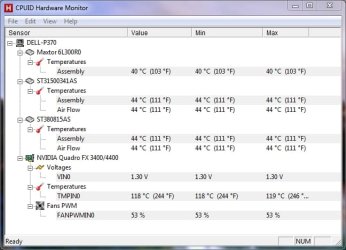
Video temperature too high?-hardwaremonitor.jpg

Any suggestions?

My System SpecsSystem Spec
12-22-2011   #2


Windows 7 Home Premium 64-bit SP1


Are you Overclocking?
Did you check the card for dust accumulation in the card's Heatsink, ect?
Is your case well-ventilated?
Are the cables in your case managed or unmanaged? (cable-management)
My System SpecsSystem Spec
12-22-2011   #3


No overclocking.
Card is clean.
It's a Dell Precision 370. I've not added any fans to it so it has whatever it came with. A fan in the power supply, one at the rear of the case and one on the video card (which I added so I could run Win 7).

Not sure what you mean by cable-management?

I'm wondering if the thermal paste between the GRU and the heat sink is dried out or of poor quality? I've never tried taking a video card apart before, so any suggestions on how to proceed? I'll get some Arctic Silver before messing with it.
My System SpecsSystem Spec
.


12-22-2011   #4


Windows 7 Home Premium 64bit sp1


Quote   Quote: Originally Posted by Ztruker View Post
This CPUID number looks way to hot to me. Fan is spinning on the card.

Nvidia Quadro FX 3400/4400 118c (244F)!!!

Attachment 189355

Any suggestions?

Looks like The fan on the Heatsink failed

Cable managment -is making sure the cables aren't blocking and restricting airflow
since you have a dell that is something you need not to worry about you didn't put it together

Now if you have warrenty on your system that would be your best option seek customer service help if it is beyond the service agreement then i suggest having it looked at by a qualified person

Chances are your card is failing about to fail or something is not working like it used too

I don't know the time span you have had this system but pretty much that would be your options other then replacing the card itself which a quadro card is Megabucks
My System SpecsSystem Spec
12-22-2011   #5


How are you sure the temperature's reporting correctly? Got a probe? Faulty sensor reporting? Compared readings between alternative monitoring software? At 118°c in my opinion the GPU would have fried, or if not fried, you'd be seeing artifacts galore... and it'd also be very smelly too, a distinctive aroma of melting would be coming from your computer... is the GPU fan spinning or not?
My System SpecsSystem Spec
12-22-2011   #6


Windows 7 Ultimate x64 SP1, LinuxMint 9 LTS x64, Debian 6, Ubuntu 10.04 LTS x64


Agree on alternate temp. monitoring software - HWINFO64 is highly regarded. Give that a try.
My System SpecsSystem Spec
12-22-2011   #7


I checked the temps with Hardware Monitor (CPUID) and SpeedFan.
Speedan said the fan on the card was running at 53% duty cycle.

I installed RivaTuner and upped that to 80%. Temp is now sitting around 93C which is a lot better than 118C but still hot I think.

I'll try HWINFO64 next and see what it says.

Thanks for the ideas.

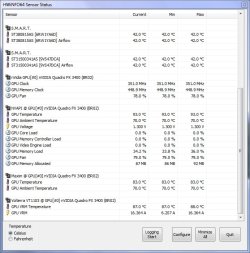
HWInfo64 agrees (I think) with the other monitoring programs. It has some numbers I don't understand though, like Ambient temperature.

Video temperature too high?-hwinfo64.jpg

Last edited by Ztruker; 12-23-2011 at 10:49 AM..
My System SpecsSystem Spec
12-22-2011   #8


Just for comparison my GPU is sitting at 44°c, it's slightly overclocked @ 685Mhz, 90mm PWM fan is revving away at 50%; but even hitting the cards high spots consistently and repeatedly over a long period never pushes the temps over 55°c.

I do not trust onboard hardware temperature sensors to be accurately calibrated, nor correctly managed in many cases. If in doubt see if you can manage to burn your fingers (power down, earth yourself too...) or better still, beg, borrow, or steal, a decent techies temperature probe...
My System SpecsSystem Spec
12-23-2011   #9


It's hot to the touch but not hot enough to burn my finger.

It's been running okay for almost two years now so I guess it's unlikely the temp is anything like what is being detected. Cranking up the fan speed did make a difference so I'll leave it alone and replace it if/when it dies.
My System SpecsSystem Spec
12-23-2011   #10


You'd just about be able to tolerate 55°-60°c on your fingertips, so it looks as if the sensor is reporting somewhat exaggerated readings, or there's some reason it's not being read correctly.

Just out of interest, try the simple freeware on the link below and see what it reads...

GPU Temp
My System SpecsSystem Spec
Reply

 Video temperature too high? problems?


Thread Tools


Similar Threads for: Video temperature too high?
Thread Forum
Graphic Card dead due to High Temperature, Any Solution? Graphic Cards
O'C my i7 920 processor, but temperature is pretty high Overclocking and Case Mods
Solved Cpu temperature really high ? please help =( Performance & Maintenance
XFX 4870 XXX - High Temperature at Standby Graphic Cards
Solved 5670's high temperature.. Graphic Cards


All times are GMT -5. The time now is 07:26 AM.


Windows 7 Forums is an independent web site and has not been authorized,
sponsored, or otherwise approved by Microsoft Corporation.
"Windows 7" and related materials are trademarks of Microsoft Corp.
© Designer Media Ltd
  

1 2 3 4 5 6 7 8 9 10 11 12 13 14 15 16 17 18 19 20 21 22 23 24 25 26 27 28 29 30