
 |
Welcome to Windows 7 Forums. Our forum is dedicated to helping you find solutions with any problems, errors or issues you are experiencing with Windows 7. The Windows 7 forum also covers news and updates and has an extensive Windows 7 tutorial section that covers a wide range of tips and tricks.
Windows 7 - Unable to run dual monitors, for home entertainment system. |
12-31-2011
|
#1 | | Windows 7 Home Premium 64Bit |
Unable to run dual monitors, for home entertainment system. Hi, when i plug in a hdmi from my tv to my computer, my desktop doesnt show up on my tv. Im trying to makee it so i can use my tv as a monitor for my computer
cOMPUTER sPECS:
MotherBoard: Gigabyte: GA-MA785GM-US2H
Cpu: AMD Phenom II x4 920 Processor
Memory: 2 X COrsair CM2x2048-6400C5
Netowrk adapter: Realtek pcie gbe family controller
Graphics: EVGA NVIDIA GeForce 8600 GT 1024 MB
Sound: Reaktek High Definition Audio
HardDrive: Seagate ST3250410AS
Thanks!
| My System Specs | | OS Windows 7 Home Premium 64Bit CPU AMD Phenom II x4 920 Processor Motherboard Gigabyte Technology Co., Ltd. GA-MA785GM-US2H (Socket AM2) Memory Corsair 4.0GB Dual-Channel DDR2 @ 401MHz (5-5-5-18) Graphics Card GeForce 8600 GT (EVGA) Sound Card Realtek High Definition Audio Monitor(s) Displays Acer X193W Screen Resolution 1440 X 900 Hard Drives 244GB Seagate ST3250410AS ATA Device (SATA) |
12-31-2011
|
#2 | | Windows 7 Pro x64 -- PCLinuxOS KDE4 FullMonty 2011 |
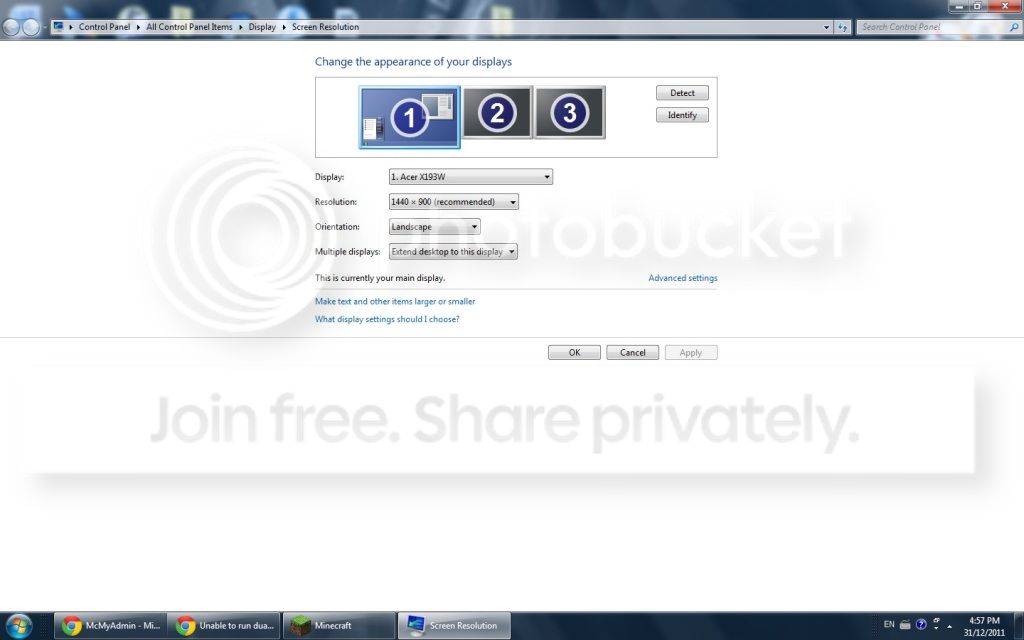
Take a screen shot of the screen resolution & stick it up here. Right click the desktop/screen resolution. First window you come too. Just curios. | My System Specs | | System Manufacturer/Model Number Custom OS Windows 7 Pro x64 -- PCLinuxOS KDE4 FullMonty 2011 CPU i7-875k @ Turbo - 7,6,5,5 - 3.6ghz Motherboard Asus P7P55D-E Deluxe Memory Corsair CMD8GX3M4A1600C8 8gb Graphics Card Asus EAH5850 DirectCU/2DIS/1GD5 Sound Card On Board Monitor(s) Displays Samsung SyncMaster T220 - Panasonic VT30a 50" Screen Resolution 1680x1050 - Keyboard Logitech Wireless MK700 Mouse Logitech Wireless MX620 PSU Corsair HX-850 Power Supply Case Coolmaster HAF 932 Cooling Corsair H50 Hard Drives Corsair Force 3 SSD 120GB x 2 ::
WD VelociRaptor 150GB WD1500HLFS x 2 Internet Speed Good enough for now Other Info Voip. Insanely cheap phone calls. |
12-31-2011
|
#3 | | Windows 7 Home Premium 64Bit |

Quote: Originally Posted by Hipster Doofus Take a screen shot of the screen resolution & stick it up here. Right click the desktop/screen resolution. First window you come too. Just curios. | My System Specs | | OS Windows 7 Home Premium 64Bit CPU AMD Phenom II x4 920 Processor Motherboard Gigabyte Technology Co., Ltd. GA-MA785GM-US2H (Socket AM2) Memory Corsair 4.0GB Dual-Channel DDR2 @ 401MHz (5-5-5-18) Graphics Card GeForce 8600 GT (EVGA) Sound Card Realtek High Definition Audio Monitor(s) Displays Acer X193W Screen Resolution 1440 X 900 Hard Drives 244GB Seagate ST3250410AS ATA Device (SATA) |
12-31-2011
|
#4 | | Windows 7 Pro x64 -- PCLinuxOS KDE4 FullMonty 2011 |
If you want to use one monitor at a time not two, then under multiple monitors select 'show desktop only on ##' then apply.
If you want extended them maybe someone else can help. | My System Specs | | System Manufacturer/Model Number Custom OS Windows 7 Pro x64 -- PCLinuxOS KDE4 FullMonty 2011 CPU i7-875k @ Turbo - 7,6,5,5 - 3.6ghz Motherboard Asus P7P55D-E Deluxe Memory Corsair CMD8GX3M4A1600C8 8gb Graphics Card Asus EAH5850 DirectCU/2DIS/1GD5 Sound Card On Board Monitor(s) Displays Samsung SyncMaster T220 - Panasonic VT30a 50" Screen Resolution 1680x1050 - Keyboard Logitech Wireless MK700 Mouse Logitech Wireless MX620 PSU Corsair HX-850 Power Supply Case Coolmaster HAF 932 Cooling Corsair H50 Hard Drives Corsair Force 3 SSD 120GB x 2 ::
WD VelociRaptor 150GB WD1500HLFS x 2 Internet Speed Good enough for now Other Info Voip. Insanely cheap phone calls. |
12-31-2011
|
#5 | | Windows 7 Home Premium 64Bit |

Quote: Originally Posted by Hipster Doofus If you want to use one monitor at a time not two, then under multiple monitors select 'show desktop only on ##' then apply.
If you want extended them maybe someone else can help. I've tried that already but it didnt work, my tv keeps on saying no signal | My System Specs | | OS Windows 7 Home Premium 64Bit CPU AMD Phenom II x4 920 Processor Motherboard Gigabyte Technology Co., Ltd. GA-MA785GM-US2H (Socket AM2) Memory Corsair 4.0GB Dual-Channel DDR2 @ 401MHz (5-5-5-18) Graphics Card GeForce 8600 GT (EVGA) Sound Card Realtek High Definition Audio Monitor(s) Displays Acer X193W Screen Resolution 1440 X 900 Hard Drives 244GB Seagate ST3250410AS ATA Device (SATA) |
12-31-2011
|
#6 | | Main - Windows 7 Pro SP1 64-Bit; 2nd - Windows Server 2008 R2 |
Your screenshot looks like there are three monitors - is that right? With one video card you will be limited to two unless you have a different video card than the one listed in your specs.
How many monitors (including the TV) do you have, and how are they all connected? Have you tried extending the desktop to the TV? | My System Specs | | System Manufacturer/Model Number Self OS Main - Windows 7 Pro SP1 64-Bit; 2nd - Windows Server 2008 R2 CPU Main - Core i7 2600K; 2nd - Core i7 920 Motherboard Main - Asus P8Z68-V Pro/Gen3; 2nd - Gigabyte GA-EX58-UDR3 Memory Main - 16GB Corsair Vengeance; 2nd - 12GB Corsair Vengeance Graphics Card Main - XFX Radeon 6870 1GB; 2nd - XFX Radeon 4870 1GB Sound Card Both: Onboard Realtek Azalia Monitor(s) Displays Main - Hann 25" + I-INC 25" + Acer 23"; 2nd - Upgrading Soon Screen Resolution Main - 1920x1080 (All Three Monitors); 2nd - Upgrading Soon Keyboard Main - Razer Reclusa; 2nd - Old MS Keyboard Mouse Main - Logitech MX Revolution; 2nd - Old MS Mouse PSU Main - OCZ 600W Modular; 2nd - OCZ 600W Case Main - Thermaltake Element G; 2nd - NZXT something or other Cooling Main - Corsair H80; 2nd - Prolimatech Megahalems Hard Drives Main - (1) Crucial M4 128GB (Boot)
Main - (1) Seagate 2TB 64MB Cache (Data)
Main - (1) Seagate 2TB 64MB Cache (Data Backup)
2nd - (1) Intel X25-M SSD 80GB (Boot)
2nd - (3) Seagate 1TB 32MB Cache (Data Backup)
2nd - (1) Seagate 320GB (Because) Internet Speed 20Mbps Time-Warner Cable |
12-31-2011
|
#7 | | Windows 7 Home Premium 64Bit |

Quote: Originally Posted by profdlp Your screenshot looks like there are three monitors - is that right? With one video card you will be limited to two unless you have a different video card than the one listed in your specs.
How many monitors (including the TV) do you have, and how are they all connected? Have you tried extending the desktop to the TV? I only have 2 monitors (including the tv), i dont know why it says 3, from my pc to lcd monitor i have it hooked up from my vga out from the mobo to the monitor, my hmdi to tv is from the graphics card to the tv. Yes i have tried to extend. | My System Specs | | OS Windows 7 Home Premium 64Bit CPU AMD Phenom II x4 920 Processor Motherboard Gigabyte Technology Co., Ltd. GA-MA785GM-US2H (Socket AM2) Memory Corsair 4.0GB Dual-Channel DDR2 @ 401MHz (5-5-5-18) Graphics Card GeForce 8600 GT (EVGA) Sound Card Realtek High Definition Audio Monitor(s) Displays Acer X193W Screen Resolution 1440 X 900 Hard Drives 244GB Seagate ST3250410AS ATA Device (SATA) |
12-31-2011
|
#8 | | Main - Windows 7 Pro SP1 64-Bit; 2nd - Windows Server 2008 R2 |
Just to make sure I have it right, the monitor is hooked to the onboard graphics and the TV to the graphics card, correct?
What happens if you hook the monitor to the video card? Is that working?
Also, I got an email response about this thread to a post (which seems to have disappeared) recommending that you double-check the input setting on the TV. That is a good idea. | My System Specs | | System Manufacturer/Model Number Self OS Main - Windows 7 Pro SP1 64-Bit; 2nd - Windows Server 2008 R2 CPU Main - Core i7 2600K; 2nd - Core i7 920 Motherboard Main - Asus P8Z68-V Pro/Gen3; 2nd - Gigabyte GA-EX58-UDR3 Memory Main - 16GB Corsair Vengeance; 2nd - 12GB Corsair Vengeance Graphics Card Main - XFX Radeon 6870 1GB; 2nd - XFX Radeon 4870 1GB Sound Card Both: Onboard Realtek Azalia Monitor(s) Displays Main - Hann 25" + I-INC 25" + Acer 23"; 2nd - Upgrading Soon Screen Resolution Main - 1920x1080 (All Three Monitors); 2nd - Upgrading Soon Keyboard Main - Razer Reclusa; 2nd - Old MS Keyboard Mouse Main - Logitech MX Revolution; 2nd - Old MS Mouse PSU Main - OCZ 600W Modular; 2nd - OCZ 600W Case Main - Thermaltake Element G; 2nd - NZXT something or other Cooling Main - Corsair H80; 2nd - Prolimatech Megahalems Hard Drives Main - (1) Crucial M4 128GB (Boot)
Main - (1) Seagate 2TB 64MB Cache (Data)
Main - (1) Seagate 2TB 64MB Cache (Data Backup)
2nd - (1) Intel X25-M SSD 80GB (Boot)
2nd - (3) Seagate 1TB 32MB Cache (Data Backup)
2nd - (1) Seagate 320GB (Because) Internet Speed 20Mbps Time-Warner Cable |
12-31-2011
|
#9 | | Windows 7 Home Premium 64Bit |
Yes, and yes.
When i hook up my monitor to my graphics card via vga it doesnt work, and the input on my tv is set to hdmi | My System Specs | | OS Windows 7 Home Premium 64Bit CPU AMD Phenom II x4 920 Processor Motherboard Gigabyte Technology Co., Ltd. GA-MA785GM-US2H (Socket AM2) Memory Corsair 4.0GB Dual-Channel DDR2 @ 401MHz (5-5-5-18) Graphics Card GeForce 8600 GT (EVGA) Sound Card Realtek High Definition Audio Monitor(s) Displays Acer X193W Screen Resolution 1440 X 900 Hard Drives 244GB Seagate ST3250410AS ATA Device (SATA) |
12-31-2011
|
#10 | | |
You have your desktop Extended to the wrong display. If the Asus is your primary display as noted in your picture, you don't want to Extend to the same display as you have it shown. Select another display and/or choose "Extend These Displays". | My System Specs | | System Manufacturer/Model Number Built 2/11/2011 OS Windows 7 Pro-x64 CPU i7-2600 3.4GHz - 3.8GHz Turbo Motherboard Intel DH67BL-B3 Memory 8Gb - 2x4GB, Muskin 991770 PC3-1333 Graphics Card Integrated Intel HD 2000 Sound Card Integrated Intel 10.1 HD, RealTek ALC892 Monitor(s) Displays Asus LCD VH222H, Haier HL24XSL2a Screen Resolution 1920x1080, 1920x1080 Keyboard Logitech EX100 Wireless Mouse Logitech EX100 Wireless PSU Seasonic 650W 80+ Gold Modular Case Rosewill Defender Cooling Stock CPU, Four 120mm case fans, PCH fan added Hard Drives Crucial C300-128Gb,
Western Digital WD5002AALX - 500Gb,
Western Digital WD7501AALS - 750Gb Internet Speed 2.5/1.5 Mbs Other Info Antec Veris Premier-Multimedia IR Station,
Cyber Accoustics-3602 Speakers,
AFT XM-5U Card Reader,
Hauppauge TV-HVR-2250,
Sony LX300 USB Turntable Unable to run dual monitors, for home entertainment system. problems? All times are GMT -5. The time now is 07:31 AM. |  |