Windows 7 Forums Search
Welcome to Windows 7 Forums. Our forum is dedicated to helping you find solutions with any problems, errors or issues you are experiencing with Windows 7. The Windows 7 forum also covers news and updates and has an extensive Windows 7 tutorial section that covers a wide range of tips and tricks.


Windows 7 - Trouble w/graphics for games that use lower resolution in FULLSCREEN

 
01-06-2012   #1


Windows 7 Professional X64


Trouble w/graphics for games that use lower resolution in FULLSCREEN

When playing lower-resolution games that use full-screen mode on my Windows 7 Professional X64 will not play without serious color glitches. It flickers and the colors are all completely messed up. I have a Nvidia GeForce 9800 GTX Integrated RAMDAC video card that is updated with the latest drivers. My monitor is a Hanns-G 28" wide-screen and is up-to-date as well.

It is SO irritating to not be able to let my kids play these old games.

I have had success disabling the "explorer.exe" in the task manager, but ONLY when playing the Age of Empires 2: Conqueror's Expansion. This method has not yet worked for any other game.

My old Myst games from Cyan and a bunch of others refuse to be clear enough to play and enjoy.

Any help would be GREATLY appreciated.

Mengistuh

My System SpecsSystem Spec
01-06-2012   #2


Windows 7 Professional x64


Mengis,

Welcome to Sevenforums to you!

I will be providing you with links that you may click that lead to a tutorial part of this website for a how-to.

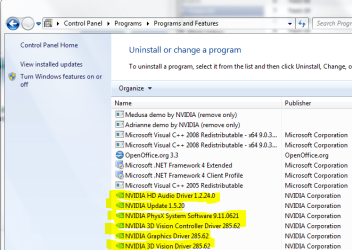
Make sure you have windows completely updated, along with every one of the games. Also, make sure your drivers are updated, especially your graphics driver. If you'd like me to find the appropriate one for you and a how-to, fill out your system specs with this tool.

Try putting your game into compatability mode: Compatibility Mode

Failing that, lower your graphics resolution and settings through your graphics control panel. If you'd like more of an explaination, please ask.

It is unusual, but some antiviruses may get in the way of the game. While I don't recommend disabling a much needed antivirus while connected to the internet, you might try it as a test. What antivirus do you use? I can offer recommendations based on how well your antivirus performs according to my experience, if you would like.

To more easily find drivers compatable with your computer, you can set windows to find them auatomatically: Compatibility Mode. Then you can check for updates and see if there are any "optional" drivers available to you.
My System SpecsSystem Spec
01-06-2012   #3


Windows 7 Professional X64


Thank you for your reply. Everything is updated, but none of the other possible solutions you offered were successful. It is really a bummer.
My System SpecsSystem Spec
.


01-07-2012   #4


Windows 7 Professional x64


You forgot to update your system specs and you didn't let me know what antivirus you are running that may allow me to further help you out and offer opinions on how you might find a solution.
My System SpecsSystem Spec
01-07-2012   #5


Windows 7 Home Pre


Mengistuh

I have a similar problem with a older game too but came to find they will play and do so very well in a VM. I use Oracle VM VirtualBox and have XP installed with there 3d Drivers that they call Vboxguestaddones (All one word)

And these all play with no problem at the lower res your looking for.

Another thought, It may not be the system that is causing this, your monitor may not go this low and cause it to act like this.
My System SpecsSystem Spec
01-07-2012   #6


Windows 7 Professional X64


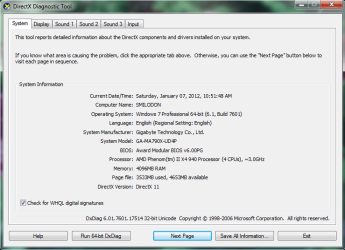
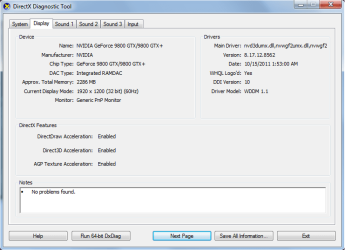
HOPEFULLY you will be able to get the specs by looking at these. I couldn't just ADD a picture to this thread. My anti-virus program is BitDefender.

Last edited by Mengistuh; 01-08-2012 at 04:43 AM..
My System SpecsSystem Spec
01-07-2012   #7


Windows 7 Professional X64


I believe that it is in fact a monitor issue. I tried just switching the resolution to 800X600 and it does the same thing. So, now what? The monitor is updated...
My System SpecsSystem Spec
01-07-2012   #8


Windows 7 Professional x64


Quote   Quote: Originally Posted by Mengistuh View Post
************ ************* **************** **********

HOPEFULLY you will be able to get the specs by looking at these. I couldn't just ADD a picture to this thread. My anti-virus program is BitDefender.
Now you go back and delete this post with your real name. Bad idea. Use this method to upload pictures:
Screenshots and Files - Upload and Post in Seven Forums

Almost guarantee it isn't monitor related, and easiest way to check is trying another monitor. Its probably the program just doesn't work with Windows 7.

Also:
Quote   Quote: Originally Posted by DustSailor View Post
Mengis,

Welcome to Sevenforums to you!

I will be providing you with links that you may click that lead to a tutorial part of this website for a how-to.

...fill out your system specs with this tool.
You don't need to use the tool, but please update your specs....
My System SpecsSystem Spec
01-08-2012   #9


Win 7 premium 64bit/Win Pro XP 32bit /Ubuntu 12.04


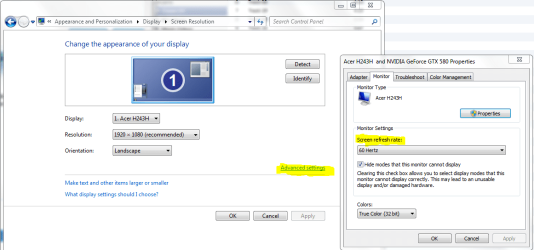
how many mhz your running the monitor at? sometimes when your monitor does not display the screen correctly is like say your monitor supports 60mhz only at you put it at 75mhz ingame it will have graphical glitches, make sure your running it at a rate your monitor supports
My System SpecsSystem Spec
01-08-2012   #10


Windows 7 Professional X64


Trouble w/graphics for games that use lower resolution in FULLSCREEN-dxdiag1.png

Trouble w/graphics for games that use lower resolution in FULLSCREEN-dxdiag2.png

Thank you so much DustSailor for helping me figure that out. Awesome. :-)
My System SpecsSystem Spec
Reply

 Trouble w/graphics for games that use lower resolution in FULLSCREEN problems?


Thread Tools


Similar Threads for: Trouble w/graphics for games that use lower resolution in FULLSCREEN
Thread Forum
Fullscreen games screen resolution settings popup problem Gaming
Solved 1st GPU 25% load 2nd GPU 99%, Lower end graphics Graphic Cards
Games crash on change of resolution when in fullscreen Gaming
How to REALLY set lower screen resolution? Graphic Cards
Help, can't run video games on lower resolutions Gaming


All times are GMT -5. The time now is 07:33 AM.


Windows 7 Forums is an independent web site and has not been authorized,
sponsored, or otherwise approved by Microsoft Corporation.
"Windows 7" and related materials are trademarks of Microsoft Corp.
© Designer Media Ltd
  

1 2 3 4 5 6 7 8 9 10 11 12 13 14 15 16 17 18 19 20 21 22 23 24 25 26 27 28 29 30