JavaScript is disabled. For a better experience, please enable JavaScript in your browser before proceeding.
You are using an out of date browser. It may not display this or other websites correctly.
You should upgrade or use an
alternative browser .
Duplicate Display in Windows 7
Hi...I have a relative problem right now that is really bothering me.
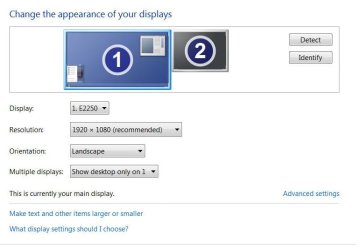
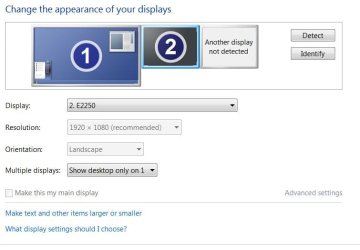
In the Control Panel, Display, Change Display Settings, it shows that I have an identical duplicate display to my primary display.
When I hit "Detect" on my first one, it shows it as "1" and the same shows it for the duplicate :sarc:
I need to completely delete the duplicate display from my system in Windows 7 64-bit
PLEASE HELP BIG TIME....thank-you very much. Paul
MS Windows 7 Home Premium 64-bit SP1 Intel Core i5 650 @ 3.20GHz Clarkdale 32nm Te... 6.0GB Dual-Channel DDR3 @ 664MHz (9-9-9-24) E2250 @ 1920x1080 ATI Radeon HD 5570 Gateway MS Windows 7 Home Premium 64-bit SP1 Intel Core i5 650 @ 3.20GHz Clarkdale 32nm Technology Gateway DX4840 (CPU 1) 6.0GB Dual-Channel DDR3 @ 664MHz (9-9-9-24) E2250 @ 1920x1080 ATI Radeon HD 5570 ATI High Definition Audio Device LG 21" LED 1TB Western Digital WDC WD10EARS-22Y5B1 (SATA)
slightly off center
Guru
Gold Member
VIP
You don't by chance have two cables going from your video card to your monitor?
Windows 10 Education 64 bit AMD Phenom II X4 980 Black Edition Deneb 3.7GHz 8GB 4GBx2 Kingston PC10600 DDR3 1333 Memory Zotac NVIDIA Geforce GT640 2 Gig DDR3 PCIe PC/Desktop Home Built Windows 10 Education 64 bit AMD Phenom II X4 980 Black Edition Deneb 3.7GHz Asus M4N68T-M V2 µATX Motherboard 8GB 4GBx2 Kingston PC10600 DDR3 1333 Memory Zotac NVIDIA Geforce GT640 2 Gig DDR3 PCIe VIA VT1708s High Definition Audio 8-channel Onboard 22" LG E2242 1080p and 2 19" I-INC AG191D 1280x1024 - 1920x1080 - 1280x1024 Crucial M100 256 GB SSD and 500 GB WD Blue SATA Thermaltake TR 620 Power Up Black ATX Mid-Tower Case Stock heatsink and fan Logitech Wireless K350 Wave Logitech Wireless M570 Trackman Wheel 80 Mbps Down 30 Mbps Up Windows Defender Internet Explorer 11 HP DVD1040e Lightscribe - External USB2
New member
Thread Starter
MS Windows 7 Home Premium 64-bit SP1 Intel Core i5 650 @ 3.20GHz Clarkdale 32nm Te... 6.0GB Dual-Channel DDR3 @ 664MHz (9-9-9-24) E2250 @ 1920x1080 ATI Radeon HD 5570 Gateway MS Windows 7 Home Premium 64-bit SP1 Intel Core i5 650 @ 3.20GHz Clarkdale 32nm Technology Gateway DX4840 (CPU 1) 6.0GB Dual-Channel DDR3 @ 664MHz (9-9-9-24) E2250 @ 1920x1080 ATI Radeon HD 5570 ATI High Definition Audio Device LG 21" LED 1TB Western Digital WDC WD10EARS-22Y5B1 (SATA)
New member
Thread Starter
MS Windows 7 Home Premium 64-bit SP1 Intel Core i5 650 @ 3.20GHz Clarkdale 32nm Te... 6.0GB Dual-Channel DDR3 @ 664MHz (9-9-9-24) E2250 @ 1920x1080 ATI Radeon HD 5570 Gateway MS Windows 7 Home Premium 64-bit SP1 Intel Core i5 650 @ 3.20GHz Clarkdale 32nm Technology Gateway DX4840 (CPU 1) 6.0GB Dual-Channel DDR3 @ 664MHz (9-9-9-24) E2250 @ 1920x1080 ATI Radeon HD 5570 ATI High Definition Audio Device LG 21" LED 1TB Western Digital WDC WD10EARS-22Y5B1 (SATA)
The Contemplator, (1963-2013)
Guru
Gold Member
Windows 8.1 Pro RTM x64 Intel Core-i5-3570K 4-core @ 3.4GHz (Ivy Brid... 4 x 4GB DDR3-1600 Corsair Vengeance CMZ8GX3M2... MSI GeForce GTX770 Gaming OC 2GB PC/Desktop Dwarf Dwf/11/2012 r09/2013 Windows 8.1 Pro RTM x64 Intel Core-i5-3570K 4-core @ 3.4GHz (Ivy Bridge) (OC 4.4GHz) ASRock Z77 Extreme4-M 4 x 4GB DDR3-1600 Corsair Vengeance CMZ8GX3M2A1600C9B (16GB) MSI GeForce GTX770 Gaming OC 2GB Realtek High Definition on board solution (ALC 898) ViewSonic VA1912w Widescreen (VGA) 1440x900 OCZ Agility 3 SSD 120GB SATA III x2 (RAID 0) XFX Pro Series 850W Semi-Modular Gigabyte IF233 1 x 120mm Front Inlet 1 x 120mm Rear Exhaust Microsoft Comfort Curve Keyboard 3000 (USB) Microsoft Comfort Mouse 3000 for Business (USB) NetGear DG834Gv3 ADSL Modem/Router (Ethernet) ~4.0 Mb/s (O2) Avast! 8.0.1497 IE 11 Optical Drive: HL-DT-ST BD-RE BH10LS30 SATA Bluray
New member
Thread Starter
MS Windows 7 Home Premium 64-bit SP1 Intel Core i5 650 @ 3.20GHz Clarkdale 32nm Te... 6.0GB Dual-Channel DDR3 @ 664MHz (9-9-9-24) E2250 @ 1920x1080 ATI Radeon HD 5570 Gateway MS Windows 7 Home Premium 64-bit SP1 Intel Core i5 650 @ 3.20GHz Clarkdale 32nm Technology Gateway DX4840 (CPU 1) 6.0GB Dual-Channel DDR3 @ 664MHz (9-9-9-24) E2250 @ 1920x1080 ATI Radeon HD 5570 ATI High Definition Audio Device LG 21" LED 1TB Western Digital WDC WD10EARS-22Y5B1 (SATA)
The Contemplator, (1963-2013)
Guru
Gold Member
Sorry, still the same. Alphabet soup.
Did you try following the Tutorial I linked to?
Save the snip to your computer and then attach it using the paperclip, as described in the Tutorial.
Windows 8.1 Pro RTM x64 Intel Core-i5-3570K 4-core @ 3.4GHz (Ivy Brid... 4 x 4GB DDR3-1600 Corsair Vengeance CMZ8GX3M2... MSI GeForce GTX770 Gaming OC 2GB PC/Desktop Dwarf Dwf/11/2012 r09/2013 Windows 8.1 Pro RTM x64 Intel Core-i5-3570K 4-core @ 3.4GHz (Ivy Bridge) (OC 4.4GHz) ASRock Z77 Extreme4-M 4 x 4GB DDR3-1600 Corsair Vengeance CMZ8GX3M2A1600C9B (16GB) MSI GeForce GTX770 Gaming OC 2GB Realtek High Definition on board solution (ALC 898) ViewSonic VA1912w Widescreen (VGA) 1440x900 OCZ Agility 3 SSD 120GB SATA III x2 (RAID 0) XFX Pro Series 850W Semi-Modular Gigabyte IF233 1 x 120mm Front Inlet 1 x 120mm Rear Exhaust Microsoft Comfort Curve Keyboard 3000 (USB) Microsoft Comfort Mouse 3000 for Business (USB) NetGear DG834Gv3 ADSL Modem/Router (Ethernet) ~4.0 Mb/s (O2) Avast! 8.0.1497 IE 11 Optical Drive: HL-DT-ST BD-RE BH10LS30 SATA Bluray
New member
Thread Starter
MS Windows 7 Home Premium 64-bit SP1 Intel Core i5 650 @ 3.20GHz Clarkdale 32nm Te... 6.0GB Dual-Channel DDR3 @ 664MHz (9-9-9-24) E2250 @ 1920x1080 ATI Radeon HD 5570 Gateway MS Windows 7 Home Premium 64-bit SP1 Intel Core i5 650 @ 3.20GHz Clarkdale 32nm Technology Gateway DX4840 (CPU 1) 6.0GB Dual-Channel DDR3 @ 664MHz (9-9-9-24) E2250 @ 1920x1080 ATI Radeon HD 5570 ATI High Definition Audio Device LG 21" LED 1TB Western Digital WDC WD10EARS-22Y5B1 (SATA)
New member
Thread Starter
MS Windows 7 Home Premium 64-bit SP1 Intel Core i5 650 @ 3.20GHz Clarkdale 32nm Te... 6.0GB Dual-Channel DDR3 @ 664MHz (9-9-9-24) E2250 @ 1920x1080 ATI Radeon HD 5570 Gateway MS Windows 7 Home Premium 64-bit SP1 Intel Core i5 650 @ 3.20GHz Clarkdale 32nm Technology Gateway DX4840 (CPU 1) 6.0GB Dual-Channel DDR3 @ 664MHz (9-9-9-24) E2250 @ 1920x1080 ATI Radeon HD 5570 ATI High Definition Audio Device LG 21" LED 1TB Western Digital WDC WD10EARS-22Y5B1 (SATA)
New member
Thread Starter
No, I only have the conventional one "monitor cable" from the PC to the monitor. Everything works great, no issues.
I purchased a new 55" Samsung LED HD TV and I want to setup a second "display" via HDMI from the PC to TV to view my TV as a monitor.
My primary display (
1 ) is what I'm defaulted to right now, but the second display (also marked as
1 ) is simply there and it is exactly the same duplicate of the first, properties and all....perfect duplicate.
.....this is an image of what I'm setup as shown below right now with Display 1 highlighted with no TV hookup. Notice that the Display: 1. E2250 this is what I currently using..... .....and alternatively when Display 2 is selected and Identified but when Detected it shows it as (1 ) not (2 ) being the problem DUPLICATE as shown below highlighted with no TV hookup....yet And notice that Display: 2. E2250 is the same as the previous image above!
I just want to delete
Display: 2. E2250 (above) altogether from my system, it can't be that hard and I believe that I need to do it through my system start run commands, regedit...but I do not know the commands nor where to delete them....Teckeez! HELP PLEASE?
Thank-you very much guys. Paul
Captureyyyyyyyy.JPG
38.9 KB
· Views: 7
Last edited: Jan 8, 2012
MS Windows 7 Home Premium 64-bit SP1 Intel Core i5 650 @ 3.20GHz Clarkdale 32nm Te... 6.0GB Dual-Channel DDR3 @ 664MHz (9-9-9-24) E2250 @ 1920x1080 ATI Radeon HD 5570 Gateway MS Windows 7 Home Premium 64-bit SP1 Intel Core i5 650 @ 3.20GHz Clarkdale 32nm Technology Gateway DX4840 (CPU 1) 6.0GB Dual-Channel DDR3 @ 664MHz (9-9-9-24) E2250 @ 1920x1080 ATI Radeon HD 5570 ATI High Definition Audio Device LG 21" LED 1TB Western Digital WDC WD10EARS-22Y5B1 (SATA)
New member
Thread Starter
CaptureJPG2.JPG
41.1 KB
· Views: 13
Last edited: Jan 8, 2012
MS Windows 7 Home Premium 64-bit SP1 Intel Core i5 650 @ 3.20GHz Clarkdale 32nm Te... 6.0GB Dual-Channel DDR3 @ 664MHz (9-9-9-24) E2250 @ 1920x1080 ATI Radeon HD 5570 Gateway MS Windows 7 Home Premium 64-bit SP1 Intel Core i5 650 @ 3.20GHz Clarkdale 32nm Technology Gateway DX4840 (CPU 1) 6.0GB Dual-Channel DDR3 @ 664MHz (9-9-9-24) E2250 @ 1920x1080 ATI Radeon HD 5570 ATI High Definition Audio Device LG 21" LED 1TB Western Digital WDC WD10EARS-22Y5B1 (SATA)