Windows 7 Forums Search
Welcome to Windows 7 Forums. Our forum is dedicated to helping you find solutions with any problems, errors or issues you are experiencing with Windows 7. The Windows 7 forum also covers news and updates and has an extensive Windows 7 tutorial section that covers a wide range of tips and tricks.


Windows 7 - Windows is not using my NVIDIA GEFORCE

 
01-19-2012   #1


Windows 7 Ultimate x64


Windows is not using my NVIDIA GEFORCE

Hi all, I have Geforce GT 525M running on Dell Inspiron N5110 .
Name:  s1.JPG
Views: 510
Size:  14.7 KB

I didn't know that my windows is not using the VGA until i installed a game and it told me that my Video card does not meet the minium requirement .
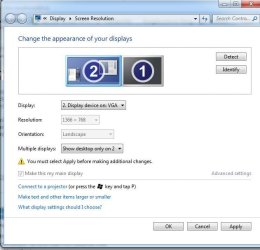
I don't know how to make windows use my VGA instead of the onboard card.
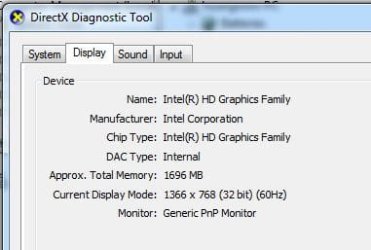
Windows is not using my NVIDIA GEFORCE-s2.jpg

I tried to "detect" and set the VGA to my main display but if i do so, i gonna see nothing on the screen except the background even i choosed "Show desktop only in 2" already .
Windows is not using my NVIDIA GEFORCE-s3.jpg

Please help me, thanks very much !

My System SpecsSystem Spec
01-19-2012   #2


Windows 7 Home Premium x64


You should be able to disable the onboard VGA in BIOS. Othewise, have you tried disabling the Intel Graphics Adapter in the Device Manager?
My System SpecsSystem Spec
01-19-2012   #3


Windows 7 Ultimate x64


Quote   Quote: Originally Posted by askavatar View Post
You should be able to disable the onboard VGA in BIOS. Othewise, have you tried disabling the Intel Graphics Adapter in the Device Manager?
Hi askavatar, thanks for the reply.

I tried to disable the onboard VGA in bios but i could not find where is that ! ( my bios menu is quiet simple ) .

If I disable the Intel adapter in the Device Manager my screen will shut down immediately ( means it's still running just not displaying anymore ) and i have to shut my laptop down by keep pressing the power button.
My System SpecsSystem Spec
.


01-19-2012   #4


Windows 7 Home Premium 64bit sp1


go into Bios check Pci-e settings or graphic card slot

there should be something telling you onboard graphics and should be able to switch to installed graphics im sure there is a setting for onboard video have to find it

Can you make a screen shot of the bios and show us the settings ?
My System SpecsSystem Spec
01-19-2012   #5


Windows 7 Ultimate 32-bit & 64-bit both SP1


It says here Inspiron N5110 15R not displaying nVidia GT525M graphics card in the system specifications. - Laptop General Hardware Forum - Laptop - Dell Community to enable it in the Optimus control panel on an application by application basis.

I'll do a bit of digging and be back.
My System SpecsSystem Spec
01-19-2012   #6


Windows 7 Pro 64 SP1


My System SpecsSystem Spec
01-19-2012   #7


Windows 7 Home Premium x64


Yeah, those Dells tend to have a limited BIOS, I forgot about that. The next choice would have been Solar's advice, but i doubt the Dell BIOS even has graphic priority options, either. Looks like Dwarf is on the right track.
My System SpecsSystem Spec
01-19-2012   #8


Windows 7 Ultimate x64


Hi guys, thanks very much for your fast replies !
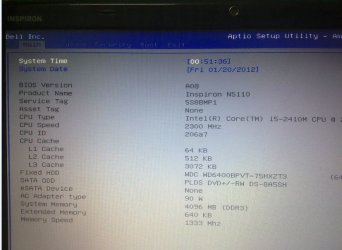
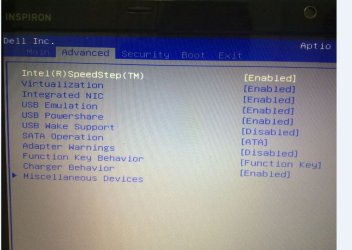
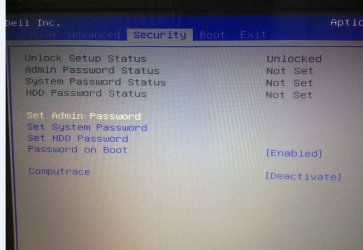
Here are some screen shot of the bios :
Windows is not using my NVIDIA GEFORCE-b1.jpg
Windows is not using my NVIDIA GEFORCE-b2.jpg
Windows is not using my NVIDIA GEFORCE-b3.jpg
My System SpecsSystem Spec
01-19-2012   #9


Windows 7 Home Premium 64bit sp1


Did you go into the intergration and virtulazation area's the integration im thinking would be the graphics disabling might bring the card up

Miscellanious devices didnt show anything?

Take a look
My System SpecsSystem Spec
01-19-2012   #10


Windows 7 Ultimate 32-bit & 64-bit both SP1


My System SpecsSystem Spec
Reply

 Windows is not using my NVIDIA GEFORCE problems?


Thread Tools


Similar Threads for: Windows is not using my NVIDIA GEFORCE
Thread Forum
Driver update for NVIDIA GeForce 7100 / NVIDIA nForce 630i? Graphic Cards
Nvidia Geforce 6200 on Windows 7 Drivers
nVIDIA GeForce FX 5500 & Windows 7 Pro Crashes and Debugging
nVidia - Display, Other hardware - NVIDIA GeForce 9500 GT Drivers
NVIDIA GeForce 9400GT & Windows 7 crashes Graphic Cards


All times are GMT -5. The time now is 07:41 AM.


Windows 7 Forums is an independent web site and has not been authorized,
sponsored, or otherwise approved by Microsoft Corporation.
"Windows 7" and related materials are trademarks of Microsoft Corp.
© Designer Media Ltd
  

1 2 3 4 5 6 7 8 9 10 11 12 13 14 15 16 17 18 19 20 21 22 23 24 25 26 27 28 29 30