|
Welcome to Windows 7 Forums. Our forum is dedicated to helping you find solutions with any problems, errors or issues you are experiencing with Windows 7. The Windows 7 forum also covers news and updates and has an extensive Windows 7 tutorial section that covers a wide range of tips and tricks.
Windows 7 - 4 monitors but only two working with mouse |
01-21-2012
|
#1 | | |
4 monitors but only two working with mouse I setup 4 displays using the DELL UltraSharp 1708FP 17" LCD MONITOR and got 3 graphics adapter HP USB Graphics Adapter (NL571AT) specifications - HP Small & Medium Business products for 3 monitors and connected 1 monitor direct to computer.
I run windows 7 professional on core 2 duo 2.33GHz and 8GB RAM PC.
So what is going on? what is the problem?
The 4 monitors all come on and shows my wallpaper but the mouse can only go to 2 monitors at a time and the 2 can switch around but only 2 works at a time.
What am i doing wrong? Why do i have this problem?
I see Intel Q35 Express Chipset Family GMA 3100 Also 3 of the monitors says digital and the 1 connected directly says analog, but i doubt that can be the problem since all monitors come on and the 2 that the mouse can go to can switch from 1 and 2 or 3 and 4 | My System Specs | | |
01-21-2012
|
#2 | | Windows 7 Professional x64 |
Hello nokia, welcome to Seven Forums!
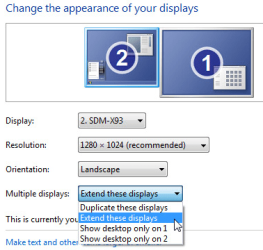
Like in this picture, did you change any of the settings?
What kind of graphics card do you have? Is it AMD, Nvidia, or built in? What is it exactly? There should be more settings in a seperate control panel for graphics dependant upon what you have. There are ways to change location of the monitors. Just setting them to the left or right of your main monitor doesn't tell the computer which side they are on, you will need to change the settings for it. You can set up monitors to be above, below, left or right of your main monitor. Let me know if you manage to find the settings. | My System Specs | | System Manufacturer/Model Number Custom Built PC (In French it is called "PC de moi") OS Windows 7 Professional x64 CPU Intel Core i7-3820 CPU OC @ 3.80GHz Motherboard Gigabyte G1.Assassin2 Memory 8.00GB (2GBx4) DDR3 1866MHz Graphics Card Nvidia-Gigabyte GeForce GTX 580 1.5GB SLI-soon 680 Sound Card On board Creative SB X-Fi Monitor(s) Displays acer 24" H243H Screen Resolution 1920x1080 Keyboard Microsoft Comfort Curve 2000 Mouse Tek Republic Wired Laser 3600 dpi Gaming Mouse PSU Silent Pro 1000w gold 80+ Case Azza Hurrican 2000 Cooling Liquid CPU cooler & fan Hard Drives 120GB OCZ Vertex III SSD,
500GB OS Hybrid Drive @ 7,200RPM Internet Speed 5.14Mbps Download Speed, .65Mbps Upload Speed & 5ms Ping Other Info You're such a good person for reading all the way down to the end. People like you truly do care! We should take all the people, and make them into people like you! :p |
01-21-2012
|
#3 | | |
thanks for the reply
the settings are set properly. Yes it shows 4 monitors and extended and everything is fine settings wise.
if you read the thread very carefully you will see i talked about the graphics adapter i used and the graphics card i have. HP USB Graphics Adapter (NL571AT) specifications - HP Small & Medium Business products
that graphics adapter can power up to 6 monitors so i have 4.
Also remember i said all of the monitors come on and they all show the wallpaper...looking like they should all work right...but the only thing the mouse will only go to 2 of the monitors.
graphics card that came with the computer is Intel Q35 Express Chipset Family GMA 3100 and that is why i am using the graphics adapter which works great for 2 monitors but i just got 2 extra monitors and now the mouse only go to 2 of them. | My System Specs | | |
01-21-2012
|
#4 | | Windows 7 Professional x64 |
Yes, I understood fully what you meant, and knew about the 6 monitor limit on the adapter, and even visited the link. I read everything you said, twice. Since all of these monitors are connected by a single adapter, it is likely that the info I gave you in the post abobe wont work correctly. Simply, all 4 monitors, though they turn on and the specifications say they work, just might not be able to function how you would like them to, with how they are set up. Try moving the mouse to the edge of the screen on all of your monitors and see if it continues and any direction. You will gain more control with actually plugging the monitors in to the graphics card. You might even get multiple cards to accomodate all monitors. I've heard where people have hooked up monitors to the integrated graphics card as well as expansion cards. But hooking all monitors into a single port via an adapter may not work very well. The settings will only effect individual ports, and not multiple monitors plugged into an adapter. | My System Specs | | System Manufacturer/Model Number Custom Built PC (In French it is called "PC de moi") OS Windows 7 Professional x64 CPU Intel Core i7-3820 CPU OC @ 3.80GHz Motherboard Gigabyte G1.Assassin2 Memory 8.00GB (2GBx4) DDR3 1866MHz Graphics Card Nvidia-Gigabyte GeForce GTX 580 1.5GB SLI-soon 680 Sound Card On board Creative SB X-Fi Monitor(s) Displays acer 24" H243H Screen Resolution 1920x1080 Keyboard Microsoft Comfort Curve 2000 Mouse Tek Republic Wired Laser 3600 dpi Gaming Mouse PSU Silent Pro 1000w gold 80+ Case Azza Hurrican 2000 Cooling Liquid CPU cooler & fan Hard Drives 120GB OCZ Vertex III SSD,
500GB OS Hybrid Drive @ 7,200RPM Internet Speed 5.14Mbps Download Speed, .65Mbps Upload Speed & 5ms Ping Other Info You're such a good person for reading all the way down to the end. People like you truly do care! We should take all the people, and make them into people like you! :p |
01-21-2012
|
#5 | | |
no not all monitors are connected to one adapter....each adapter is for each monitor...i have 3 adapters and the 4th monitor is connected directly to computer
i have tried moving the mouse around over a billion times. Also as i said all 4 monitors come on no problem at all...all screens showing my wallpaper...so the only thing is that mouse doesn't go to the other 2 monitors thats all | My System Specs | | |
01-21-2012
|
#6 | | Windows 7 Professional x64 |
Alrighty nokia,
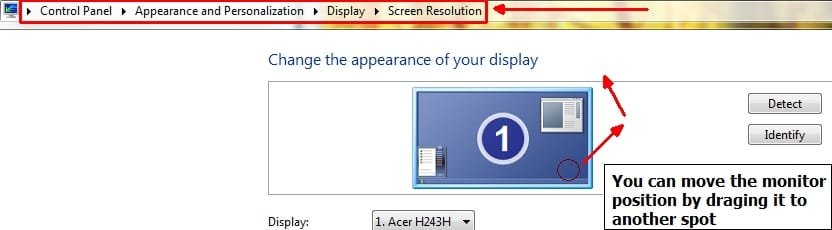
Let me know if you see 4 monitors listed here:
Make sure each monitor is set as "extended" | My System Specs | | System Manufacturer/Model Number Custom Built PC (In French it is called "PC de moi") OS Windows 7 Professional x64 CPU Intel Core i7-3820 CPU OC @ 3.80GHz Motherboard Gigabyte G1.Assassin2 Memory 8.00GB (2GBx4) DDR3 1866MHz Graphics Card Nvidia-Gigabyte GeForce GTX 580 1.5GB SLI-soon 680 Sound Card On board Creative SB X-Fi Monitor(s) Displays acer 24" H243H Screen Resolution 1920x1080 Keyboard Microsoft Comfort Curve 2000 Mouse Tek Republic Wired Laser 3600 dpi Gaming Mouse PSU Silent Pro 1000w gold 80+ Case Azza Hurrican 2000 Cooling Liquid CPU cooler & fan Hard Drives 120GB OCZ Vertex III SSD,
500GB OS Hybrid Drive @ 7,200RPM Internet Speed 5.14Mbps Download Speed, .65Mbps Upload Speed & 5ms Ping Other Info You're such a good person for reading all the way down to the end. People like you truly do care! We should take all the people, and make them into people like you! :p |
01-21-2012
|
#7 | | |
yes i can see all 4 monitors there numbered 1, 2, 3, 4 and yes i can drag them and change the positions | My System Specs | | |
01-21-2012
|
#8 | | Windows 7 Professional x64 |
And you set them as extended? Did you position them how you wanted? Can you move the mouse over how the pictures indicate? | My System Specs | | System Manufacturer/Model Number Custom Built PC (In French it is called "PC de moi") OS Windows 7 Professional x64 CPU Intel Core i7-3820 CPU OC @ 3.80GHz Motherboard Gigabyte G1.Assassin2 Memory 8.00GB (2GBx4) DDR3 1866MHz Graphics Card Nvidia-Gigabyte GeForce GTX 580 1.5GB SLI-soon 680 Sound Card On board Creative SB X-Fi Monitor(s) Displays acer 24" H243H Screen Resolution 1920x1080 Keyboard Microsoft Comfort Curve 2000 Mouse Tek Republic Wired Laser 3600 dpi Gaming Mouse PSU Silent Pro 1000w gold 80+ Case Azza Hurrican 2000 Cooling Liquid CPU cooler & fan Hard Drives 120GB OCZ Vertex III SSD,
500GB OS Hybrid Drive @ 7,200RPM Internet Speed 5.14Mbps Download Speed, .65Mbps Upload Speed & 5ms Ping Other Info You're such a good person for reading all the way down to the end. People like you truly do care! We should take all the people, and make them into people like you! :p |
01-21-2012
|
#9 | | |
actually i just found out what happened
everytime i moved the position of the monitors i never press apply...now when i press apply changes...it worked!!!
Thanks a lot..i really appreciate it! You the only one that helped me! | My System Specs | | |
01-21-2012
|
#10 | | Windows 7 Professional x64 |
Lol that can be an easy thing to overlook. Appologies for all the confusion, but very glad you got it sorted | My System Specs | | System Manufacturer/Model Number Custom Built PC (In French it is called "PC de moi") OS Windows 7 Professional x64 CPU Intel Core i7-3820 CPU OC @ 3.80GHz Motherboard Gigabyte G1.Assassin2 Memory 8.00GB (2GBx4) DDR3 1866MHz Graphics Card Nvidia-Gigabyte GeForce GTX 580 1.5GB SLI-soon 680 Sound Card On board Creative SB X-Fi Monitor(s) Displays acer 24" H243H Screen Resolution 1920x1080 Keyboard Microsoft Comfort Curve 2000 Mouse Tek Republic Wired Laser 3600 dpi Gaming Mouse PSU Silent Pro 1000w gold 80+ Case Azza Hurrican 2000 Cooling Liquid CPU cooler & fan Hard Drives 120GB OCZ Vertex III SSD,
500GB OS Hybrid Drive @ 7,200RPM Internet Speed 5.14Mbps Download Speed, .65Mbps Upload Speed & 5ms Ping Other Info You're such a good person for reading all the way down to the end. People like you truly do care! We should take all the people, and make them into people like you! :p 4 monitors but only two working with mouse problems? All times are GMT -5. The time now is 07:42 AM. |  |