Windows 7 Forums Search
Welcome to Windows 7 Forums. Our forum is dedicated to helping you find solutions with any problems, errors or issues you are experiencing with Windows 7. The Windows 7 forum also covers news and updates and has an extensive Windows 7 tutorial section that covers a wide range of tips and tricks.


Windows 7 - AMD Radeon 6670 / SpeedFan indicates 0 RPMs

 
01-25-2012   #1


Windows


AMD Radeon 6670 / SpeedFan indicates 0 RPMs

I have an eerie situation. When I turn my computer on, with chassis case off, I can clearly see the GPU's fan spinning happily. However, according to SpeedFan, the GPU's RPM is 0.

All drivers have been correctly installed. Also, this GPU is completely powered through PCIex16 motherboard slot. No extra power cables are required. Does this maybe have something to do with it?

Thanks guys!

My System SpecsSystem Spec
01-26-2012   #2


Systems 1 and 2: Windows 7 Enterprise x64, Win 8 Developer


Don't know if this will help, but worth a shot.

SpeedFan article: Advanced Fan Speed Control
My System SpecsSystem Spec
01-26-2012   #3


Win 7 64bit Desktop/Win 7 32bit Laptop


Hi,

Try this wee desktop gadget OrbLog » Blog Archive » GPU Observer – Sidebar Gadget

Its very good, I use it to monitor my gtx570, never tried it with an Ati/Amd card but its has support for both .


Nightreaper.
My System SpecsSystem Spec
.


01-26-2012   #4


Windows 7 Home Premium 64-bit


Quote   Quote: Originally Posted by Nightreaper View Post
Hi,

Try this wee desktop gadget OrbLog » Blog Archive » GPU Observer – Sidebar Gadget

Its very good, I use it to monitor my gtx570, never tried it with an Ati/Amd card but its has support for both .


Nightreaper.
Really nice gadget
My System SpecsSystem Spec
01-26-2012   #5


Windows 7 Home Premium 64 bit


Quote   Quote: Originally Posted by Anesthetic View Post
I have an eerie situation. When I turn my computer on, with chassis case off, I can clearly see the GPU's fan spinning happily. However, according to SpeedFan, the GPU's RPM is 0.

All drivers have been correctly installed. Also, this GPU is completely powered through PCIex16 motherboard slot. No extra power cables are required. Does this maybe have something to do with it?

Thanks guys!
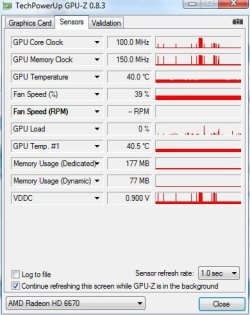
The GPU reading is fairly new in Speedfan, so the "0" RPM is not an indication that something is broken. Speedfan is always being refined, so the problem may not get fixed until the next version. Try GPU-Z. If GPU-Z doesn't show anything, then there's a problem.
My System SpecsSystem Spec
01-28-2012   #6


Windows


Thanks all! GPU-Z worked! It's spinning.
My System SpecsSystem Spec
Reply

 AMD Radeon 6670 / SpeedFan indicates 0 RPMs problems?


Thread Tools


Similar Threads for: AMD Radeon 6670 / SpeedFan indicates 0 RPMs
Thread Forum
HIS Radeon HD 6670 after processor overheat Graphic Cards
AMD Radeon 6670 vs 6870 Graphic Cards
Solved BSOD after installing 600w PS and 6670 Radeon Crashes and Debugging
amd ati radeon 6670 2gb ddr 3 problem plz help Graphic Cards
Compatibility With XFX HD-667X-ZAF3 Radeon HD 6670... Graphic Cards


All times are GMT -5. The time now is 07:43 AM.


Windows 7 Forums is an independent web site and has not been authorized,
sponsored, or otherwise approved by Microsoft Corporation.
"Windows 7" and related materials are trademarks of Microsoft Corp.
© Designer Media Ltd
  

1 2 3 4 5 6 7 8 9 10 11 12 13 14 15 16 17 18 19 20 21 22 23 24 25 26 27 28 29 30