I have been searching the internet for hours trying to find a solution to this problem to no avail  .
.
Computer: Dell precision workstation t3500, Intel Xeon W3503 @ 2.4ghz, 6gb ram, GTX 560 ti (not working now, worked before restore)
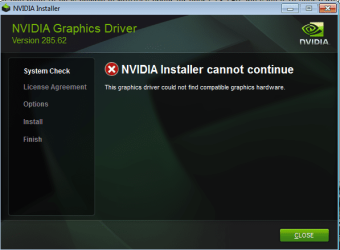
I just restored my PC through Dell's backup and recovery manager. When finished, I tried to install drivers for my GTX 560 that I downloaded off of the Nvidia website. I receive the error: "The graphics driver could not find compatible graphics hardware."
I go to check the Device Manager and in the Display adapters I see "Standard VGA graphics adapter", not my Nvidia card. I'm assuming that is the reason my card does not appear and I can't install drivers?
These are the steps I have already taken:
First I tried uninstalling the Standard VGA graphics adapter but I found that it re-installs itself whenever I restart. Next, I tried to uninstall in safe mode but it STILL re-installs it self while in safe mode. I have tried Driver Sweeper to the same effect. After reading several threads online where users experience similar problems, I went to Dell to find the drivers they supplied for the computer I bought and Dell doesn't offer drivers for the card I have because I upgraded since buying the prebuilt from Dell. I found Dell drivers for a 560 ti however I still receive the same "The graphics driver could not find compatible graphics hardware" error.
These are the hardware id's for the Standard VGA graphics adapter:
PCI\VEN_10DE&DEV_1087&SUBSYS_20683842&REV_A1
PCI\VEN_10DE&DEV_1087&SUBSYS_20683842
PCI\VEN_10DE&DEV_1087&CC_030000
PCI\VEN_10DE&DEV_1087&CC_0300
Why is Device Manager showing me "Standard VGA graphics adapter", Why isn't it recognizing my card when it previously did before being restored?, and most importantly how do I get it to recognize my card so I can install the drivers?
Thanks
.Computer: Dell precision workstation t3500, Intel Xeon W3503 @ 2.4ghz, 6gb ram, GTX 560 ti (not working now, worked before restore)
I just restored my PC through Dell's backup and recovery manager. When finished, I tried to install drivers for my GTX 560 that I downloaded off of the Nvidia website. I receive the error: "The graphics driver could not find compatible graphics hardware."
I go to check the Device Manager and in the Display adapters I see "Standard VGA graphics adapter", not my Nvidia card. I'm assuming that is the reason my card does not appear and I can't install drivers?
These are the steps I have already taken:
First I tried uninstalling the Standard VGA graphics adapter but I found that it re-installs itself whenever I restart. Next, I tried to uninstall in safe mode but it STILL re-installs it self while in safe mode. I have tried Driver Sweeper to the same effect. After reading several threads online where users experience similar problems, I went to Dell to find the drivers they supplied for the computer I bought and Dell doesn't offer drivers for the card I have because I upgraded since buying the prebuilt from Dell. I found Dell drivers for a 560 ti however I still receive the same "The graphics driver could not find compatible graphics hardware" error.
These are the hardware id's for the Standard VGA graphics adapter:
PCI\VEN_10DE&DEV_1087&SUBSYS_20683842&REV_A1
PCI\VEN_10DE&DEV_1087&SUBSYS_20683842
PCI\VEN_10DE&DEV_1087&CC_030000
PCI\VEN_10DE&DEV_1087&CC_0300
Why is Device Manager showing me "Standard VGA graphics adapter", Why isn't it recognizing my card when it previously did before being restored?, and most importantly how do I get it to recognize my card so I can install the drivers?
Thanks
My Computer
At a glance
Windows 7
- OS
- Windows 7