Windows 7 Forums Search
Welcome to Windows 7 Forums. Our forum is dedicated to helping you find solutions with any problems, errors or issues you are experiencing with Windows 7. The Windows 7 forum also covers news and updates and has an extensive Windows 7 tutorial section that covers a wide range of tips and tricks.


Windows 7 - Issue with Radeon HD 5450 graphic card

 
02-07-2012   #1


Windows 7 Ultimate


Issue with Radeon HD 5450 graphic card

Hi.
I have the above mentioned graphic card.

I have a VGA monitor connected to the VGA connector on the board, and that works great.
Then I wanted to have another monitor connected to the DVI port via a DVI to VGA adapter.
This doesn't work.
I'm unsure how to get the new monitor activated.

Any suggestions ?

TIA

My System SpecsSystem Spec
02-07-2012   #2


Windows 7 Ultimate 32-bit & 64-bit both SP1


Does it work if it's the only monitor connected?
My System SpecsSystem Spec
02-07-2012   #3


If you hit windows key + P and select duplicate. Does it work?
My System SpecsSystem Spec
.


02-07-2012   #4


Windows 7 Ultimate


Quote   Quote: Originally Posted by Dwarf View Post
Does it work if it's the only monitor connected?
No it doesn't
My System SpecsSystem Spec
02-07-2012   #5


Windows 7 Ultimate


Quote   Quote: Originally Posted by Kevin Ismail View Post
If you hit windows key + P and select duplicate. Does it work?
I didn't know this option. Many thanks.

I tested it, and selected duplicate, but still not working.
I even do test with 800X600 resolution.

Attached there is a photo of the DVI to VGA adapter
Attached Thumbnails
Issue with Radeon HD 5450 graphic card-radeonhd5450.jpg  
My System SpecsSystem Spec
02-07-2012   #6


If the DVI to VGA adapter fit each other it should actually work.

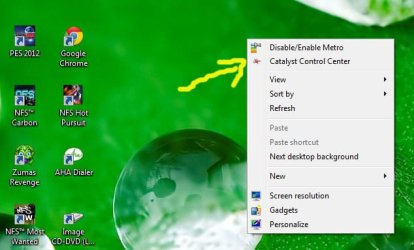
If you properly installed ATI drivers and catalyst control center, then you can try detecting it from there.
start from desktop menu option as seen here.

Issue with Radeon HD 5450 graphic card-menu-option.jpg

I assume you already tried to swap those monitor between primary and secondary.
My System SpecsSystem Spec
02-07-2012   #7


Windows 7 Ultimate


Then DVI to VGA works ok on another computer.
And yes, I swapped the monitors.

I have attached the control center I use with my GPU card.

Could I ask you to guide me through the control center to try if I have done it correct ?
Attached Thumbnails
Issue with Radeon HD 5450 graphic card-catalyst.jpg  
My System SpecsSystem Spec
02-07-2012   #8


Before we go there, I might have to ask you if you were able to rule out the connection problem.
As you already mention that it didn't work though you connected the new monitor alone (replacing the older monitor) to the D-Sub (primary VGA socket). In a normal condition, it didn't give you a screen, then probably you should check out with the VGA cable first by alternating it with the old cable.

If you managed to get the screen by then. Connect both of it.

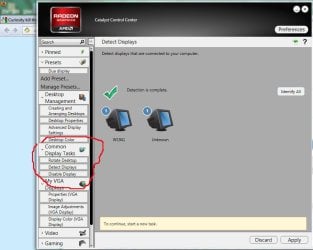
On the Catalyst start screen, you can hit the menu [Common Display Task] -> [Detect Display]
When the detection done you will see this,
Issue with Radeon HD 5450 graphic card-task.jpg

If it shows you both monitor there then you can click [apply]

The rest of the setting for dual display then yours.

Cheers
My System SpecsSystem Spec
02-07-2012   #9


Windows 7 Ultimate


@Kevin Ismail

Many thanks for your reply.

To recapitulate.

I tested both monitors via the DVI to VGA adapter. Even with low resolution, none of them worked in that set up.

Both monitors works if connected to the VGA output of the graphics card.

Via the same DVI to VGA, both monitors are working on another computer with a different graphics card than on the computer in focus.

I just tested with detection of the second monitor, but as it didn't worked with any of the monitors direct connected, it doesn't work.

I presume a defective card ?, what say ?
Attached Thumbnails
Issue with Radeon HD 5450 graphic card-detection.jpg  
My System SpecsSystem Spec
02-08-2012   #10


Darkhorse.

Well, I think we better find another way around to find the problem before dismissing the card.
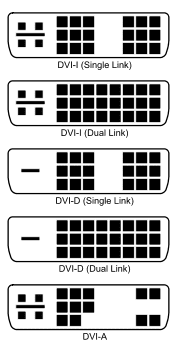
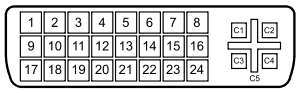
There are few more type of DVI to VGA adapter as you may see here,

Issue with Radeon HD 5450 graphic card-181px-dvi_connector_types.svg.png Name:  300px-DVI_Connector_Pinout.svg.png
Views: 396
Size:  10.9 KB

There is further information about it
Digital Visual Interface - Wikipedia, the free encyclopedia
Even though I have no more clue on it, can you try to find other type of it, though the adapter in hand proven work with other VGA card.

It worth to try I think?
My System SpecsSystem Spec
Reply

 Issue with Radeon HD 5450 graphic card problems?


Thread Tools


Similar Threads for: Issue with Radeon HD 5450 graphic card
Thread Forum
Solved New System w/ Radeon HD 6450 and Radeon HD 5450 Need Help Graphic Cards
Radeon HD 5700 series graphic card Graphic Cards
i need driver for graphic card ati radeon 7000 Drivers
graphic card radeon issue Graphic Cards


All times are GMT -5. The time now is 07:52 AM.


Windows 7 Forums is an independent web site and has not been authorized,
sponsored, or otherwise approved by Microsoft Corporation.
"Windows 7" and related materials are trademarks of Microsoft Corp.
© Designer Media Ltd
  

1 2 3 4 5 6 7 8 9 10 11 12 13 14 15 16 17 18 19 20 21 22 23 24 25 26 27 28 29 30