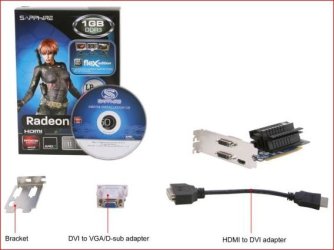
Solved Two Radeon HD 6350 (HDMI) not supporting three monitors

Skibbles

New member
I just got a new work computer here (Dell Optiplex 790) and this issue is driving me nuts because my productivity is way down without three monitors, and even further because I'm spending all my time trying to get three monitors to work =D

I have two ATI Radeon HD 6350 video cards with HDMI ports. I'm using two splitters. One splitter for the main card has two Acer monitors hooked up (these work), and the other splitter has a single Acer monitor hooked up and does not work.

I know it works, because I can alternate between monitors but only two at a time.

Now - I've been doing research for about six hours and I just can't figure it out. I've been reading a lot about something called a "display port" but I can confirm that there are no display ports on either video card.

I've included a pic just for fun I guess:

0yfuAl.jpg
 

My Computer

OS
Windows 7 Pro x64
Skibbles, welcome to the Seven Forums.

Is it two cards, or is it a single card with a low profile bracket like the one shown here?

lowpro.JPG

If it is a single card, then you can only run two monitors off of it unless you use a splitter. A splitter also defeats the purpose of multi monitor unless you are looking to run the same thing on both (clone).
 

My Computer

Computer type
PC/Desktop
Computer Manufacturer/Model Number
Me
OS
Win 7 Ultimate x64
CPU
FX-8350 @ 4.6 GHz so far
Motherboard
Asus M5A97 EVO
Memory
ADATA XPG V1 Series Black 8GB DDR3 1600
Graphics Card(s)
Sapphire R9 270x Dual-X
Sound Card
Xonar DGX w/ Corsair Vengence 1300
Monitor(s) Displays
Acer S232HL Abid
Screen Resolution
1920x1080
Hard Drives
120 GB OCZ Vertex 3
500 GB Seagate 7200.12
PSU
Antec Earthwatts 650W Green
Case
Antec Three Hundred
Cooling
Cooler Master 212 EVO
Keyboard
Logitech G510
Mouse
Logitech G500s
Internet Speed
35000/3000
I cracked open the case earlier to double check and it's certainly two separate cards. Device manager also has two cards listed.

I'm not trying to achieve eyefinity or anything, just three separate displays. My old station used to handle three monitors with a splitter and a single so I don't see how this can't work!
 

My Computer

OS
Windows 7 Pro x64
Yes...with AMD GPU's you need a display port for all three monitors to work. The AMD technology is called eyefinity. Have a look at this.


Experience Eyefinity
 

My Computer

Computer Manufacturer/Model Number
Custom built
OS
Windows 7 Ultimate 64 bit
CPU
AMD Phenom II X4 965 Black Edition
Motherboard
Gigabyte GA-MA790X-DS4
Memory
GSkill 4 X 2 GB PC 8500
Graphics Card(s)
XFX Radeon HD 6790 D
Sound Card
On board RealTek HD
Monitor(s) Displays
Dual monitors:Samsung SyncMaster S20B300
Screen Resolution
1600 X 900
Hard Drives
Seagate Barracuda 1TB (primary)
Seagate Barracuda 2 X 320 GB
PSU
Ultra X4 750 watt fully modular
Case
Thermaltake Overseer RX 1 full tower
Cooling
Core-Contact 92 mm CPU Cooler
Keyboard
Logitech G510
Mouse
Razor DeathAdder
Internet Speed
50/5 Mbps UL/DL
Other Info
Optical: Super Muliti DVD burner w/lightscribe, Hauppauge WinTV HVR-1800
Thanks for the quick replies!

So I can have all the video cards I want but if they don't have display ports I'm SOL?

Eyefinity is exactly what I don't want though. I just want three seperate displays. Does this make a difference?

I just want to make sure it's clear I can't do anything so I can tell the boss the new PC won't work =)
 

My Computer

OS
Windows 7 Pro x64
you can do a vga to a Hdmi that is how i have two monitors set up the one with the HDMI has to be picked up first where the VGA is secondary that is probally why

Hdmi has to be enabled at start up you will see it when booting but when it comes to the vga it won't show till you have confirmed or customized the other monitor

If you understand what i am getting at establish the HDMI first then go on with the VGA
 

My Computer

Computer type
PC/Desktop
Computer Manufacturer/Model Number
CoreI7-6700K MrFingerIII Special Builds
OS
Windows 10 Home Premium 64bit sp1
CPU
Intel I7-6700K @ 4.6 Ghz 1.344 volts everyday OC
Motherboard
Asrock Fatality K6 Z170 Socket 1151
Memory
32GB G-Skill TridentZ 3200mhz 16-18-18-38 DDR4
Graphics Card(s)
Sli Gigabyte Windforce GTX 980 G1
Sound Card
AC97 Creative Rage Tactic 3D Headphones Bluetooth
Monitor(s) Displays
27" Asus ROG Swift PG278Q G-Sync 48" Vizio Smart HD TV
Screen Resolution
2560x1440p 27"- 48" Currently Gaming at 2560x1440p Res 2K
Hard Drives
250GB Samsung Evo840SSD Seagate baracuda 500 GB WD Mybook 500Gb 1TB Seagate Barracuda
PSU
HX1050w Corsair Silver 80plus certified crosfire/sli
Case
Enthod Pro Full Tower
Cooling
Corsair H110i GT 280 mm High Performance WaterBlock
Keyboard
Logitech wireless keyboard
Mouse
Logitech wireless mouse
Internet Speed
Cox Cable 100+ mb
Antivirus
WebRoot Spysweeper with Antivirus
Browser
IE-10, Chrome, Opera
Other Info
My Other Rig is a AMD FX8320E @4.6Ghz 16GB Ballistic Sport Ram
Mobo Asrock Fatality 990FX 120GB OCZ SSD 1TB Seagate Barracuda Corsair H75 Cooling PSU Corsair CX750
GPU GTX Gigabyte 970G1
I'm having trouble understanding what you're saying... =(

To be detailed however: the three monitors are all VGA connected to DVI adapters, connected to an HDMI splitter with DVI females.

VGA->DVI->HDMI Splitter (and thus, an adapter as well)
 

My Computer

OS
Windows 7 Pro x64
like i said start with HDMI first if you have a port use it seperate

second make sure you are actually using a dvi vs vga they look the same it might be confusing you

use one vga slot 1 dvi then 1 hdmi all seperate connection styles if you have a dvi spliter for HDMI fine but use the other as regular vga

Hope this is easier to understand
 

My Computer

Computer type
PC/Desktop
Computer Manufacturer/Model Number
CoreI7-6700K MrFingerIII Special Builds
OS
Windows 10 Home Premium 64bit sp1
CPU
Intel I7-6700K @ 4.6 Ghz 1.344 volts everyday OC
Motherboard
Asrock Fatality K6 Z170 Socket 1151
Memory
32GB G-Skill TridentZ 3200mhz 16-18-18-38 DDR4
Graphics Card(s)
Sli Gigabyte Windforce GTX 980 G1
Sound Card
AC97 Creative Rage Tactic 3D Headphones Bluetooth
Monitor(s) Displays
27" Asus ROG Swift PG278Q G-Sync 48" Vizio Smart HD TV
Screen Resolution
2560x1440p 27"- 48" Currently Gaming at 2560x1440p Res 2K
Hard Drives
250GB Samsung Evo840SSD Seagate baracuda 500 GB WD Mybook 500Gb 1TB Seagate Barracuda
PSU
HX1050w Corsair Silver 80plus certified crosfire/sli
Case
Enthod Pro Full Tower
Cooling
Corsair H110i GT 280 mm High Performance WaterBlock
Keyboard
Logitech wireless keyboard
Mouse
Logitech wireless mouse
Internet Speed
Cox Cable 100+ mb
Antivirus
WebRoot Spysweeper with Antivirus
Browser
IE-10, Chrome, Opera
Other Info
My Other Rig is a AMD FX8320E @4.6Ghz 16GB Ballistic Sport Ram
Mobo Asrock Fatality 990FX 120GB OCZ SSD 1TB Seagate Barracuda Corsair H75 Cooling PSU Corsair CX750
GPU GTX Gigabyte 970G1
I tip my hat to you sir. It worked!!!!

This is what I did for those who may have the same issues:

1) Both HDMI ports have DVI splitters plugged in.
2) One monitor has DVI straight from the monitor to a HDMI splitter on the "main" gfx card (slot 1)
3) The other two monitors are VGA, adapted to DVI, and both plugged into the "second" gfx card (slot 2)

I don't know how this worked or if I got lucky, but it's worth a try for anyone having problems.

 

My Computer

OS
Windows 7 Pro x64
Glad you got it going always helps to understand how the cards work with Hdmi

also welcome to 7 forums SKIBBLES ;)
 

My Computer

Computer type
PC/Desktop
Computer Manufacturer/Model Number
CoreI7-6700K MrFingerIII Special Builds
OS
Windows 10 Home Premium 64bit sp1
CPU
Intel I7-6700K @ 4.6 Ghz 1.344 volts everyday OC
Motherboard
Asrock Fatality K6 Z170 Socket 1151
Memory
32GB G-Skill TridentZ 3200mhz 16-18-18-38 DDR4
Graphics Card(s)
Sli Gigabyte Windforce GTX 980 G1
Sound Card
AC97 Creative Rage Tactic 3D Headphones Bluetooth
Monitor(s) Displays
27" Asus ROG Swift PG278Q G-Sync 48" Vizio Smart HD TV
Screen Resolution
2560x1440p 27"- 48" Currently Gaming at 2560x1440p Res 2K
Hard Drives
250GB Samsung Evo840SSD Seagate baracuda 500 GB WD Mybook 500Gb 1TB Seagate Barracuda
PSU
HX1050w Corsair Silver 80plus certified crosfire/sli
Case
Enthod Pro Full Tower
Cooling
Corsair H110i GT 280 mm High Performance WaterBlock
Keyboard
Logitech wireless keyboard
Mouse
Logitech wireless mouse
Internet Speed
Cox Cable 100+ mb
Antivirus
WebRoot Spysweeper with Antivirus
Browser
IE-10, Chrome, Opera
Other Info
My Other Rig is a AMD FX8320E @4.6Ghz 16GB Ballistic Sport Ram
Mobo Asrock Fatality 990FX 120GB OCZ SSD 1TB Seagate Barracuda Corsair H75 Cooling PSU Corsair CX750
GPU GTX Gigabyte 970G1
Back
Top