| Windows 7: Native resolution doesn't appear |
23 Feb 2012
|
#1 | | Windows 7 Professional x64 |
Native resolution doesn't appear I just changed my PC from one with Radeon 4800 and WinXP to one you can see in my profile (most important: Gigabyte GeForce GTX560 and Win7Pro64).
I didn't, however, change my NEC LCD19WV monitor with native resolution 1440x900 (VGA cable connected via adapter to DVI-I).
Thing is, that i simply can't force my system to "recognize" that monitor use 1440x900 resolution (it sees some low 4:3 resolution as native). It's not on a list. Also any other 16:10 resolution i try is sort of blurry.
On top of that when i try to force 1440x900 32bit an and 60hz all i get is flattened screen with two inch-thick black bars on top and bottom of it.
Have all drivers up to date etc. and no idea what to do with it and could really use your help guys.
Michael | My System Specs |
| OS Windows 7 Professional x64 CPU Intel Core i5-2310 2.9GHz (BX80623I52310) Motherboard Asus P8H61-M LX2/SI Memory Kingston HyperX 4GB DDR3-1333 Non-ECC CL9 Red (KHX1333C9D3B1 Graphics Card Gigabyte GeForce GTX 560 1GB GV-N56GOC-1GI Monitor(s) Displays NEC LCD19WV PSU Aerocool E80-500 (500W) 80+ (AEROE80-500) Hard Drives Dysk Western Digital Caviar Blue, 3.5'', 500GB, SATA III, 7200RPM |
23 Feb 2012
|
#2 | | Windows 7 Ultimate x64 Solo. |
Hi Emnel. Welcome to Sevenforums
Just checking out. When you open the device manager, is it you monitor listed by it's native name? (NEC LCD19WV)
Kevin. | My System Specs | | Computer type PC/Desktop System Manufacturer/Model Number Self built system OS Windows 7 Ultimate x64 CPU CORE i5 Motherboard Intel DH55PJ Memory 4GB Graphics Card ATI HD 4650 Sound Card Realtek HD Integrated Monitor(s) Displays LG Flatron L1742S; LG Flatron 19"; Toshiba 32" Screen Resolution 1280 x 1024; 1366 x 768 Keyboard Logitech Wireless Mouse Logitech Wireless PSU Power Case Simbadda Cooling Conventional Hard Drives Seagate Barracuda 500 GB
WDC 1 TB Internet Speed 256Kbps Other Info External HDD Transcend 500GB
Dial Up Modem Huawei
Home-made Home Theater
Laptop ASUS K42F, Core i3, 4GB memory, 320GB HDD.
LAptop Fujitsu LH531, Core i3, 4GB Memory, 500 GB HDD, Nvidia VGA |
23 Feb 2012
|
#3 | | Windows 7 Professional x64 |
Yes, but i had to practicly shove it down the computers throat but manualy browsing for driver file. Before that any semi-automatic attempts to insta those drivers (be it from cd or using downloaded NEC softwere) ended with "Generic PnP".
However when i finally managed to get that name there that was p. much only thing that changed. Resolution options etc. remained the same. | My System Specs | | OS Windows 7 Professional x64 CPU Intel Core i5-2310 2.9GHz (BX80623I52310) Motherboard Asus P8H61-M LX2/SI Memory Kingston HyperX 4GB DDR3-1333 Non-ECC CL9 Red (KHX1333C9D3B1 Graphics Card Gigabyte GeForce GTX 560 1GB GV-N56GOC-1GI Monitor(s) Displays NEC LCD19WV PSU Aerocool E80-500 (500W) 80+ (AEROE80-500) Hard Drives Dysk Western Digital Caviar Blue, 3.5'', 500GB, SATA III, 7200RPM |
24 Feb 2012
|
#4 | | Windows 7 Ultimate x64 Solo. |
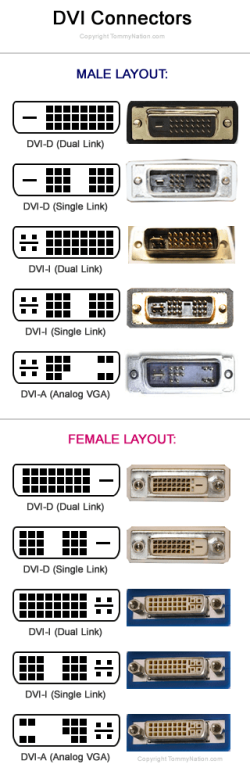
You mentioned you DVI adapter was DVI-I (single or dual link).
How about having DVI-A adapter (purely analog signal only)
The pin out are shown on the pict below.
or
Have you tried to connect the monitor directly to the D-Sub port?
Kevin | My System Specs | | Computer type PC/Desktop System Manufacturer/Model Number Self built system OS Windows 7 Ultimate x64 CPU CORE i5 Motherboard Intel DH55PJ Memory 4GB Graphics Card ATI HD 4650 Sound Card Realtek HD Integrated Monitor(s) Displays LG Flatron L1742S; LG Flatron 19"; Toshiba 32" Screen Resolution 1280 x 1024; 1366 x 768 Keyboard Logitech Wireless Mouse Logitech Wireless PSU Power Case Simbadda Cooling Conventional Hard Drives Seagate Barracuda 500 GB
WDC 1 TB Internet Speed 256Kbps Other Info External HDD Transcend 500GB
Dial Up Modem Huawei
Home-made Home Theater
Laptop ASUS K42F, Core i3, 4GB memory, 320GB HDD.
LAptop Fujitsu LH531, Core i3, 4GB Memory, 500 GB HDD, Nvidia VGA |
24 Feb 2012
|
#5 | | Windows 7 Professional x64 |
Adampter i'm using has male DVI-A layout, while card it's connected to has female DVI-I (dual link) one.
Onl D-Sub port i have is one on motherboard and when i tried to plug monitor there i couldn't even get screen running.
EDIT: While i was browsing web looking for solution saw a suggestion that i should get VGA <--> DVI cable and connect my monitor directly to the card with it. That is supposed to help card to recognize monitor.
Oh, and about that driver - it's just a name, i looked deeper into it's details and it's all "Generic PnP" stuff. | My System Specs | | OS Windows 7 Professional x64 CPU Intel Core i5-2310 2.9GHz (BX80623I52310) Motherboard Asus P8H61-M LX2/SI Memory Kingston HyperX 4GB DDR3-1333 Non-ECC CL9 Red (KHX1333C9D3B1 Graphics Card Gigabyte GeForce GTX 560 1GB GV-N56GOC-1GI Monitor(s) Displays NEC LCD19WV PSU Aerocool E80-500 (500W) 80+ (AEROE80-500) Hard Drives Dysk Western Digital Caviar Blue, 3.5'', 500GB, SATA III, 7200RPM |
24 Feb 2012
|
#6 | | Windows 7 Ultimate x64 Solo. |
Well. Seems a bit weird to me.
I've check out your monitor spec as follows,
horizontal frequency [khz] 30.0 - 83.0
Vertical frequency [hz] 55.0 - 75.0
Connectors Analog: 1 x mini D-sub 15 pin
Optimum Resolution 1440 x 900 at 60 Hz
Other Resolutions 1280 x 1024; 1280 x 960; 1280 x 768; 1152 x 864; 1024 x 768; 832 x 624; 800 x 600; 720 x 400; 640 x 480
Normally it should work fine if connected to your onboard D-Sub port (set auto in BIOS).
When the appropriate driver is installed then it should have been able to extract EDID data from the monitor chip.
There is also way you might try it out, open the driver, -> update driver, but choose "Let me pick from a list of device driver on my computer" then try to see any monitor have the closest match to yours.
If still no luck. You might consider run a try with any alternative monitor.
----------------
Anyone here in the forums, more help is welcomed. | My System Specs | | Computer type PC/Desktop System Manufacturer/Model Number Self built system OS Windows 7 Ultimate x64 CPU CORE i5 Motherboard Intel DH55PJ Memory 4GB Graphics Card ATI HD 4650 Sound Card Realtek HD Integrated Monitor(s) Displays LG Flatron L1742S; LG Flatron 19"; Toshiba 32" Screen Resolution 1280 x 1024; 1366 x 768 Keyboard Logitech Wireless Mouse Logitech Wireless PSU Power Case Simbadda Cooling Conventional Hard Drives Seagate Barracuda 500 GB
WDC 1 TB Internet Speed 256Kbps Other Info External HDD Transcend 500GB
Dial Up Modem Huawei
Home-made Home Theater
Laptop ASUS K42F, Core i3, 4GB memory, 320GB HDD.
LAptop Fujitsu LH531, Core i3, 4GB Memory, 500 GB HDD, Nvidia VGA |
24 Feb 2012
|
#7 | | Windows 7 Professional x64 |
Ok, i'll try to connect it directly to motherboard, i probably didn;t check it properly since i never had similar problems before.
When it comes to that other option , should i just try to find another 19' with 1440x900 native&vga and try if those drivers work?
EIDDT: I tried to plug my monitor to VGA onboard after messing in BIOS a bit and once again monitor has no signal :9 Do you happen to know where could i enable it within Acer BIOS?
Last edited by Emnel; 24 Feb 2012 at 12:55 PM..
| My System Specs | | OS Windows 7 Professional x64 CPU Intel Core i5-2310 2.9GHz (BX80623I52310) Motherboard Asus P8H61-M LX2/SI Memory Kingston HyperX 4GB DDR3-1333 Non-ECC CL9 Red (KHX1333C9D3B1 Graphics Card Gigabyte GeForce GTX 560 1GB GV-N56GOC-1GI Monitor(s) Displays NEC LCD19WV PSU Aerocool E80-500 (500W) 80+ (AEROE80-500) Hard Drives Dysk Western Digital Caviar Blue, 3.5'', 500GB, SATA III, 7200RPM |
24 Feb 2012
|
#8 | | Windows 7 Professional x64 |
SUCCESS... sort of :P
Ok, I worked on that BIOS a bit harder and once i chenged Internal Graphic Adapter from (if i remember correctly) PEG/PCI to PCI/iGPU I was able to get signal when pluged into onboard VGA (tho when i was pluged to the card there were no signal).
Computer made some registry changes, restarted itself and once it was back online i was able to select perfectly good warking 1440x900 resolution!
However...
My GTX560 is now sort of offline and only cart i am able to use is onboard Intel one... Less than ideal.
Any tips how to combine both things?
EDIT: Oh, and there weren't any AUTO option in that bios settings, only ones there:
iGPU
PCI/iGPU (one i chose)
PCI/PEG
PEG/iGPU
PEG/PCI (one that was on before i think)
Earlier i also changed iGUP Multi-Monitor from disabled to enabled in case its relevant. | My System Specs | | OS Windows 7 Professional x64 CPU Intel Core i5-2310 2.9GHz (BX80623I52310) Motherboard Asus P8H61-M LX2/SI Memory Kingston HyperX 4GB DDR3-1333 Non-ECC CL9 Red (KHX1333C9D3B1 Graphics Card Gigabyte GeForce GTX 560 1GB GV-N56GOC-1GI Monitor(s) Displays NEC LCD19WV PSU Aerocool E80-500 (500W) 80+ (AEROE80-500) Hard Drives Dysk Western Digital Caviar Blue, 3.5'', 500GB, SATA III, 7200RPM |
25 Feb 2012
|
#9 | | Windows 7 Professional x64 |
In case somene has similar problem.
All that had to be done was moding nvidia driver by adding 1440x900 mode to one line of code and it's all working 
Thanks for help here anyways, without it i wouldnt know where problem was. | My System Specs | | OS Windows 7 Professional x64 CPU Intel Core i5-2310 2.9GHz (BX80623I52310) Motherboard Asus P8H61-M LX2/SI Memory Kingston HyperX 4GB DDR3-1333 Non-ECC CL9 Red (KHX1333C9D3B1 Graphics Card Gigabyte GeForce GTX 560 1GB GV-N56GOC-1GI Monitor(s) Displays NEC LCD19WV PSU Aerocool E80-500 (500W) 80+ (AEROE80-500) Hard Drives Dysk Western Digital Caviar Blue, 3.5'', 500GB, SATA III, 7200RPM |
25 Feb 2012
|
#10 | | Windows 7 Ultimate x64 Solo. |
Sorry I kindda lost track of the thread.
Glad to know you worked it out.
Mostly on BIOS, auto is available, but yeah you got the sequence. I did modify resolution on the driver list sometimes, but when the card able to read monitor's EDID then mostly it will be overwritten with the extracted data.
Kevin. | My System Specs | | Computer type PC/Desktop System Manufacturer/Model Number Self built system OS Windows 7 Ultimate x64 CPU CORE i5 Motherboard Intel DH55PJ Memory 4GB Graphics Card ATI HD 4650 Sound Card Realtek HD Integrated Monitor(s) Displays LG Flatron L1742S; LG Flatron 19"; Toshiba 32" Screen Resolution 1280 x 1024; 1366 x 768 Keyboard Logitech Wireless Mouse Logitech Wireless PSU Power Case Simbadda Cooling Conventional Hard Drives Seagate Barracuda 500 GB
WDC 1 TB Internet Speed 256Kbps Other Info External HDD Transcend 500GB
Dial Up Modem Huawei
Home-made Home Theater
Laptop ASUS K42F, Core i3, 4GB memory, 320GB HDD.
LAptop Fujitsu LH531, Core i3, 4GB Memory, 500 GB HDD, Nvidia VGA Native resolution doesn't appear problems? All times are GMT -5. The time now is 09:49 PM. | |