| Windows 7: How can I limit refresh rates? |
25 Feb 2012
|
#1 | | |
How can I limit refresh rates? I seem to have an issue opposite of what is normally desired. In my case, my monitor only supports 60Hz but some 3D apps try to change the refresh rate to something higher, leaving only "Out of Range" displaying on my monitor.
So, I need to find a way to make Windows 7 only use 60Hz.
My video card is an EVGA GTX 460, monitor is Sceptre X24WG, but I can find no drivers for it.
I remember being able to do this in the past but not sure how or if it can be done in Windows 7.
Any help is appreciated, thanks. | My System Specs |
| OS Windows 7 Ultimate x64 |
25 Feb 2012
|
#2 | | |
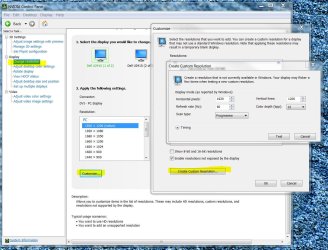
You should be able to create a custom resolution/refresh rate in the Nvidia Control Panel
ie: | My System Specs | | Computer type PC/Desktop System Manufacturer/Model Number SmartEyeball Custom Systems OS 8 Pro x64 CPU i7 3770K 4.6GHz Motherboard ASUS P8Z77 WS (great board good slot placement) Memory 16GB G.Skill Trident X 2400mhz Graphics Card 2x Gigabyte GTX 670 OC WindForce SLI Sound Card X-FI Forte 7.1 + ATH-AD900 Headphones Monitor(s) Displays x3 Dell U2410 / 58" Samsung / "40 Sony Screen Resolution 1920*1200 / 1920*1080 Keyboard Topre Realforce // Ducky Shine MX Black // Filco Ninja TKL Mouse Razer Imperator + Thermaltake Theron PSU Corsair AX1200W Case Thermaltake Level 10 GT Snow Edition Cooling Noctua NH-D14 Hard Drives 2x Intel 520 240GB (RAID 0) * 2x WD Caviar Blacks 2TB (RAID 0) * 2TB WD Caviar Black Antivirus MSE Browser Opera, Chrome, FF Other Info GT Extreme V2 Sim Racing Cockpit + 40" LCD and K/B Mouse stand ▼
Fanatec CSR Elite Wheel + Clubsport Pedals + CSR shifter/7GS ▼
Buttkicker v2 Seat Rumbler with Dedicated 5.1 and Sub Woofer attached to frame ▼
=
Bloody Big Grin |
25 Feb 2012
|
#3 | | |
Thanks for the reply. Yes, I can make a custom resolution and that works for setting the desktop resolution and refresh rate (actually had to do this to get 1900x1200). However when a 3D app goes full screen it (something) is selecting another refresh rate.
If I look in the NVidia control panel, for the "stock" resolutions it allows for selection of other refresh rates besides 60. I need to limit things somehow so that when a resolution change occurs it always uses 60. Now it's trying to use something else and my monitor can't display it.
There seems to be some disconnect between Windows / NVidia and the monitor, seems like what I need is something that will tell Windows / DirectX not to use anything except 60Hz.
BTW, this hasn't been an issue with this monitor on the Vista and XP machines that use it (via KVM).
So far I've spent $900 to build a game machine that can't play games, frustrating | My System Specs | | OS Windows 7 Ultimate x64 |
25 Feb 2012
|
#4 | | |
Its the game or whatever it is you are trying to run that is the problem. You should talk to the developer of that game. It isn't Windows that is trying to change the refresh rate its the game in question. | My System Specs | | System Manufacturer/Model Number Alienware Aurora ALX R4 OS Windows 7 x64 (SP1) CPU Intel Core i7-3930K (3.2GHz, Turbo 4GHz) Motherboard Alienware Aurora-R4 x79 Memory 4x Samsung 4GB PC3-12800 DDR3 (16GB 1600MHz) Graphics Card Nvidia Geforce GTX 690 (Stock) Sound Card RealTek Integrated Audio Monitor(s) Displays Dell UltraSharp U3011 Screen Resolution 2560x1600 Other Info Dell Inspiron Mini 10v (Intel Atom N270 1.6 GHz; 1GB; Windows 7 Ultimate) |
25 Feb 2012
|
#5 | | Windows 7 Pro-x64 South Texas |
Don't run the game in 3D.  I don't think your display supports it anyway. 3D normally requires a higher refresh rate--120Hz and up. | My System Specs | | Computer type PC/Desktop System Manufacturer/Model Number Built 2/11/2011 OS Windows 7 Pro-x64 CPU i7-2600 3.4GHz - 3.8GHz Turbo Motherboard Intel DH67BL-B3 Memory 8Gb - 2x4GB, Muskin 991770 PC3-1333 Graphics Card Integrated Intel HD 2000 Sound Card Integrated Intel 10.1 HD, RealTek ALC892 Monitor(s) Displays Asus LCD VH222H, Haier HL24XSL2a Screen Resolution 1920x1080, 1920x1080 Keyboard Logitech EX100 Wireless Mouse Logitech EX100 Wireless PSU Seasonic 650W 80+ Gold Modular Case Rosewill Defender Cooling Stock CPU, Four 120mm case fans, PCH fan added Hard Drives Crucial C300-128Gb,
Western Digital WD5002AALX - 500Gb,
Western Digital WD7501AALS - 750Gb Internet Speed 2.5/1.5 Mbs Antivirus Microsoft Security Essentials Browser Microsoft Internet Explorer 10 Other Info Antec Veris Premier-Multimedia IR Station,
Cyber Accoustics-3602 Speakers,
AFT XM-5U Card Reader,
Hauppauge TV-HVR-2250,
Sony LX300 USB Turntable |
25 Feb 2012
|
#6 | | Windows 7 Home Premium 64bit Southern Ohio |
Yea, I was going to say dont you need a 120hz monitor for 3d Vision?
I seem to recall it needs to do 2 images at 60hz for it to work (total 120) or something along that line ... I dont use it so Im not sure.
--EDIT --
If Im reading this correctly it appears thats the problem. http://www.nvidia.com/object/3d-visi...uirements.html
Note the 3D display Req. | My System Specs | | System Manufacturer/Model Number Custom (Self Build) OS Windows 7 Home Premium 64bit CPU Intel Core i7 2700k Motherboard eVGA P67 SLI Memory 8GB Mushkin Redline Ridgebacks @1866 Graphics Card EVGA GTX570 SC Sound Card XiFi Titanium HD Monitor(s) Displays LG W2453V Screen Resolution 1920x1080 Keyboard Saitek Cyborg PSU Seasonic x750 Case Corsair 600T SE White Cooling eVGA Superclocked CPU Cooler Hard Drives Intel 320 80GB -- Intel X25-V 40GB --WD Black 1TB x2 -- WD Blue 640GB Antivirus Kaspersky Browser IE Other Info LG BD/DVD |
25 Feb 2012
|
#7 | | Windows 7 Pro-x64 South Texas |
Yeah, 120Hz for passive 3D (Two-color glasses). Active 3D (Expensive shutter glasses) need even higher. And, active 3D requires an emitter on the display for the glasses. | My System Specs | | Computer type PC/Desktop System Manufacturer/Model Number Built 2/11/2011 OS Windows 7 Pro-x64 CPU i7-2600 3.4GHz - 3.8GHz Turbo Motherboard Intel DH67BL-B3 Memory 8Gb - 2x4GB, Muskin 991770 PC3-1333 Graphics Card Integrated Intel HD 2000 Sound Card Integrated Intel 10.1 HD, RealTek ALC892 Monitor(s) Displays Asus LCD VH222H, Haier HL24XSL2a Screen Resolution 1920x1080, 1920x1080 Keyboard Logitech EX100 Wireless Mouse Logitech EX100 Wireless PSU Seasonic 650W 80+ Gold Modular Case Rosewill Defender Cooling Stock CPU, Four 120mm case fans, PCH fan added Hard Drives Crucial C300-128Gb,
Western Digital WD5002AALX - 500Gb,
Western Digital WD7501AALS - 750Gb Internet Speed 2.5/1.5 Mbs Antivirus Microsoft Security Essentials Browser Microsoft Internet Explorer 10 Other Info Antec Veris Premier-Multimedia IR Station,
Cyber Accoustics-3602 Speakers,
AFT XM-5U Card Reader,
Hauppauge TV-HVR-2250,
Sony LX300 USB Turntable |
25 Feb 2012
|
#8 | | |
Sorry, by 3D I didn't mean 3D lol, I meant 3D as in Direct3D or OpenGL.
After messing with it more today, I installed the X-Plane demo, fortunately it allows me to choose resolution and refresh rate, so hopefully the other ones will too.
And now that I see that one can do it, the blame does squarely fall on the game developer, although I'm sure from their perspective they are picking from a list of what Windows (or video or monitor driver) tells them will work.
I think that's the core of the problem. I cannot find any drivers for my monitor. It's using Generic Plug and Play (I've also tried Generic Non Plug and play too). The result is always the same - it is showing that it can do >60Hz, but it really can't and therein lies the problem.
I had a similar issue once in the past long ago with XP, but I was able to create a custom inf file for the monitor with just the resolutions and refresh rates I wanted. However for one I don't remember how I did it (the inf syntax is not exactly straight forward), and also I'm not sure if that would even work with Windows 7.
I know the easiest answer would be to just go buy another monitor, but all coinage has been spent on this project (besides the monitor looks fine). | My System Specs | | OS Windows 7 Ultimate x64 |
25 Feb 2012
|
#9 | | Windows 7 Pro-x64 South Texas |
I was looking at the console for my Intel chipset driver (under Display>Screen Resolution>Advanced Settings-Monitor tab) and there's a check box to "Hide modes that this monitor cannot display". This box is just below the drop-down for Screen refresh rate. I think this is present for the generic display driver. You might check to see if there's a similar setting.
Added:
I forgot to mention that I believe this will limit what Windows will allow software to select too.
Last edited by carwiz; 25 Feb 2012 at 11:46 PM..
Reason: Additon
| My System Specs | | Computer type PC/Desktop System Manufacturer/Model Number Built 2/11/2011 OS Windows 7 Pro-x64 CPU i7-2600 3.4GHz - 3.8GHz Turbo Motherboard Intel DH67BL-B3 Memory 8Gb - 2x4GB, Muskin 991770 PC3-1333 Graphics Card Integrated Intel HD 2000 Sound Card Integrated Intel 10.1 HD, RealTek ALC892 Monitor(s) Displays Asus LCD VH222H, Haier HL24XSL2a Screen Resolution 1920x1080, 1920x1080 Keyboard Logitech EX100 Wireless Mouse Logitech EX100 Wireless PSU Seasonic 650W 80+ Gold Modular Case Rosewill Defender Cooling Stock CPU, Four 120mm case fans, PCH fan added Hard Drives Crucial C300-128Gb,
Western Digital WD5002AALX - 500Gb,
Western Digital WD7501AALS - 750Gb Internet Speed 2.5/1.5 Mbs Antivirus Microsoft Security Essentials Browser Microsoft Internet Explorer 10 Other Info Antec Veris Premier-Multimedia IR Station,
Cyber Accoustics-3602 Speakers,
AFT XM-5U Card Reader,
Hauppauge TV-HVR-2250,
Sony LX300 USB Turntable |
26 Feb 2012
|
#10 | | |
If the above fails and your monitor is the "SCEPTRE X24WG-Naga" then you could try the Vista driver at the bottom of this page Sceptre Manual Download
EDIT: To get to the Advanced Settings on most Win 7 computers just right click the Desktop -> Change Resolution -> Advanced Settings | My System Specs | | System Manufacturer/Model Number Self built OS Windows 7 Ultimate x64 CPU Intel Pentium Dual Core E5200 2.5GHz (3.77GHz OC) Motherboard Asus P5Q-E Memory Corsair 4GB DDR2 (4x1GB CM2X1024-6400C4) Graphics Card Palit GeForce GTS 250 (1024MB) Sound Card On Board (ADI AD2000B 8ch HD) Monitor(s) Displays Samsung 32in LCD TV Screen Resolution 1360x768 Keyboard Logitech MX5000 Laser (Combo) Mouse Logitech MX5000 Laser (Combo) PSU 550W Antec Neo HE 550 Case Antec P180 Cooling Xigmatex Red Scorpion CPU Cooler. 3x120mm Fans Hard Drives 2 x 1TB Samsung 103SJ (Raid0)
2 x External 500GB Samsung 502IJ (NexStar 3 HD Enclosures) Internet Speed ADSL2+ (avg 10 Mbps Down, 0.80 Mbps up) Other Info Gigabyte GN-WP01GS 54g Wireless Lan Card How can I limit refresh rates? problems? All times are GMT -5. The time now is 05:20 AM. | |