| Windows 7: Heatsinks to bring down GPU temps |
16 Apr 2012
|
#1 | | Windows 7 Home Premium x64 Malmö, Sweden |
Heatsinks to bring down GPU temps Hi, as the titles says I was wondering if using heatsinks would help bring down temps a bit my card idle at around 47-50c so I would love to see if I can bring down those temps a bit by using heatsinks, I cant really get a aftermarket cooler because most of them uses 2.5 or 3 slots so they would hit my wireless pci card that I cant move anywhere else because of my motherboard, so if I add heatsinks to the vram I think it is that is not being covered by the current fan would that be a good idea or a bad one, I tried to google a bit and some said it was good some said it would break the card. Picture below is not very good but the best one I could find so if someone who is a bit more into this could maybe help me. And it was not that long ago since I put new thermal paste on it. Oh and almost forgot, what I can remember max temps was around 82c when I last furmark but it could be different now.
Oh and I have 2x 140 mm fans blowing in cold air from the side that should be hitting the card but strangely enough I did not see any difference in temps when I installed those. Sorry for the long text. | My System Specs |
| Computer type PC/Desktop OS Windows 7 Home Premium x64 CPU Intel Core i7 860 (Lynnfield) Motherboard Asus P7P55D (LGA1156) Memory Corsair Vengeance 9,9,9,24 1600Mhz 1.50v 2x4G Graphics Card Asus nVidia 560 GTX Sound Card Asus Xonar DG Monitor(s) Displays Acer P235H & NEC E201W Screen Resolution 1920x1080 & 900x1600 Keyboard Ducky Shine Mouse tT Theron PSU Corsair 650 Modular Case Corsair 800D Cooling Corsair H80 with Noctua fans Hard Drives 2 Internet Speed 100/100 Browser IE10 |
16 Apr 2012
|
#2 | | Windows 8 Pro with Media Center x64 Southern California, USA |
Andreas,
I do not have an answer to your question, but I do know that some companies, such as EVGA, sell an Nvidia 680 card that comes with a built in water cooler (minus the actual cooler motor and fan). You can then buy a CPU water cooler that doubles as a GPU cooler and get both CPU and GPU to have excellent temperatures. I am sure there are many different cards and companies that have similar cooling capabilities, and if you were to get a CPU/GPU cooler, it would save on space and perhaps even money.
The only drawback is if you do not want to spend the money to get a new card and water cooler. If that is the case, you would have to look into choosing if you want to get the water cooler and parts for installing it onto your GPU (would need to take the outer shell of your card off if you have one), or if you want to go ahead and just by a GPU cooler (fan, I would guess) which would be a lot cheaper. If you install the cooling fan onto the GPU, you will still need to take the outer shell off (again, if you have it). But for the GPU fan option, I do not know of a good one to suggest to you.
There is the option of buying an interal fan and aiming it at your GPU. Some fans can attach to your motherboard or clip to another location such as the hard rive bay. You could also buy dual fans that you can plug into either your pci-e x1 slot, pci slot, or pci-e slot (keep in mind, these are all different fans, so make sure they will fit properly if you choose this route).
Hope I've helped! | My System Specs | | Computer type PC/Desktop System Manufacturer/Model Number Dell Inspiron M5040 OS Windows 8 Pro with Media Center x64 CPU AMD E-450 APU 1.65 GHz Memory 4GB Graphics Card Built-in Radeon HD 6320 Graphics Screen Resolution 1366 x 768 Mouse Microsoft Wireless Mobile Mouse 3500 Cooling fan Hard Drives 500GB Internet Speed 2.86Mbps Download Speed, 2.85Mbps Upload Speed & 26ms Ping Antivirus Defender Browser IE10 |
16 Apr 2012
|
#3 | | |
My question is this
Do you have a heat problem, or a reason for needing to get your temps down other than you just want to for the sake of doing it? | My System Specs | | System Manufacturer/Model Number Self-Built in July 2009 OS Windows 7 Ultimate x64 CPU Intel Q9550 2.83Ghz OC'd to 3.40Ghz Motherboard Gigabyte GA-EP45-UD3R rev. 1.1, F12 BIOS Memory 8GB G.Skill PI DDR2-800, 4-4-4-12 timings Graphics Card EVGA 1280MB Nvidia GeForce GTX570 Sound Card Realtek ALC899A 8 channel onboard audio Monitor(s) Displays 23" Acer x233H Screen Resolution 1920x1080 Keyboard ABS M1 Mechanical Mouse Logitech G9 Laser Mouse PSU Corsair 620HX modular Case Antec P182 Cooling stock Hard Drives Intel X25-M 80GB Gen 2 SSD
Western Digital 1TB Caviar Black, 32MB cache. WD1001FALS Internet Speed 15/2 cable modem Other Info Windows and Linux enthusiast. Logitech G35 Headset. |
16 Apr 2012
|
#4 | | Windows 7 Home Premium x64 Malmö, Sweden |

Quote: Originally Posted by DustSailor Andreas,
I do not have an answer to your question, but I do know that some companies, such as EVGA, sell an Nvidia 680 card that comes with a built in water cooler (minus the actual cooler motor and fan). You can then buy a CPU water cooler that doubles as a GPU cooler and get both CPU and GPU to have excellent temperatures. I am sure there are many different cards and companies that have similar cooling capabilities, and if you were to get a CPU/GPU cooler, it would save on space and perhaps even money.
The only drawback is if you do not want to spend the money to get a new card and water cooler. If that is the case, you would have to look into choosing if you want to get the water cooler and parts for installing it onto your GPU (would need to take the outer shell of your card off if you have one), or if you want to go ahead and just by a GPU cooler (fan, I would guess) which would be a lot cheaper. If you install the cooling fan onto the GPU, you will still need to take the outer shell off (again, if you have it). But for the GPU fan option, I do not know of a good one to suggest to you.
There is the option of buying an interal fan and aiming it at your GPU. Some fans can attach to your motherboard or clip to another location such as the hard rive bay. You could also buy dual fans that you can plug into either your pci-e x1 slot, pci slot, or pci-e slot (keep in mind, these are all different fans, so make sure they will fit properly if you choose this route).
Hope I've helped! Thats a tad extreme and expensive since my case is not watercooled at all and its and old GTX 260, apparently I removed that part for some reason. And to try I actually put a 140 mm fan on the bottom of my case resting on some MB standoffs laying right under the fan = 3 140 mm fans blowing cold air on the card did not change anything at all, and the GPU in the picture is how my card look 
Quote: Originally Posted by pparks1 My question is this
Do you have a heat problem, or a reason for needing to get your temps down other than you just want to for the sake of doing it? The temp just seem high to me and the card is about 4 years old now so if I could get the card to run a bit cooler I would be happy if it would add some more lifespan to the card since my wallet don't really allow me to just go out and buy a new card (I wish I could) | My System Specs | | Computer type PC/Desktop OS Windows 7 Home Premium x64 CPU Intel Core i7 860 (Lynnfield) Motherboard Asus P7P55D (LGA1156) Memory Corsair Vengeance 9,9,9,24 1600Mhz 1.50v 2x4G Graphics Card Asus nVidia 560 GTX Sound Card Asus Xonar DG Monitor(s) Displays Acer P235H & NEC E201W Screen Resolution 1920x1080 & 900x1600 Keyboard Ducky Shine Mouse tT Theron PSU Corsair 650 Modular Case Corsair 800D Cooling Corsair H80 with Noctua fans Hard Drives 2 Internet Speed 100/100 Browser IE10 |
16 Apr 2012
|
#5 | | Windows 8 Pro with Media Center x64 Southern California, USA |
47-50 C isn't bad. 60 C is a tad too much. 30 C is room temperature out here on a good day (Southern California), cards normally run from 35 - 45 C. You may be VERY slowly wearing down your GPU faster than others, but it should still work fine in years to come.
Just to be sure, this temp only happens under graphically intensive programs right, it isn't running that high under normal conditions? If so, completely fine. Best practices are to turn off/put computer into sleep mode when you are finished using it.
Make sure you clean out all dust (canned air is best solution), and have a steady airflow in the case with wires secured out of the way. An extra fan may help, even if it is only by a few degrees lower. Otherwise, a new card or water cooling may be the only worthwhile solution. If your card is 4 years old (thought I read that somewhere?), consider that it may not last forever, but there is no way to know how long it will last. For $150US you could get a Geforce 460 and I know personally that that card is good AND cool. | My System Specs | | Computer type PC/Desktop System Manufacturer/Model Number Dell Inspiron M5040 OS Windows 8 Pro with Media Center x64 CPU AMD E-450 APU 1.65 GHz Memory 4GB Graphics Card Built-in Radeon HD 6320 Graphics Screen Resolution 1366 x 768 Mouse Microsoft Wireless Mobile Mouse 3500 Cooling fan Hard Drives 500GB Internet Speed 2.86Mbps Download Speed, 2.85Mbps Upload Speed & 26ms Ping Antivirus Defender Browser IE10 |
16 Apr 2012
|
#6 | | |
Depending upon the GPU, this might be right in line with what is normal. My Nvidia 580 GTX will run at 80C or more during gaming sessions with BF3. I want to say it idles in the 40's. That's exactly where it is designed to run. | My System Specs | | System Manufacturer/Model Number Self-Built in July 2009 OS Windows 7 Ultimate x64 CPU Intel Q9550 2.83Ghz OC'd to 3.40Ghz Motherboard Gigabyte GA-EP45-UD3R rev. 1.1, F12 BIOS Memory 8GB G.Skill PI DDR2-800, 4-4-4-12 timings Graphics Card EVGA 1280MB Nvidia GeForce GTX570 Sound Card Realtek ALC899A 8 channel onboard audio Monitor(s) Displays 23" Acer x233H Screen Resolution 1920x1080 Keyboard ABS M1 Mechanical Mouse Logitech G9 Laser Mouse PSU Corsair 620HX modular Case Antec P182 Cooling stock Hard Drives Intel X25-M 80GB Gen 2 SSD
Western Digital 1TB Caviar Black, 32MB cache. WD1001FALS Internet Speed 15/2 cable modem Other Info Windows and Linux enthusiast. Logitech G35 Headset. |
16 Apr 2012
|
#7 | | Windows 7 Ultimate 64 Southern California |
| My System Specs | | System Manufacturer/Model Number A blend of brains, brawn and dumb luck, ask me about rig #2 ! OS Windows 7 Ultimate 64 CPU i7 3770k OC'd 4.6 @ 1.17v, still love my FX 8120 Motherboard MSI P67A-GD80 b3 Memory 16 gb Crucial Ballistix Tracer DDR3 9-9-9-27 @ 2000 Graphics Card XFX Radeon 7870 Sound Card On board HD audio with lossless 24 bit/192 sample rate Monitor(s) Displays (2) LG LED 23" 1920 x 1080 2ms Monitors via mini d-port Screen Resolution 1680 X 1050 p Keyboard (2) Logitech Illuminated Keyboards (1) usb (1) wireless K800 Mouse Logitech G9x & T-BC21 - nano nx for the laptop PSU Ultra X4 modular 1050 watt 80% silver rating & APC 1200 RS Case CoolerMaster Storm Styker Cooling 6 case fans 140mm & 120mm, Thermaltake h2o extreme Hard Drives Samsung 256 gb 830 SSD sata III
(2) 1 tb Hitachi deskmates/sata II
(1) 1 tb WD green/sata II
(2) 2 tb WD My Book/esata
(1) 500 gb Sea. Freeagent/esata
(2) 250 gb Sea. Freeagent go's/usb
(1) WD 2 tb Green 64 sata III
(1) 120 gb OCZ Vertex SS Internet Speed Upgraded from bottom of the barrel to bareable Other Info 4 Noctua case fans + 3 Noctua in p/p on H100 cooler
Integrated hot swap drive bays for 2.5" Drives
(2) Lite-on dvd/cd optical 22X
Integrated fan controller and led on/off
HP Officejet Pro L7680 all-n-one
HP 4 laserjet (the beast)
Hot swappable 3.5" hard drive bay
Belkin Play N600 HD router
Asus USB 3 & sata 6 PCIe card
Vantec IDE to sata adptr./Ultra sata adptr
HP Probook i3 laptop |
16 Apr 2012
|
#8 | | Windows 7 Home premium 64bit |
Make sure you have enough ventilation in your case maybe your not letting out enough air and that is causing those temps because my gpu idles at 41c and my cpu is at 21c. So my suggestion is get some more ventilation if you don't already have some and clean out the case of dust and your components like the heat sink and gpu fan.Amazed nobody suggested that maybe he is not blowing out enough of the hot air anyways i suggest you clean it up, check if it's dusty inside and use a compressed can of air to clean it out. | My System Specs | | Computer type PC/Desktop System Manufacturer/Model Number me OS Windows 7 Home premium 64bit CPU AMD Phenom II X4 925 (Deneb) OC 3.4GHz Motherboard M5A78L-MLX Plus Memory 8192MB RAM DDR3 1600 Graphics Card XFX HD 6870 1GB (Connected via HDMI) Monitor(s) Displays Polaroid TLAC-02255 22" Digital HD LED TV and 17"LED Monitor Screen Resolution 1920x1080 60Hz / 1280x1024 60Hz Keyboard Microsoft USB Comfort Curve Keyboard 2000 (IntelliType Pro) Mouse Logitech Optical Gaming Mouse G400 PSU CORSAIR CX600 600w Case AZZA Orion 202 EVO with 3fans and a corsair af fan Cooling cooler master hyper TX3 cpu cooler Hard Drives 500gb hdd 7200rpm Western Digital Internet Speed 5.22Mbps download 0.65Mbps upload Antivirus Comodo Internet Security Browser IE 10 |
16 Apr 2012
|
#9 | | Windows 7 Ultimate 64 Southern California |
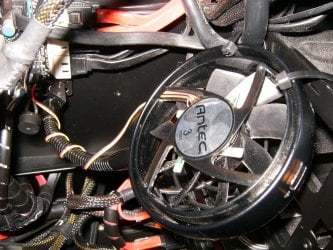
I use one of these and it works well as long as you can zip tie the outer ring to something. Amazon.com: Antec SpotCool System Cooler: Electronics | My System Specs | | System Manufacturer/Model Number A blend of brains, brawn and dumb luck, ask me about rig #2 ! OS Windows 7 Ultimate 64 CPU i7 3770k OC'd 4.6 @ 1.17v, still love my FX 8120 Motherboard MSI P67A-GD80 b3 Memory 16 gb Crucial Ballistix Tracer DDR3 9-9-9-27 @ 2000 Graphics Card XFX Radeon 7870 Sound Card On board HD audio with lossless 24 bit/192 sample rate Monitor(s) Displays (2) LG LED 23" 1920 x 1080 2ms Monitors via mini d-port Screen Resolution 1680 X 1050 p Keyboard (2) Logitech Illuminated Keyboards (1) usb (1) wireless K800 Mouse Logitech G9x & T-BC21 - nano nx for the laptop PSU Ultra X4 modular 1050 watt 80% silver rating & APC 1200 RS Case CoolerMaster Storm Styker Cooling 6 case fans 140mm & 120mm, Thermaltake h2o extreme Hard Drives Samsung 256 gb 830 SSD sata III
(2) 1 tb Hitachi deskmates/sata II
(1) 1 tb WD green/sata II
(2) 2 tb WD My Book/esata
(1) 500 gb Sea. Freeagent/esata
(2) 250 gb Sea. Freeagent go's/usb
(1) WD 2 tb Green 64 sata III
(1) 120 gb OCZ Vertex SS Internet Speed Upgraded from bottom of the barrel to bareable Other Info 4 Noctua case fans + 3 Noctua in p/p on H100 cooler
Integrated hot swap drive bays for 2.5" Drives
(2) Lite-on dvd/cd optical 22X
Integrated fan controller and led on/off
HP Officejet Pro L7680 all-n-one
HP 4 laserjet (the beast)
Hot swappable 3.5" hard drive bay
Belkin Play N600 HD router
Asus USB 3 & sata 6 PCIe card
Vantec IDE to sata adptr./Ultra sata adptr
HP Probook i3 laptop |
16 Apr 2012
|
#10 | | Windows 7 Home Premium x64 Arkansas, USA |
Andreas,
My GTX 560ti SuperClock idled at 50C, I use the fan profile in Afterburner to bring it down to 43C. It does raise the noise level a little bit, but the peace of mind makes it worthwhile.
Relatively high idle and working temps are supposed to be normal for these cards but it seems to me that the cooler we can make them run, the better.
According to HWiNFO, the current temp of my graphics card is 43C and the fan is running at about 1950 rpm with only the web browser open. I was just playing Borderlands, the max temp was 69C and the fan max was 3390 rpm. Noticeable, but not annoying. | My System Specs | | System Manufacturer/Model Number Custom Build OS Windows 7 Home Premium x64 CPU Intel Core 2 Duo E8500 oc 4.275GHz Motherboard Gigabyte EP45-UD3R Memory 2x2GB Kingston Hyper-X PC2-6400 Graphics Card EVGA GTX 560 Ti SC Sound Card Realtek on-board Monitor(s) Displays Asus PA246Q + Hannspree HF-257 Screen Resolution 1920x1200 + 1920x1080 Keyboard El Cheapo Mouse Logitech M-BZ105A PSU Antec 650W Case Cooler Master HAF 932 Cooling EVGA Superclock Hard Drives Samsung 830 128GB Heatsinks to bring down GPU temps problems? All times are GMT -5. The time now is 07:54 PM. | |