I've seen some useful information on this site so I really hope someone can help.
I recently upgraded to a HD6870. Installation went OK, have a much better experience with the new card. Then I learnt about Eyefinity and thought I'd give it a go having some spare monitors around.
I've got all 3 monitors set up and per some video guide I found I went to open the Catalyst Control Center so complete the setup...except its no where to be found.
Its driving me insane, I've uninstalled, reinstalled, cleaned drivers, checked for the windows/assembly key problem, but nothing seems to work.
When running the driver install file I click custom, and I can't see CCC in the options, so I don't even know if it's installed.
Running Win 7 32 bit and am at a loss as to what to try next.
May I know the source of the driver install file you're using?
All legitimate, AMD driver packages that are downloaded from AMD's website contain the following components as shown in the screenshot i took of a package i just downloaded for my own AMD card:-
The CCC has now been renamed to the CPCC (Catalyst Pro Control Center), but serves the same function.
Get the proper latest driver package from AMD from their website linked below:-
Drivers are official. Tried manually downloading them and by using the auto detect feature. Tried downloading again via the provided link and still no joy:
As you can see there is no option for me to install the control center.
Last edited by mansun37; 09 Jul 2012 at 01:10 AM..
Reason: Sort out screenshot
It looks like the installer is not even detecting your Graphics Card properly, 2 very important entries, AMD Display Driverand Catalyst Pro Control Center are not even listed.
Let's try something a little different here:-
Can you run the command pnputil -e in an elevated command prompt and upload the txt file using the following instructions?
1. Click Start Orb
2. In search box, type cmd
3. Right-click on cmd.exe, and choose 'Run as Administrator'
4. In the command prompt, type in pnputil -e >pnp.txt
5. Upload and attach the pnp.txt file that you created using this tutorial :-
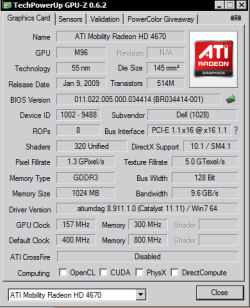
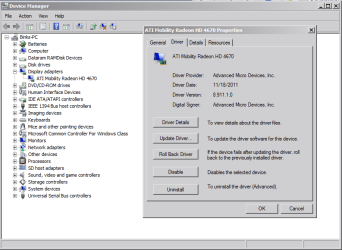
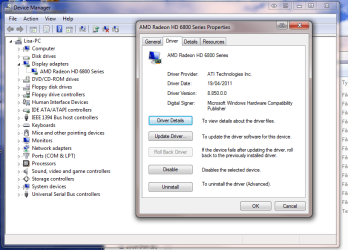
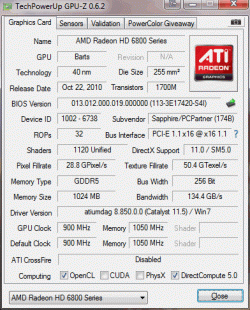
It'd also be helpful if you could post a screenshot from GPUz (http://www.techpowerup.com/gpuz/) and an entry from your Device Manager (Start|type in device manager|enter) like the ones below:-
Requested info attached. I'm off to work now so won't be able to reply for some time, but I shall be happy to supply further information/try anything you can suggest later this evening. Many thanks for taking the time to look at this.
From your attached pnp.txt file, I note various driver entries/issues that could arise to complicate the detection of your AMD graphics card by the Catalyst Install Manager.
Code:
Published name : oem13.inf
Driver package provider : NVIDIA
Class : Display adapters
Driver date and version : 09/27/2009 8.16.11.9107
Signer name : Microsoft Windows Hardware Compatibility Publisher
Published name : oem24.inf
Driver package provider : NVIDIA
Class : Display adapters
Driver date and version : 07/09/2010 8.17.12.5896
Signer name : Microsoft Windows Hardware Compatibility Publisher
Published name : oem40.inf
Driver package provider : Advanced Micro Devices
Class : Sound, video and game controllers
Driver date and version : 02/23/2012 7.12.0.7706
Signer name : Microsoft Windows Hardware Compatibility Publisher
Published name : oem41.inf
Driver package provider : ATI Technologies Inc.
Class : Display adapters
Driver date and version : 04/19/2011 8.850.0.0000
Signer name : Microsoft Windows Hardware Compatibility Publisher
Before we proceed, I need some further information.
Did you properly uninstall all of the driver software that your NVIDIA card was using prior to upgrading to your new AMD graphics card?
You've somehow managed to get a somewhat outdated set of AMD drivers (Catalyst 11.5, dated 04/19/2011) to install on your system, that much is verified by your pnputil output,GPUz and Hardware Devices screenshot.
Was the initial driver installation done using drivers provided with your card on a CD/DVD disc?
Thanks in advance, and i hope to hear your reply soon.
At work no so can't access the PC. I've upgraded from an nVidea card and un-installed it via device manager as I have for previous card upgrades. The new card itself is working fine and the automatic detect/install of drivers worked OK, I've not seen anything to suggest it cannot detect the card type.
With regards to the drivers being old, the last time I tried an install was using the CD that came with the card, rather than using the downloaded version, in the hope that that would install the missing control centre. It's likely that driver is a version or two out of date, but unfortunately installing it didn't resolve the missing control centre problem
Don't seem to be able to PM you (no option to do so, perhaps as I've only just joined?).
I shall be home and able to access the PC in an hour or so, if you had a suggestion or needed some further information let me know and I'll jump on it as soon as I get back.
Alrighty then, when you return home; There's just a few things I'd like ask you,
Quote:
Its driving me insane, I've uninstalled, reinstalled, cleaned drivers, checked for the windows/assembly key problem, but nothing seems to work.
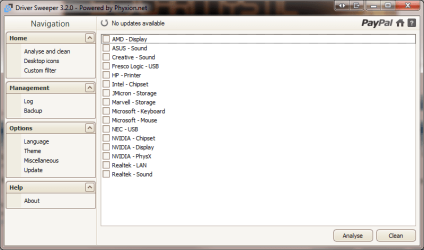
In your very first post you've mentioned that you've "cleaned drivers", what is the name of this driver cleaner, and which "drivers" were you referring to (for clarification purposes)?
(I suspect that would be the drivers from AMD that failed to give you the CCC with each re-installation/uninstallation cycle, but it'd be helpful if you clarified.)
Quote:
I've upgraded from an nVidea card and un-installed it via device manager as I have for previous card upgrades.
Did you not use the Programs and Features in the Control Panel for the NVIDIA driver package entry to remove it?
That's it for now, post another message with the answers when you've direct access to your PC and are ready to go.