Windows 7 Forums


Windows 7: I can't figure out my display driver, can you help me?

06 Sep 2012   #1

Windows XP Professional 32-bit 2.2GHZ
Dawlish, UK
 
 
I can't figure out my display driver, can you help me?

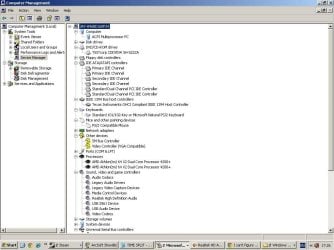
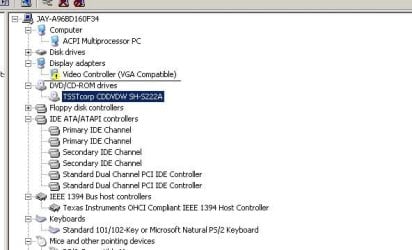
Hi. I recently installed Windows XP on my PC after some virus f'd it up, anyway make a long story short, I installed a few drivers [e.g. sound driver and internet drivers] but there is still one driver remaining called "Video Controller [VGA Compatible]" and I tried to find my display drivers but I just don't know.

So I tried downloading some display drivers but none of them were compatible.

Thus, I attached a .txt file of my 'dxdiag' info and if you could find out what my 'Video controller' is that'd be great

It's irritating because I can't play games without a video controller.

Attached Files
File Type: txt DxDiag.txt (38.1 KB, 17 views)
My System SpecsSystem Spec

06 Sep 2012   #2

Windows 7 ultimate x64


Ya ofcourse we can help.. Go to start->control panel->device manger->display adapter..
Under display adapter you will see your graphics card..
My System SpecsSystem Spec
07 Sep 2012   #3

Windows 7 Professional x64 SP1
Somewhere in a hole, Sydney, Australia


OK, so pretty much, you don't have a video card. You've only got your onboard video processor (ie: the one that came on your motherboard).

Machine name: JAY-A96BD160F34
Operating System: Windows XP Professional (5.1, Build 2600) Service Pack 3 (2600.xpsp_sp3_gdr.120504-1619)
Language: English (Regional Setting: English)
System Manufacturer: Acer
System Model: Aspire M5100
BIOS: Phoenix - AwardBIOS v6.00PG
Processor: AMD Athlon(tm) 64 X2 Dual Core Processor 4200+, MMX, 3DNow (2 CPUs), ~2.2GHz
Memory: 768MB RAM
Page File: 865MB used, 1009MB available
Windows Dir: D:\WINDOWS
DirectX Version: DirectX 9.0c (4.09.0000.0904)
DX Setup Parameters: Not found
DxDiag Version: 5.03.2600.5512 32bit Unicode


No mention of any external video card there, and:

Display Tab 1: The system is using the generic video driver. Please install video driver provided by the hardware manufacturer. Direct3D functionality not available. You should verify that the driver is a final version from the hardware manufacturer.

So as far as I can see, you don't have any video card in your computer.

What I suggest:
Go to your Processor Manufacturer's Site (AMD in this case) and find the suitabale VIDEO DRIVER for your PROCESSOR.

Download, and install.
My System SpecsSystem Spec
.


07 Sep 2012   #4

Windows 7 Ultimate 32x
United Kingdom


Here are the drivers for your display adapter from the official site:

If its Nvidia : http://global-download.acer.com/GDFi...C=ACER&SC=PA_7

If its ATI : http://global-download.acer.com/GDFi...C=ACER&SC=PA_7

I would mostly go with the nvidia one tbh so try install that and let me know thanks.
My System SpecsSystem Spec
07 Sep 2012   #5

Windows 7 Professional x64 SP1
Somewhere in a hole, Sydney, Australia


Quote   Quote: Originally Posted by dexislegend123 View Post
Here are the drivers for your display adapter from the official site:

If its Nvidia : http://global-download.acer.com/GDFi...C=ACER&SC=PA_7

If its ATI : http://global-download.acer.com/GDFi...C=ACER&SC=PA_7

I would mostly go with the nvidia one tbh so try install that and let me know thanks.
Doesn't look like he has an onboard graphics adaptor (look at his dxdiag, if you can find any evidence of another graphics card please correct me).
My System SpecsSystem Spec
07 Sep 2012   #6

Windows 7 Ultimate 32x
United Kingdom


I was going by the post you stated above for his processor this quote "OK, so pretty much, you don't have a video card. You've only got your onboard video processor (ie: the one that came on your motherboard)."

By the looks of it he is doing fresh install hense the sound and lan etc drivers he is installing. He clearly states on his post he requires one more the VGA driver. Looking at his DXDIAG his System Model: Aspire M5100. If you go to Acer's website and punch up the drivers for that model for his operating system you will give them two links i posted. Its worth a shot s it not?

Unless he can tell us if he knows of a video card he has put in the pc?
My System SpecsSystem Spec
07 Sep 2012   #7

Windows 7 Professional x64 SP1
Somewhere in a hole, Sydney, Australia


Well, when you buy a computer from most big manufacturers (Dell, Lenovo, HP, Acer etc.) they also allow you to choose what components go in to it (sort of). So, he might've chosen not to get a graphics card (this is me running on a thin wire).
However, IF he did somehow choose a graphics card and dxdiag didn't pick it up, he should probably try sticking the card back in again...
Because unless the system recognises the card drivers will be useless.
My System SpecsSystem Spec
07 Sep 2012   #8

Windows 7 Ultimate 32x
United Kingdom


but his system is recognizing it as his first post he stated that his system is asking for "called "Video Controller [VGA Compatible]" driver. so my guess is he should download one of the files and update his generic driver with one of them i gave him. But tbh he should help up out a little more if he wouldnt mind and see if he can get a picture up of the inside of his pc which would help us a little moree ....
My System SpecsSystem Spec
07 Sep 2012   #9

Windows 7 Professional x64 SP1
Somewhere in a hole, Sydney, Australia


Video Controller Driver - not necessarily Graphics Card though, possibly it's recognizing his onboard graphics processor.

To the OP - when you read this, kindly check whether you're actually using a graphics card or your onboard processor.
Start Menu > Search > Device Manager > Display Adaptors.
List what you see there

Thanks in advance*E
My System SpecsSystem Spec
07 Sep 2012   #10

Windows XP Professional 32-bit 2.2GHZ
Dawlish, UK


Quote   Quote: Originally Posted by Mintos45 View Post
OK, so pretty much, you don't have a video card. You've only got your onboard video processor (ie: the one that came on your motherboard).

Machine name: JAY-A96BD160F34
Operating System: Windows XP Professional (5.1, Build 2600) Service Pack 3 (2600.xpsp_sp3_gdr.120504-1619)
Language: English (Regional Setting: English)
System Manufacturer: Acer
System Model: Aspire M5100
BIOS: Phoenix - AwardBIOS v6.00PG
Processor: AMD Athlon(tm) 64 X2 Dual Core Processor 4200+, MMX, 3DNow (2 CPUs), ~2.2GHz
Memory: 768MB RAM
Page File: 865MB used, 1009MB available
Windows Dir: D:\WINDOWS
DirectX Version: DirectX 9.0c (4.09.0000.0904)
DX Setup Parameters: Not found
DxDiag Version: 5.03.2600.5512 32bit Unicode


No mention of any external video card there, and:

Display Tab 1: The system is using the generic video driver. Please install video driver provided by the hardware manufacturer. Direct3D functionality not available. You should verify that the driver is a final version from the hardware manufacturer.

So as far as I can see, you don't have any video card in your computer.

What I suggest:
Go to your Processor Manufacturer's Site (AMD in this case) and find the suitabale VIDEO DRIVER for your PROCESSOR.

Download, and install.

Thank you all very much for the help here guys. I'm hoping one of these posts will work
My System SpecsSystem Spec
Reply

 I can't figure out my display driver, can you help me? problems?


Thread Tools


Similar help and support threads for: I can't figure out my display driver, can you help me?
Thread Forum
Solved How do i figure out display issues problem? Graphic Cards
Display driver Intel Graphics Accelerator Driver for Windows XP Stop Drivers
I think this is a driver problem, can't figure out which BSOD Help and Support
Cannot figure out which Driver to Download--SM BUS Controller Hardware & Devices
Display driver Graphic Cards


All times are GMT -5. The time now is 05:25 PM.


Seven Forums Android App Seven Forums IOS App Follow us on Facebook

Windows 7 Forums is an independent web site and has not been authorized,
sponsored, or otherwise approved by Microsoft Corporation.
"Windows 7" and related materials are trademarks of Microsoft Corp.
© Designer Media Ltd
  

1 2 3 4 5 6 7 8 9 10 11 12 13 14 15 16 17 18 19 20 21 22 23 24 25 26 27 28 29 30 31 32