Windows 7 Forums


Windows 7: New video card install, but password stops install

03 Dec 2012   #1

Windows 7 64 bit
 
 
New video card install, but password stops install

Hi--I hope that title isn't too confusing. My monitor keeps giving me "no signal" messages; also tried another monitor. Both monitors work on other computers w/ same cables. I have a new video card, but I can't install b/c my computer is passworded and I can't see screen to login and install the card. What to do? Thanks in advance.

My System SpecsSystem Spec

03 Dec 2012   #2

Windows 7 Professional x 64
Canada


Hello dottielove to assist you further you will need to add as much information as possible to "My System Specs" in the bottom of your post such as the make/model or motherboard of the computer in question and also the make/model of the video card you are attempting to install so proper help can be given to resolve your issue.

Your computer is most likely now using the default onboard video output, a 2nd one connected to motherboard which may also be an older VGA type, If so connect your monitor to the onboard video output and you should be able to log into your computer and install the software for your video card.

Also when your computer first boots up can you see the splash screen to enter your BIOS settings as there is usually a setting to switch from onboard video to PCI-E (your setting may be labelled diferently) which enables use of the video card and would be explained in the user manual for your computer.
My System SpecsSystem Spec
03 Dec 2012   #3

Windows 7 64 bit


Lenovo H405
CPU AX255
onboard video (no-frills, just use to run my printers)

new video card: no name, from China, APCB M3 94V-0 (pulled it out of my ofc. computer)

I have no video display on either video card.--Dottie
My System SpecsSystem Spec
.


03 Dec 2012   #4

Windows 7 Professional x 64
Canada


Hello again dottielove I couldn't find any relevant information about your video card APCB M3 94V-0 if the video card is very old and was made before 2007 it may only work with Windows XP with no newer drivers available and is not compatible with Windows 7. (IE: how old is the computer it came from)

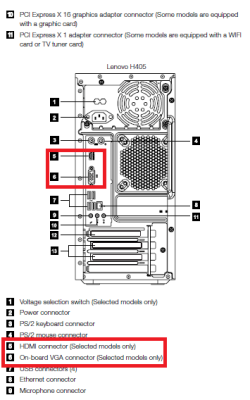
I would recommend first unplugging the computer and removing the card you have tried to install and use the on board video (see diagram below) until either compatible drivers for Windows 7 can be found or you can find a newer (cheap) card that is Win 7 compatible

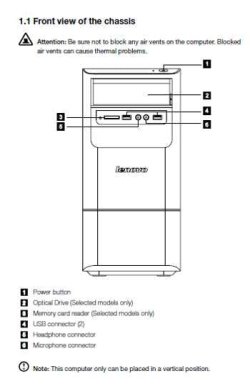
Just to be sure I am on the right track does your computer look similar to any of the pictures below and please connect your monitor into the onboard video (connections 5 &/or 6) below with just the keyboard, mouse and monitor connected.

New video card install, but password stops install-lenovo-h405-desktop-front.jpgNew video card install, but password stops install-lenovo-h405-desktop-back.pngName:  Lenovo H405 Desktop.PNG
Views: 118
Size:  29.1 KB

Also you may be able to find more detailed information about your computer by visiting the Lenovo page below. The serial # should be located on a sticker usually placed on the back of the computer.

Lenovo Support - Product Configuration (US)
My System SpecsSystem Spec
04 Dec 2012   #5

Windows 7 Pro X64 SP1
Danbury, CT


Dottielove: can you share with us why you aren't discussing this with the person who controls the passwords for the PC?

That creates the impression that you're trying to do something that someone (parent?) doesn't want you to do.
My System SpecsSystem Spec
04 Dec 2012   #6

win 7 ultimate
nottingham


Quote   Quote: Originally Posted by bobkn View Post
Dottielove: can you share with us why you aren't discussing this with the person who controls the passwords for the PC?

That creates the impression that you're trying to do something that someone (parent?) doesn't want you to do.
Hi bobkn, I think what the OP means is that she has a black screen and cannot see where/when to input the password
My System SpecsSystem Spec
04 Dec 2012   #7

Windows 7 Pro X64 SP1
Danbury, CT


Quote   Quote: Originally Posted by pebbly View Post
Quote   Quote: Originally Posted by bobkn View Post
Dottielove: can you share with us why you aren't discussing this with the person who controls the passwords for the PC?

That creates the impression that you're trying to do something that someone (parent?) doesn't want you to do.
Hi bobkn, I think what the OP means is that she has a black screen and cannot see where/when to input the password
Sounds plausible.

It may not have occurred to me because I assumed that the password was relevant. My apologies. I believe that a black screen at that point would mean that Windows would be no go, passworded or not.

I'm not sure that "APCB M3 94V-0" is any sort of graphics card part number. What sort of slot does it use? The Lenovo H405 has a PCI-E 2.0 X16 graphics slot. Are you (Dottielove) using that, or is the graphics card an old PCI one? If the latter, it may or may not be suitable for Windows 7.

Regardless, the graphics card swap procedure is the same:

With the old graphics connected, uninstall the drivers for that.

Shut down rather than rebooting.

Shut off the power, or disconnect the PC from the mains if the power supply has no switch.

Swap the graphics.

Power up again.

Windows will either install the generic VGA drivers, or something more specific to the new graphics card. Either should suffice to get you a display.

When you're back into Windows (he wrote optimistically), install the proper drivers for the graphics card. That'll require that you know what it is. You may be able to get the (hardware) device ID out of Device Manager, and search the Web for that.

Good luck.

My System SpecsSystem Spec
Reply

 New video card install, but password stops install problems?


Thread Tools


Similar help and support threads for: New video card install, but password stops install
Thread Forum
Unable to install new video card driver on W7 64 bit Drivers
Trying to install video card on new build Graphic Cards
BSOD after new video card install BSOD Help and Support
Trying to install new ram, conflict with video card Hardware & Devices
Can I install a new video card? Graphic Cards


All times are GMT -5. The time now is 08:00 PM.


Seven Forums Android App Seven Forums IOS App Follow us on Facebook

Windows 7 Forums is an independent web site and has not been authorized,
sponsored, or otherwise approved by Microsoft Corporation.
"Windows 7" and related materials are trademarks of Microsoft Corp.
© Designer Media Ltd
  

1 2 3 4 5 6 7 8 9 10 11 12 13 14 15 16 17 18 19 20 21 22 23 24 25 26 27 28 29 30 31 32