| Windows 7: Locked screen doesn't appear on both |
30 Sep 2009
|
#1 | | |
Locked screen doesn't appear on both Dual monitor - Laptop and minitor. Does anyone know if this is Windows 7 related, when i go to lock my screen, it only show on my laptop display. The monitor is black. How to make the locked screen apearing on both? | My System Specs |
| System Manufacturer/Model Number Lenovo ThinkPad T60 OS Windows 7 Ultimate 64Bit CPU GenuineIntel Intel(R) Core(TM) DuoCore T2400 @ 1.83GHz Motherboard Intel(R) 82801G (ICH7 Family) Memory 2.00 GB Graphics Card Mobile Intel(R) 945 Express Chipset Sound Card SoundMAX Integrated Digital HD Audio Monitor(s) Displays ThinkPad Display Screen Resolution 1400x1050 Keyboard Standard Keyboard Mouse HID-compliant Mouse Hard Drives 100Gb SATA Internet Speed Cable Broadband - 54Mbps Other Info Intel(R) PRO/1000 PL Network Connection
11a/b/g Wireless LAN Mini PCI Express Adapter |
01 Oct 2009
|
#2 | | |
No one done dual monitor yet?
Just for info, in Xp the login box can be moved using the cursor, in Windows 7 the box can't, so i'm guessing this is why locked screen don't work on both monitor when running Windows 7. | My System Specs | | System Manufacturer/Model Number Lenovo ThinkPad T60 OS Windows 7 Ultimate 64Bit CPU GenuineIntel Intel(R) Core(TM) DuoCore T2400 @ 1.83GHz Motherboard Intel(R) 82801G (ICH7 Family) Memory 2.00 GB Graphics Card Mobile Intel(R) 945 Express Chipset Sound Card SoundMAX Integrated Digital HD Audio Monitor(s) Displays ThinkPad Display Screen Resolution 1400x1050 Keyboard Standard Keyboard Mouse HID-compliant Mouse Hard Drives 100Gb SATA Internet Speed Cable Broadband - 54Mbps Other Info Intel(R) PRO/1000 PL Network Connection
11a/b/g Wireless LAN Mini PCI Express Adapter |
01 Oct 2009
|
#3 | | Windows 7 x64 Ultimate A Finnish immigrant in Leipzig, Germany |
Logon screen is shown on both displays only if the desktop is duplicated. If the desktop is extended, logon screen is shown only on the main display. To my knowledge there's nothing you can do to show logon on extended display.
Kari | My System Specs | | Computer type Laptop System Manufacturer/Model Number HP ENVY 17-1150eg OS Windows 7 x64 Ultimate CPU 1.6 GHz Intel Core i7-720QM Processor Memory 6 GB Graphics Card ATI Mobility Radeon HD 5850 Graphics Sound Card Beats sound system with integrated subwoofer Monitor(s) Displays 17" laptop display, 22" LCD and 32" Full HD TV through HDMI Screen Resolution 1600*900, 1680*1050 and 1920*1080 Keyboard Logitech diNovo Media Desktop Laser (bluetooth) Mouse Logitech MX1000 Laser (Bluetooth) Hard Drives Internal: 2 x 500 GB SATA Hard Disk Drive 7200 rpm
External: 2TB for backups, 3TB USB3 network drive for media Internet Speed 50/10 Mbps VDSL Antivirus MSE, Windows Defender Browser Maxthon 3.5.2. Other Info Windows 7 Ultimate Retail Full in English, additional Guest-user accounts in Finnish, German and Swedish (Working languages English & Swedish, Family language German, my own language, mother tongue, Finnish. I really need Ultimate to get to use Language Packs!) |
01 Oct 2009
|
#4 | | |
That is the theory. But doesn't apply to Xp. When locked in Xp both screens show wallpaper but only the main screen showed the login box. In Windows 7 the secondary screen is black (but you can move the cursor over to it). | My System Specs | | System Manufacturer/Model Number Lenovo ThinkPad T60 OS Windows 7 Ultimate 64Bit CPU GenuineIntel Intel(R) Core(TM) DuoCore T2400 @ 1.83GHz Motherboard Intel(R) 82801G (ICH7 Family) Memory 2.00 GB Graphics Card Mobile Intel(R) 945 Express Chipset Sound Card SoundMAX Integrated Digital HD Audio Monitor(s) Displays ThinkPad Display Screen Resolution 1400x1050 Keyboard Standard Keyboard Mouse HID-compliant Mouse Hard Drives 100Gb SATA Internet Speed Cable Broadband - 54Mbps Other Info Intel(R) PRO/1000 PL Network Connection
11a/b/g Wireless LAN Mini PCI Express Adapter |
01 Oct 2009
|
#5 | | Windows 7 x64 Ultimate A Finnish immigrant in Leipzig, Germany |
That is precisely what I mean. If you use extended desktop and enter logon screen by locking the computer, switching the user or after boot, Windows 7 shows it only on the main display. Because the secondary display has nothing to show it stays blank but is still on an operational, so if you move your cursor it really shows there.
Choosing desktop duplication is the only way to show logon screen on multiple displays in Windows 7.
Kari | My System Specs | | Computer type Laptop System Manufacturer/Model Number HP ENVY 17-1150eg OS Windows 7 x64 Ultimate CPU 1.6 GHz Intel Core i7-720QM Processor Memory 6 GB Graphics Card ATI Mobility Radeon HD 5850 Graphics Sound Card Beats sound system with integrated subwoofer Monitor(s) Displays 17" laptop display, 22" LCD and 32" Full HD TV through HDMI Screen Resolution 1600*900, 1680*1050 and 1920*1080 Keyboard Logitech diNovo Media Desktop Laser (bluetooth) Mouse Logitech MX1000 Laser (Bluetooth) Hard Drives Internal: 2 x 500 GB SATA Hard Disk Drive 7200 rpm
External: 2TB for backups, 3TB USB3 network drive for media Internet Speed 50/10 Mbps VDSL Antivirus MSE, Windows Defender Browser Maxthon 3.5.2. Other Info Windows 7 Ultimate Retail Full in English, additional Guest-user accounts in Finnish, German and Swedish (Working languages English & Swedish, Family language German, my own language, mother tongue, Finnish. I really need Ultimate to get to use Language Packs!) |
01 Oct 2009
|
#6 | | |
Yes choosing desktop duplication allows for both screen to appear locked. Doing this will mean you have your icons and bars etc appearing on both screens, which i do not want. In Xp extended mode not only showed both screens when locked, but it only have the primary screen with the icons, bars only.
What can i check to prove what i'm saying is true?
Someone said to use Ultramon but it doesn't work for me. | My System Specs | | System Manufacturer/Model Number Lenovo ThinkPad T60 OS Windows 7 Ultimate 64Bit CPU GenuineIntel Intel(R) Core(TM) DuoCore T2400 @ 1.83GHz Motherboard Intel(R) 82801G (ICH7 Family) Memory 2.00 GB Graphics Card Mobile Intel(R) 945 Express Chipset Sound Card SoundMAX Integrated Digital HD Audio Monitor(s) Displays ThinkPad Display Screen Resolution 1400x1050 Keyboard Standard Keyboard Mouse HID-compliant Mouse Hard Drives 100Gb SATA Internet Speed Cable Broadband - 54Mbps Other Info Intel(R) PRO/1000 PL Network Connection
11a/b/g Wireless LAN Mini PCI Express Adapter |
02 Oct 2009
|
#7 | | Windows 7 x64 Ultimate A Finnish immigrant in Leipzig, Germany |
I really don't understand you anymore? The situation doesn't change, even if you repeat your question. WHEN USING EXTENDED DESKTOP IN WINDOWS 7 THE LOGON SCREEN IS SHOWN ONLY ON THE MAIN DISPLAY! The only way to show logon on multiple displays is to duplicate the desktop.
There are no third party applications or utilities for controlling multiple displays which can change this fact.
Bailing out. 10-7
Kari | My System Specs | | Computer type Laptop System Manufacturer/Model Number HP ENVY 17-1150eg OS Windows 7 x64 Ultimate CPU 1.6 GHz Intel Core i7-720QM Processor Memory 6 GB Graphics Card ATI Mobility Radeon HD 5850 Graphics Sound Card Beats sound system with integrated subwoofer Monitor(s) Displays 17" laptop display, 22" LCD and 32" Full HD TV through HDMI Screen Resolution 1600*900, 1680*1050 and 1920*1080 Keyboard Logitech diNovo Media Desktop Laser (bluetooth) Mouse Logitech MX1000 Laser (Bluetooth) Hard Drives Internal: 2 x 500 GB SATA Hard Disk Drive 7200 rpm
External: 2TB for backups, 3TB USB3 network drive for media Internet Speed 50/10 Mbps VDSL Antivirus MSE, Windows Defender Browser Maxthon 3.5.2. Other Info Windows 7 Ultimate Retail Full in English, additional Guest-user accounts in Finnish, German and Swedish (Working languages English & Swedish, Family language German, my own language, mother tongue, Finnish. I really need Ultimate to get to use Language Packs!) |
05 Oct 2009
|
#8 | | |
Have you calm down yet Kari? lol
If so pls bail back and help probe into this issue with me.
"WHEN USING EXTENDED DESKTOP IN WINDOWS 7 THE LOGON SCREEN IS SHOWN ONLY ON THE MAIN DISPLAY! The only way to show logon on multiple displays is to duplicate the desktop." I get u 110% on this. However i think i mentioned locked screen and locked box as being two different things. The locked screen (as appeared with wallpaper), in extended mode should show on both monitors and it's not (currently i'm getting one as black/blank). The locked box (where i type in your password to login) i agree should only appear on one monitor if it is in extended mode (both monitors if you go duplicate). | My System Specs | | System Manufacturer/Model Number Lenovo ThinkPad T60 OS Windows 7 Ultimate 64Bit CPU GenuineIntel Intel(R) Core(TM) DuoCore T2400 @ 1.83GHz Motherboard Intel(R) 82801G (ICH7 Family) Memory 2.00 GB Graphics Card Mobile Intel(R) 945 Express Chipset Sound Card SoundMAX Integrated Digital HD Audio Monitor(s) Displays ThinkPad Display Screen Resolution 1400x1050 Keyboard Standard Keyboard Mouse HID-compliant Mouse Hard Drives 100Gb SATA Internet Speed Cable Broadband - 54Mbps Other Info Intel(R) PRO/1000 PL Network Connection
11a/b/g Wireless LAN Mini PCI Express Adapter |
05 Oct 2009
|
#9 | | Windows 7 x64 Ultimate A Finnish immigrant in Leipzig, Germany |
Windows 7 has no separate locked screen and locked box. I really don't understand what you mean.
Think logically: the whole idea of extended desktop is that you can see different content on your displays. When you open an application or program, it only opens in one of your displays. Locking your computer opens logon "application", taking you to the main window of that application i.e. Logon Screen. Any other application would leave the other displays intact, but locking the computer blanks other displays because according to Windows 7 logic's, that's what you want: lock your computer so nobody can see what's there.
I am totally lost with you. Windows 7 extended desktop works 100%. Logon screen is logically shown only on the main display. It works as designed, and it works well.
Kari | My System Specs | | Computer type Laptop System Manufacturer/Model Number HP ENVY 17-1150eg OS Windows 7 x64 Ultimate CPU 1.6 GHz Intel Core i7-720QM Processor Memory 6 GB Graphics Card ATI Mobility Radeon HD 5850 Graphics Sound Card Beats sound system with integrated subwoofer Monitor(s) Displays 17" laptop display, 22" LCD and 32" Full HD TV through HDMI Screen Resolution 1600*900, 1680*1050 and 1920*1080 Keyboard Logitech diNovo Media Desktop Laser (bluetooth) Mouse Logitech MX1000 Laser (Bluetooth) Hard Drives Internal: 2 x 500 GB SATA Hard Disk Drive 7200 rpm
External: 2TB for backups, 3TB USB3 network drive for media Internet Speed 50/10 Mbps VDSL Antivirus MSE, Windows Defender Browser Maxthon 3.5.2. Other Info Windows 7 Ultimate Retail Full in English, additional Guest-user accounts in Finnish, German and Swedish (Working languages English & Swedish, Family language German, my own language, mother tongue, Finnish. I really need Ultimate to get to use Language Packs!) |
05 Oct 2009
|
#10 | | |
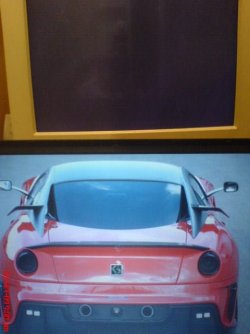
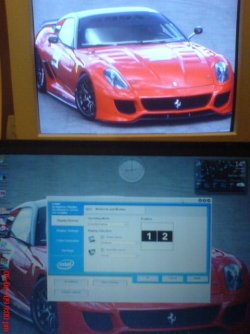
Not sure why it's so hard to understand Kari. Note: Pls do not laugh at these images, the screen is 15 years old and these pics are off a 7 y.o phone. Xp (shows extended mode selected, locked screen) | My System Specs | | System Manufacturer/Model Number Lenovo ThinkPad T60 OS Windows 7 Ultimate 64Bit CPU GenuineIntel Intel(R) Core(TM) DuoCore T2400 @ 1.83GHz Motherboard Intel(R) 82801G (ICH7 Family) Memory 2.00 GB Graphics Card Mobile Intel(R) 945 Express Chipset Sound Card SoundMAX Integrated Digital HD Audio Monitor(s) Displays ThinkPad Display Screen Resolution 1400x1050 Keyboard Standard Keyboard Mouse HID-compliant Mouse Hard Drives 100Gb SATA Internet Speed Cable Broadband - 54Mbps Other Info Intel(R) PRO/1000 PL Network Connection
11a/b/g Wireless LAN Mini PCI Express Adapter Locked screen doesn't appear on both problems? All times are GMT -5. The time now is 12:01 AM. | |