
Windows 7 Forums


Windows 7: Still no SLi in 7600 RTM Help

06 Oct 2009  
thefabe

Windows 7 ultimate 64 bit / XP Home sp3
4,649 posts
Gulf Coast Texas
 
 
Still no SLi in 7600 RTM Help

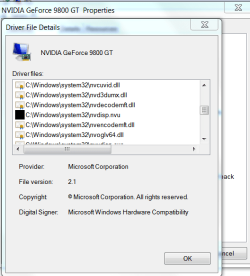
I just updated my driver to the new 191.07 but I still don't even get the SLI capabile system balloon, and when I try to enable sli I get the (some programs need to close do you want to close them) (Nview) and needless to say no SLi. I have thought it might have been an IRQ conflict problem since the 2 cards and my PCI_e TV card share the same IRQ 16. but removing the TV card changes nothing. I do however have a question about a blacked out file in driver properties that may be the problem. When I click on it I get Unknown, Could this be where I'm having the problem and how can I fix it. Thanks. Fabe Still no SLi in 7600 RTM Help-device-mngr-9800-gt.png
My System SpecsSystem Spec

06 Oct 2009  
Mark

Windows 7 Ultimate Vista Ultimate x64
4,665 posts
QLD, Cairns


Have you updated the nForce drivers, new drivers just got released 15.49.
My System SpecsSystem Spec
06 Oct 2009  
thefabe

Windows 7 ultimate 64 bit / XP Home sp3
4,649 posts
Gulf Coast Texas


No I will do that now.
My System SpecsSystem Spec
.


06 Oct 2009  
ccatlett1984

windows 7 RTM x64
828 posts
michigan (metro detroit area)


if that doesnt work, this is what you need to do:

1. uninstall all nvidia drivers. then shutdown the computer.
2. remove the sli bridge and the 2nd card from the pc.
3. power on the pc and install the latest nvidia drivers, shutdown the pc.
4. reinstall the 2nd card and the sli bridge.
5. power on the pc, it should install the drivers for the 2nd card for you, reboot.
6. try to enable sli.
My System SpecsSystem Spec
06 Oct 2009  
thefabe

Windows 7 ultimate 64 bit / XP Home sp3
4,649 posts
Gulf Coast Texas


Well I tried the new Nforce chipset drivers and they installed fine but then when I tried to enable SLi my sytem turned into the devils advocate. Black screens and 1024 x 768 resolution red marks by my display drivers, explorer crashing. I mean just went nutts. so I did a restore to get back and start all over. I'll run thru the above suggestions and hopefully will be back soon. Thanks. fabe

Last edited by thefabe; 06 Oct 2009 at 01:16 PM..
My System SpecsSystem Spec
06 Oct 2009  
thefabe

Windows 7 ultimate 64 bit / XP Home sp3
4,649 posts
Gulf Coast Texas


Well guys it's still a no go.It's got me completely stumped. So since I'm not that much of a gamer i'm going to sell both of these cards and get me a gtx 260 that's on sale and they can take their Scaled Lace Interface and!!! Thanks for all your suggestions much appreciated. Fabe (Edit) Just wanted to say that I did manage to remove the black box shown in the initial post.

Last edited by thefabe; 06 Oct 2009 at 01:16 PM.. Reason: Added additional information
My System SpecsSystem Spec
06 Oct 2009  
ccatlett1984

windows 7 RTM x64
828 posts
michigan (metro detroit area)


sorry its a no-go for you, that is the reason i run ATI cards.
My System SpecsSystem Spec
06 Oct 2009  
chev65

Windows 7 Ult, Windows 8 Pro,
7,893 posts
San Diego


That is the reason I run Nvidia boards with nvidia cards, works better that way. ATI FTL.
My System SpecsSystem Spec
14 Oct 2009  
UKMedia

Windows 7 Ultimate 64Bit (SP 1)
247 posts


Quote   Quote: Originally Posted by ccatlett1984 View Post
if that doesnt work, this is what you need to do:

1. uninstall all nvidia drivers. then shutdown the computer.
2. remove the sli bridge and the 2nd card from the pc.
3. power on the pc and install the latest nvidia drivers, shutdown the pc.
4. reinstall the 2nd card and the sli bridge.
5. power on the pc, it should install the drivers for the 2nd card for you, reboot.
6. try to enable sli.

I'll try this myself, as I've got 2 x 285GTX. If I connect them via SLI, I get the black screen problem after a game (at best) and often get a graphics driver has been reset message. If I run just one, no problems.

I'll let you know how i get on...

Regards
UKMedia
My System SpecsSystem Spec
14 Oct 2009  
thefabe

Windows 7 ultimate 64 bit / XP Home sp3
4,649 posts
Gulf Coast Texas


TX for your help but I caved in and just received my GTX 260 super-clocked card. It was a reasonable boost in FPS and enough card for me ATM. Fabe
My System SpecsSystem Spec
Reply

 Still no SLi in 7600 RTM Help problems?


Thread Tools


Similar help and support threads for: Still no SLi in 7600 RTM Help
Thread Forum
What is (build 7600) General Discussion
7600.16385 is RTM there is no 7600.16386 General Discussion
Win 7 7600 rtm in the end ? General Discussion


All times are GMT -5. The time now is 01:47 PM.


Windows 7 Forums is an independent web site and has not been authorized,
sponsored, or otherwise approved by Microsoft Corporation.
"Windows 7" and related materials are trademarks of Microsoft Corp.
© Designer Media Ltd