Windows 7 Forums


Windows 7: Windows 7 not detecting my GPU.

12 Oct 2009   #1

Windows 7 x64 Ultimate
Sydney, Australia.
 
 
Windows 7 not detecting my 9500GT.

Hey, I'm having problems with getting my GPU to work with Windows 7, I'm dual booting with Windows XP x86 (32bit) and with XP it's working perfectly.

I've done a CPU-Z report and uploaded the details via my website, you can check out the specs here. I've done the majority of troubleshooting steps that I've found via google, MSN, general bulletin board lurking and so on, I've yet to find the answer.

I'm running Windows 7 x64.


CPU-Z report on Windows 7 x64.


The error I'm currently recieving.


I've tried getting the drivers via the Windows Update tool.


I've tried going through the Device Management and locating the "nv_disp.inf" file, but I couldn't do it via that way, only goes to the "English" folder and no further.


I've also tried doing the same as above except going to "show compatiable hardware" unticking that, then clicking "Nvidia", then locating the 9500GT from the list and then trying that way but it does not work either.


Last edited by Parker; 14 Oct 2009 at 05:29 AM..
My System SpecsSystem Spec

14 Oct 2009   #2

Windows 7 x64 Ultimate
Sydney, Australia.


Forgive me for reviving this thread, but I really need some assistance
My System SpecsSystem Spec
14 Oct 2009   #3

Windows 7 Ultimate X64
43° 40' 0 N 79° 25' 0 W


Try removing the previous install, and folder(s)
C:>NVIDIA>DisplayDriver>_______ , then reboot

Install latest driver is 191.07 x64 Win 7
for your GeForce 9500GT
My System SpecsSystem Spec
.


14 Oct 2009   #4

Windows 7 x64 Ultimate
Sydney, Australia.


Quote   Quote: Originally Posted by grimreaper View Post
Try removing the previous install, and folder(s)
C:>NVIDIA>DisplayDriver>_______ , then reboot

Install latest driver is 191.07 x64 Win 7
for your GeForce 9500GT
It didn't work


I really think that it's not DETECTING the hardware not that the drivers don't work? BUT the 9500 works with XP.

Edit; these errors seem to be contradicting themselves?

Last edited by Parker; 14 Oct 2009 at 02:55 AM..
My System SpecsSystem Spec
14 Oct 2009   #5

Windows 7 ultimate 64 bit / XP Home sp3
Gulf Coast Texas


This isn't going to solve your problem but if you download GPU-z and run it will provide more information on your card something is definetly heenky. I know this must be very frustrating, but sometimes and I mean only sometines if you unseat the card then reseat it, this wiil cause windows to search for the driver upon reboot. GPU-Z Video card GPU Information Utility Aslso check out this thread it talks about down grading the graphic driver in the last post their is a reference to another thread having to do with the 9500gt. good Luck. Fabe
My System SpecsSystem Spec
14 Oct 2009   #6

Windows 7 Pro x64
England


have you tried letting nvidia detected the drivers for you via the website.

open IE8
Code:
http://www.nvidia.com/Download/index.aspx?lang=en-us
Select
Graphics Drivers under Option 2:

worth a try.
My System SpecsSystem Spec
14 Oct 2009   #7

win7 ultimate / virtual box
weston super mare, UK


are all the motherboard devices installed ?

when you go to device manager is there anything with a question mark or exclamation mark ?

what happens if you right click unninstall your device in device manager then reeboot or "scan for changes" ?

can you please fill out your system spec here on this forum
My System SpecsSystem Spec
14 Oct 2009   #8

Windows 7 x64 Ultimate
Sydney, Australia.


Quote   Quote: Originally Posted by thefabe View Post
This isn't going to solve your problem but if you download GPU-z and run it will provide more information on your card something is definetly heenky. I know this must be very frustrating, but sometimes and I mean only sometines if you unseat the card then reseat it, this wiil cause windows to search for the driver upon reboot. GPU-Z Video card GPU Information Utility Aslso check out this thread it talks about down grading the graphic driver in the last post their is a reference to another thread having to do with the 9500gt. good Luck. Fabe
Forgot to post that! :P
Not sure what thread you're talking about? Do you mean "W7 not detecting my 9800gtx+ "?

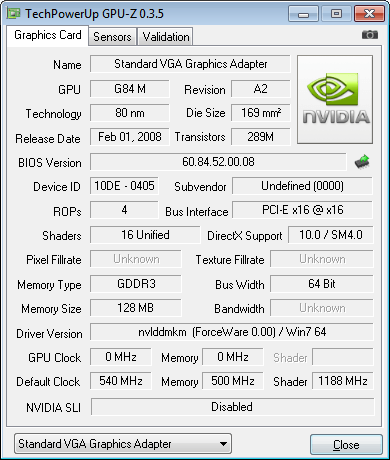
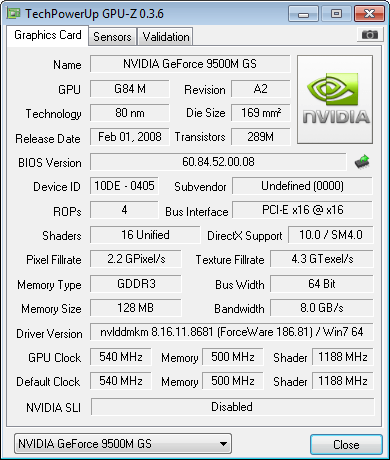
Also

Windows XP GPU Report


Windows 7 GPU Report

Quote   Quote: Originally Posted by JoHn87 View Post
have you tried letting nvidia detected the drivers for you via the website.

open IE8
Code:
http://www.nvidia.com/Download/index.aspx?lang=en-us
Select
Graphics Drivers under Option 2:

worth a try.
Did that when I first put Windows 7 on, it gave me notebook drivers, never the less I downloaded and installed and to no avail I received the same error.

Quote   Quote: Originally Posted by ickymay View Post
are all the motherboard devices installed ?

when you go to device manager is there anything with a question mark or exclamation mark ?

what happens if you right click unninstall your device in device manager then reeboot or "scan for changes" ?

can you please fill out your system spec here on this forum
Yep everthing works perfectly except for sound (did I mention that the GPU works with x32 visit? ~ tried it ages ago and it worked), anyway I'll give the uninstalling and rebooting a try.


I got a giggle from..
My System SpecsSystem Spec
14 Oct 2009   #9

W7 X-64 RTM,SUSE 11.1, XP PRO SP3 as a VM, VMware ESXi
Hafnarfjörður IS


Hi there
whilst in general I would recommend a Clean install this might be one of the instances where an "Upgrade" install would pay dividends.

What I would do here is a "Half way house".

1) Install a CLEAN version of 64 bit VISTA. You don't have to activate it if you've got a full install Windows 7 disk.

2) add all the necessary drivers etc from the nvidia site. Don't add any other apps other than the mobo drivers etc. Get ALL these working -- no exclamation marks against any devices in the device manager list.

3) now run a Windows 7 UPGRADE. Windows 7 will keep the existing drivers if it can't find a Windows 7 version and it will "adjust" the compatability so you won't get the installer saying it doesn't recognize the OS.

Doing an upgrade this way gives you the best of both worlds - it's essentially a CLEAN install but preserves hard to find or non existant drivers.

It's just possible that the Windows 7 compatability check before it does the upgrade might sling out the video driver -- unlikely as the code for video won't have changed much. If it does I'm afraid you are screwed until nvidia fix their stuff for Windows 7.

Cheers
jimbo
My System SpecsSystem Spec
14 Oct 2009   #10

Windows 7 x64 Ultimate
Sydney, Australia.


Quote   Quote: Originally Posted by jimbo45 View Post
Hi there
whilst in general I would recommend a Clean install this might be one of the instances where an "Upgrade" install would pay dividends.

What I would do here is a "Half way house".

1) Install a CLEAN version of 64 bit VISTA. You don't have to activate it if you've got a full install Windows 7 disk.

2) add all the necessary drivers etc from the nvidia site. Don't add any other apps other than the mobo drivers etc. Get ALL these working -- no exclamation marks against any devices in the device manager list.

3) now run a Windows 7 UPGRADE. Windows 7 will keep the existing drivers if it can't find a Windows 7 version and it will "adjust" the compatability so you won't get the installer saying it doesn't recognize the OS.

Doing an upgrade this way gives you the best of both worlds - it's essentially a CLEAN install but preserves hard to find or non existant drivers.

It's just possible that the Windows 7 compatability check before it does the upgrade might sling out the video driver -- unlikely as the code for video won't have changed much. If it does I'm afraid you are screwed until nvidia fix their stuff for Windows 7.

Cheers
jimbo
I don't have Windows Vista, dual booting with XP.
My System SpecsSystem Spec
Reply

 Windows 7 not detecting my GPU. problems?


Thread Tools


Similar help and support threads for: Windows 7 not detecting my GPU.
Thread Forum
Solved Windows only detecting 8 og 32 - GB RAM. Hardware & Devices
Windows 7 not detecting HDD Installation & Setup
Windows 7 not detecting any of my USB devices Drivers
Windows 7 64 bit Only Detecting 2gb of ram? Hardware & Devices
Help Windows Not Detecting. Drivers


All times are GMT -5. The time now is 10:43 PM.


Seven Forums Android App Seven Forums IOS App Follow us on Facebook

Windows 7 Forums is an independent web site and has not been authorized,
sponsored, or otherwise approved by Microsoft Corporation.
"Windows 7" and related materials are trademarks of Microsoft Corp.
© Designer Media Ltd
  

1 2 3 4 5 6 7 8 9 10 11 12 13 14 15 16 17 18 19 20 21 22 23 24 25 26 27 28 29 30 31 32