| Windows 7: Nvidia Control Panel |
14 Oct 2009
|
#1 | | Windows 7 Professional x64 Ponta Poră, MS |
Nvidia Control Panel Hi,
I always changed those Perfomance and Quality thingies, but never noticed a difference, what does it change?
I mean, those 32xq Anti-Aliasing, never seen a difference.
Is there a performance change?
Like, 2 times faster , or?? | My System Specs |
| System Manufacturer/Model Number Custom Built OS Windows 7 Professional x64 CPU Intel Core i7 2600k - 3.4 GHz Motherboard Asus Maximus IV Z68 - Extreme Memory 4x4 Ripjaws X79 Series 2133 MHz (9-11-10-28) Graphics Card 1x eVGA GTX 580 - 3GB Classified Sound Card Realtek ALC 889 HD Audio Monitor(s) Displays Full HD Philips TV 32" Screen Resolution 1920x1080 Keyboard Logitech K800 Wireless Mouse Logitech Performance MX Laser PSU 800W Coolermaster Silentpro Gold Case Sentey - Renegade GS-6200 Cooling Stock Hard Drives 1x Crucial m4 SSD 512 GB Internet Speed 10MB Internet Connection |
14 Oct 2009
|
#2 | | Windows 7 Ultimate (x86) Pheonix, AZ |
I've only noticed slight differences with some games and programs. When using the advanced settings there is a tab for application specific settings and I think those settings override the global settings. Unless your using the slider (basic panel).
I've also noticed that the older the game the less impact your settings seem to have. Like with Doom3, I cant change/improve the quality no matter what settings I use in the CP. I do notice a change in FPS in the game. But visualy, I cant see a difference.
I would be currious to hear some more detailed and accurate info from other users.
Also I'll mention I have the nvidia service set to manual. Im not sure how much impact if any that has. | My System Specs | | System Manufacturer/Model Number Dell Dimension E520 OS Windows 7 Ultimate (x86) CPU Intel 2.20 Dual Core Memory 4 GB Graphics Card nVidia 9400 GT (512 MB) Sound Card Sigmatel C Major HD Monitor(s) Displays 22" Samsung 2232 bw Screen Resolution 1680x1050 Mouse Microsoft Arc Other Info Wacom Graphire 4 (6x8) Tablet |
15 Oct 2009
|
#3 | | Windows 7 ultimate 64 bit / XP Home sp3 Gulf Coast Texas |
I always set mine to performance over quality but I have a GTX 260 and the quality is a none issue. As far as any gain well without extensive benchmarking it would be hard to tell. And visually or game play it depends on the game. IMO the difference is not really noticeable to me but might be more if you are running 2-4 gigs of ram with a medium graphic card. Once again this is only my opinion yours may very. | My System Specs | | System Manufacturer/Model Number Self Built OS Windows 7 ultimate 64 bit / XP Home sp3 CPU intel Core 2 Duo E8400 3.0ghz Motherboard Asus P5ND bios 1401 Memory 8 gigs 1066 OCZ Fata1ty Graphics Card EVGA GTX 580 Call of Duty Black Ops Edition Sound Card Creative Soundblaster Audigy 2zs Monitor(s) Displays Asus 24in LCD's 2MS X2 Screen Resolution 1920x1080p @60Hz Keyboard Logitech Bluetooth Wireless MX5000 Mouse Logitech Bluetooth Wireless MX1000 PSU OCZ 700W GameXtreme Case NZXT Apollo Cooling Corsair H50 CPU/120mm x3 /60mm x2 /Corsair Dominator Ram Hard Drives WD Caviar 500 Black/ WD Caviar 200 Blue Internet Speed Download 19.83 Upload 0.97 Other Info Logitech Z2300 Speakers/ Bose Noise Cancelling Headphones/Avermedia PCI-e Hybrid TV Bravo/Epson NX415 all in one/ 4 Port Powered USB Hub/ LG 10x Bluray Burner /TSST Corp DVDRW External |
15 Oct 2009
|
#4 | | |

Quote: Originally Posted by AlexRD Hi,
I always changed those Perfomance and Quality thingies, but never noticed a difference, what does it change?
I mean, those 32xq Anti-Aliasing, never seen a difference.
Is there a performance change?
Like, 2 times faster , or?? personally ive never noticed a difference going from 4x to 8xAA (except on the FPS), let alone 32xq AA , its a gimmick IMO, if you could properly utilize that level of AA it would Just look like a blurry mess... | My System Specs | | System Manufacturer/Model Number myself OS SEVEN x64 CPU Q9450 @ 3.6GHZ 1.34v Motherboard ASUS P5K PREMIUM P35 Memory 8GB 1066 buffalo firestix @ 1152mhz CL5 Graphics Card Sapphire HD 5970 + GTX260 (physX) Sound Card Creative X-FI Xtreme Gamer Monitor(s) Displays SAMSUNG 20'' & SAMSUNG 23'' (dual screens) Screen Resolution 2048x1152 & 1680x1050 Keyboard LOGITECH E110 Mouse logitech NX5 PSU XCILIO 850w (78A) Case CM590 1x 120x38mm & 2x92x38mm / 4x 120x25mm Cooling AC7 PRO @ 92x38mm blower, Lamptron military bus bay controll Hard Drives 1x seagate 160gb IDE & 1x seagate 160gb SATA Internet Speed 2MB Other Info its a continual ''work in progress''.... |
15 Oct 2009
|
#5 | | |

Quote: Originally Posted by AlexRD Hi,
I always changed those Perfomance and Quality thingies, but never noticed a difference, what does it change?
I mean, those 32xq Anti-Aliasing, never seen a difference.
Is there a performance change?
Like, 2 times faster , or??
Makes BIG Diferrence if you change all Switch's to High Performance vs. Quality on any of the Tabs.
2 to 1 on Benchmark Results. | My System Specs | | |
17 Oct 2009
|
#6 | | |

Quote: Originally Posted by cbkitt 
Quote: Originally Posted by AlexRD Hi,
I always changed those Perfomance and Quality thingies, but never noticed a difference, what does it change?
I mean, those 32xq Anti-Aliasing, never seen a difference.
Is there a performance change?
Like, 2 times faster , or??
Makes BIG Diferrence if you change all Switch's to High Performance vs. Quality on any of the Tabs.
2 to 1 on Benchmark Results. surly your not saying that selecting ''performance'' rather than ''quality'' with 32xq AA will DOUBLE benchmark scores..??, thats impossible..
my stock 3dmark06 score is 18k, so by enabling ''performance'' settings in the NV panel will raise my score by 50% giving me a total of.... wait for it!!!! 36k... 
world record anyone... | My System Specs | | System Manufacturer/Model Number myself OS SEVEN x64 CPU Q9450 @ 3.6GHZ 1.34v Motherboard ASUS P5K PREMIUM P35 Memory 8GB 1066 buffalo firestix @ 1152mhz CL5 Graphics Card Sapphire HD 5970 + GTX260 (physX) Sound Card Creative X-FI Xtreme Gamer Monitor(s) Displays SAMSUNG 20'' & SAMSUNG 23'' (dual screens) Screen Resolution 2048x1152 & 1680x1050 Keyboard LOGITECH E110 Mouse logitech NX5 PSU XCILIO 850w (78A) Case CM590 1x 120x38mm & 2x92x38mm / 4x 120x25mm Cooling AC7 PRO @ 92x38mm blower, Lamptron military bus bay controll Hard Drives 1x seagate 160gb IDE & 1x seagate 160gb SATA Internet Speed 2MB Other Info its a continual ''work in progress''.... |
18 Oct 2009
|
#7 | | Windows 7 ultimate 32 bit. |
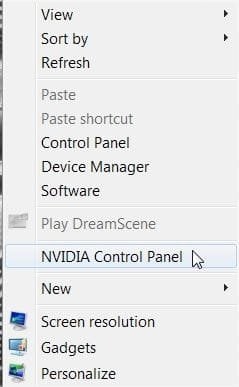
How do I get to the Nvidia Control Panel? I'm new to windows 7 and I am just confused. I'm running a gtx 260 geforce superclocked 216. trying to turn off my Vsync. lul. | My System Specs | | OS Windows 7 ultimate 32 bit. |
18 Oct 2009
|
#8 | | Windows® 7 Ultimate x64 SP1 Payson/AZ |

Quote: Originally Posted by andygnow How do I get to the Nvidia Control Panel? I'm new to windows 7 and I am just confused. I'm running a gtx 260 geforce superclocked 216. trying to turn off my Vsync. lul. Rightclick the desktop & click on the Nvidia Control Panel!
Yea...too simple right! | My System Specs | | System Manufacturer/Model Number ABS Tech Ultimate X9 OS Windows® 7 Ultimate x64 SP1 CPU Intel Core 2 Duo E8400 (E0) @ 4.0GHz Motherboard ASUS P5Q Pro Turbo / 1780 FSB Memory G.SKILL-F2-8500CL5D-4GBPK (2x2Gbs) (5-5-5-15) @ 1067Mhz Graphics Card EVGA GTX 470 SC (845/1690/2000) 160Gbs Sound Card VIA HD Audio / Boston Acoustics Monitor(s) Displays Acer X222W HD 22" LCD 2500:1 / 5ms Screen Resolution 1680x1050 Keyboard Logitech G15 Gaming Keyboard (Old Style Blue!) Mouse Logitech MX518 Gaming Mouse PSU Silent Pro GOLD 80 PLUS 800w /95% efficiency / SLI-Crossfire Case ABS Stealth Black-Custom Cooling CoolerMaster V6GT 6 Heatpipe 200w CPU Cooler Hard Drives Seagate Barracuda SATAII 2 x 320GB
Seagate Barracuda SATAII 1Tb
Intel® Rapid Storage Technology v10.1.0.1008
AHCI-NCQ Enabled Internet Speed 1Mbs-up/ 6Mbs-down |
18 Oct 2009
|
#9 | | Windows 7 ultimate 32 bit. |
Yeah thing is. I don't see it there. I would have done so a long time ago | My System Specs | | OS Windows 7 ultimate 32 bit. |
18 Oct 2009
|
#10 | | Windows 7 ultimate 32 bit. |
Nevermind. I got it!. I updated my drivers and right clicked desktop. There. Thanks! cs timez. | My System Specs | | OS Windows 7 ultimate 32 bit. Nvidia Control Panel problems? All times are GMT -5. The time now is 02:19 PM. | |