| Windows 7: nvidia 8800 GT driver issues |
29 Oct 2009
|
#1 | | |
nvidia 8800 GT driver issues I had 32bit installed fine and working properly for a long time. When I messed with the Control panel for the 3D gfx options like filtering and stuff to bump up my quality, my game crashed and after watching youtube for more then 10minutes.
I was getting blue screens and freezing and everything. I used driver cleaners, and tried all different versions of drivers both custom from Tweakforce and right off the NV website. I have reformatted with 64bit windows on, since I have 4GB of ram now anyways, and even with a 186 driver version that is stable I still crash when any type of video or game is playing within 10minutes.
Any ideas? | My System Specs |
| |
29 Oct 2009
|
#2 | | |
"I was getting blue screens and freezing and everything."
C:\Windows\Minidump
Use winrar to make a .rar of the .dmp files there. Upload .rar to Rapidshare. Post a link here for us, please.
Other than that, for now, check that pc is getting adequate cooling. Check graphics adapter fan for proper operation and that it's clean. | My System Specs | | System Manufacturer/Model Number self built OS 7600.20510 x86 CPU P4 550 3.4 GHz HT running at 3.5 GHz Motherboard MSI PM8M3-V (MS-7211 v1.x) Micro-ATX mainboard Memory OCZ 2 GB(2x1GB) DDR400mHz running @ 414 mHz Graphics Card HIS Radeon HD 3850 IceQ 3 Turbo HDMI Dual DL-DVI AGP Sound Card MOTU Traveler firewire studio interface 192 kHz 24 bit Monitor(s) Displays 22" widescreen Acer X223W LCD, 17" Compaq P75 CRT Screen Resolution 1680x1050 and 1280x1024 Keyboard Logitch Classical Keyboard 200 Mouse Logitech Mediaplay cordless PSU 350W generic Case Cybertronpc, it glows blue Cooling stock cpu fan, Ice-Q 3 gpu and system, many case fans Hard Drives SATA I x2 WD, 400 GB and 120 GB, SATA 2 WD Caviar Black 1 TB Internet Speed 1792/448 kbits/sec Other Info SATA II PCI fake RAID adapter, 1 GB Readyboost, original ATI Remote Wonder (even works with WMC perfectly), Logitech Rumblepad 2 game controller x2 |
30 Oct 2009
|
#3 | | |

Quote: Originally Posted by Kevinp I had 32bit installed fine and working properly for a long time. When I messed with the Control panel for the 3D gfx options like filtering and stuff to bump up my quality, my game crashed and after watching youtube for more then 10minutes.
I was getting blue screens and freezing and everything. I used driver cleaners, and tried all different versions of drivers both custom from Tweakforce and right off the NV website. I have reformatted with 64bit windows on, since I have 4GB of ram now anyways, and even with a 186 driver version that is stable I still crash when any type of video or game is playing within 10minutes.
Any ideas? Aside from ensuring it's being properly cooled...What Wattage of power supply are you using? It's possible its no longer sufficient to power your card and other components (either due to new hardware additions since or due to failure of the power supply, reduced voltage/wattage for example) | My System Specs | | OS Windows 7 Ultimate x64 CPU Intel Core i7-2600 Memory 16Gb DDR3-1600 Graphics Card ATI Radeon 7950 Sound Card Creative X-Fi Extreme Gamer Monitor(s) Displays (2) 22" LG WideScreens Screen Resolution 1920 x 1080 PSU Antec TruPower 750W Hard Drives (1) Samsung 840 Pro 256GB
(1) WD RE4 1Tb SATA3 Drive Internet Speed 50Mbps |
30 Oct 2009
|
#4 | | Win 7 Pro x64, VM Win XP, Win7 Pro Sandbox, Kubuntu 11 Fruitland, Idaho |
Attempt upgrading to Nvidia driver 191.07. Hope that helps. | My System Specs | | System Manufacturer/Model Number HP Pavilion a4302f OS Win 7 Pro x64, VM Win XP, Win7 Pro Sandbox, Kubuntu 11 CPU AMD Athlon(tm) II X4 640 @ 3.0 Gbz Memory 12GB 1066MHz DDR3 SDRAM - 2x4GB, 2x2GB Graphics Card ATI Radeon HD 4350 HD Graphics/Audio with 512MB Sound Card Realtek High Definition Audio Monitor(s) Displays 1. Dell 23" SP2307, 2. Mitsublishi 40" HDTV, Hannspree 25" Screen Resolution 1. 2048x1152, 2. 1920-1080, 3. 1920x1200 Keyboard Microsoft Wireless 2000 Mouse Microsoft Wireless Mouse 5000 Case Mid Tower Cooling Standard Fans - 5 fans (very quiet) Hard Drives Int: 1 120 Gig SSD i
1 - 2.5" 500 USB External HDD
1 -1 Tb USB External HDD Internet Speed 10 Mbit (realistically 500 Kbit - 1.2 Mbit) Other Info Speakers - Bose Desktop (Excellent Sound)
1 external CD|DVD\Blue-ray Recorders/Players (Sony) |
30 Oct 2009
|
#5 | | W7 RTM Ultimate x64 South Coast NSW |
or attempt the 190.62 drivers, some people are having problems with the 191 drivers on the 8 series cards. | My System Specs | | System Manufacturer/Model Number Custom Build OS W7 RTM Ultimate x64 CPU Intel Q8400 @ 2.66GHZ Motherboard Gigabyte GA-EG45M-UD2H Memory 4GB DDR2-800 Graphics Card Gainward GTS 450 GLH 1GB Edition Sound Card Integrated 8 Channel Monitor(s) Displays AOC 23.6 Inch Widescreen LCD Screen Resolution 1920x1080 Keyboard HP SK-2960 Multimedia Keyboard Mouse Logitech M350 Wireless Gaming Mouse PSU Apevia Java Power 500W Case Cooler Master HAF 922 Black Cooling Stock Intel CPU Fan Hard Drives Seagate 500GB Internal
Western Digital 1TB Internal
Hitachi 1TB External Internet Speed 1.5MB |
30 Oct 2009
|
#6 | | Win 7 Pro x64, VM Win XP, Win7 Pro Sandbox, Kubuntu 11 Fruitland, Idaho |
I have the same card GeForce 8800 GT OC, and as of yet there has been no problems with the 191 drivers; read my specs. | My System Specs | | System Manufacturer/Model Number HP Pavilion a4302f OS Win 7 Pro x64, VM Win XP, Win7 Pro Sandbox, Kubuntu 11 CPU AMD Athlon(tm) II X4 640 @ 3.0 Gbz Memory 12GB 1066MHz DDR3 SDRAM - 2x4GB, 2x2GB Graphics Card ATI Radeon HD 4350 HD Graphics/Audio with 512MB Sound Card Realtek High Definition Audio Monitor(s) Displays 1. Dell 23" SP2307, 2. Mitsublishi 40" HDTV, Hannspree 25" Screen Resolution 1. 2048x1152, 2. 1920-1080, 3. 1920x1200 Keyboard Microsoft Wireless 2000 Mouse Microsoft Wireless Mouse 5000 Case Mid Tower Cooling Standard Fans - 5 fans (very quiet) Hard Drives Int: 1 120 Gig SSD i
1 - 2.5" 500 USB External HDD
1 -1 Tb USB External HDD Internet Speed 10 Mbit (realistically 500 Kbit - 1.2 Mbit) Other Info Speakers - Bose Desktop (Excellent Sound)
1 external CD|DVD\Blue-ray Recorders/Players (Sony) |
30 Oct 2009
|
#7 | | |
I have tired all drivers. I even reformatted with windows XP and tried my old stable drivers that have always worked and my computer still crashes. It all happened since I played with the control panel a bit and even maybe from the overclock on my card that I did. I removed the overclock, but this still shouldnt be happeneing.
And that minidump folder never existed in my windows. | My System Specs | | |
30 Oct 2009
|
#8 | | |
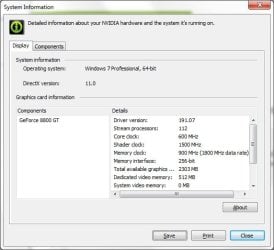
These are my settings...with a PNY 8800 GT...and I haven't had any issues. | My System Specs | | System Manufacturer/Model Number Shuttle (SFF) / SP35P2 Pro OS Win 7 Pro 64 Bit CPU Q6600 Motherboard Shuttle Memory 4GB Graphics Card 8800GT Sound Card On Board Monitor(s) Displays Samsung 22" Screen Resolution 1680x1050 Keyboard Creative Fatal1ty Mouse Logitech MX518 PSU Shuttle 450 Watt Case Shuttle Cooling Fans...lots of them Hard Drives WD 640 Boot
WD 640 Data
WD 500 external backup Internet Speed Wicked Fast Other Info Capricorn |
01 Nov 2009
|
#9 | | |
I have the same card and the same thing is happening. It doesnt matter what game I play but after 10-20 minutes it locks up the system or blue screens it. I just installed Windows 7 Pro 64bit 4 days ago and updated my video drivers like a day after that to 191.07. I am thinking that the problem is with the 64 bit drivers as it has done this with XP 64bit as well as the betas and RC of Windows 7, and with multiple versions of drivers.
I havent added any new hardware that would cause a power drain, however I may have one of my fans going bad (it still works just is loud) but i thought that overheating would just cause the system to shut down not lock up. I am thinking I may just replace the card, but any help would be great. | My System Specs | | |
01 Nov 2009
|
#10 | | |

Quote: Originally Posted by Auptyk I have the same card and the same thing is happening. It doesnt matter what game I play but after 10-20 minutes it locks up the system or blue screens it. I just installed Windows 7 Pro 64bit 4 days ago and updated my video drivers like a day after that to 191.07. I am thinking that the problem is with the 64 bit drivers as it has done this with XP 64bit as well as the betas and RC of Windows 7, and with multiple versions of drivers.
I havent added any new hardware that would cause a power drain, however I may have one of my fans going bad (it still works just is loud) but i thought that overheating would just cause the system to shut down not lock up. I am thinking I may just replace the card, but any help would be great. The video card is likely overheating. For 10-20 minutes it's increasing temp and then it can't take it any longer. Seems most plausible to me. Check the fan on the card. Replace it if there's any doubt. Use a fan speed control like Rivatuner. Set it at max and see if crashes persist. | My System Specs | | System Manufacturer/Model Number self built OS 7600.20510 x86 CPU P4 550 3.4 GHz HT running at 3.5 GHz Motherboard MSI PM8M3-V (MS-7211 v1.x) Micro-ATX mainboard Memory OCZ 2 GB(2x1GB) DDR400mHz running @ 414 mHz Graphics Card HIS Radeon HD 3850 IceQ 3 Turbo HDMI Dual DL-DVI AGP Sound Card MOTU Traveler firewire studio interface 192 kHz 24 bit Monitor(s) Displays 22" widescreen Acer X223W LCD, 17" Compaq P75 CRT Screen Resolution 1680x1050 and 1280x1024 Keyboard Logitch Classical Keyboard 200 Mouse Logitech Mediaplay cordless PSU 350W generic Case Cybertronpc, it glows blue Cooling stock cpu fan, Ice-Q 3 gpu and system, many case fans Hard Drives SATA I x2 WD, 400 GB and 120 GB, SATA 2 WD Caviar Black 1 TB Internet Speed 1792/448 kbits/sec Other Info SATA II PCI fake RAID adapter, 1 GB Readyboost, original ATI Remote Wonder (even works with WMC perfectly), Logitech Rumblepad 2 game controller x2 nvidia 8800 GT driver issues problems? All times are GMT -5. The time now is 02:12 AM. | |