| | Welcome to Windows 7 Forums. Our forum is dedicated to helping you find solutions with any problems, errors or issues you are experiencing with Windows 7. The Windows 7 forum also covers news and updates and has an extensive Windows 7 tutorial section that covers a wide range of tips and tricks. | Windows 7 - NVIDIA Driver - Convert from Desktop to Mobile (Laptop)
|
11-08-2009
|
#11 | | Windows 7 Ultimate x86-64 |
Thanks, but I'd prefer to leave UAC alone and I don't what - if any - long term effects this app has.
| My System Specs | | System Manufacturer/Model Number Sony Vaio Z46GDU OS Windows 7 Ultimate x86-64 CPU P9700@2.8GHz 1066MHz FSB Motherboard Sony branded Memory 6GB DDR3 1066MHz Graphics Card 9300M GS 256MB Dedicated (Speed) + Intel4500MHD (Stamina) Sound Card Realtek HD Audio Monitor(s) Displays 13.1' WXGA Screen Resolution 1600x900 Hard Drives 320GB 7200RPM w/ 16MB cache Internet Speed 1MB/s |
11-10-2009
|
#12 | | |
thanks for the help,
but to be honest with u, i can't find NV_DISP.inf
could u please help | My System Specs | | System Manufacturer/Model Number Sony Vaio VGN-SZ48GN OS windows 7 |
11-10-2009
|
#13 | | |
That's because the instructions are for English/US version. You can find your inf by going to C:\NVIDIA
Then in the upper right part of Windows Explorer, search for:
*.inf | My System Specs | | System Manufacturer/Model Number self built OS 7600.20510 x86 CPU P4 550 3.4 GHz HT running at 3.5 GHz Motherboard MSI PM8M3-V (MS-7211 v1.x) Micro-ATX mainboard Memory OCZ 2 GB(2x1GB) DDR400mHz running @ 414 mHz Graphics Card HIS Radeon HD 3850 IceQ 3 Turbo HDMI Dual DL-DVI AGP Sound Card MOTU Traveler firewire studio interface 192 kHz 24 bit Monitor(s) Displays 22" widescreen Acer X223W LCD, 17" Compaq P75 CRT Screen Resolution 1680x1050 and 1280x1024 Keyboard Logitch Classical Keyboard 200 Mouse Logitech Mediaplay cordless PSU 350W generic Case Cybertronpc, it glows blue Cooling stock cpu fan, Ice-Q 3 gpu and system, many case fans Hard Drives SATA I x2 WD, 400 GB and 120 GB, SATA 2 WD Caviar Black 1 TB Internet Speed 1792/448 kbits/sec Other Info SATA II PCI fake RAID adapter, 1 GB Readyboost, original ATI Remote Wonder (even works with WMC perfectly), Logitech Rumblepad 2 game controller x2 |
11-10-2009
|
#14 | | |
actually i found the file,
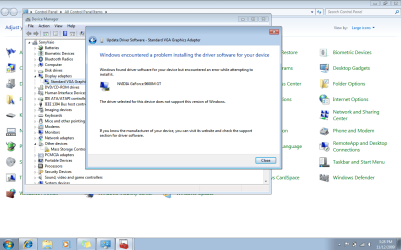
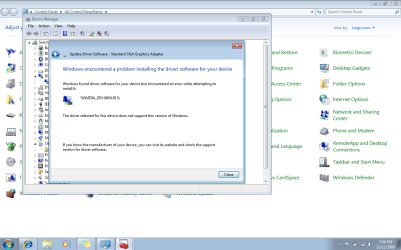
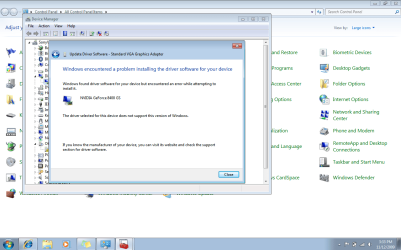
did everything as you said, and this is what I get when i try to update the driver
please check the attached picture of what I got.
my VGA card is
GeForce Go 7400
Sony Vaio, VGN-SZ48GN | My System Specs | | System Manufacturer/Model Number Sony Vaio VGN-SZ48GN OS windows 7 |
11-10-2009
|
#15 | | |
Did you download the x86 driver?
Also, you don't tell it to look in a folder. You specifically click on the .inf you edited, as part of the process....right after you click have disk then browse. That will open up a navigation pane to go find the .inf. | My System Specs | | System Manufacturer/Model Number self built OS 7600.20510 x86 CPU P4 550 3.4 GHz HT running at 3.5 GHz Motherboard MSI PM8M3-V (MS-7211 v1.x) Micro-ATX mainboard Memory OCZ 2 GB(2x1GB) DDR400mHz running @ 414 mHz Graphics Card HIS Radeon HD 3850 IceQ 3 Turbo HDMI Dual DL-DVI AGP Sound Card MOTU Traveler firewire studio interface 192 kHz 24 bit Monitor(s) Displays 22" widescreen Acer X223W LCD, 17" Compaq P75 CRT Screen Resolution 1680x1050 and 1280x1024 Keyboard Logitch Classical Keyboard 200 Mouse Logitech Mediaplay cordless PSU 350W generic Case Cybertronpc, it glows blue Cooling stock cpu fan, Ice-Q 3 gpu and system, many case fans Hard Drives SATA I x2 WD, 400 GB and 120 GB, SATA 2 WD Caviar Black 1 TB Internet Speed 1792/448 kbits/sec Other Info SATA II PCI fake RAID adapter, 1 GB Readyboost, original ATI Remote Wonder (even works with WMC perfectly), Logitech Rumblepad 2 game controller x2 |
11-10-2009
|
#16 | | |
No never mind,
actually its working perfectly
thank you so much | My System Specs | | System Manufacturer/Model Number Sony Vaio VGN-SZ48GN OS windows 7 |
11-10-2009
|
#17 | | |
Alright. Attach (after using Winrar on it) the .inf and I will look at it. Also, right click on the video card in the device manager. Properties. Details tab. Change dropdown to hardware ids. Copy and paste the hardware id strings you're using to here.
I'll make sure the .inf is correct and you can take things from there. | My System Specs | | System Manufacturer/Model Number self built OS 7600.20510 x86 CPU P4 550 3.4 GHz HT running at 3.5 GHz Motherboard MSI PM8M3-V (MS-7211 v1.x) Micro-ATX mainboard Memory OCZ 2 GB(2x1GB) DDR400mHz running @ 414 mHz Graphics Card HIS Radeon HD 3850 IceQ 3 Turbo HDMI Dual DL-DVI AGP Sound Card MOTU Traveler firewire studio interface 192 kHz 24 bit Monitor(s) Displays 22" widescreen Acer X223W LCD, 17" Compaq P75 CRT Screen Resolution 1680x1050 and 1280x1024 Keyboard Logitch Classical Keyboard 200 Mouse Logitech Mediaplay cordless PSU 350W generic Case Cybertronpc, it glows blue Cooling stock cpu fan, Ice-Q 3 gpu and system, many case fans Hard Drives SATA I x2 WD, 400 GB and 120 GB, SATA 2 WD Caviar Black 1 TB Internet Speed 1792/448 kbits/sec Other Info SATA II PCI fake RAID adapter, 1 GB Readyboost, original ATI Remote Wonder (even works with WMC perfectly), Logitech Rumblepad 2 game controller x2 |
11-10-2009
|
#18 | | |
I would just like to say thank you for all your help. I have been lurking on the forum since i installed windows 7 but unfortunately I have not been as lucky as some and have yet to find a solution to my NVIDIA graphic card driver.
I followed the directions in this post but on restart the windows logo gets all distorted and i am forced to power off and restart with my best last known configuration. | My System Specs | | System Manufacturer/Model Number Dell XPS M1530 OS windows 7 Ultimate CPU Intel Core2 Duo Memory 1.00g Graphics Card NVIDIA 8400 M/ 8600M ???? Monitor(s) Displays Standard VGA Graphics Adapter Screen Resolution 1280x800 |
11-10-2009
|
#19 | | |

Quote: Originally Posted by kg3 I would just like to say thank you for all your help. I have been lurking on the forum since i installed windows 7 but unfortunately I have not been as lucky as some and have yet to find a solution to my NVIDIA graphic card driver.
I followed the directions in this post but on restart the windows logo gets all distorted and i am forced to power off and restart with my best last known configuration. You can follow my previous post right above you too. | My System Specs | | System Manufacturer/Model Number self built OS 7600.20510 x86 CPU P4 550 3.4 GHz HT running at 3.5 GHz Motherboard MSI PM8M3-V (MS-7211 v1.x) Micro-ATX mainboard Memory OCZ 2 GB(2x1GB) DDR400mHz running @ 414 mHz Graphics Card HIS Radeon HD 3850 IceQ 3 Turbo HDMI Dual DL-DVI AGP Sound Card MOTU Traveler firewire studio interface 192 kHz 24 bit Monitor(s) Displays 22" widescreen Acer X223W LCD, 17" Compaq P75 CRT Screen Resolution 1680x1050 and 1280x1024 Keyboard Logitch Classical Keyboard 200 Mouse Logitech Mediaplay cordless PSU 350W generic Case Cybertronpc, it glows blue Cooling stock cpu fan, Ice-Q 3 gpu and system, many case fans Hard Drives SATA I x2 WD, 400 GB and 120 GB, SATA 2 WD Caviar Black 1 TB Internet Speed 1792/448 kbits/sec Other Info SATA II PCI fake RAID adapter, 1 GB Readyboost, original ATI Remote Wonder (even works with WMC perfectly), Logitech Rumblepad 2 game controller x2 |
11-10-2009
|
#20 | | |
Thank You.
Hardware ID Strings
PCI\VEN_10DE&DEV_0427&SUBSYS_022E1028&REV_A1
PCI\VEN_10DE&DEV_0427&SUBSYS_022E1028
PCI\VEN_10DE&DEV_0427&CC_030000
PCI\VEN_10DE&DEV_0427&CC_0300 | My System Specs | | System Manufacturer/Model Number Dell XPS M1530 OS windows 7 Ultimate CPU Intel Core2 Duo Memory 1.00g Graphics Card NVIDIA 8400 M/ 8600M ???? Monitor(s) Displays Standard VGA Graphics Adapter Screen Resolution 1280x800 | NVIDIA Driver - Convert from Desktop to Mobile (Laptop) | All times are GMT -5. The time now is 09:28 AM. |  |