| Windows 7: Nvidia Geforce 8800GTX Problems.. |
12 Nov 2009
|
#1 | | |
Nvidia Geforce 8800GTX Problems.. Ever since I have installed Windows 7 Ultimate I have been having difficulties with my card. In device manager I get code 43 (the device has reported problems). I been off and on the phone with NVIDIA and BFG, gone through the beta and stable drivers for the 8 series, and I cannot get it working. It was working fine on Vista ultimate. I also did an upgrade (not a clean install) to Windows 7 because the setup could not recognize my hard drives for some reason, I am working on a fix to that, but I didn't know if that could have something to do with my problem.
I don't know if this has anything to do with it, but in the device manager there is a PCI slot that says it needs a driver installed, I have tried to manually do it but I cannot find it. Is there a possibility that this is the PCI slot my video card is plugged in to? I am not sure how to check. I have an Asus A8N SLI-Deluxe motherboard and I don't know how to go about looking for this PCI driver or if it will even help me fix my video card problem,  I am so frustrated. I have no idea what to do. | My System Specs |
| System Manufacturer/Model Number Ibuy OS Windows 7 Ultimate CPU AMD Athlon 4800 Motherboard Asus A8N SLI-Deluxe Memory 2 gb Graphics Card Nvidia Geforce 8800GTX Hard Drives Two 80gb WD |
12 Nov 2009
|
#2 | | |

Quote: Originally Posted by Dorr404 I don't know if this has anything to do with it, but in the device manager there is a PCI slot that says it needs a driver installed That's not actually a PCI slot driver. That's a driver for your motherboard to interface with your video card well.
I checked on things for you and you lucked out. Seems you have an nForce4 motherboard which I'm hoping for your sake can support 7. I think it can because you said it worked on Vista.
Anything nForce3 or lower is impossible to work.
So in this case, the simple fix will be to install the chipset drivers for the board from the manufacturer's website. Use the Vista driver and install from the device manager if you have to. If there's a 7 driver, of course use that.
If you run into problems installing, I'll tell you a sure way how to get it to work (as long as you have at least Vista chipset drivers handy.)
Edit - Here you are. Use the Vista driver. Get the right Vista one for Windows you installed - either 32 or 64 bit. If they don't have it, search the net for a chipset driver for your exact type and Vista. http://www.asus.com/product.aspx?P_ID=e1h9yUaMZAsTwIEN | My System Specs | | System Manufacturer/Model Number self built OS 7600.20510 x86 CPU P4 550 3.4 GHz HT running at 3.5 GHz Motherboard MSI PM8M3-V (MS-7211 v1.x) Micro-ATX mainboard Memory OCZ 2 GB(2x1GB) DDR400mHz running @ 414 mHz Graphics Card HIS Radeon HD 3850 IceQ 3 Turbo HDMI Dual DL-DVI AGP Sound Card MOTU Traveler firewire studio interface 192 kHz 24 bit Monitor(s) Displays 22" widescreen Acer X223W LCD, 17" Compaq P75 CRT Screen Resolution 1680x1050 and 1280x1024 Keyboard Logitch Classical Keyboard 200 Mouse Logitech Mediaplay cordless PSU 350W generic Case Cybertronpc, it glows blue Cooling stock cpu fan, Ice-Q 3 gpu and system, many case fans Hard Drives SATA I x2 WD, 400 GB and 120 GB, SATA 2 WD Caviar Black 1 TB Internet Speed 1792/448 kbits/sec Other Info SATA II PCI fake RAID adapter, 1 GB Readyboost, original ATI Remote Wonder (even works with WMC perfectly), Logitech Rumblepad 2 game controller x2 |
01 Dec 2009
|
#3 | | |
thank you for the advice!
However, that is a no-go. I could not find the drivers mentioned above. I am still puzzled by this issue. I do not think my card is broken, as the monitor is plugged in through the card and it is still working, but there are some times when you can tell that it is not working properly. Also, before I upgraded from Vista, at times a window would pop up saying that it has crashed, but it was only temporary after a restart.
I am still confused any input is appreciated. Thank you. | My System Specs | | System Manufacturer/Model Number Ibuy OS Windows 7 Ultimate CPU AMD Athlon 4800 Motherboard Asus A8N SLI-Deluxe Memory 2 gb Graphics Card Nvidia Geforce 8800GTX Hard Drives Two 80gb WD |
01 Dec 2009
|
#4 | | |
Hi. Please post a screenshot of the device manager and when you right click on the one that says PCI slot that needs driver installed. Update driver software. Browse my computer. Let me pick.
What we need to see is the let me pick screen for your available choices. Perhaps the driver is already on the machine but Windows just need to be told to use it. | My System Specs | | System Manufacturer/Model Number self built OS 7600.20510 x86 CPU P4 550 3.4 GHz HT running at 3.5 GHz Motherboard MSI PM8M3-V (MS-7211 v1.x) Micro-ATX mainboard Memory OCZ 2 GB(2x1GB) DDR400mHz running @ 414 mHz Graphics Card HIS Radeon HD 3850 IceQ 3 Turbo HDMI Dual DL-DVI AGP Sound Card MOTU Traveler firewire studio interface 192 kHz 24 bit Monitor(s) Displays 22" widescreen Acer X223W LCD, 17" Compaq P75 CRT Screen Resolution 1680x1050 and 1280x1024 Keyboard Logitch Classical Keyboard 200 Mouse Logitech Mediaplay cordless PSU 350W generic Case Cybertronpc, it glows blue Cooling stock cpu fan, Ice-Q 3 gpu and system, many case fans Hard Drives SATA I x2 WD, 400 GB and 120 GB, SATA 2 WD Caviar Black 1 TB Internet Speed 1792/448 kbits/sec Other Info SATA II PCI fake RAID adapter, 1 GB Readyboost, original ATI Remote Wonder (even works with WMC perfectly), Logitech Rumblepad 2 game controller x2 |
01 Dec 2009
|
#5 | | Windows 7 Pro & Vista Home Premium Pennsylvania |
First uninstall the old driver from Programs and Features,. check Device Manger to make sure they gone
Now download driver sweeper here: Guru3D - Driver Sweeper
Now try the install again,. making sure you have the correct drivers from Nvidia | My System Specs | | System Manufacturer/Model Number Cheap $399.00 E-Machine OS Windows 7 Pro & Vista Home Premium CPU Athlon 64 3800+ (Orleans) 2.40GHz Motherboard Winfast Memory 2GB DDR2 RAM DIMM Graphics Card NVIDIA GeForce 8500 GT 512 MB memory HDMI out Sound Card creative X-Fi Exteme 7..1 channel Monitor(s) Displays Acer V223W 22" widescreen DVI Screen Resolution 1680x1050 Keyboard Dell Mouse Sony Vaio PSU OCZ 550 watt Case Gateway Cooling 2 fans Hard Drives WDC WD5 500GB
WDC WD25 250GB Internet Speed 18MB/s down - .72MB /s up |
01 Dec 2009
|
#6 | | |

Quote: Originally Posted by reghakr First uninstall the old driver from Programs and Features,. check Device Manger to make sure they gone
Now download driver sweeper here: Guru3D - Driver Sweeper
Now try the install again,. making sure you have the correct drivers from Nvidia There are no correct drivers from NVIDIA. It's nForce4. | My System Specs | | System Manufacturer/Model Number self built OS 7600.20510 x86 CPU P4 550 3.4 GHz HT running at 3.5 GHz Motherboard MSI PM8M3-V (MS-7211 v1.x) Micro-ATX mainboard Memory OCZ 2 GB(2x1GB) DDR400mHz running @ 414 mHz Graphics Card HIS Radeon HD 3850 IceQ 3 Turbo HDMI Dual DL-DVI AGP Sound Card MOTU Traveler firewire studio interface 192 kHz 24 bit Monitor(s) Displays 22" widescreen Acer X223W LCD, 17" Compaq P75 CRT Screen Resolution 1680x1050 and 1280x1024 Keyboard Logitch Classical Keyboard 200 Mouse Logitech Mediaplay cordless PSU 350W generic Case Cybertronpc, it glows blue Cooling stock cpu fan, Ice-Q 3 gpu and system, many case fans Hard Drives SATA I x2 WD, 400 GB and 120 GB, SATA 2 WD Caviar Black 1 TB Internet Speed 1792/448 kbits/sec Other Info SATA II PCI fake RAID adapter, 1 GB Readyboost, original ATI Remote Wonder (even works with WMC perfectly), Logitech Rumblepad 2 game controller x2 |
01 Dec 2009
|
#7 | | Windows 7 Pro & Vista Home Premium Pennsylvania |
I looked at his first post and thought he disable the nForce and had a Geforce card.
It's Hell getting old | My System Specs | | System Manufacturer/Model Number Cheap $399.00 E-Machine OS Windows 7 Pro & Vista Home Premium CPU Athlon 64 3800+ (Orleans) 2.40GHz Motherboard Winfast Memory 2GB DDR2 RAM DIMM Graphics Card NVIDIA GeForce 8500 GT 512 MB memory HDMI out Sound Card creative X-Fi Exteme 7..1 channel Monitor(s) Displays Acer V223W 22" widescreen DVI Screen Resolution 1680x1050 Keyboard Dell Mouse Sony Vaio PSU OCZ 550 watt Case Gateway Cooling 2 fans Hard Drives WDC WD5 500GB
WDC WD25 250GB Internet Speed 18MB/s down - .72MB /s up |
01 Dec 2009
|
#8 | | |
Haha he needs both. The nForce controls the mobo and then the GeForce video driver will work. | My System Specs | | System Manufacturer/Model Number self built OS 7600.20510 x86 CPU P4 550 3.4 GHz HT running at 3.5 GHz Motherboard MSI PM8M3-V (MS-7211 v1.x) Micro-ATX mainboard Memory OCZ 2 GB(2x1GB) DDR400mHz running @ 414 mHz Graphics Card HIS Radeon HD 3850 IceQ 3 Turbo HDMI Dual DL-DVI AGP Sound Card MOTU Traveler firewire studio interface 192 kHz 24 bit Monitor(s) Displays 22" widescreen Acer X223W LCD, 17" Compaq P75 CRT Screen Resolution 1680x1050 and 1280x1024 Keyboard Logitch Classical Keyboard 200 Mouse Logitech Mediaplay cordless PSU 350W generic Case Cybertronpc, it glows blue Cooling stock cpu fan, Ice-Q 3 gpu and system, many case fans Hard Drives SATA I x2 WD, 400 GB and 120 GB, SATA 2 WD Caviar Black 1 TB Internet Speed 1792/448 kbits/sec Other Info SATA II PCI fake RAID adapter, 1 GB Readyboost, original ATI Remote Wonder (even works with WMC perfectly), Logitech Rumblepad 2 game controller x2 |
01 Dec 2009
|
#9 | | Windows 7 Pro & Vista Home Premium Pennsylvania |
Oh my God,
i need a break | My System Specs | | System Manufacturer/Model Number Cheap $399.00 E-Machine OS Windows 7 Pro & Vista Home Premium CPU Athlon 64 3800+ (Orleans) 2.40GHz Motherboard Winfast Memory 2GB DDR2 RAM DIMM Graphics Card NVIDIA GeForce 8500 GT 512 MB memory HDMI out Sound Card creative X-Fi Exteme 7..1 channel Monitor(s) Displays Acer V223W 22" widescreen DVI Screen Resolution 1680x1050 Keyboard Dell Mouse Sony Vaio PSU OCZ 550 watt Case Gateway Cooling 2 fans Hard Drives WDC WD5 500GB
WDC WD25 250GB Internet Speed 18MB/s down - .72MB /s up |
04 Dec 2009
|
#10 | | |
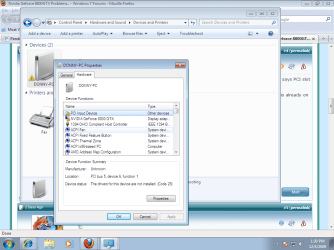
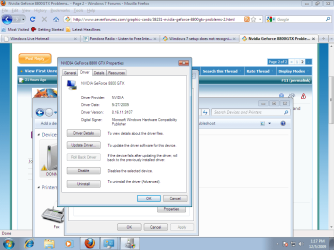
I am not sure as to what you wanted for the screenshot, but here is one. You all got any other ideas?  Sorry it took me so long ot post back, you guys are great with the feedback, If I could get this working I would be beyond happy.
Thanks Again. | My System Specs | | System Manufacturer/Model Number Ibuy OS Windows 7 Ultimate CPU AMD Athlon 4800 Motherboard Asus A8N SLI-Deluxe Memory 2 gb Graphics Card Nvidia Geforce 8800GTX Hard Drives Two 80gb WD Nvidia Geforce 8800GTX Problems.. problems? All times are GMT -5. The time now is 01:05 PM. | |