|
Welcome to Windows 7 Forums. Our forum is dedicated to helping you find solutions with any problems, errors or issues you are experiencing with Windows 7. The Windows 7 forum also covers news and updates and has an extensive Windows 7 tutorial section that covers a wide range of tips and tricks.
Windows 7 - problem ATI AIW 9700 Pro on W7 |
11-14-2009
|
#1 | | |
problem ATI AIW 9700 Pro on W7 Hi,
Hi, I have a P4PB400 mainboard and ATI All-in-Wonder 9700 Pro. I installed Windows 7, and only get VGA PnP driver for Video. I tried many Catalyst installations, back to v7.1, but none of them really install the driver and CCC. The driver install program does not give any error message, but it just does not install the driver and CCC.
I have searched for 2 days on Internet, tried several other ways, but still no luck. I do not seem to get drivers to work in Windows 7.
Please, any help is appreciated
Thanks! | My System Specs | | |
11-14-2009
|
#2 | | |

Quote: Originally Posted by Flexmens Hi,
Hi, I have a P4PB400 mainboard and ATI All-in-Wonder 9700 Pro. I installed Windows 7, and only get VGA PnP driver for Video. I tried many Catalyst installations, back to v7.1, but none of them really install the driver and CCC. The driver install program does not give any error message, but it just does not install the driver and CCC.
I have searched for 2 days on Internet, tried several other ways, but still no luck. I do not seem to get drivers to work in Windows 7.
Please, any help is appreciated
Thanks! you 64biit or 32?
Ken J | My System Specs | | System Manufacturer/Model Number HP Pavillion dv-7 1005 Tx OS WCP ONLY CPU 2@2.4 Memory 4 gigs Graphics Card Nvidia 9600M Sound Card HD built-in Monitor(s) Displays 17" Wxga Screen Resolution 1440x900 Cooling none Internet Speed 45Mb down 5Mb up |
11-14-2009
|
#3 | | |

Quote: Originally Posted by Flexmens
I have searched for 2 days on Internet, tried several other ways, but still no luck. I do not seem to get drivers to work in Windows 7.
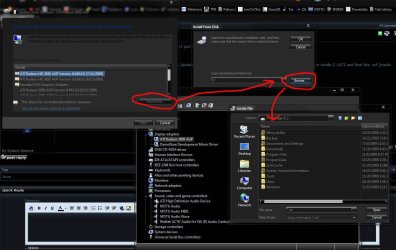
! Download the Vista driver for it from ATI's site. Extract it to C:\ATI
Then install using the device manager. Right click standard vga. Update driver software. Browse. Let me pick. Have disk. Browse. Now go inside C:\ATI and find the .inf (inside driver display folder or something.)
Double click on it and hit ok.
Do the same for the tv part of the card in sound section of device manager. I think it's the inf inside the WDDM folder you want for this. Let me know if you need further help....I used to have an AIW card (9800 Pro) and know them well. | My System Specs | | System Manufacturer/Model Number self built OS 7600.20510 x86 CPU P4 550 3.4 GHz HT running at 3.5 GHz Motherboard MSI PM8M3-V (MS-7211 v1.x) Micro-ATX mainboard Memory OCZ 2 GB(2x1GB) DDR400mHz running @ 414 mHz Graphics Card HIS Radeon HD 3850 IceQ 3 Turbo HDMI Dual DL-DVI AGP Sound Card MOTU Traveler firewire studio interface 192 kHz 24 bit Monitor(s) Displays 22" widescreen Acer X223W LCD, 17" Compaq P75 CRT Screen Resolution 1680x1050 and 1280x1024 Keyboard Logitch Classical Keyboard 200 Mouse Logitech Mediaplay cordless PSU 350W generic Case Cybertronpc, it glows blue Cooling stock cpu fan, Ice-Q 3 gpu and system, many case fans Hard Drives SATA I x2 WD, 400 GB and 120 GB, SATA 2 WD Caviar Black 1 TB Internet Speed 1792/448 kbits/sec Other Info SATA II PCI fake RAID adapter, 1 GB Readyboost, original ATI Remote Wonder (even works with WMC perfectly), Logitech Rumblepad 2 game controller x2 |
11-20-2009
|
#4 | | |
Hi,
Back from travel. Thanks for feedback. I see 2 files: CL_83742.inf and CW_83742.inf
Which one to take? By the way, if I try to update VGA driver, it does not work so far. Windows keeps on saying "latest driver is installed", even if I browse for the *.inf files.
Thanks for your advice on how to proceed
Flex | My System Specs | | |
11-20-2009
|
#5 | | |
You want to use the CL one and point specifically to it, instead of just choosing the folder.
Follow this part precisely:
"Then install using the device manager. Right click standard vga. Update driver software. Browse. Let me pick. Have disk. Browse. Now go inside C:\ATI and find the .inf (inside driver display folder or something.)
Double click on it and hit ok." | My System Specs | | System Manufacturer/Model Number self built OS 7600.20510 x86 CPU P4 550 3.4 GHz HT running at 3.5 GHz Motherboard MSI PM8M3-V (MS-7211 v1.x) Micro-ATX mainboard Memory OCZ 2 GB(2x1GB) DDR400mHz running @ 414 mHz Graphics Card HIS Radeon HD 3850 IceQ 3 Turbo HDMI Dual DL-DVI AGP Sound Card MOTU Traveler firewire studio interface 192 kHz 24 bit Monitor(s) Displays 22" widescreen Acer X223W LCD, 17" Compaq P75 CRT Screen Resolution 1680x1050 and 1280x1024 Keyboard Logitch Classical Keyboard 200 Mouse Logitech Mediaplay cordless PSU 350W generic Case Cybertronpc, it glows blue Cooling stock cpu fan, Ice-Q 3 gpu and system, many case fans Hard Drives SATA I x2 WD, 400 GB and 120 GB, SATA 2 WD Caviar Black 1 TB Internet Speed 1792/448 kbits/sec Other Info SATA II PCI fake RAID adapter, 1 GB Readyboost, original ATI Remote Wonder (even works with WMC perfectly), Logitech Rumblepad 2 game controller x2 |
11-20-2009
|
#6 | | |
Hi,
Thanks. I did, when I selected the INF file, I had to choose the Card, so I choose "ATI All in Wonder", which there were 2 of, so I selected the first one. It installed it, and then I rebooted, unfortunately, the Computer crashed during set-up (some memory dumped, etc..), so I restored it to VGA.
May be I need an older version of INF file ? | My System Specs | | |
11-20-2009
|
#7 | | |
Funny, when I start Windows in "Safe mode", I can see the 9700 Pro driver (under display), but when i start Windows properly, it disappears... | My System Specs | | |
11-20-2009
|
#8 | | |
Try installing in safe mode. Then boot to normal. | My System Specs | | System Manufacturer/Model Number self built OS 7600.20510 x86 CPU P4 550 3.4 GHz HT running at 3.5 GHz Motherboard MSI PM8M3-V (MS-7211 v1.x) Micro-ATX mainboard Memory OCZ 2 GB(2x1GB) DDR400mHz running @ 414 mHz Graphics Card HIS Radeon HD 3850 IceQ 3 Turbo HDMI Dual DL-DVI AGP Sound Card MOTU Traveler firewire studio interface 192 kHz 24 bit Monitor(s) Displays 22" widescreen Acer X223W LCD, 17" Compaq P75 CRT Screen Resolution 1680x1050 and 1280x1024 Keyboard Logitch Classical Keyboard 200 Mouse Logitech Mediaplay cordless PSU 350W generic Case Cybertronpc, it glows blue Cooling stock cpu fan, Ice-Q 3 gpu and system, many case fans Hard Drives SATA I x2 WD, 400 GB and 120 GB, SATA 2 WD Caviar Black 1 TB Internet Speed 1792/448 kbits/sec Other Info SATA II PCI fake RAID adapter, 1 GB Readyboost, original ATI Remote Wonder (even works with WMC perfectly), Logitech Rumblepad 2 game controller x2 |
11-20-2009
|
#9 | | |
If you mean running the latest Catalyst install under Safe mode, no, that failed.
Could someone help me to create the right INF file for this AIW 9700 Pro card? | My System Specs | | |
11-20-2009
|
#10 | | |
No, I mean install as I said before, only in safe mode.
The CL one is the right one.
Which motherboard? If it's an nForce3 or lower, that's not going to work on Windows 7.
If it's not, you want to try to update the chipset to latest possible, like from VIA. Especially the CPU to AGP bridge driver, under system devices in device manager. | My System Specs | | System Manufacturer/Model Number self built OS 7600.20510 x86 CPU P4 550 3.4 GHz HT running at 3.5 GHz Motherboard MSI PM8M3-V (MS-7211 v1.x) Micro-ATX mainboard Memory OCZ 2 GB(2x1GB) DDR400mHz running @ 414 mHz Graphics Card HIS Radeon HD 3850 IceQ 3 Turbo HDMI Dual DL-DVI AGP Sound Card MOTU Traveler firewire studio interface 192 kHz 24 bit Monitor(s) Displays 22" widescreen Acer X223W LCD, 17" Compaq P75 CRT Screen Resolution 1680x1050 and 1280x1024 Keyboard Logitch Classical Keyboard 200 Mouse Logitech Mediaplay cordless PSU 350W generic Case Cybertronpc, it glows blue Cooling stock cpu fan, Ice-Q 3 gpu and system, many case fans Hard Drives SATA I x2 WD, 400 GB and 120 GB, SATA 2 WD Caviar Black 1 TB Internet Speed 1792/448 kbits/sec Other Info SATA II PCI fake RAID adapter, 1 GB Readyboost, original ATI Remote Wonder (even works with WMC perfectly), Logitech Rumblepad 2 game controller x2 problem ATI AIW 9700 Pro on W7 problems? All times are GMT -5. The time now is 08:30 AM. |  |