Windows 7 Forums Search
Welcome to Windows 7 Forums. Our forum is dedicated to helping you find solutions with any problems, errors or issues you are experiencing with Windows 7. The Windows 7 forum also covers news and updates and has an extensive Windows 7 tutorial section that covers a wide range of tips and tricks.


Windows 7 - How to force nvidia to use 1680x1050


02-14-2009   #1


Windows 3.11


How to force nvidia to use 1680x1050

Hi to all!

I am using windows 7 RC x64 (build 7100) and i cant use 1680x1050 res on my monitor. Now i am using 1440x900. It shows me that i can use 1680x1050 res but when i apply, it automatic change to 1600x1200. So how i can force my grafic card to use 1680x1050?

I have nvidia GeForce 8500 GT
GeForce 8500

I am using Samsung SyncMaster 2023NW 20" Widescreen TFT Monitor
Play.com (UK) : Samsung SyncMaster 2023NW 20" Widescreen TFT Monitor : Computing - Free Delivery

Any help would be appreciated! Thank You!


Last edited by v0id; 07-06-2009 at 09:14 AM.. Reason: Solved
My System SpecsSystem Spec
02-14-2009   #2


Windows 7 Ultimate Vista Ultimate x64


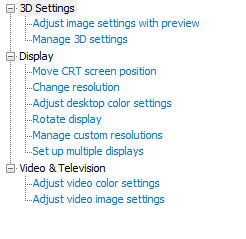
Try using the Nvidia control panel and select the native resolution setting and use monitors built in scaling, I think you may have to use a DVI cable to get that option though, which is the best option anyway if you have it.

How to force nvidia to use 1680x1050-2009-02-15_003015.jpg
My System SpecsSystem Spec
02-14-2009   #3


Windows 3.11


Thank you for answering but i dont have in nvidia cp "Change flat panel scaling" option. I am using advanced setings!
Attached Images
 
My System SpecsSystem Spec
.


02-14-2009   #4


Windows 7 Ultimate Vista Ultimate x64


That is because you are using a VGA connection to your monitor, you will need to use DVI and that will solve your problem.
My System SpecsSystem Spec
02-14-2009   #5


Windows 3.11


But in XP its working, only in windows 7 i cant use 1680x1050 res. Is there any other solution? I dont have DVI and my monitor not suport DVI only VGA!
My System SpecsSystem Spec
02-14-2009   #6


Windows 7 Ultimate Vista Ultimate x64


No sorry, everyone that has had this problem also has it working fine on XP and Vista but this is the only know solution for Windows 7 ATM, once you have a DVI cable you will not want to go back anyway, the picture is far superior and is what you should be using anyway unless your Graphics Card doesn't support it.
My System SpecsSystem Spec
02-14-2009   #7


Windows 3.11


OK! If not there any other solution i will go back to XP or Vista (probably XP).
Thank You for helping me!
My System SpecsSystem Spec
02-14-2009   #8


Windows 7 Ultimate Vista Ultimate x64


So DVI is not an option for you then?
My System SpecsSystem Spec
02-14-2009   #9


Windows 3.11


I dont have DVI! But i think there is other solution coz its working on XP and Vista! I will try to find one. If someone other have other solution please replay to this thread. If i not find til tomorrow i will back to XP or Vista.
My System SpecsSystem Spec
02-17-2009   #10


Windows 3.11


No other solution for me?
OK!
I am now runing XP
My System SpecsSystem Spec
Reply

 How to force nvidia to use 1680x1050


Thread Tools


Similar Threads for: How to force nvidia to use 1680x1050
Thread Forum
Doubt about best drivers for Nvidia Ge Force 6200 AGP 512Mb Ram Graphic Cards
Logitech Driving Force EX - Force Feedback Motor Query Hardware & Devices
Nvidia Ge Force 7000m Graphic Cards
1680x1050 Graphic Cards


All times are GMT -5. The time now is 05:03 AM.


Windows 7 Forums is an independent web site and has not been authorized,
sponsored, or otherwise approved by Microsoft Corporation.
"Windows 7" and related materials are trademarks of Microsoft Corp.
© Designer Media Ltd
  

1 2 3 4 5 6 7 8 9 10 11 12 13 14 15 16 17 18 19 20 21 22 23 24 25 26 27 28 29 30