Windows 7 Forums Search
Welcome to Windows 7 Forums. Our forum is dedicated to helping you find solutions with any problems, errors or issues you are experiencing with Windows 7. The Windows 7 forum also covers news and updates and has an extensive Windows 7 tutorial section that covers a wide range of tips and tricks.


Windows 7 - HD5750 No sound problem

 
11-19-2009   #1


windows 7


HD5750 No sound problem

hi, well i just installed this new graphics card called HD5750, on my windows 7 OS. i installed the drivers from the CD that came with the graphics card, however i have absolutely no sound at all. does anyone know how come?

My System SpecsSystem Spec
11-19-2009   #2


Windows 7 Ultimate x64 RTM


ATI cards onboard Audio controller only allows sound output through the HDMI port... if you have speakers or headphones then you would also need to have a separate sound card or enable your motherboards onboard sound controller.
My System SpecsSystem Spec
11-19-2009   #3


windows 7


ok, so how would i enable my motherboards onboard sound controller.
My System SpecsSystem Spec
.


11-19-2009   #4


Windows 7 Ultimate x64 RTM


in the BIOS.... you will need to reboot, and during the POST hit the delete key, once in the bios look for Integrated Peripherals option, and in there you should have the option of enabling onboard sound IF you have it(its very common so you probably do). Save and exit bios and once in windows it will tell you it found new hardware, install drivers. If you happen to know the make of your board we can the latest drivers before we do anything else
My System SpecsSystem Spec
11-19-2009   #5


Windows 7 ultimate 64 bit / XP Home sp3


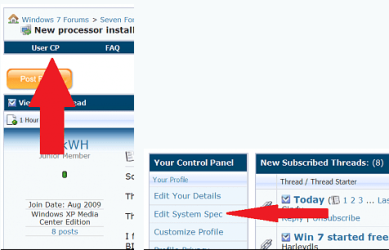
Welcome to seven forums. How to list your system specs so others can easily check them. Thanks. Fabe HD5750 No sound problem-usercp-1.png
My System SpecsSystem Spec
11-19-2009   #6


windows 7


Quote   Quote: Originally Posted by ba5ik View Post
in the BIOS.... you will need to reboot, and during the POST hit the delete key, once in the bios look for Integrated Peripherals option, and in there you should have the option of enabling onboard sound IF you have it(its very common so you probably do). Save and exit bios and once in windows it will tell you it found new hardware, install drivers. If you happen to know the make of your board we can the latest drivers before we do anything else
i tried it, and it was already enabled.
My System SpecsSystem Spec
11-19-2009   #7


windows 7


Quote   Quote: Originally Posted by thefabe View Post
Welcome to seven forums. How to list your system specs so others can easily check them. Thanks. Fabe Attachment 37671
i dont know all of my system specs.
My System SpecsSystem Spec
11-19-2009   #8


Windows 7 Ultimate x64 RTM


Piriform - Speccy download this tool
My System SpecsSystem Spec
11-19-2009   #9


windows 7


should be there now
My System SpecsSystem Spec
11-19-2009   #10


Windows 7 Ultimate x64 RTM


you have a sound card installed so you should be getting sound...
My System SpecsSystem Spec
Reply

 HD5750 No sound problem problems?


Thread Tools


Similar Threads for: HD5750 No sound problem
Thread Forum
Solved Sound problem - need to 'scan for hardware changes' to get sound Hardware & Devices
Windows Media Player Problem - Sound/skipping problem. Music, Pictures & Video
ATI Radeon HD5750 (Driver Issue?) Graphic Cards
sound problem Sound & Audio
My sound problem Sound & Audio


All times are GMT -5. The time now is 08:31 AM.


Windows 7 Forums is an independent web site and has not been authorized,
sponsored, or otherwise approved by Microsoft Corporation.
"Windows 7" and related materials are trademarks of Microsoft Corp.
© Designer Media Ltd
  

1 2 3 4 5 6 7 8 9 10 11 12 13 14 15 16 17 18 19 20 21 22 23 24 25 26 27 28 29 30