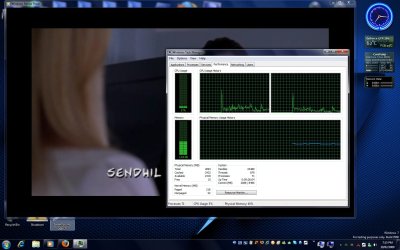
Huge increase in CPU usage while playing any video

Dragor1

New member
I have installed 181.22 version of Vista's 32 bit drivers and K-Lite's Mega Codec pack v4.5.3.0.

Whenever I play any video using Winamp or any player that uses DShow, I get abnormally huge CPU usage which was not the case in either XP or Vista.

Heres the results from playback of two file types:

1. an AVI file:


2. an RMVB file using the Real Alternative installed with K-Lite Mega Codec pack.


Please help!

It feels as though my GPU is sleeping and letting the CPU do all the work!

Thanks for your time!
 

My Computer

Computer type
PC/Desktop
Computer Manufacturer/Model Number
Custom built
OS
Windows 7 Ultimate (64 bit) dual boot with Fedora KDE
CPU
Intel Corei5-3470 @ 3.20Ghz (Turbo 3.60Ghz) [6MB L3 cache]
Motherboard
GIGABYTE GA-B75M-D3H [intel B75 Express Chipset]
Memory
8 GB [4 GB x 2] DDR3 1600 Mhz G.Skill
Graphics Card(s)
Zotac nVidia GeForce GTX 650 1024 MB GDDR5 (128 bit)
Sound Card
Realtek ALC 887 HD Audio codec onboard
Monitor(s) Displays
Samsung SyncMaster 2033SW+
Screen Resolution
1600 x 900 @ 60Hz
Hard Drives
1 x S-ATA II Seagate 1 TB [Win7 Ultimate x86-64 RTM]
1 x S-ATA Samsung 1 TB [Fedora]
PSU
Cooler Master Thunder 650W
Case
Cooler Master Elite 344 - USB 3
Cooling
All Fan [1 on front and 1 at back]
Keyboard
Microsoft PS/2 Multimedia keyboard
Mouse
Microsoft Optical Mouse USB
Internet Speed
1 Mbps Cable
Antivirus
Kaspersky Internet Security
Browser
Firefox
Just a thought.

If you're up for it, you could try the Windows 7 Codec Pack. Please be sure to uninstall the previous codec and try the video again.

Hope it works out for yah ;)
 

My Computer

Computer Manufacturer/Model Number
Custom Build
OS
Windows 7 Build 7048 x64
CPU
Athlon 64 X2 Dual Core 4600+
Motherboard
EMX-AMD750G-PRO
Memory
4 x 1GB Kingston 400MHz 6-6-6-18 (800MHz)
Graphics Card(s)
ATI Radeon 3650
Sound Card
Realtek HD Audio
Monitor(s) Displays
22" AOC 2216Vw
Screen Resolution
1680x1050
Cooling
Arctic Cooling Freezer 64 Pro PWM
Keyboard
Generic Enhanced Natural Keyboard
Mouse
Logitech VX Nano
Other Info
Edifier M1550
Does the above mentioned Codec pack have Real Alternative?

I MUST be able to play rmvb files w/o installing real player [real player stinks but the codec rocks!].

But I think that this problem might be more related to drivers than the codec pack since EVERY video played anywhere [even flash in Firefox] is causiing abnormally high CPU usage!

I'll give the codec pack later, first, I am gonna uninstall Vista's drivers and try using the Windows Update ones.

Will post back with results.

Thanks for your time!
 

My Computer

Computer type
PC/Desktop
Computer Manufacturer/Model Number
Custom built
OS
Windows 7 Ultimate (64 bit) dual boot with Fedora KDE
CPU
Intel Corei5-3470 @ 3.20Ghz (Turbo 3.60Ghz) [6MB L3 cache]
Motherboard
GIGABYTE GA-B75M-D3H [intel B75 Express Chipset]
Memory
8 GB [4 GB x 2] DDR3 1600 Mhz G.Skill
Graphics Card(s)
Zotac nVidia GeForce GTX 650 1024 MB GDDR5 (128 bit)
Sound Card
Realtek ALC 887 HD Audio codec onboard
Monitor(s) Displays
Samsung SyncMaster 2033SW+
Screen Resolution
1600 x 900 @ 60Hz
Hard Drives
1 x S-ATA II Seagate 1 TB [Win7 Ultimate x86-64 RTM]
1 x S-ATA Samsung 1 TB [Fedora]
PSU
Cooler Master Thunder 650W
Case
Cooler Master Elite 344 - USB 3
Cooling
All Fan [1 on front and 1 at back]
Keyboard
Microsoft PS/2 Multimedia keyboard
Mouse
Microsoft Optical Mouse USB
Internet Speed
1 Mbps Cable
Antivirus
Kaspersky Internet Security
Browser
Firefox
Hey just a thought. I noticed the same thing today infact when I tried to watch my Fast and Furious movie on AVI. I kept on getting lag and CPU spikes. I installed DVIX and it had no effect. Then remembering from past experience I downloaded Windows Media Player Classic. After extracting it from its RAR I dragged the AVI file ontop of it and it opened and played without lag or major CPU usage.

Not sure if its what you want but its a quick fix.
 

My Computer

Computer Manufacturer/Model Number
Custom
OS
Windows 7 x64 build
CPU
Core i7 920 @2.67GHz OC'd to 3.8GHz
Motherboard
ASUS P6T Delux
Memory
4GB 1066MHz
Graphics Card(s)
ATI Radeon 4850
Monitor(s) Displays
Acer 24"
Screen Resolution
1920x1200
Hard Drives
Hitachi 500GB 16MB Cache 7200 RPM
PSU
Rosewill 600W
Cooling
Thermaltake V1 AX
Keyboard
Logitech G15
Mouse
Logitech mx1000
Internet Speed
8Mb down
Does the above mentioned Codec pack have Real Alternative?

I MUST be able to play rmvb files w/o installing real player [real player stinks but the codec rocks!].

But I think that this problem might be more related to drivers than the codec pack since EVERY video played anywhere [even flash in Firefox] is causiing abnormally high CPU usage!

I'll give the codec pack later, first, I am gonna uninstall Vista's drivers and try using the Windows Update ones.

Will post back with results.

Thanks for your time!

I've checked with the site and my installation, and yes, it does play real media files.

You're welcome;)
 

My Computer

Computer Manufacturer/Model Number
Custom Build
OS
Windows 7 Build 7048 x64
CPU
Athlon 64 X2 Dual Core 4600+
Motherboard
EMX-AMD750G-PRO
Memory
4 x 1GB Kingston 400MHz 6-6-6-18 (800MHz)
Graphics Card(s)
ATI Radeon 3650
Sound Card
Realtek HD Audio
Monitor(s) Displays
22" AOC 2216Vw
Screen Resolution
1680x1050
Cooling
Arctic Cooling Freezer 64 Pro PWM
Keyboard
Generic Enhanced Natural Keyboard
Mouse
Logitech VX Nano
Other Info
Edifier M1550
Silly me! I should've looked more closely at the installer pic shown on Shark007 site:

choice.jpg


It says RealMedia components right there!

My bad! sorry!

BTW, I have uninstalled Vista's 181.22 and then let Windows Update their Prerelease WDDM 1.0 driver which reads as 179.23 in nVidia Control Panel's system information dialog.

That, unfortunately, didn't have any effect. I am downlading Windows 7 codec pack as I write this.

Will post back.

Thank you for your time!
 

My Computer

Computer type
PC/Desktop
Computer Manufacturer/Model Number
Custom built
OS
Windows 7 Ultimate (64 bit) dual boot with Fedora KDE
CPU
Intel Corei5-3470 @ 3.20Ghz (Turbo 3.60Ghz) [6MB L3 cache]
Motherboard
GIGABYTE GA-B75M-D3H [intel B75 Express Chipset]
Memory
8 GB [4 GB x 2] DDR3 1600 Mhz G.Skill
Graphics Card(s)
Zotac nVidia GeForce GTX 650 1024 MB GDDR5 (128 bit)
Sound Card
Realtek ALC 887 HD Audio codec onboard
Monitor(s) Displays
Samsung SyncMaster 2033SW+
Screen Resolution
1600 x 900 @ 60Hz
Hard Drives
1 x S-ATA II Seagate 1 TB [Win7 Ultimate x86-64 RTM]
1 x S-ATA Samsung 1 TB [Fedora]
PSU
Cooler Master Thunder 650W
Case
Cooler Master Elite 344 - USB 3
Cooling
All Fan [1 on front and 1 at back]
Keyboard
Microsoft PS/2 Multimedia keyboard
Mouse
Microsoft Optical Mouse USB
Internet Speed
1 Mbps Cable
Antivirus
Kaspersky Internet Security
Browser
Firefox
Update: Installed Windows 7 Codec pack but still nothing!

However, as Sparatan117 noted, I did try running things through MPC Home Cinema and CPU usage was quite low; about 15%. But its still higher than what it was in Vista and XP.

I would not like to use MPC HC as my default video player in place of Winamp because I have setup Winamp to give me exactly the type of sound I need.

MPC on the other hand has no such arrangements.

I completely fail to see the logic behind this! How can it be working flawlessly in XP and even in Vista, and not work properly in 7?

Is it because I have a dated 6600? Or am I overlooking something?

Please help!

Thanks for your time!

P.S.: Although Windows 7 codec package is good, I will be reverting back to K-Lite Mega Codec Pack's newer version [v 4.6.2], as I get lots of stuff with it, like MPC HC and other awesome tools! No hard feelings!
 
Last edited:

My Computer

Computer type
PC/Desktop
Computer Manufacturer/Model Number
Custom built
OS
Windows 7 Ultimate (64 bit) dual boot with Fedora KDE
CPU
Intel Corei5-3470 @ 3.20Ghz (Turbo 3.60Ghz) [6MB L3 cache]
Motherboard
GIGABYTE GA-B75M-D3H [intel B75 Express Chipset]
Memory
8 GB [4 GB x 2] DDR3 1600 Mhz G.Skill
Graphics Card(s)
Zotac nVidia GeForce GTX 650 1024 MB GDDR5 (128 bit)
Sound Card
Realtek ALC 887 HD Audio codec onboard
Monitor(s) Displays
Samsung SyncMaster 2033SW+
Screen Resolution
1600 x 900 @ 60Hz
Hard Drives
1 x S-ATA II Seagate 1 TB [Win7 Ultimate x86-64 RTM]
1 x S-ATA Samsung 1 TB [Fedora]
PSU
Cooler Master Thunder 650W
Case
Cooler Master Elite 344 - USB 3
Cooling
All Fan [1 on front and 1 at back]
Keyboard
Microsoft PS/2 Multimedia keyboard
Mouse
Microsoft Optical Mouse USB
Internet Speed
1 Mbps Cable
Antivirus
Kaspersky Internet Security
Browser
Firefox
I'll see what I can do to help out. I'll let ya know as soon as I come up with a solution.
 

My Computer

Computer Manufacturer/Model Number
Custom
OS
Windows 7 x64 build
CPU
Core i7 920 @2.67GHz OC'd to 3.8GHz
Motherboard
ASUS P6T Delux
Memory
4GB 1066MHz
Graphics Card(s)
ATI Radeon 4850
Monitor(s) Displays
Acer 24"
Screen Resolution
1920x1200
Hard Drives
Hitachi 500GB 16MB Cache 7200 RPM
PSU
Rosewill 600W
Cooling
Thermaltake V1 AX
Keyboard
Logitech G15
Mouse
Logitech mx1000
Internet Speed
8Mb down
Update: Installed Windows 7 Codec pack but still nothing!

However, as Sparatan117 noted, I did try running things through MPC Home Cinema and CPU usage was quite low; about 15%. But its still higher than what it was in Vista and XP.

I would not like to use MPC HC as my default video player in place of Winamp because I have setup Winamp to give me exactly the type of sound I need.

MPC on the other hand has no such arrangements.

I completely fail to see the logic behind this! How can it be working flawlessly in XP and even in Vista, and not work properly in 7?

Is it because I have a dated 6600? Or am I overlooking something?

Please help!

Thanks for your time!

P.S.: Although Windows 7 codec package is good, I will be reverting back to K-Lite Mega Codec Pack's newer version [v 4.6.2], as I get lots of stuff with it, like MPC HC and other awesome tools! No hard feelings!

You're most welcome and no hard feelings :)

Well, this is still in its beta stage, though I'd suspect some other things are working to make that behave like that as I don't experience the symptoms you're having.

Please let us know the progress of your media experience ;)

I'll give a shout out if I have something for yah.
 

My Computer

Computer Manufacturer/Model Number
Custom Build
OS
Windows 7 Build 7048 x64
CPU
Athlon 64 X2 Dual Core 4600+
Motherboard
EMX-AMD750G-PRO
Memory
4 x 1GB Kingston 400MHz 6-6-6-18 (800MHz)
Graphics Card(s)
ATI Radeon 3650
Sound Card
Realtek HD Audio
Monitor(s) Displays
22" AOC 2216Vw
Screen Resolution
1680x1050
Cooling
Arctic Cooling Freezer 64 Pro PWM
Keyboard
Generic Enhanced Natural Keyboard
Mouse
Logitech VX Nano
Other Info
Edifier M1550
I have installed 181.22 version of Vista's 32 bit drivers and K-Lite's Mega Codec pack v4.5.3.0.

Whenever I play any video using Winamp or any player that uses DShow, I get abnormally huge CPU usage which was not the case in either XP or Vista.

Please help!

It feels as though my GPU is sleeping and letting the CPU do all the work!

Thanks for your time!

Hi Dragor1, I havent had time to research your problem but I do have a sollution that both you and the Seven Forum Users will love and it's FREE! 100% GPU Accelerated video playback using Media Player Classic Home Cinema (GPU accelerated). Found here Media Player Classic Home Cinema (GPU accelerated) download from Guru3D.com. The player works great under XP,Vista 32/64 and Windows 7 32/64. It offloads all of the video decoding to your GPU and works with most GPUs including motherboard integrated sollutions.
Enjoy! :)
 

My Computer

Computer Manufacturer/Model Number
Custom
OS
XP 32, Vista 64, Windows 7
CPU
AMD Phenom
Motherboard
AMD 790FX
Memory
Mushkin 8500 Ascent
Graphics Card(s)
Sapphire 4870 1GB DDR5
Sound Card
X-Fi Fatality FPS
Monitor(s) Displays
Samsung
Screen Resolution
1680x1050
Hard Drives
1 TB Seagate RAID 0
PSU
650W
Case
Thermaltake Armor
Cooling
Zalman
Keyboard
G-15
Mouse
Logitech Trackman Optical
Internet Speed
6Mbs
Other Info
ASUS PhysX PPU
I just checked on mine playing an AVI and it seemed to stay around 5% usage and I have had no freezing or lag, everything is running smoothly.

2009-02-19_191600.jpg
 

My Computer

Computer Manufacturer/Model Number
Home Brew
OS
Windows 7 Ultimate Vista Ultimate x64
CPU
Core 2 Duo E8500 3.16Ghz @ 3.8Ghz
Motherboard
eVGA 750i FTW
Memory
2x2Gigs Patriot PC2-6400 LL
Graphics Card(s)
Inno3D GeForce GTX260 216 SP
Monitor(s) Displays
ASUS VW222U 22" 2ms Response time
Screen Resolution
1680x1050
Hard Drives
SATA 150GB
SATA II 250GB
USB IDE 750GB Ext.
PSU
HYTEC 600W & Thermaltake 650W Toughpower Power Exp
Case
Thermaltake Armor LCS (Liquid Cooling System)
Cooling
Liquid Cooling System
Keyboard
Logitech G15 Gaming Keyboard
Mouse
Logitech G9 Gaming Mouse

My Computer

Computer Manufacturer/Model Number
Custom
OS
XP 32, Vista 64, Windows 7
CPU
AMD Phenom
Motherboard
AMD 790FX
Memory
Mushkin 8500 Ascent
Graphics Card(s)
Sapphire 4870 1GB DDR5
Sound Card
X-Fi Fatality FPS
Monitor(s) Displays
Samsung
Screen Resolution
1680x1050
Hard Drives
1 TB Seagate RAID 0
PSU
650W
Case
Thermaltake Armor
Cooling
Zalman
Keyboard
G-15
Mouse
Logitech Trackman Optical
Internet Speed
6Mbs
Other Info
ASUS PhysX PPU
@ Snowcrash: Unfortunately, I can't use MPC HC to make my GPU decode video [aka DXVA - DirectX Video Acceleration] because my GPU is GeForce 6600. I need atleast Geforce 8 series or Radeon 3xxx series in order to get that magic working!

I read the article at Guru3d.com: Accelerate x.264 1080p movies over the GPU Guide

@ Mr.Grim and Snowcrash: I am glad to see that you dont have the problems that I have!

and @ NosferatuX: Thanks dude!

From what I can gather, the problem, atleast for now, seems to be my GeForce 6600.

I will be removing my graphics card and trying out my onboard GMA 950 to see whether it has the same problems.

I also tried switching off Aero by changing to Basic theme but the isse remains.

I would really appreciate if someone with a Geforce 6 series could confirm whether or not they are facing a similar problem!

Thank you all, for your replies!

This community is great!
 

My Computer

Computer type
PC/Desktop
Computer Manufacturer/Model Number
Custom built
OS
Windows 7 Ultimate (64 bit) dual boot with Fedora KDE
CPU
Intel Corei5-3470 @ 3.20Ghz (Turbo 3.60Ghz) [6MB L3 cache]
Motherboard
GIGABYTE GA-B75M-D3H [intel B75 Express Chipset]
Memory
8 GB [4 GB x 2] DDR3 1600 Mhz G.Skill
Graphics Card(s)
Zotac nVidia GeForce GTX 650 1024 MB GDDR5 (128 bit)
Sound Card
Realtek ALC 887 HD Audio codec onboard
Monitor(s) Displays
Samsung SyncMaster 2033SW+
Screen Resolution
1600 x 900 @ 60Hz
Hard Drives
1 x S-ATA II Seagate 1 TB [Win7 Ultimate x86-64 RTM]
1 x S-ATA Samsung 1 TB [Fedora]
PSU
Cooler Master Thunder 650W
Case
Cooler Master Elite 344 - USB 3
Cooling
All Fan [1 on front and 1 at back]
Keyboard
Microsoft PS/2 Multimedia keyboard
Mouse
Microsoft Optical Mouse USB
Internet Speed
1 Mbps Cable
Antivirus
Kaspersky Internet Security
Browser
Firefox
You're most welcome man!

Since you're out to dismantle your 6600 from your setup, please do verify if you have the latest BIOS and chipset drivers for your motherboard, here. Might be worth trying ;)

I do hope that if your on-board graphics perform much better, your 6600 wont go to waste :(
 

My Computer

Computer Manufacturer/Model Number
Custom Build
OS
Windows 7 Build 7048 x64
CPU
Athlon 64 X2 Dual Core 4600+
Motherboard
EMX-AMD750G-PRO
Memory
4 x 1GB Kingston 400MHz 6-6-6-18 (800MHz)
Graphics Card(s)
ATI Radeon 3650
Sound Card
Realtek HD Audio
Monitor(s) Displays
22" AOC 2216Vw
Screen Resolution
1680x1050
Cooling
Arctic Cooling Freezer 64 Pro PWM
Keyboard
Generic Enhanced Natural Keyboard
Mouse
Logitech VX Nano
Other Info
Edifier M1550
I have a little bit of a skip every now and then when im decoding some sorts of movies through Windows Media Player. but there is one movie i have that will only play smoothly through Windows media player. Who knows....

But for now i would just stick with Media Player Classic. That way you it doesnt cost you a dime ;) but whatever you wanna do.
 

My Computer

Computer Manufacturer/Model Number
Custom
OS
Windows 7 x64 build
CPU
Core i7 920 @2.67GHz OC'd to 3.8GHz
Motherboard
ASUS P6T Delux
Memory
4GB 1066MHz
Graphics Card(s)
ATI Radeon 4850
Monitor(s) Displays
Acer 24"
Screen Resolution
1920x1200
Hard Drives
Hitachi 500GB 16MB Cache 7200 RPM
PSU
Rosewill 600W
Cooling
Thermaltake V1 AX
Keyboard
Logitech G15
Mouse
Logitech mx1000
Internet Speed
8Mb down
I think I finally know what my problem is.

When I try to play videos through WMP12 and/or Winamp, the codecs which I installed are not used.

Instead the default built in codecs i.e. for an AVI file with MP3 audio, I get the following active filters:

AVI Splitter, MP3 Decoder DMO, Mpeg4s Decoder DMO.

When I play the same file with Media player Classic, I get:

AVI Splitter, ffdshow Audio decoder, ffdshow Video Decoder.

SO, my question now becomes:

How to make Winamp and/or WMP12 force to load the same decoders that Media Player Classic uses?

As far as I remember, it used to work properly when I had my first installtion of seven. But I had to reinstall and ever since I have this problem!

Please help me! I am also gonna post my problem on K-Lite Codec pack's forums.

Waiting for your replies!

Thanks for your time!
 

My Computer

Computer type
PC/Desktop
Computer Manufacturer/Model Number
Custom built
OS
Windows 7 Ultimate (64 bit) dual boot with Fedora KDE
CPU
Intel Corei5-3470 @ 3.20Ghz (Turbo 3.60Ghz) [6MB L3 cache]
Motherboard
GIGABYTE GA-B75M-D3H [intel B75 Express Chipset]
Memory
8 GB [4 GB x 2] DDR3 1600 Mhz G.Skill
Graphics Card(s)
Zotac nVidia GeForce GTX 650 1024 MB GDDR5 (128 bit)
Sound Card
Realtek ALC 887 HD Audio codec onboard
Monitor(s) Displays
Samsung SyncMaster 2033SW+
Screen Resolution
1600 x 900 @ 60Hz
Hard Drives
1 x S-ATA II Seagate 1 TB [Win7 Ultimate x86-64 RTM]
1 x S-ATA Samsung 1 TB [Fedora]
PSU
Cooler Master Thunder 650W
Case
Cooler Master Elite 344 - USB 3
Cooling
All Fan [1 on front and 1 at back]
Keyboard
Microsoft PS/2 Multimedia keyboard
Mouse
Microsoft Optical Mouse USB
Internet Speed
1 Mbps Cable
Antivirus
Kaspersky Internet Security
Browser
Firefox
Back
Top