| Windows 7: Jagged font since upgrading video card |
22 Nov 2009
|
#1 | | |
Jagged font since upgrading video card I installed Windows 7 64 bit a few days ago and used a BFG Nvidia 7950GT because I hadn't bought a new video card yet. The fonts looked great and were similar to the ClearType font that I was used to in Windows XP. I then upgraded to a BFG Nvidia 285 gtx yesterday and now the fonts are jagged, even with ClearType enabled.
This is driving me crazy. Anyone have a fix? I've tried unchecking and then checking the cleartype setting and I do see a difference in the font, but it isn't as good as before.
Thanks! | My System Specs |
| |
22 Nov 2009
|
#2 | | |
Hi. Install the latest driver from NVIDIA's website. | My System Specs | | System Manufacturer/Model Number self built OS 7600.20510 x86 CPU P4 550 3.4 GHz HT running at 3.5 GHz Motherboard MSI PM8M3-V (MS-7211 v1.x) Micro-ATX mainboard Memory OCZ 2 GB(2x1GB) DDR400mHz running @ 414 mHz Graphics Card HIS Radeon HD 3850 IceQ 3 Turbo HDMI Dual DL-DVI AGP Sound Card MOTU Traveler firewire studio interface 192 kHz 24 bit Monitor(s) Displays 22" widescreen Acer X223W LCD, 17" Compaq P75 CRT Screen Resolution 1680x1050 and 1280x1024 Keyboard Logitch Classical Keyboard 200 Mouse Logitech Mediaplay cordless PSU 350W generic Case Cybertronpc, it glows blue Cooling stock cpu fan, Ice-Q 3 gpu and system, many case fans Hard Drives SATA I x2 WD, 400 GB and 120 GB, SATA 2 WD Caviar Black 1 TB Internet Speed 1792/448 kbits/sec Other Info SATA II PCI fake RAID adapter, 1 GB Readyboost, original ATI Remote Wonder (even works with WMC perfectly), Logitech Rumblepad 2 game controller x2 |
22 Nov 2009
|
#3 | | |
I have the latest drivers from Nvidia. Just to make sure, I downloaded them again and reinstalled. Unfortunately the issue still exists | My System Specs | | |
22 Nov 2009
|
#4 | | |
Can you post a screenshot of this?
There's more to it then taking your word - that's not the issue - it's a technical reason. | My System Specs | | System Manufacturer/Model Number self built OS 7600.20510 x86 CPU P4 550 3.4 GHz HT running at 3.5 GHz Motherboard MSI PM8M3-V (MS-7211 v1.x) Micro-ATX mainboard Memory OCZ 2 GB(2x1GB) DDR400mHz running @ 414 mHz Graphics Card HIS Radeon HD 3850 IceQ 3 Turbo HDMI Dual DL-DVI AGP Sound Card MOTU Traveler firewire studio interface 192 kHz 24 bit Monitor(s) Displays 22" widescreen Acer X223W LCD, 17" Compaq P75 CRT Screen Resolution 1680x1050 and 1280x1024 Keyboard Logitch Classical Keyboard 200 Mouse Logitech Mediaplay cordless PSU 350W generic Case Cybertronpc, it glows blue Cooling stock cpu fan, Ice-Q 3 gpu and system, many case fans Hard Drives SATA I x2 WD, 400 GB and 120 GB, SATA 2 WD Caviar Black 1 TB Internet Speed 1792/448 kbits/sec Other Info SATA II PCI fake RAID adapter, 1 GB Readyboost, original ATI Remote Wonder (even works with WMC perfectly), Logitech Rumblepad 2 game controller x2 |
23 Nov 2009
|
#5 | | |
Here's a screenshot. Notice in the selected areas some of the letters are fatter than others. | My System Specs | | |
23 Nov 2009
|
#6 | | |
That looks fine here to me. Maybe your monitor is doing something. | My System Specs | | System Manufacturer/Model Number self built OS 7600.20510 x86 CPU P4 550 3.4 GHz HT running at 3.5 GHz Motherboard MSI PM8M3-V (MS-7211 v1.x) Micro-ATX mainboard Memory OCZ 2 GB(2x1GB) DDR400mHz running @ 414 mHz Graphics Card HIS Radeon HD 3850 IceQ 3 Turbo HDMI Dual DL-DVI AGP Sound Card MOTU Traveler firewire studio interface 192 kHz 24 bit Monitor(s) Displays 22" widescreen Acer X223W LCD, 17" Compaq P75 CRT Screen Resolution 1680x1050 and 1280x1024 Keyboard Logitch Classical Keyboard 200 Mouse Logitech Mediaplay cordless PSU 350W generic Case Cybertronpc, it glows blue Cooling stock cpu fan, Ice-Q 3 gpu and system, many case fans Hard Drives SATA I x2 WD, 400 GB and 120 GB, SATA 2 WD Caviar Black 1 TB Internet Speed 1792/448 kbits/sec Other Info SATA II PCI fake RAID adapter, 1 GB Readyboost, original ATI Remote Wonder (even works with WMC perfectly), Logitech Rumblepad 2 game controller x2 |
23 Nov 2009
|
#7 | | |
I think you may be correct. I'm at work now and I can't see anything wrong with the font in the image. I'll have to check out how to calibrate my monitor.
Thanks for taking a look at the screenshot | My System Specs | | |
24 Nov 2009
|
#8 | | |
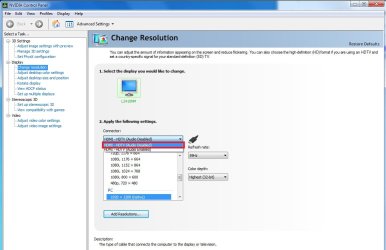
I figured out the problem after some trial and error flipping of the Nvidia settings. For anyone else that has this same issue with Nvidia cards, do the following:
1. Right-click on the desktop and go to Nvida Control Panel
2. Make sure advanced settings are used
3. Click on Display -> Change resolution
4. Change the Connector from HDMI - HDTV (Audio enabled) to HDMI - HDTV (Audio disabled)
5. You should notice an obvious improvement in the resolution
See screenshot for details | My System Specs | | |
14 Jan 2010
|
#9 | | |
I'm getting the same problem but it only happened after changing monitors (Both 22" Samsung's but different models). Both used VGA, but one was connected through a KVM switch. Any other suggestions on how to fix this? | My System Specs | | System Manufacturer/Model Number Custom Built OS Windows 7 Ultimate x64 CPU Intel Q6600 Quad Core at 3.0 Ghz Motherboard XFX Nforce 680i SLI Memory 8GB (4x2GB) Corsair CM2X2048-6400C5 Graphics Card XFX Radeon HD 5770 Sound Card Onboard Realtek HD Audio Monitor(s) Displays 22" Samsung Screen Resolution 1680x1050 Keyboard Logitech G15 Mouse Logitech Optical Mouse PSU 580W Mushikn HP-580 Case Antec Nine Hundred Cooling Noctua CPU Cooling + 5 Case Fans Hard Drives 2x1TB Seagate ST31000340AS in RAID 0 Internet Speed Cable Jagged font since upgrading video card problems? All times are GMT -5. The time now is 10:26 PM. | |