| | Welcome to Windows 7 Forums. Our forum is dedicated to helping you find solutions with any problems, errors or issues you are experiencing with Windows 7. The Windows 7 forum also covers news and updates and has an extensive Windows 7 tutorial section that covers a wide range of tips and tricks. | Windows 7 - ATI Radeon X1800 XT problems
|
11-25-2009
|
#1 | | |
ATI Radeon X1800 XT problems I just installed Windows 7 for the first time, I'm having trouble with my graphics card. It's a Radeon X1800 XT, which should be fine with Windows 7 (so I'm told). I've installed the latest drivers and yet nothing seems to have changed. I can't even see the Graphics Card in the Device Manager.
Apologies if similar issues have been covered in the past. | My System Specs | | |
11-25-2009
|
#2 | | |
Hi. Use this driver.
Run it to extract it to C:\ATI
Close the installer after it is done extracting.
Go to the device manager. Right click on standard vga in display adapters. Update driver software. Browse my computer. Let me pick. Have disk. Browse.
Navigate somewhere inside C:\ATI for the .inf file and double click on it. Click ok. Click next. Let it install.
Reboot and choose an Aero theme by right clicking on the desktop and choosing personalize.
Run setup.exe somewhere in C:\ATI to install the CCC. Use custom mode to install. | My System Specs | | System Manufacturer/Model Number self built OS 7600.20510 x86 CPU P4 550 3.4 GHz HT running at 3.5 GHz Motherboard MSI PM8M3-V (MS-7211 v1.x) Micro-ATX mainboard Memory OCZ 2 GB(2x1GB) DDR400mHz running @ 414 mHz Graphics Card HIS Radeon HD 3850 IceQ 3 Turbo HDMI Dual DL-DVI AGP Sound Card MOTU Traveler firewire studio interface 192 kHz 24 bit Monitor(s) Displays 22" widescreen Acer X223W LCD, 17" Compaq P75 CRT Screen Resolution 1680x1050 and 1280x1024 Keyboard Logitch Classical Keyboard 200 Mouse Logitech Mediaplay cordless PSU 350W generic Case Cybertronpc, it glows blue Cooling stock cpu fan, Ice-Q 3 gpu and system, many case fans Hard Drives SATA I x2 WD, 400 GB and 120 GB, SATA 2 WD Caviar Black 1 TB Internet Speed 1792/448 kbits/sec Other Info SATA II PCI fake RAID adapter, 1 GB Readyboost, original ATI Remote Wonder (even works with WMC perfectly), Logitech Rumblepad 2 game controller x2 |
11-25-2009
|
#3 | | |
Thanks for the quick response.
Perhaps I'm missing something obvious here, but I don't see a display adapters tab anywhere in the device manager. | My System Specs | | |
11-25-2009
|
#4 | | |

Quote: Originally Posted by ricksname Thanks for the quick response.
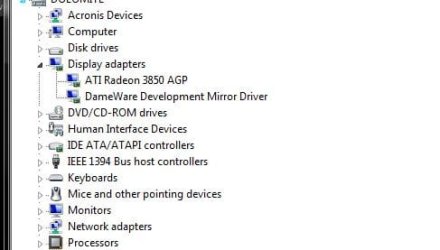
Perhaps I'm missing something obvious here, but I don't see a display adapters tab anywhere in the device manager. Screenshot: | My System Specs | | System Manufacturer/Model Number self built OS 7600.20510 x86 CPU P4 550 3.4 GHz HT running at 3.5 GHz Motherboard MSI PM8M3-V (MS-7211 v1.x) Micro-ATX mainboard Memory OCZ 2 GB(2x1GB) DDR400mHz running @ 414 mHz Graphics Card HIS Radeon HD 3850 IceQ 3 Turbo HDMI Dual DL-DVI AGP Sound Card MOTU Traveler firewire studio interface 192 kHz 24 bit Monitor(s) Displays 22" widescreen Acer X223W LCD, 17" Compaq P75 CRT Screen Resolution 1680x1050 and 1280x1024 Keyboard Logitch Classical Keyboard 200 Mouse Logitech Mediaplay cordless PSU 350W generic Case Cybertronpc, it glows blue Cooling stock cpu fan, Ice-Q 3 gpu and system, many case fans Hard Drives SATA I x2 WD, 400 GB and 120 GB, SATA 2 WD Caviar Black 1 TB Internet Speed 1792/448 kbits/sec Other Info SATA II PCI fake RAID adapter, 1 GB Readyboost, original ATI Remote Wonder (even works with WMC perfectly), Logitech Rumblepad 2 game controller x2 |
11-25-2009
|
#5 | | |
Yes, that category is completely absent from my Device Manager. I have no idea why this could be. It was working fine hours ago on XP. There are three unknown devices under the other devices tab. Could that be related to the issue? | My System Specs | | |
11-25-2009
|
#6 | | |
Can you post a screenshot showing the whole device manager with system devices section maximized, please?
It is related.
In the meantime, probably all you need to do before installing the video driver is to visit your motherboard manufacturer's site to install the latest chipset drivers. | My System Specs | | System Manufacturer/Model Number self built OS 7600.20510 x86 CPU P4 550 3.4 GHz HT running at 3.5 GHz Motherboard MSI PM8M3-V (MS-7211 v1.x) Micro-ATX mainboard Memory OCZ 2 GB(2x1GB) DDR400mHz running @ 414 mHz Graphics Card HIS Radeon HD 3850 IceQ 3 Turbo HDMI Dual DL-DVI AGP Sound Card MOTU Traveler firewire studio interface 192 kHz 24 bit Monitor(s) Displays 22" widescreen Acer X223W LCD, 17" Compaq P75 CRT Screen Resolution 1680x1050 and 1280x1024 Keyboard Logitch Classical Keyboard 200 Mouse Logitech Mediaplay cordless PSU 350W generic Case Cybertronpc, it glows blue Cooling stock cpu fan, Ice-Q 3 gpu and system, many case fans Hard Drives SATA I x2 WD, 400 GB and 120 GB, SATA 2 WD Caviar Black 1 TB Internet Speed 1792/448 kbits/sec Other Info SATA II PCI fake RAID adapter, 1 GB Readyboost, original ATI Remote Wonder (even works with WMC perfectly), Logitech Rumblepad 2 game controller x2 |
11-25-2009
|
#7 | | |
Ok thanks, I'll try that now.
Here are links to the screenshots: 1 2
Edit: I've had a look on Asus' website, there seems to be a fair range of different downloads available. My motherboard is a Socket 939 A8R32-MVP Deluxe. Which download should I be after?
Heres the link: http://support.asus.com/download/dow...Language=en-us | My System Specs | | |
11-26-2009
|
#8 | | |
Update to latest bios and disable all unused ports after in the bios, like parallel, serial, floppy etc...
See if that takes the exclamation point away from the device manager. | My System Specs | | System Manufacturer/Model Number self built OS 7600.20510 x86 CPU P4 550 3.4 GHz HT running at 3.5 GHz Motherboard MSI PM8M3-V (MS-7211 v1.x) Micro-ATX mainboard Memory OCZ 2 GB(2x1GB) DDR400mHz running @ 414 mHz Graphics Card HIS Radeon HD 3850 IceQ 3 Turbo HDMI Dual DL-DVI AGP Sound Card MOTU Traveler firewire studio interface 192 kHz 24 bit Monitor(s) Displays 22" widescreen Acer X223W LCD, 17" Compaq P75 CRT Screen Resolution 1680x1050 and 1280x1024 Keyboard Logitch Classical Keyboard 200 Mouse Logitech Mediaplay cordless PSU 350W generic Case Cybertronpc, it glows blue Cooling stock cpu fan, Ice-Q 3 gpu and system, many case fans Hard Drives SATA I x2 WD, 400 GB and 120 GB, SATA 2 WD Caviar Black 1 TB Internet Speed 1792/448 kbits/sec Other Info SATA II PCI fake RAID adapter, 1 GB Readyboost, original ATI Remote Wonder (even works with WMC perfectly), Logitech Rumblepad 2 game controller x2 |
11-26-2009
|
#9 | | |
Well now I'm struggling even to update the bios. I don't have any floppy disks so thats not an option, I tried putting the files on a USB drive and a DVD and the bios update facility couldn't detect either of them. Is there some method of formatting necessary that I have missed?
The file I downloaded was the latest bios (0701.rom) for Windows Vista. Windows 7 wasn't an option so I assumed Vista would be the best bet.
A certain level of patience is required for this kind of work. Nothing is ever simple when it comes to PCs, it seems. | My System Specs | | |
11-26-2009
|
#10 | | |
Success!
I eventually found the ASUS Update tool, which had my bios updated in minutes.
Now my PC is detecting my Graphics Card and everything seems to be working fine.
Thanks a lot for the help, torrentg! You're a hero. | My System Specs | | | ATI Radeon X1800 XT problems | All times are GMT -5. The time now is 04:44 AM. |  |