| Windows 7: 2nd monitor max resolution at 1024x768 |
19 Dec 2009
|
#1 | | |
2nd monitor max resolution at 1024x768 So I recently just hooked up a 2nd monitor to my computer just to play with it. Unfortunately, it will not go above 1024x768. I would like to set it to 1280x1024. The monitor is a Digimate DGL20, it's an LCD that was made back in 2005. The screen's max resolution might be set to 1024x768, but if that's so its there anyway i can set it to 1280x1024? | My System Specs |
| System Manufacturer/Model Number Dell XPS OS Windows 7 CPU Pentium 4 3.2ghz Memory 2.75gb Graphics Card Radeon 9800 Pro Sound Card Creative SB audigy 2 Monitor(s) Displays Dell 1702Fp, Digimate DGL20 |
19 Dec 2009
|
#2 | | Windows 7 Professional x64 Rednecksville |
Hello,
Could you try hooking up the monitor as Primary? Do you know that the monitor can go above that resolution?
Thanks,
~Jonathan | My System Specs | | System Manufacturer/Model Number Custom OS Windows 7 Professional x64 CPU Intel i7 2600K OC'd @ 4620 MHz Motherboard Asus P8Z68-V Pro Memory 16GB GSkill Sniper 2133 Mhz (4x4GB) Graphics Card EVGA GeForce GTX 480 SuperClocked+ Sound Card Realtek High Definition Audio Monitor(s) Displays 2x Acer S273HLbmii 27" Screen Resolution 2 x 1920x1080 Keyboard Logitech MK320 (wireless) Mouse Logitech MK320 (wireless) PSU Corsair HW Series 750w (modular) Case Cooler Master HAF 932 Advanced Blue Edition Cooling CM Hyper 212+ CPU cooler, 3x 230mm + 1x 140mm case fans Hard Drives 64GB Crucial M4 SSD
Storage: Hitachi 1TB 5400RPM, Samsung 1.5TB 5400RPM Internet Speed 30 Mb/s : 2 Mb/s |
19 Dec 2009
|
#3 | | |
Even if I hook it up as primary, the resolution won't go higher. I deselected the "hide modes" option and try to select a higher resolution but the only ones listed are 16:9 ratio and I get "input not supported" error. I'm thinking that this monitor can't go higher but was then wondering if there is a tweak to do it. | My System Specs | | System Manufacturer/Model Number Dell XPS OS Windows 7 CPU Pentium 4 3.2ghz Memory 2.75gb Graphics Card Radeon 9800 Pro Sound Card Creative SB audigy 2 Monitor(s) Displays Dell 1702Fp, Digimate DGL20 |
19 Dec 2009
|
#4 | | Windows 7 Professional x64 Rednecksville |
Sorry buddy, I think you are stuck. The only other thing you can try is making sure you have the latest drivers. Check Device Manager under the graphics adapters and monitors sections, and right-click on them and click Update drivers. If that does not work, you can try visiting the card and monitor manufacturers' sites, and seeing if they have any newer drivers. | My System Specs | | System Manufacturer/Model Number Custom OS Windows 7 Professional x64 CPU Intel i7 2600K OC'd @ 4620 MHz Motherboard Asus P8Z68-V Pro Memory 16GB GSkill Sniper 2133 Mhz (4x4GB) Graphics Card EVGA GeForce GTX 480 SuperClocked+ Sound Card Realtek High Definition Audio Monitor(s) Displays 2x Acer S273HLbmii 27" Screen Resolution 2 x 1920x1080 Keyboard Logitech MK320 (wireless) Mouse Logitech MK320 (wireless) PSU Corsair HW Series 750w (modular) Case Cooler Master HAF 932 Advanced Blue Edition Cooling CM Hyper 212+ CPU cooler, 3x 230mm + 1x 140mm case fans Hard Drives 64GB Crucial M4 SSD
Storage: Hitachi 1TB 5400RPM, Samsung 1.5TB 5400RPM Internet Speed 30 Mb/s : 2 Mb/s |
20 Dec 2009
|
#5 | | Win 7 Ultimate x64 Etobicoke, Ontario |

Quote: Originally Posted by j0ckinjz The monitor is a Digimate DGL20 You realize that is a TV and not a monitor? Quote: Digitmate 20-inch TFT-LCD TV Brilliant in both design and performance, the Digitmate 20-inch TFT-LCD TV elevates viewing to an art form with its rich colors and captivating contrasts. This masterfully crafted television boasts 640 x 480 resolution, 0.63 dot pitch, 4:3 aspect ratio, 500:1 contrast and 450 nit brightness to create strikingly realistic images you will savor for years to come. The Digitmate DGL20 features built-in speakers, S-Video in, and full-function remote. Digimate DGL20 20" LCD TV - DGL20 Review
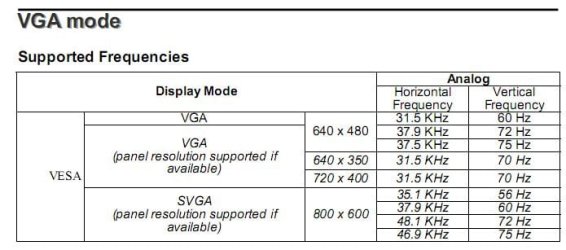
Only reason I can see for it running at 1024x768 to begin with is that it isn't being detected properly, so 1280x1024 is out of the question. Might be a good idea to revisit the user's manual for it. If you don't have it any more a pdf version can be found here, Digimate 20" LCD TV Model DGL20 User's Manual | ManualsOnline | My System Specs | | System Manufacturer/Model Number Me OS Win 7 Ultimate x64 CPU Phenom II x4 955 @ 4 GHz. Motherboard Asus M5A97 EVO Memory 2x2 GB Kingston HyperX DDR3 1600 Graphics Card Sapphire HD 6850 Sound Card Xonar DGX w/ Logitech X-530 Monitor(s) Displays Acer S232HL Abid Screen Resolution 1920x1080 Keyboard Logitech Wave Mouse Logitech G5 v2 PSU Antec Earthwatts 650W Green Case Antec Three Hundred Cooling Cooler Master 212 EVO Hard Drives 120 GB OCZ Vertex 3
500 GB Seagate 7200.12 Internet Speed 24000/1000 |
20 Dec 2009
|
#6 | | |

Quote: Originally Posted by stormy13 
Quote: Originally Posted by j0ckinjz The monitor is a Digimate DGL20 You realize that is a TV and not a monitor? Quote: Digitmate 20-inch TFT-LCD TV Brilliant in both design and performance, the Digitmate 20-inch TFT-LCD TV elevates viewing to an art form with its rich colors and captivating contrasts. This masterfully crafted television boasts 640 x 480 resolution, 0.63 dot pitch, 4:3 aspect ratio, 500:1 contrast and 450 nit brightness to create strikingly realistic images you will savor for years to come. The Digitmate DGL20 features built-in speakers, S-Video in, and full-function remote. Digimate DGL20 20" LCD TV - DGL20 Review
Only reason I can see for it running at 1024x768 to begin with is that it isn't being detected properly, so 1280x1024 is out of the question. Might be a good idea to revisit the user's manual for it. If you don't have it any more a pdf version can be found here, Digimate 20" LCD TV Model DGL20 User's Manual | ManualsOnline It's a multi-function tv so it has a d-sub port.
I just thought that maybe there was a way to upscale the resolution so it would match my main monitor. | My System Specs | | System Manufacturer/Model Number Dell XPS OS Windows 7 CPU Pentium 4 3.2ghz Memory 2.75gb Graphics Card Radeon 9800 Pro Sound Card Creative SB audigy 2 Monitor(s) Displays Dell 1702Fp, Digimate DGL20 |
20 Dec 2009
|
#7 | | Win 7 Ultimate x64 Etobicoke, Ontario |
Quote: It's a multi-function tv so it has a d-sub port. Doesn't mean much, more for ease of connectivity than anything. Also after reading that manual I'm surprised that it is running at 1024x768 (page 23), Quote: I just thought that maybe there was a way to upscale the resolution so it would match my main monitor. No there isn't, not unless you like seeing nothing but "out of range" messages. | My System Specs | | System Manufacturer/Model Number Me OS Win 7 Ultimate x64 CPU Phenom II x4 955 @ 4 GHz. Motherboard Asus M5A97 EVO Memory 2x2 GB Kingston HyperX DDR3 1600 Graphics Card Sapphire HD 6850 Sound Card Xonar DGX w/ Logitech X-530 Monitor(s) Displays Acer S232HL Abid Screen Resolution 1920x1080 Keyboard Logitech Wave Mouse Logitech G5 v2 PSU Antec Earthwatts 650W Green Case Antec Three Hundred Cooling Cooler Master 212 EVO Hard Drives 120 GB OCZ Vertex 3
500 GB Seagate 7200.12 Internet Speed 24000/1000 2nd monitor max resolution at 1024x768 problems? All times are GMT -5. The time now is 10:51 PM. | |