| Windows 7: Pictures look bad on one computer and not the other |
27 Dec 2009
|
| | |
Pictures look bad on one computer and not the other My desktop computer (windows 7) shows some pictures (generally photos with a lot of white or bright parts in them) really badly, its like theyre 256 colors or something like that. I thought all my photos had been saved wrong or something then i looked at them on my laptop (vista) and they were all ok. Ive tried viewing them in several diff programs and they all look the same.
I updated my monitor driver and my video card driver, im not sure what else to do! I dont know if its the OS, the video card or the monitor (or something else??) I installed windows 7 recently (2 months ago i guess) and i hadnt looked over the pics til now so i dont know if its been like this the whole time or if its a new problem. Same problem with viewing these same pics on the internet (had some saved to my myspace page - they look fine on my laptop and wrong with this desktop) so im sure its not the way they were transferred to this computer, its definitely a viewing problem.
video card: radeon 4870
monitor: viewsonic vx2235wm | My System Specs |
| OS Win7 CPU i5 750 Motherboard gigabyte Memory 4gig Graphics Card radeon 4870 Sound Card on board Screen Resolution 1680x1050 Keyboard logitech g19 Mouse New one incoming PSU 750w Case NZXT Tempest Hard Drives 750gig and a 320gig Internet Speed faaaaaaaaast |
27 Dec 2009
|
| | Windows 7 Ultimate x64 Service Pack 1 10,506 posts Doncaster, UK |
Do other images, such as desktop backgrounds, look in a similar way? Check your colour depth and screen resolution settings - these should be set to 32-bit and the monitor's native resolution respectively. | My System Specs | | Computer type PC/Desktop System Manufacturer/Model Number Dwarf Dwf/11/2012 OS Windows 7 Ultimate x64 Service Pack 1 CPU Intel Core-i5-3570K 4-core @ 3.4GHz (Ivy Bridge) (OC 4.2GHz) Motherboard ASRock Z77 Extreme4-M Memory 4 x 4GB DDR3-1600 Corsair Vengeance CMZ8GX3M2A1600C9B (16GB) Graphics Card 2 x AMD Radeon HD7770 1GB CrossFired (OC 1100MHz/1250MHz) Sound Card Realtek High Definition on board solution (ALC 898) Monitor(s) Displays ViewSonic VA1912w Widescreen (VGA) Screen Resolution 1440x900 Keyboard Microsoft Comfort Curve Keyboard 3000 (USB) Mouse Microsoft Comfort Mouse 3000 for Business (USB) PSU XFX Pro Series 850W Semi-Modular Case Gigabyte IF233 Cooling 1 x 120mm Front Inlet 1 x 120mm Rear Exhaust Hard Drives OCZ Agility 3 SSD 120GB SATA III x2 (RAID 0)
Samsung HD501LJ 500GB SATA II x2
Hitachi HDS721010CLA332 1TB SATA II
Iomega 1.5TB Ext USB 2.0
WD 2.0TB Ext USB 3.0 Internet Speed NetGear DG834Gv3 ADSL Modem/Router (Ethernet) ~4.0 Mb/s (O2) Antivirus Avast! 8.0.1483 Browser IE 9 Other Info Optical Drive: HL-DT-ST BD-RE BH10LS30 SATA Bluray
Lexmark S305 Printer/Scanner/Copier (USB)
CTF-430 Tablet & Pen
WEI Score: 7.7/7.9/7.4/7.4/7.9
Asus Eee PC 1011PX Netbook (Windows 7 x86 Starter) |
27 Dec 2009
|
| | |
its set to 32 bit, and most images look fine, it only shows up with bright/white photos. | My System Specs | | OS Win7 CPU i5 750 Motherboard gigabyte Memory 4gig Graphics Card radeon 4870 Sound Card on board Screen Resolution 1680x1050 Keyboard logitech g19 Mouse New one incoming PSU 750w Case NZXT Tempest Hard Drives 750gig and a 320gig Internet Speed faaaaaaaaast |
27 Dec 2009
|
| | Windows 7 Ultimate x64 Service Pack 1 10,506 posts Doncaster, UK |
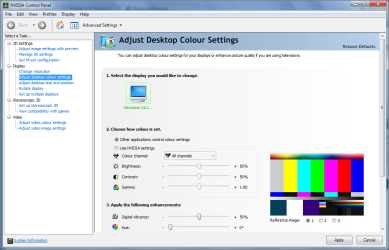
OK. Have a look in the control panel (mine is obviously NVidia, but yours should be similar). Try adjusting the settings to see if that helps. 
You could also try Display Color Calibration | My System Specs | | Computer type PC/Desktop System Manufacturer/Model Number Dwarf Dwf/11/2012 OS Windows 7 Ultimate x64 Service Pack 1 CPU Intel Core-i5-3570K 4-core @ 3.4GHz (Ivy Bridge) (OC 4.2GHz) Motherboard ASRock Z77 Extreme4-M Memory 4 x 4GB DDR3-1600 Corsair Vengeance CMZ8GX3M2A1600C9B (16GB) Graphics Card 2 x AMD Radeon HD7770 1GB CrossFired (OC 1100MHz/1250MHz) Sound Card Realtek High Definition on board solution (ALC 898) Monitor(s) Displays ViewSonic VA1912w Widescreen (VGA) Screen Resolution 1440x900 Keyboard Microsoft Comfort Curve Keyboard 3000 (USB) Mouse Microsoft Comfort Mouse 3000 for Business (USB) PSU XFX Pro Series 850W Semi-Modular Case Gigabyte IF233 Cooling 1 x 120mm Front Inlet 1 x 120mm Rear Exhaust Hard Drives OCZ Agility 3 SSD 120GB SATA III x2 (RAID 0)
Samsung HD501LJ 500GB SATA II x2
Hitachi HDS721010CLA332 1TB SATA II
Iomega 1.5TB Ext USB 2.0
WD 2.0TB Ext USB 3.0 Internet Speed NetGear DG834Gv3 ADSL Modem/Router (Ethernet) ~4.0 Mb/s (O2) Antivirus Avast! 8.0.1483 Browser IE 9 Other Info Optical Drive: HL-DT-ST BD-RE BH10LS30 SATA Bluray
Lexmark S305 Printer/Scanner/Copier (USB)
CTF-430 Tablet & Pen
WEI Score: 7.7/7.9/7.4/7.4/7.9
Asus Eee PC 1011PX Netbook (Windows 7 x86 Starter) |
27 Dec 2009
|
| | |
all the settings were already the same as yours ): | My System Specs | | OS Win7 CPU i5 750 Motherboard gigabyte Memory 4gig Graphics Card radeon 4870 Sound Card on board Screen Resolution 1680x1050 Keyboard logitech g19 Mouse New one incoming PSU 750w Case NZXT Tempest Hard Drives 750gig and a 320gig Internet Speed faaaaaaaaast |
27 Dec 2009
|
| | Windows 7 Home Premium 32 posts Dubai, UAE |
Excuse me if i had missed this, but, is it just with specific pictures or the whole screen, like anything bright on the monitor?
Awaiting response | My System Specs | | System Manufacturer/Model Number Custom Build OS Windows 7 Home Premium Memory 4GB RAM Graphics Card nVidia Geforce 9500 GT - 2541mb Sound Card Realtek High Defenition Audio Monitor(s) Displays SAMSUNG 20" Screen Resolution 1600x900 Keyboard Genius Mouse Samsung Hard Drives C:\ 468 GB
D:\ 462 GB Internet Speed 8 Mbits |
27 Dec 2009
|
| | |
yes it does happen with anything bright, but its not quite as noticeable as it is in the photos, i dont know why
to clarify, i notice it in other pictures on the internet, not just ones that belong to me, but this here text box is white, and seems to display no problems, its only noticeable along the gradient if you know what i mean, its like the colors dont blend well, im going to arrange some pics to show what i mean! | My System Specs | | OS Win7 CPU i5 750 Motherboard gigabyte Memory 4gig Graphics Card radeon 4870 Sound Card on board Screen Resolution 1680x1050 Keyboard logitech g19 Mouse New one incoming PSU 750w Case NZXT Tempest Hard Drives 750gig and a 320gig Internet Speed faaaaaaaaast |
27 Dec 2009
|
| | Windows 7 Home Premium 32 posts Dubai, UAE |
I use a fairly old Graphic Card, nVidia Geforce Fx 5500, when i got Windows 7 and downloaded the driver update I had the same problem, what i did was reduce the Screen Refresh Rate from 75 to 60 and the screen looked regular again, maybe you can try that?
Here are the steps:
-Right Click on the Desktop and Choose Screen Resolution.
-Click on Advanced Settings.
-Click on the Monitor Tab
-Under Screen Refresh Rate change the number to 60
Please remember these steps though so in case it does not help you would be able to go to your older settings.
Hope it all works out for you!
-Ray95 | My System Specs | | System Manufacturer/Model Number Custom Build OS Windows 7 Home Premium Memory 4GB RAM Graphics Card nVidia Geforce 9500 GT - 2541mb Sound Card Realtek High Defenition Audio Monitor(s) Displays SAMSUNG 20" Screen Resolution 1600x900 Keyboard Genius Mouse Samsung Hard Drives C:\ 468 GB
D:\ 462 GB Internet Speed 8 Mbits |
27 Dec 2009
|
| | |
i tried to change it, the only options were 59hz and 60 hz. it was on 59, i changed it to 60, it made no diff, i went back to check i did it correctly and it was on 59 again! i made sure to choose apply before choOsing 'ok' this time. But it still went back to 59! craziness!
im also having a hard time getting a pic to show, i can get a pic that looks bad to me but i know it will look fine to you, so i was going to take a screenshot to show what it looked like to me, but when i saved the screenshot and viewed it on my laptop it looked fine too! I dont know what else i can do lol, but but in case it helps to understand, all the photo looks normal, but the bright spots on the face from the flash are WAAAAY too bright, they stand out as being very abnormal, whiter than paper on otherwise tan skin.
But like i said, its not just pictures of people that are like this. | My System Specs | | OS Win7 CPU i5 750 Motherboard gigabyte Memory 4gig Graphics Card radeon 4870 Sound Card on board Screen Resolution 1680x1050 Keyboard logitech g19 Mouse New one incoming PSU 750w Case NZXT Tempest Hard Drives 750gig and a 320gig Internet Speed faaaaaaaaast |
27 Dec 2009
|
| | Windows 7 Home Premium 32 posts Dubai, UAE |
It could be with the settings of your Monitor, are you using a laptop or a desktop computer? as a desktop you might have to change the brightness option through the buttons on the screen itself, and i understand what you mean about the pictures, and it also points towards having a problem with the screen, cause taking a screenshot is operated throughout the computer of what it thinks its displaying, but if its not showing correctly that means the screen has something wrong.
So see if adjusting any of the monitor settings would help. Edit: There could also be an "Auto" button on your screen, try clicking that, its supposed to adjust the screen automatically to make it fit.
-Ray95 | My System Specs | | System Manufacturer/Model Number Custom Build OS Windows 7 Home Premium Memory 4GB RAM Graphics Card nVidia Geforce 9500 GT - 2541mb Sound Card Realtek High Defenition Audio Monitor(s) Displays SAMSUNG 20" Screen Resolution 1600x900 Keyboard Genius Mouse Samsung Hard Drives C:\ 468 GB
D:\ 462 GB Internet Speed 8 Mbits Pictures look bad on one computer and not the other problems? All times are GMT -5. The time now is 05:31 PM. | |