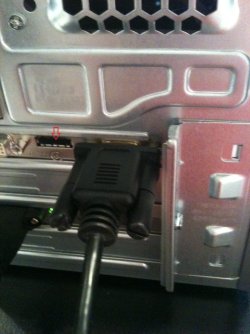
You have to choose one or the other but not both. HDMI invariably will not function if RGB connections are used simultaneously. Depending on your graphics card you may not have audio throughput in your HDMI so you will then need to connect audio separately.
Also in order to see a picture at all on your TV you will then have to call up your PC graphics card's control panel and set it to the multi-display mode, then choose which display to use or extend the desktop to both. Expect a few problems trying to find the cursor etc. but once it works and you get the hang of it it's easy.
Reboot of both the PC and the TV may be necessary to get this working.
My Computer
At a glance
Win 7 Ult SP1/Win 10 Pro (all x64)Intel® Core™ i7-975 Extreme O/C to 4.02 GHz, ...24GB Corsair Vengeance DDR3 SDRAM at 1600MHz ...1792 MB NVIDIA® GeForce® GTX 295 Dual Core
Computer type
PC/Desktop
Computer Manufacturer/Model Number
Alienware® ALX X58
OS
Win 7 Ult SP1/Win 10 Pro (all x64)
CPU
Intel® Core™ i7-975 Extreme O/C to 4.02 GHz, 8MB Cache
Motherboard
Asus® P6T Deluxe V2 X58 LGA1366
Memory
24GB Corsair Vengeance DDR3 SDRAM at 1600MHz - 6 x 4096MB
Right-click an empty space on your desktop - you should see ATI Radeon Control Center or words to that effect. If you don't then you haven't installed all the latest stuff from ATI. I use nVidia so am only going by memory. The graphics card has to be told that there is another display to power, hence my mentioning the multi-display settings.
HDMI will give you better display quality than RGB.
My Computer
At a glance
Win 7 Ult SP1/Win 10 Pro (all x64)Intel® Core™ i7-975 Extreme O/C to 4.02 GHz, ...24GB Corsair Vengeance DDR3 SDRAM at 1600MHz ...1792 MB NVIDIA® GeForce® GTX 295 Dual Core
Computer type
PC/Desktop
Computer Manufacturer/Model Number
Alienware® ALX X58
OS
Win 7 Ult SP1/Win 10 Pro (all x64)
CPU
Intel® Core™ i7-975 Extreme O/C to 4.02 GHz, 8MB Cache
Motherboard
Asus® P6T Deluxe V2 X58 LGA1366
Memory
24GB Corsair Vengeance DDR3 SDRAM at 1600MHz - 6 x 4096MB