| Windows 7: Screen Flickering!?! |
25 Jan 2010
|
#1 | | windows 7 Ultimate 32bit & 64bit |
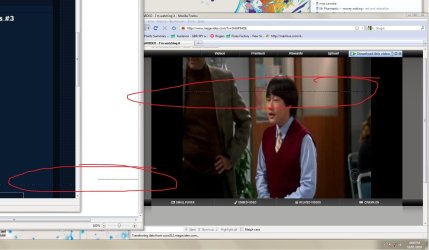
Screen Flickering!?! Hey guys, My screen is flickering. Here is a screencap I took. I have Windows 7 and Xp installed, doesnt do this in Xp, is it video card driver problems? I have a Geforce 7900GT, with a dell 3007fwp monitor.
thank you. | My System Specs |
| System Manufacturer/Model Number Clone OS windows 7 Ultimate 32bit & 64bit CPU athlon 64 3500+ Venice Motherboard Asus A8R-MVP Memory 2x1GB OCZ Gold dual-channel DDR @ 200MHZ 3-3-3-8 Graphics Card xfx 8600 gts Monitor(s) Displays 3007fpw Screen Resolution 2560x1600 PSU Antec Truepower 2.0 380watts (came with case) Case Antec Hard Drives 312.57GB Seagate ST3320620AS
244.20GB Western Digital WDC WD2500KS-00MJB0
488.39GB Western Digital WDC WD5000AAKS-00TMA0 |
25 Jan 2010
|
#2 | | Windows 7 Ultimate x64 SP1 Coimbatore/India Doha/Qatar |
Hi,
Just update your Graphics/video card drivers. It will resolve the issue ! | My System Specs | | System Manufacturer/Model Number Dell Inspiron N5010 OS Windows 7 Ultimate x64 SP1 CPU Intel Core i3 Memory 4 GB DDR3 Screen Resolution 1366 X 768 Hard Drives Seagate 500 GB Internet Speed 4 MBPS |
25 Jan 2010
|
#3 | | Windows 7 ultimate 64 bit / XP Home sp3 Gulf Coast Texas |
A litle help with driver link http://www.nvidia.com/object/win7_wi...6.21_whql.html Please post back with results. Thanks and welcome to seven forums. Fabe | My System Specs | | System Manufacturer/Model Number Self Built OS Windows 7 ultimate 64 bit / XP Home sp3 CPU intel Core 2 Duo E8400 3.0ghz Motherboard Asus P5ND bios 1401 Memory 8 gigs 1066 OCZ Fata1ty Graphics Card EVGA GTX 580 Call of Duty Black Ops Edition Sound Card Creative Soundblaster Audigy 2zs Monitor(s) Displays Asus 24in LCD's 2MS X2 Screen Resolution 1920x1080p @60Hz Keyboard Logitech Bluetooth Wireless MX5000 Mouse Logitech Bluetooth Wireless MX1000 PSU OCZ 700W GameXtreme Case NZXT Apollo Cooling Corsair H50 CPU/120mm x3 /60mm x2 /Corsair Dominator Ram Hard Drives WD Caviar 500 Black/ WD Caviar 200 Blue Internet Speed Download 19.83 Upload 0.97 Other Info Logitech Z2300 Speakers/ Bose Noise Cancelling Headphones/Avermedia PCI-e Hybrid TV Bravo/Epson NX415 all in one/ 4 Port Powered USB Hub/ LG 10x Bluray Burner /TSST Corp DVDRW External |
25 Jan 2010
|
#4 | | windows 7 Ultimate 32bit & 64bit |
Thanks for the replies, tried the drivers from the link, still doing the samething. it comes and goes, but still very annoying, since my job is to look at charts, and its constantly flickering with my graphs. any other suggestions?
thank you. 
Quote: Originally Posted by thefabe A litle help with driver link NVIDIA DRIVERS 196.21 WHQL Please post back with results. Thanks and welcome to seven forums. Fabe | My System Specs | | System Manufacturer/Model Number Clone OS windows 7 Ultimate 32bit & 64bit CPU athlon 64 3500+ Venice Motherboard Asus A8R-MVP Memory 2x1GB OCZ Gold dual-channel DDR @ 200MHZ 3-3-3-8 Graphics Card xfx 8600 gts Monitor(s) Displays 3007fpw Screen Resolution 2560x1600 PSU Antec Truepower 2.0 380watts (came with case) Case Antec Hard Drives 312.57GB Seagate ST3320620AS
244.20GB Western Digital WDC WD2500KS-00MJB0
488.39GB Western Digital WDC WD5000AAKS-00TMA0 |
26 Jan 2010
|
#5 | | Windows 7 Ultimate x64 SP1 Coimbatore/India Doha/Qatar |
OK now, try changing the Monitor refresh rate in the Graphics properties ! | My System Specs | | System Manufacturer/Model Number Dell Inspiron N5010 OS Windows 7 Ultimate x64 SP1 CPU Intel Core i3 Memory 4 GB DDR3 Screen Resolution 1366 X 768 Hard Drives Seagate 500 GB Internet Speed 4 MBPS |
26 Jan 2010
|
#6 | | Windows 7 Ultimate x64 SP1 Coimbatore/India Doha/Qatar |
* Try using digital cables or really good (analog)VGA cables. The digital cables may solve the "flickering screen"
problem.
* Check this link for additional instrucsions: Five tips to fix a screen flicker | My System Specs | | System Manufacturer/Model Number Dell Inspiron N5010 OS Windows 7 Ultimate x64 SP1 CPU Intel Core i3 Memory 4 GB DDR3 Screen Resolution 1366 X 768 Hard Drives Seagate 500 GB Internet Speed 4 MBPS |
26 Jan 2010
|
#7 | | windows 7 Ultimate 32bit & 64bit |
hmm, checked most of those things, secure cable, and power plug, check monitor and videocard settings (60mhz is the only settings available for my monitor). If its not doing it in windows xp, and its doing it in windows 7, wouldn't that mean that its a software, not hardware problem?
Last edited by hastyle; 26 Jan 2010 at 07:18 PM..
| My System Specs | | System Manufacturer/Model Number Clone OS windows 7 Ultimate 32bit & 64bit CPU athlon 64 3500+ Venice Motherboard Asus A8R-MVP Memory 2x1GB OCZ Gold dual-channel DDR @ 200MHZ 3-3-3-8 Graphics Card xfx 8600 gts Monitor(s) Displays 3007fpw Screen Resolution 2560x1600 PSU Antec Truepower 2.0 380watts (came with case) Case Antec Hard Drives 312.57GB Seagate ST3320620AS
244.20GB Western Digital WDC WD2500KS-00MJB0
488.39GB Western Digital WDC WD5000AAKS-00TMA0 |
03 Feb 2010
|
#8 | | Windows 7 Ultimate x64 SP1 Coimbatore/India Doha/Qatar |
Am sorry, that I don't have any further solutions from here.
Lets wait for others to post some solutions | My System Specs | | System Manufacturer/Model Number Dell Inspiron N5010 OS Windows 7 Ultimate x64 SP1 CPU Intel Core i3 Memory 4 GB DDR3 Screen Resolution 1366 X 768 Hard Drives Seagate 500 GB Internet Speed 4 MBPS |
07 Feb 2010
|
#9 | | Windows 7 (Professional 64 bit) |
Screen Flickering!?!* driving me insane I have the same problem - it has been driving me insane. It started as soon as the new computer and monitor arrived. I have tried everything you listed above, plus all suggestions from Dell help desk, microsoft site etc including updating drivers, changing resolution and refresh rate, replacing cable, replacing video card, replacing monitor (twice). Grateful for any help or suggestions as I need to use this damn computer all day everyday for my work. | My System Specs | | OS Windows 7 (Professional 64 bit) CPU i7 Memory 6GB Graphics Card NVIDA GT220 Monitor(s) Displays Dell G2410 Screen Resolution 60 |
07 Feb 2010
|
#10 | | Win7 Enterprise, Win7 x86 (Ult 7600), Win7 x64 Ult 7600, TechNet RTM on AMD x64 (2.8Ghz) SomeWhere in the HOT Arizona Desert ! |

Quote: Originally Posted by kristine I have the same problem - it has been driving me insane. It started as soon as the new computer and monitor arrived. I have tried everything you listed above, plus all suggestions from Dell help desk, microsoft site etc including updating drivers, changing resolution and refresh rate, replacing cable, replacing video card, replacing monitor (twice). Grateful for any help or suggestions as I need to use this damn computer all day everyday for my work.
Hi & Welcome to SevenForums,
Could you please fill in your system hardware specs. And any other details that might be helpful. More than 1 monitor connected, or a TV connected, also ? | My System Specs | | Computer type PC/Desktop System Manufacturer/Model Number Built them myself, Science Experiments ! OS Win7 Enterprise, Win7 x86 (Ult 7600), Win7 x64 Ult 7600, TechNet RTM on AMD x64 (2.8Ghz) CPU AMD fx8350 4ghz, AMD-32 2400mhz, AMD-64 3200mhz, AMDx64 2.8G Motherboard SIS 755, ECS-K8M890M-M (Ult 7600), GigaByte & others Memory 2gb, 4gb on the Ult 7600, 4gb on Technet RTM, 32gb on FX8350 Graphics Card Draw my own Graphics, several nVidia cards Sound Card on motherboard Monitor(s) Displays 19" flat scr, 28" I-Inc widescr,22" Emprex Widescr, 23" Acer Screen Resolution 1280 x 1024, 1440 x 900, 1920 x 1080 Keyboard Compaq & Dell recycled from GoodWill Mouse Made in China Optical Wired Mouse PSU 430w, 550w, 600w, 700, 800, etc Case All Generic Full Towers Cooling Open Air & a few fans, some w/ colored LEDs Hard Drives 6 pata Ide HD's & 2 Sata HD's
added 80gb external on Ult 7600 computer,
numerous extra 1tb, 2TB, 3Tb SATA HD's
A collection of ext HD Docks w/ HDs Internet Speed Fast Cable InterNet Antivirus AVG Free on 24 different Desktops, NO Problems! Browser IE 8 is preferred, but use FireFox sometimes Other Info Linksys Routers, switches, & Hubs
Too Many USB Flash Drives to count, Biggest is 64GB !
Eight computers in my home network.
Sixteen computers at my business network.
Linked via TeamViewer !
Lots of old used spare computer parts everywhere! Screen Flickering!?! problems? All times are GMT -5. The time now is 07:45 AM. | |