|  | | |
09 Feb 2010
|
#1 | | |
vRAM, RAM. Ok, bare with me. New to all this.
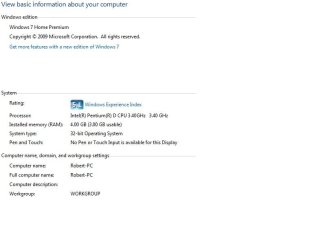
I'll start from begining. 3 1/2 year old comp, never tinkered with the hardware, just software. Until about a week ago. Running Windows 7 32-bit (we recomended for my comp).
Had problem with screen, blue dots, etc. So bought new graphics card (Radeon HD 5770) and fixed the problem. Everything ran fine, all games smooth, etc.
So, after getting my first taste of updating the hardware, decide to upgrade my RAM from 2GB to 4GB.
Bought installed, and bingo, 4GB. (This is where it starts going wrong)
ISSUE 1:
Then tried running some games and it started coming up with, Memory running dangerously low and not starting up. (game in question FM2010).
So checked specs and it says 4GB (3GB Usable). Although i'm concerned about why i can't use all 4GB, my main concern is why games have decided to stop working.
The error message that comes up says it need 1.8GB to run. And i'm wondering how it possibly ran when i had just 2gb.
ISSUE 2:
On another game, it comes up with the error message, The video card does not have the neccessary specs - requires 64mb. Forgiv me if i'm wrong but my nice shiny new Video card has 1GB vRAM, does it not?
So i have a feeling the 2 issues are linked. but i'm not an expert. possibly not able to access my 1gb on G-card so spilling over into my 3gb of usable RAM.
Priority, fixing the issue to be able to run my games again.
Secondary finding a way to get all 4GB running. (been reading some forums and seen tips like upgrade to 7 64-bit, but don't think my comp can handle it, also tips like updating BIOS, but seems needlessly risky - only an option if all else fails) | My System Specs |
| |
09 Feb 2010
|
#2 | | Windows 7 Professional x64 Rednecksville |
I believe it is the fact that you are running a 32-bit OS. I'm not sure of this, but because you have a total of 5GB, and 32-bit can only handle 4GB, that may be why. | My System Specs | | System Manufacturer/Model Number Custom OS Windows 7 Professional x64 CPU Intel i7 2600K OC'd @ 4620 MHz Motherboard Asus P8Z68-V Pro Memory 16GB GSkill Sniper 2133 Mhz (4x4GB) Graphics Card EVGA GeForce GTX 480 SuperClocked+ Sound Card Realtek High Definition Audio Monitor(s) Displays 2x Acer S273HLbmii 27" Screen Resolution 2 x 1920x1080 Keyboard Logitech MK320 (wireless) Mouse Logitech MK320 (wireless) PSU Corsair HW Series 750w (modular) Case Cooler Master HAF 932 Advanced Blue Edition Cooling CM Hyper 212+ CPU cooler, 3x 230mm + 1x 140mm case fans Hard Drives 64GB Crucial M4 SSD
Storage: Hitachi 1TB 5400RPM, Samsung 1.5TB 5400RPM Internet Speed 30 Mb/s : 2 Mb/s |
09 Feb 2010
|
#3 | | Windows 7 Ultimate x86-64 |
1) 32-bit OS cannot access more than 4GB due to address space limitations - you should have gone for x64.
2) Did the RAM you buy match CAS latencies, other timings and speed? Matched set?
3) What game? | My System Specs | | System Manufacturer/Model Number Sony Vaio Z46GDU OS Windows 7 Ultimate x86-64 CPU P9700@2.8GHz 1066MHz FSB Motherboard Sony branded Memory 6GB DDR3 1066MHz Graphics Card 9300M GS 256MB Dedicated (Speed) + Intel4500MHD (Stamina) Sound Card Realtek HD Audio Monitor(s) Displays 13.1' WXGA Screen Resolution 1600x900 Hard Drives 320GB 7200RPM w/ 16MB cache Internet Speed 1MB/s |
10 Feb 2010
|
#4 | | |
reply hi - no the two new 1gb have a different mHz.
and thought that could be the problems... so tried just the 2 old memory stick, and just the two new ones, but same issue persists.
This makes me think that some settings have auto adjusted, and need re-correcting, but what, where and how? | My System Specs | | |
10 Feb 2010
|
#6 | | |
How would i go about installing 64bit Windows 7, from 32bit? | My System Specs | | |
10 Feb 2010
|
#7 | | Windows 7 Professional x64 Rednecksville |
You will need to reinstall Windows. Find a friend with a 64-bit disc, or call Microsoft, and they may ship you a DVD.
You product key can still be used to activate it. | My System Specs | | System Manufacturer/Model Number Custom OS Windows 7 Professional x64 CPU Intel i7 2600K OC'd @ 4620 MHz Motherboard Asus P8Z68-V Pro Memory 16GB GSkill Sniper 2133 Mhz (4x4GB) Graphics Card EVGA GeForce GTX 480 SuperClocked+ Sound Card Realtek High Definition Audio Monitor(s) Displays 2x Acer S273HLbmii 27" Screen Resolution 2 x 1920x1080 Keyboard Logitech MK320 (wireless) Mouse Logitech MK320 (wireless) PSU Corsair HW Series 750w (modular) Case Cooler Master HAF 932 Advanced Blue Edition Cooling CM Hyper 212+ CPU cooler, 3x 230mm + 1x 140mm case fans Hard Drives 64GB Crucial M4 SSD
Storage: Hitachi 1TB 5400RPM, Samsung 1.5TB 5400RPM Internet Speed 30 Mb/s : 2 Mb/s |
10 Feb 2010
|
#8 | | Windows 7 Ultimate x64 Service Pack 1 Doncaster, UK |
First of all, we need some specs of your system, in particular the make and model number of your motherboard and which processor you have installed. | My System Specs | | System Manufacturer/Model Number Dwarf Dwf/11/2012 OS Windows 7 Ultimate x64 Service Pack 1 CPU Intel Core-i5-3570K 4-core @ 3.4GHz (Ivy Bridge) (OC 4.2GHz) Motherboard ASRock Z77 Extreme4-M Memory 4 x 4GB DDR3-1600 Corsair Vengeance CMZ8GX3M2A1600C9B (16GB) Graphics Card 2 x AMD Radeon HD7770 1GB CrossFired (OC 1100MHz/1250MHz) Sound Card Realtek High Definition on board solution (ALC 898) Monitor(s) Displays ViewSonic VA1912w Widescreen (VGA) Screen Resolution 1440x900 Keyboard Microsoft Comfort Curve Keyboard 3000 (USB) Mouse Microsoft Comfort Mouse 3000 for Business (USB) PSU XFX Pro Series 850W Semi-Modular Case Gigabyte IF233 Cooling 1 x 120mm Front Inlet 1 x 120mm Rear Exhaust Hard Drives OCZ Agility 3 SSD 120GB SATA III x2 (RAID 0)
Samsung HD501LJ 500GB SATA II x2
Hitachi HDS721010CLA332 1TB SATA II
Iomega 1.5TB Ext USB 2.0
WD 2.0TB Ext USB 3.0 Internet Speed NetGear DG834Gv3 ADSL Modem/Router (Ethernet) ~4.0 Mb/s (O2) Antivirus Avast! 7.0.1474 Browser IE 9 Other Info Optical Drive: HL-DT-ST BD-RE BH10LS30 SATA Bluray
Lexmark S305 Printer/Scanner/Copier (USB)
CTF-430 Tablet & Pen
WEI Score: 7.7/7.9/7.4/7.4/7.9
Asus Eee PC 1011PX Netbook (Windows 7 x86 Starter) |
10 Feb 2010
|
#9 | | Windows 7 Ultimate x86-64 |

Quote: Originally Posted by robertcarringto hi - no the two new 1gb have a different mHz.
and thought that could be the problems... so tried just the 2 old memory stick, and just the two new ones, but same issue persists.
This makes me think that some settings have auto adjusted, and need re-correcting, but what, where and how? That's the issue, try the 2 sticks and only the 2 sticks and then see if that works - new memory should be the same brand, same CAS latencies, same speed. same type. | My System Specs | | System Manufacturer/Model Number Sony Vaio Z46GDU OS Windows 7 Ultimate x86-64 CPU P9700@2.8GHz 1066MHz FSB Motherboard Sony branded Memory 6GB DDR3 1066MHz Graphics Card 9300M GS 256MB Dedicated (Speed) + Intel4500MHD (Stamina) Sound Card Realtek HD Audio Monitor(s) Displays 13.1' WXGA Screen Resolution 1600x900 Hard Drives 320GB 7200RPM w/ 16MB cache Internet Speed 1MB/s |
10 Feb 2010
|
#10 | | |
As others have said, a 32-bit OS can only address 4GB of RAM total. That takes into account your video card...which has 1GB. So, that is why you have 3GB usable of your system RAM. | My System Specs | | System Manufacturer/Model Number Self-Built in July 2009 OS Windows 7 Ultimate x64 CPU Intel Q9550 2.83Ghz OC'd to 3.40Ghz Motherboard Gigabyte GA-EP45-UD3R rev. 1.1, F12 BIOS Memory 8GB G.Skill PI DDR2-800, 4-4-4-12 timings Graphics Card EVGA 1280MB Nvidia GeForce GTX570 Sound Card Realtek ALC899A 8 channel onboard audio Monitor(s) Displays 23" Acer x233H Screen Resolution 1920x1080 Keyboard ABS M1 Mechanical Mouse Logitech G9 Laser Mouse PSU Corsair 620HX modular Case Antec P182 Cooling stock Hard Drives Intel X25-M 80GB Gen 2 SSD
Western Digital 1TB Caviar Black, 32MB cache. WD1001FALS Internet Speed 15/2 cable modem Other Info Windows and Linux enthusiast. Logitech G35 Headset. All times are GMT -5. The time now is 02:55 PM. | |