Windows 7 Forums


Windows 7: dual screens with different resolution

29 Mar 2010  
JM123

Windows 7 Ultimate 64x
3 posts
 
 
dual screens with different resolution

I have windows 7 ultimate 64x with 2 screens. Is it possible to set each screen t o have its own display resolution when they are Mirrored? The screens are not the same and (one is a basic dell flat screen, and one is my hd 52" tv) and i prefer not to use the extend screen choice, but i rather would like to just mirror them but have 800x600 on one, and 1024x768 on the other (just for example). When i watch dvd movies, the entire hd tv is not using the full screen and only shows as a sqware instead of wide screen. I use to have this working before, but not sure how i did it, and i just reinstalled windows 7.

Possible?, and how (i could not see how to do this)?
thanks.

My System SpecsSystem Spec

29 Mar 2010  
Maxheadroom

windows 7 64bit build 7600
224 posts


hi JM123 i use DisplayFusion: Multi-Monitor Taskbar and Desktop Wallpaper|Binary Fortress Software
i have 2 monitors and a 50" plasma
the 2 monitors are different res and its not a problem
with my ati card i set up a short cut profile for a main monitor and tv setup 1 click and its done.

if they are mirrored im not sure but still worth a look m8
My System SpecsSystem Spec
29 Mar 2010  
Bare Foot Kid

W 7 64-bit Ultimate
24,328 posts
The Lowcountry


Hello JM123, welcome to Seven Forums!


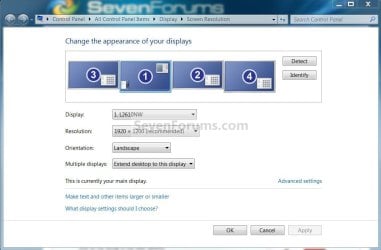
Right click an empty spot on the desktop and select screen resolution, select the resolution for the monitor of your choosing in the window that opens.

dual screens with different resolution-monitors.jpg
My System SpecsSystem Spec
.


29 Mar 2010  
JM123

Windows 7 Ultimate 64x
3 posts


Quote   Quote: Originally Posted by Bare Foot Kid View Post
Hello JM123, welcome to Seven Forums!


Right click an empty spot on the desktop and select screen resolution, select the resolution for the monitor of your choosing in the window that opens.

Attachment 63818
i am not in a place to test this, but i don't think you get this option when they are mirrored and not extended like you have in the picture. When they are mirrored i only see the option (last time i tried) to adjust the size that is compatible with both screens which is the max size of my dell. I will double check tonight though.
My System SpecsSystem Spec
29 Mar 2010  
Kari

Windows 7 x64 Ultimate
12,754 posts
A Finnish immigrant in Leipzig, Germany


Quote   Quote: Originally Posted by JM123 View Post
Quote   Quote: Originally Posted by Bare Foot Kid View Post
Hello JM123, welcome to Seven Forums!


Right click an empty spot on the desktop and select screen resolution, select the resolution for the monitor of your choosing in the window that opens.

Attachment 63818
i am not in a place to test this, but i don't think you get this option when they are mirrored and not extended like you have in the picture. When they are mirrored i only see the option (last time i tried) to adjust the size that is compatible with both screens which is the max size of my dell. I will double check tonight though.
That is true. Without third party applications duplicated screens have the same resolution. Max resolution is then the max resolution of the display that has smaller max resolution.
My System SpecsSystem Spec
29 Mar 2010  
Bare Foot Kid

W 7 64-bit Ultimate
24,328 posts
The Lowcountry


Quote   Quote: Originally Posted by JM123 View Post
Quote   Quote: Originally Posted by Bare Foot Kid View Post
Hello JM123, welcome to Seven Forums!


Right click an empty spot on the desktop and select screen resolution, select the resolution for the monitor of your choosing in the window that opens.

Attachment 63818
i am not in a place to test this, but i don't think you get this option when they are mirrored and not extended like you have in the picture. When they are mirrored i only see the option (last time i tried) to adjust the size that is compatible with both screens which is the max size of my dell. I will double check tonight though.

My apologies, I wasn't sure if that's what you meant; maybe the suggestion by Maxheadroom above is your best bet, I think DisplayFusion is only like $15.00 USD for a basic sub, I fooled around with it briefly once.
My System SpecsSystem Spec
29 Mar 2010  
zzz2496

Windows7 Ultimate 64bit
1,364 posts


"Mirror" = same resolutions on both screens, you can't have "mirror" at different resolutions. If you want to make the TV one show as full screen image on TV, if you have NVIDIA card, you can set it up in "NVIDIA control panel" -> "Adjust desktop size and position" (provided that you're using a digital connection, either HDMI/DVI/DP). I don't know how to set it as such on an ATi card, so I don't know. Other than that, I don't think other manufacturer has the display setup flexibility of NVIDIA's driver.

zzz2496
My System SpecsSystem Spec
Reply

 dual screens with different resolution problems?


Thread Tools


Similar help and support threads for: dual screens with different resolution
Thread Forum
Can't use DVI while Dual Screens Are Working Hardware & Devices
Different Windows 7 Boot Screens due to Resolution? General Discussion
Dual Screens. Hardware & Devices
Some Help With Dual Screens General Discussion
7 RC MC Crashing on Dual Screens Media Center


All times are GMT -5. The time now is 04:45 PM.


Windows 7 Forums is an independent web site and has not been authorized,
sponsored, or otherwise approved by Microsoft Corporation.
"Windows 7" and related materials are trademarks of Microsoft Corp.
© Designer Media Ltd