Windows 7 Forums Search
Welcome to Windows 7 Forums. Our forum is dedicated to helping you find solutions with any problems, errors or issues you are experiencing with Windows 7. The Windows 7 forum also covers news and updates and has an extensive Windows 7 tutorial section that covers a wide range of tips and tricks.


Windows 7 - Help: How do I determine my graphics card?

 
04-08-2010   #1


Windows 7


Help: How do I determine my graphics card?

I wasn't expecting this to be such a problem, or I would have checked beforehand, but I just upgraded to windows 7 from vista. I need to change the drivers from the stock VGA adapter to my GPU. However I'm having difficulty, because I can't remember what my card is except that it's nVidia. I'm positive it's either an nForce or Quadro. However, I can't check my system because my it comes up as the windows 7 VGA adapter. It also appears that many people are having problems updating their driver from the default, so I have no way of knowing if my driver won't update or if I have the wrong driver. Just wondering if anyone has any thoughts.

My System SpecsSystem Spec
04-08-2010   #2


Windows 7 Pro 64 SP1


Welcome to the forum,
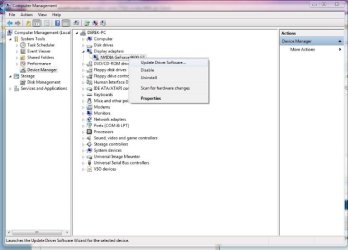
Go to device manager, look under display adapter. right click, update driver.

You could also try the automatic search on this page,

http://www.nvidia.com/Download/index5.aspx?lang=en-us
Attached Thumbnails
Help: How do I determine my graphics card?-device.jpg  
My System SpecsSystem Spec
04-08-2010   #3


Windows 7 Enterprise x64 Service Pack 1


The best thing to do is simply go to Dell's website and search for your laptop model. I had a quick look and there's 3 options of graphic cards your laptop comes with: Nvidia Quadro 140M, Nvidia Quadro 135M or Intel Graphic Accelerator X3100.

As you're sure you have an Nvidia, it'll be one of the Quadros. If you want to know exactly you could download a program like Speccy and see if that tells you exactly, but you could also just go to Nvidia's website and download the drivers for Quadro netbook NVS series. The drivers for the 140M should also cover the 135M graphic card.

Or you could just update it through Windows, go to device manager and right click on the VGA adapter and go to properties then update.
My System SpecsSystem Spec
.


04-08-2010   #4


Windows 7 Home Premium 64bit


GPU-Z Video card GPU Information Utility
try that link works great no install required.
My System SpecsSystem Spec
04-08-2010   #5


Windows 7 Enterprise x64 Service Pack 1


Quote   Quote: Originally Posted by rvbfan View Post
GPU-Z Video card GPU Information Utility
try that link works great no install required.
Good idea. Forgot about GPU-Z.
My System SpecsSystem Spec
04-08-2010   #6


Windows 7 Ultimate 64bit


u can use speccy to check system info Speccy - System Information - Free Download
My System SpecsSystem Spec
Reply

 Help: How do I determine my graphics card? problems?


Thread Tools


Similar Threads for: Help: How do I determine my graphics card?
Thread Forum
play high graphics games without graphics card Gaming
Solved New graphics card - low graphics memory ? Graphic Cards
Graphics Card/Onboard Graphics for Media Centre PC Graphic Cards
Graphics Card - Install New Card Tutorials


All times are GMT -5. The time now is 08:04 AM.


Windows 7 Forums is an independent web site and has not been authorized,
sponsored, or otherwise approved by Microsoft Corporation.
"Windows 7" and related materials are trademarks of Microsoft Corp.
© Designer Media Ltd
  

1 2 3 4 5 6 7 8 9 10 11 12 13 14 15 16 17 18 19 20 21 22 23 24 25 26 27 28 29 30