Windows 7 Forums Search
Welcome to Windows 7 Forums. Our forum is dedicated to helping you find solutions with any problems, errors or issues you are experiencing with Windows 7. The Windows 7 forum also covers news and updates and has an extensive Windows 7 tutorial section that covers a wide range of tips and tricks.


Windows 7 - Nvidia Geforce GT 325M graphics card is not detected

 
04-18-2010   #1


Windows 7 ultimate 32 bit


Nvidia Geforce GT 325M graphics card is not detected

I have the Asus-N61JV notebook with Nvidia Geforce GT 325M grpahics card on Windows 7 32 bit. I downloaded the version 197.16 driver from Nvidia. By default my notebook detects the driver as standard VGA graphics adapter. The Chip type is detected as “Intel(R)Ironlake Mobile Graphics ChipSet”. Now when I follow the manual driver installation the message I am receiving is “Installing this device is not recommended because Windows cannot verify that iy is compatible with your hardware…. ” , I thought of ignoring this message and proceed with the installation but then paused to check if any one else is facing the same problem. Any idea?

My System SpecsSystem Spec
04-18-2010   #2


Windows 7 Ultimate x64


Well, if you want to install the latest driver for this graphic card, you can find it here.

NVIDIA DRIVERS 197.16 WHQL

Or you can try the one available on the Asus website.

It should work just fine either way, despite the message.
My System SpecsSystem Spec
04-18-2010   #3


Windows 7 ultimate 32 bit


Well as I mentioned in my original post I have downloaded the latest driver from Nvidia website. I have ignored the message and the Nvidia Geforce GT 325M is installed.
But when I go to
Control Panel--> Display--> Change Display Settings and then Click on the Advanced Settings link a Window Opened with the title "(Default Monitor) and Properties". There is an Adapter Tab in there which I assume should list the details of the graphics card.
Here it is showing nothing i.e

Chip type: "Unavailable"
Total Available Graphics Memory: "Unavailable" etc.

Is this how it supposed to show ?
My System SpecsSystem Spec
.


04-18-2010   #4


Windows 7 Ultimate x64


Well, with my card, it does show all the information. Try running the WEI to see if that helps your computer recognize the card.
My System SpecsSystem Spec
04-18-2010   #5


Windows 7 ultimate 32 bit


This is interesting, even though the driver installation was successful when i shut down the computer and start it again it showed the message that "standard VGA graphics adapter" is installed successfully and it replace the Nvidia driver. So I updated the driver files once again and the Nvidia came back. On a test basis when i shut down the computer and start it again the "standard vga graphics adapter" took over once again. In Device manager I can see two Display adapters are listed:
1. Standard VGA graphics adapter
2. Nvidia Geforce GT 325M

As FYI: I ran the WEI but it reported an error and couldn't complete it.
My System SpecsSystem Spec
04-18-2010   #6


Windows 7 Ultimate x64


Well, if you can get it to work, you can force Windows to stop auto installing the automatic drivers. Though I suggest installing the ASUS driver versions first to see if that works more properly. There may be something that they did to modify the graphics that makes them not fully compatible with the Nvidia drivers.
My System SpecsSystem Spec
04-18-2010   #7


Win 7 Ultimate x64


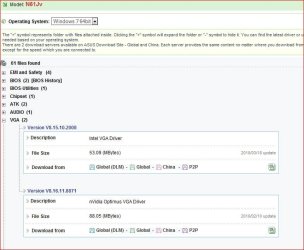
You install both the Intel and Nvidia video drivers?

Nvidia Geforce GT 325M graphics card is not detected-asuslappy.jpg

The Intel driver is for the GPU integrated into the CPU. As to how it switches between the two (automatically or by a setting in the display controls) I can't tell you as what passes for a manual for that model at the moment leaves a lot to be desired (as in totally useless).
My System SpecsSystem Spec
04-18-2010   #8


Windows 7 ultimate 32 bit


@Zen00: From Nvidia I have found a display driver which says will support my specific model of notebook.
Nvidia link: NVIDIA DRIVERS 189.42

I will start with that to see if it works. Also downloaded the Asus supported driver from the Asus support site.

Asus Link : http://support.asus.com/download/Dow...Language=en-us

@Stormy13: NO I didn't install both the drivers. By default my notebook detects the Intel driver. I removed and try to install the Nvidia driver which was installed. But if I Shutdown the notebook and then start it after a while the notebook once again automatically detect the intel driver.

Last edited by satyr; 04-19-2010 at 12:21 AM..
My System SpecsSystem Spec
04-19-2010   #9


Win 7 Ultimate x64


The "Standard VGA graphics adapter" says to me that while it may be detected the driver for the Intel video isn't installed, which unlike onboard video is integrated into the CPU.
My System SpecsSystem Spec
04-19-2010   #10


Windows 7 ultimate 32 bit


Ok, so I tried both the drivers

1. The Nvidia Recommended from the NVIDIA link
2. The Asus Recommended from the Asus Support link

Result: Unsurprisingly same. It does install the NVIDIA GT325 card, showed it into the device list but doesn't show the specification in the "Adapter details" page.

I ran the WEI but it cannot complete the process and throws an error.

I have a feeling there could be a fault in the hardware that came with my laptop.
My System SpecsSystem Spec
Reply

 Nvidia Geforce GT 325M graphics card is not detected problems?


Thread Tools


Similar Threads for: Nvidia Geforce GT 325M graphics card is not detected
Thread Forum
Nvidia geforce 240 gts graphics card issue Graphic Cards
New Graphics Card Nvidia Geforce GTX 460 has disabled my sound. Graphic Cards
Solved MSI Nvidia GeForce GTS 450 graphics card Graphic Cards
Nvidia Graphics Card Not Being Detected Graphic Cards
Problem with updating Nvidia Geforce 8400M GT graphics card Graphic Cards


All times are GMT -5. The time now is 08:05 AM.


Windows 7 Forums is an independent web site and has not been authorized,
sponsored, or otherwise approved by Microsoft Corporation.
"Windows 7" and related materials are trademarks of Microsoft Corp.
© Designer Media Ltd
  

1 2 3 4 5 6 7 8 9 10 11 12 13 14 15 16 17 18 19 20 21 22 23 24 25 26 27 28 29 30