| Windows 7: Nvidia Geforce 9600+ 1GB issue!!! Please help. |
23 May 2010
|
#1 | | |
Nvidia Geforce 9600+ 1GB issue!!! Please help. | My System Specs |
| OS windows 7 home premium |
23 May 2010
|
#2 | | |
You may need to go into the BIOS setup and set it to boot with your pcie slot. If you have your motherboard manual it may be some help.
Look at disabling on-board graphic. | My System Specs | | System Manufacturer/Model Number self built OS windows 7 CPU AMD Motherboard Gagabyte Memory 8 gigs Kinkston hyper x Graphics Card 9800 GTX PSU corsar Hard Drives 80 gig ssd |
23 May 2010
|
#3 | | Windows 7 Ultimate x64. Ellesmere Port, UK. |
Make sure all connections are secure!
Have you installed the latest driver? | My System Specs | | System Manufacturer/Model Number Custom Build. OS Windows 7 Ultimate x64. CPU i5 760 @ 4.2Ghz. 1.18v Motherboard Gigabyte - H55M-USB3 Memory 4g Corsair xms3 ddr3, 1600Mhz. Graphics Card Gigabyte GTX-560Ti soc edition Sound Card Asus Xonar Dx - Logitech Z5500. Monitor(s) Displays Acer 22" LCD Wide screen 1680-1050 -Samsung 42" Plasma.... Screen Resolution 1680/1050 -----1920/1080p. Keyboard Logitech G15-v2 Gaming. Mouse Microsoft Sidewinder X8. PSU XigmaTek 80plus NRP-PC702 - 700w dual 30a. Case Venus Gamers Midi Tower Case with LED Display Cooling Arctic Freezer 7 Pro Rev 2... x2 Arctic F8 case fans........ Hard Drives 2x 2TB Seagate Go Flex,
1x 1TB Seagate,
1x 640WD Black,
x16 Gig sandisc flash drive,
1x8Gig sandisc flash drive. Internet Speed Virgin Media - 50mb down- 8mb up. Other Info x2 Xbox 360 wireless controllers...
Dual layer optical disc drive...
Chrome 79million
A.V = MSE |
23 May 2010
|
#4 | | |
yes i set in bios to lunch graphic card from pci slot. think all cables allright.
could latest drivers affect image while bios is loading, before windows?
is there anything else in bios to set apart of "slot priority"? | My System Specs | | OS windows 7 home premium |
23 May 2010
|
#5 | | Windows 7 Ultimate x64 Service Pack 1 Doncaster, UK |
You could try the other port on the card. Failing that, I would suspect the card itself. Check your BIOS, and ensure that the graphics device is set to Auto. This means that if the sytem detects a graphics card, it will use that, but if not it will default to the on-board.
During the POST phase of a boot, it is the driver that is built-in to the BIOS on the graphics card that provides the display capability. If this is corrupted, then you will have display problems, also it might not relinquish full control to your system after POST thus leading to further display problems once your system has booted up.
Another point. Some cards require an auxiliary power connector. If yours does, have you connected it? | My System Specs | | System Manufacturer/Model Number Dwarf Dwf/11/2012 OS Windows 7 Ultimate x64 Service Pack 1 CPU Intel Core-i5-3570K 4-core @ 3.4GHz (Ivy Bridge) (OC 4.2GHz) Motherboard ASRock Z77 Extreme4-M Memory 4 x 4GB DDR3-1600 Corsair Vengeance CMZ8GX3M2A1600C9B (16GB) Graphics Card 2 x AMD Radeon HD7770 1GB CrossFired (OC 1100MHz/1250MHz) Sound Card Realtek High Definition on board solution (ALC 898) Monitor(s) Displays ViewSonic VA1912w Widescreen (VGA) Screen Resolution 1440x900 Keyboard Microsoft Comfort Curve Keyboard 3000 (USB) Mouse Microsoft Comfort Mouse 3000 for Business (USB) PSU XFX Pro Series 850W Semi-Modular Case Gigabyte IF233 Cooling 1 x 120mm Front Inlet 1 x 120mm Rear Exhaust Hard Drives OCZ Agility 3 SSD 120GB SATA III x2 (RAID 0)
Samsung HD501LJ 500GB SATA II x2
Hitachi HDS721010CLA332 1TB SATA II
Iomega 1.5TB Ext USB 2.0
WD 2.0TB Ext USB 3.0 Internet Speed NetGear DG834Gv3 ADSL Modem/Router (Ethernet) ~4.0 Mb/s (O2) Antivirus Avast! 7.0.1474 Browser IE 9 Other Info Optical Drive: HL-DT-ST BD-RE BH10LS30 SATA Bluray
Lexmark S305 Printer/Scanner/Copier (USB)
CTF-430 Tablet & Pen
WEI Score: 7.7/7.9/7.4/7.4/7.9
Asus Eee PC 1011PX Netbook (Windows 7 x86 Starter) |
23 May 2010
|
#6 | | |

Quote: Originally Posted by Dwarf You could try the other port on the card. Failing that, I would suspect the card itself. Check your BIOS, and ensure that the graphics device is set to Auto. This means that if the sytem detects a graphics card, it will use that, but if not it will default to the on-board.
During the POST phase of a boot, it is the driver that is built-in to the BIOS on the graphics card that provides the display capability. If this is corrupted, then you will have display problems, also it might not relinquish full control to your system after POST thus leading to further display problems once your system has booted up.
Another point. Some cards require an auxiliary power connector. If yours does, have you connected it? Thanks. You would laugh but that card got small cable, its not looking like a power connector, only 2 pins. so assume that everything is connected. will try to a different slot tomorrow. Will post result. Thanks for direction!!! | My System Specs | | OS windows 7 home premium |
23 May 2010
|
#7 | | Win 7 Ultimate x64 Etobicoke, Ontario |
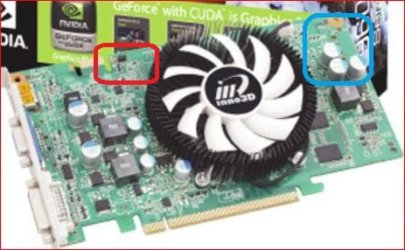
This the card? Nvidia Geforce 9600+ 1GB HDMI Graphics Card : Nvidia PCI Express : Maplin
If so it doesn't have or need an external power connector. Here is a blow up of the card,
If it needed the extra power connector it would be in the blue square, and is quite clearly missing, so no issue there. I assume the 2 pin connector that you are referring too is the one circled in red. If so that is a SPDIF header and you connect a 2 pin SPDIF cable from that to the one on a sound card, and then you can pass audio over the HDMI connection.
As for the problem with the card it is quite possible that it is a dud out of the box. Not unheard of for that sort of thing happening, and not fun when it happens to you.
Another thing about that card, not sure exactly what it is. It may say 9600+ on the box but in going to Inno3D's website I can't find it. Even more confusing about it is the listed specs, if those are correct then I don't know what that card is supposed to be. There is a "green" version of the 9600 GT, Inno3D Unveils Green 9600GT E-Save, GTS 250
One person in the Maplin comments said that it is actually a 9600 GSO, but even then the specs don't match up, Video Card Comparison - GPUReview.com
with either of the two GSO versions.
All things considering it does sound like a dud card, and you would probably be better served returning it for another. | My System Specs | | System Manufacturer/Model Number Me OS Win 7 Ultimate x64 CPU Phenom II x4 955 @ 4 GHz. Motherboard Asus M5A97 EVO Memory 2x2 GB Kingston HyperX DDR3 1600 Graphics Card Sapphire HD 6850 Sound Card Xonar DGX w/ Logitech X-530 Monitor(s) Displays Acer S232HL Abid Screen Resolution 1920x1080 Keyboard Logitech Wave Mouse Logitech G5 v2 PSU Antec Earthwatts 650W Green Case Antec Three Hundred Cooling Cooler Master 212 EVO Hard Drives 120 GB OCZ Vertex 3
500 GB Seagate 7200.12 Internet Speed 24000/1000 |
23 May 2010
|
#8 | | |

Quote: Originally Posted by PavelChehoff P.S. It allright if monitor connected to mobo graphic card. That's why, you need to plug the monitor onto the 9600gt, not the motherboard's graphics card.... | My System Specs | | System Manufacturer/Model Number Custom Built/ Built by me, CR-48 OS Windows 7 Ultimate x64 CPU INTEL CORE I5 750 180x20 all powersaving 1.168v Motherboard MSI P55-GD55 Memory OCZ 4GB DDR3 PC3-10666 (7-7-7-20-2t) @1.651v Graphics Card ASUS 9800GT GLACIATOR FANSINK Sound Card ONBOARD REALTEK ALC889 Monitor(s) Displays VIEWSONIC VX924, VIZIO VS420LF1A Screen Resolution VX924: 1280x1024 75hz, VS420LF1A: 1920x1080 60hz(1080p) Keyboard Logitech K520 Mouse LOGITECH M310 PSU OCZ MODXSTREAM PRO 700 WATT SEMI-MODULAR Case ANTEC 900 Cooling CoolerMaster Hyper 212+ Hard Drives HITACHI Deskstar HD31000 IDK/7K 1TB 7200RPM 32MB CACHE SATA II Internet Speed CHARTER PIPELINE 15MB DOWN/ 3MB UP Other Info ROUTER: DLINK DIR-655, Netgear WNR3500L (SamKnows)
MODEM: MOTOROLA SB6120
HTPC: AMD Athlon II x2 255 C3, Pegatron M2N78-LA (Violet 3.02) , Galaxy NVidia Geforce 210, HP OEM 300WATT PSU, Zalman Z7 Plus, SAMSUNG 3GB PC2-5300, SEAGATE 80GB SATA, Hauppauge WinTV-HVR-1800 |
24 May 2010
|
#9 | | |
sorted. it was faulty graphic card. my advise is NOT TO USE MAPLIN STORE. its not the first time they are selling low quality staff. replaced one working good. thanks to all in your enforce to help me! :-) | My System Specs | | OS windows 7 home premium Nvidia Geforce 9600+ 1GB issue!!! Please help. problems? All times are GMT -5. The time now is 01:12 AM. | |