Welcome to Windows 7 Forums. Our forum is dedicated to helping you find solutions with any problems, errors or issues you are experiencing with Windows 7. The Windows 7 forum also covers news and updates and has an extensive Windows 7 tutorial section that covers a wide range of tips and tricks.
When logging on, or coming back from sleep, screen has an orange tint
When I turn on my computer, the screen has an orange/yellow tint to it, sometimes it stays there for about a second, then goes back to normal. Sometimes it stays there until I restart.
I tried to screen capture it, but it didnt show up in the screen shot.
My display driver is "Mobile Intel(R) 4 Series Express Chipset Family"
I have an Asus computer running windows 7 x64
Im not sure if theres some type of driver I can download and install to fix this, or what.
I hope someone can help me out! Its a real pain to have to keep restarting until it goes away
System Manufacturer/Model Number Asus UL50A/UL50Ag Series OS Windows 7 Home Premium x64 CPU Genuine Intel(R) CPU U7300 @ 1.30GHz Memory 4.00 Gigs Graphics Card Mobile Intel(R) 4 Series Express Chipset Family Sound Card Realtek High Definition Audio Monitor(s) Displays Generic PnP Monitor Screen Resolution 1366 x 768 - 60Hz
Check your monitor cable, give it a little wiggle and see if that affects the tint. The fact that it didn't show up on a screenshot means that it is just the monitor, not the system itself.
System Manufacturer/Model Number Hera OS Windows 7 Ultimate x64, Mint 9 CPU Intel i5-2500k Motherboard ASUS P8P67 Pro Memory 2x 4Gb Corsair VENGEANCE DDR3-1600 Graphics Card NVidia GeForce N260GTX Twin Frozr Sound Card Realtek HD OnBoard Audio Monitor(s) Displays ASUS 24" Monitor Screen Resolution 1920x1080
Keyboard Razer Tarantula Mouse Razer Lachesis PSU Cooler Master Real Power Pro 750W Case Cooler Master Haf 932 Cooling Fans Hard Drives G.SKILL Phoenix Series 60GB SATA II MLC Internal Solid State Drive (SSD)
SAMSUNG Spinpoint F3R 1TB 7200 RPM 32MB Cache SATA II Internet Speed not fast enough
Check your monitor cable, give it a little wiggle and see if that affects the tint. The fact that it didn't show up on a screenshot means that it is just the monitor, not the system itself.
~Lordbob
Thanks for the advice
But this is a laptop :/
It goes away if I disable the display driver, then enable it again
System Manufacturer/Model Number Asus UL50A/UL50Ag Series OS Windows 7 Home Premium x64 CPU Genuine Intel(R) CPU U7300 @ 1.30GHz Memory 4.00 Gigs Graphics Card Mobile Intel(R) 4 Series Express Chipset Family Sound Card Realtek High Definition Audio Monitor(s) Displays Generic PnP Monitor Screen Resolution 1366 x 768 - 60Hz
Check your monitor cable, give it a little wiggle and see if that affects the tint. The fact that it didn't show up on a screenshot means that it is just the monitor, not the system itself.
~Lordbob
Thanks for the advice
But this is a laptop :/
It goes away if I disable the display driver, then enable it again
The monitor cable might be going bad then, but you would be best sending it in for repair for that, as it can be tricky.
System Manufacturer/Model Number Hera OS Windows 7 Ultimate x64, Mint 9 CPU Intel i5-2500k Motherboard ASUS P8P67 Pro Memory 2x 4Gb Corsair VENGEANCE DDR3-1600 Graphics Card NVidia GeForce N260GTX Twin Frozr Sound Card Realtek HD OnBoard Audio Monitor(s) Displays ASUS 24" Monitor Screen Resolution 1920x1080
Keyboard Razer Tarantula Mouse Razer Lachesis PSU Cooler Master Real Power Pro 750W Case Cooler Master Haf 932 Cooling Fans Hard Drives G.SKILL Phoenix Series 60GB SATA II MLC Internal Solid State Drive (SSD)
SAMSUNG Spinpoint F3R 1TB 7200 RPM 32MB Cache SATA II Internet Speed not fast enough
Check your monitor cable, give it a little wiggle and see if that affects the tint. The fact that it didn't show up on a screenshot means that it is just the monitor, not the system itself.
~Lordbob
Thanks for the advice
But this is a laptop :/
It goes away if I disable the display driver, then enable it again
The monitor cable might be going bad then, but you would be best sending it in for repair for that, as it can be tricky.
~Lordbob
As an elimination test, try running with the generic VGA driver (disabled intel) for an extended amount of time to see if the problem persists.
If it does the same thing with both the Generic and intel driver, then it could indeed be hardware.
If it only occurs with the intel driver, then that's the most likely culprit.
System Manufacturer/Model Number Custom OS Windows 7 Ultimate (64-Bit) CPU AMD Phenom II X6 1090T Motherboard MSI 890FXA-GD70 Memory 8 gigs of Patriot Viper 2133 (4x2) Graphics Card Diamond ATI Radeon 5850 Sound Card onboard Monitor(s) Displays LG 22" LCD Widescreen Screen Resolution 1680 by 1050 (max of monitor)
Keyboard Logitech G11 Mouse Logitech 220 Wireless mouse PSU Corsair TX850 Case Thermaltake Armor A90 Cooling Thermaltake Spin Q CPU Cooler Hard Drives Various 7200RPM, SATA II 3.0 drives Internet Speed 16 Megabit broadband (Cable co.)
System Manufacturer/Model Number Asus UL50A/UL50Ag Series OS Windows 7 Home Premium x64 CPU Genuine Intel(R) CPU U7300 @ 1.30GHz Memory 4.00 Gigs Graphics Card Mobile Intel(R) 4 Series Express Chipset Family Sound Card Realtek High Definition Audio Monitor(s) Displays Generic PnP Monitor Screen Resolution 1366 x 768 - 60Hz
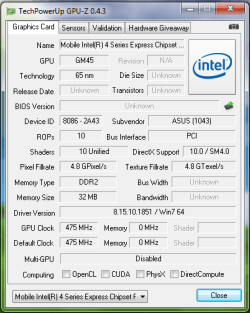
This link has more info on your GPU, not to be confused with the laptop equivalent of a video card, you have a 4500MHD in that regard, I had you run GPU-Z to get that out of you with little trouble and other info might be useful, 32 megs of video RAM seems out of place (low # these days) and couldn't find some info, might just be because it's a laptop though.
Get the latest and greatest, install and reboot, and give the results.
That is assuming you are still having that problem?
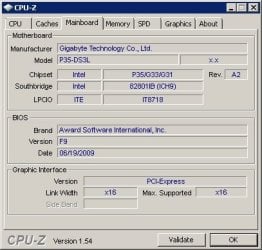
Couldn't hurt to run this next attachment (unzip someplace, run the .exe) and post a screen shot also, please show the 3rd tab (Mainboard)
All this info is to help troubleshoot further and verify specifics such as BIOS version, be it me or someone else, std operating procedure for me, at least. DETAILS DETAILS DETAILS!
System Manufacturer/Model Number Custom OS Windows 7 Ultimate (64-Bit) CPU AMD Phenom II X6 1090T Motherboard MSI 890FXA-GD70 Memory 8 gigs of Patriot Viper 2133 (4x2) Graphics Card Diamond ATI Radeon 5850 Sound Card onboard Monitor(s) Displays LG 22" LCD Widescreen Screen Resolution 1680 by 1050 (max of monitor)
Keyboard Logitech G11 Mouse Logitech 220 Wireless mouse PSU Corsair TX850 Case Thermaltake Armor A90 Cooling Thermaltake Spin Q CPU Cooler Hard Drives Various 7200RPM, SATA II 3.0 drives Internet Speed 16 Megabit broadband (Cable co.)
32 megs of video RAM seems out of place (low # these days) and couldn't find some info, might just be because it's a laptop though.
The 32 megs is low, but that would be the dedicated amount of VRAM that particular chip has - there may be a BIOS setting to increase the amount of dedicated VRAM it utilises. The rest of the video memory would be 'shared' with the system RAM.