
You are using an out of date browser. It may not display this or other websites correctly.
You should upgrade or use an alternative browser.
You should upgrade or use an alternative browser.
Windows 7 RC + nvlddmkm.sys BSOD
- Thread starter Eagle Eye
- Start date

Nvidia 7950GX2 BSOD
Hi
Since Last Saturday 27th Feb 2010 a normal running Dimension 9200 under retail version of the Win 7 x64 Ultimate started to through BSOD with Nvlddmkm.sys error and a memory dump.
I could not run my Win7 OS cd to boot to do a custom install as during the phase of completing the installation BSOD with a memory dump and it reboots again. This cycle keeps repeating. Since I have started the custom install with a format I have lost the ability to start in safe mode either.
Luckly I have has a system image back up and able to use the repair option to install the Image backup but that too on reaching the Win 7 logo throughs a BSOD with Nvlddmkm.sys error and memory dump. This goes in the loop of boot,BSOD and restart.... Now again I on safe-mode managed to reach the Device Manager and here uninstalled the Nvidia driver.Then on re boot, on the basic drivers computer did not BSOD. This confirmed that the driver built in Win 7 OS CD for some reason having problem with my Nvidia Geforce 1GB 7950 GX2 GPU.
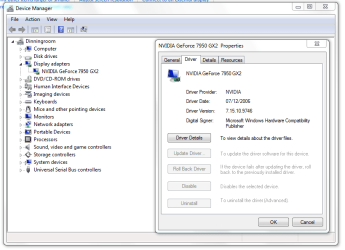
I installed the Dell's Vista x64 version of the Nvidia driver under safe mode at this point. This has now allowed me to operate my Win 7. When I went to Device Manager, I find under the display device only one 7950GX2 [Here I use to see 2x 7950 GX2 in the past!!]
The first suspect is half of my Geforce 7950 GX2 is not functioning and does not like the latest drivers but the old Dell's version of Vista x64 driver for some unknown reasons.
I intend to replace with a new GPU and try again.
Thanking you.
Regards
To Whom It May Concern:
I have an issue with my EVGA GTX 280 SC, regardless of the driver installed I get a BSOD with nvlddmkm.sys error and a memory dump. It works just fine with the 6600GT I used as an alternative. I just wanted to know if anyone else is gettiing
Hi
Since Last Saturday 27th Feb 2010 a normal running Dimension 9200 under retail version of the Win 7 x64 Ultimate started to through BSOD with Nvlddmkm.sys error and a memory dump.
I could not run my Win7 OS cd to boot to do a custom install as during the phase of completing the installation BSOD with a memory dump and it reboots again. This cycle keeps repeating. Since I have started the custom install with a format I have lost the ability to start in safe mode either.
Luckly I have has a system image back up and able to use the repair option to install the Image backup but that too on reaching the Win 7 logo throughs a BSOD with Nvlddmkm.sys error and memory dump. This goes in the loop of boot,BSOD and restart.... Now again I on safe-mode managed to reach the Device Manager and here uninstalled the Nvidia driver.Then on re boot, on the basic drivers computer did not BSOD. This confirmed that the driver built in Win 7 OS CD for some reason having problem with my Nvidia Geforce 1GB 7950 GX2 GPU.
I installed the Dell's Vista x64 version of the Nvidia driver under safe mode at this point. This has now allowed me to operate my Win 7.
When I went to Device Manager, I find under the display device only one 7950GX2 [Here I use to see 2x 7950 GX2 in the past!!]The first suspect is half of my Geforce 7950 GX2 is not functioning and does not like the latest drivers but the old Dell's version of Vista x64 driver for some unknown reasons.
I intend to replace with a new GPU and try again.
Thanking you.
Regards
Attachments
Last edited:
My Computer
At a glance
Windows 7 Ultimate 64bitIntel viiv Duo core 6400 @ 2.136GBNvidis GX2 1GB v7.15.10.9746 [Dell's 14359 Dr...
- Computer Manufacturer/Model Number
- Dell
- OS
- Windows 7 Ultimate 64bit
- CPU
- Intel viiv Duo core 6400 @ 2.13
- Memory
- 6GB
- Graphics Card(s)
- Nvidis GX2 1GB v7.15.10.9746 [Dell's 14359 Driver]
- Sound Card
- Creative Sound Blaster
Hi people, I'm just going to pitch in on this thread because I am having the same problems. Mind you though, it is going to be quite long, but also have very detailed information because I have spent almost a week trouble shooting the nvlddmkm.sys error.
Hi
have you had any breakthrough with the problem. I own a Dell Dimension 9200 that has suddenly started to through BSOD. The whole story is like yours.
I custom installed my Vista x64 ultimate to test and there is no BSOD.
I am with the same graphic card [Nvidia 7950GX2] in safe mode changed the driver version of the Nvidia to Vistax64 Dell's driver and the Win 7 x64 behaving normally.
However I would like to know as to what is the solution to your problem. I am so afraid to play any games because in case it throughs a BSOD!!
Regards
My Computer
At a glance
Windows 7 Ultimate 64bitIntel viiv Duo core 6400 @ 2.136GBNvidis GX2 1GB v7.15.10.9746 [Dell's 14359 Dr...
- Computer Manufacturer/Model Number
- Dell
- OS
- Windows 7 Ultimate 64bit
- CPU
- Intel viiv Duo core 6400 @ 2.13
- Memory
- 6GB
- Graphics Card(s)
- Nvidis GX2 1GB v7.15.10.9746 [Dell's 14359 Driver]
- Sound Card
- Creative Sound Blaster

You should have started your own thread. This thread was about TDRs (Timeout Detection & Recovery). However, u should have 2 7950gx2 showing up in the device manager. Maybe your card is dying. Re-seat the card and check it's power.
My Computer
At a glance
Windows 7 Home Premium (64-bit) SP1 RTMIntel Core2Duo [email protected]2x2Gb GEIL DDR2 800 4-4-4-12 @ 1.8vASUS HD4850 512Mb @700/1100
- OS
- Windows 7 Home Premium (64-bit) SP1 RTM
- CPU
- Intel Core2Duo [email protected]
- Motherboard
- ASUS P5Q (BIOS 2208)
- Memory
- 2x2Gb GEIL DDR2 800 4-4-4-12 @ 1.8v
- Graphics Card(s)
- ASUS HD4850 512Mb @700/1100
- Sound Card
- Realtek ALC1200 @ Intel 82801JB ICH10
- Monitor(s) Displays
- Samsung Syncmaster T220
- Screen Resolution
- 1680x1050x32@60Hz
- Hard Drives
- Seagate ST3500410AS SATA300 500Gb
Hitachi HDS721032CLA362 SATA300 320Gb
- PSU
- Antec NeoPower 650W 3.3v@24A/5v@24A/12v@19A/12v@19A/12v@19A
- Internet Speed
- 3Mbps
This thread was about the nvlddmkm.sys BSOD issue. TDR was just one suggested culprit. See quote below.
Anyway, I started having this BSOD on bootup a while back... after a windows update. Basically, I was having to boot from a previous restore point just to get into windows "normal" mode. Today, however, the restore points no longer worked... just kept BSODing on boot with a nvlddmkm.sys error. The tdrlevel=0 tweak did nothing for me... neither did rolling back/updating my nvidia drivers... or clearing out all the non ms startups in msconfig. Finally, figuring one of my 275s was bad, I disabled the secondary card in the device manager while in safe mode and found I could boot normally again. At that point, I removed and re-installed the current nvid drivers for both (again) and found that the sli option was missing from the nvid control panel. While researching this new problem, I found the simple solution was to roll back the realtek lan drivers to a previous version in device manager. Apparently, there is a conflict between the windows7/vista lan and nvidia's gpu drivers that causes nvlddmkm BSODs, (found this on the EVGA site and Tom's). Anyway, since I rolled my realtek lan driver back, I've had no more of these blue screens.
I'm not sure if this will help all of you guys out, since some of the earlier posts were well before the windows update that I was having issues with, but it wouldn't hurt to try. If it doesn't work, you can always just restore the lan drivers.
Edit: Oh yea, for what it's worth, I'm running win7 64 with a coupl'a gtx275s.
Anyway, I started having this BSOD on bootup a while back... after a windows update. Basically, I was having to boot from a previous restore point just to get into windows "normal" mode. Today, however, the restore points no longer worked... just kept BSODing on boot with a nvlddmkm.sys error. The tdrlevel=0 tweak did nothing for me... neither did rolling back/updating my nvidia drivers... or clearing out all the non ms startups in msconfig. Finally, figuring one of my 275s was bad, I disabled the secondary card in the device manager while in safe mode and found I could boot normally again. At that point, I removed and re-installed the current nvid drivers for both (again) and found that the sli option was missing from the nvid control panel. While researching this new problem, I found the simple solution was to roll back the realtek lan drivers to a previous version in device manager. Apparently, there is a conflict between the windows7/vista lan and nvidia's gpu drivers that causes nvlddmkm BSODs, (found this on the EVGA site and Tom's). Anyway, since I rolled my realtek lan driver back, I've had no more of these blue screens.
I'm not sure if this will help all of you guys out, since some of the earlier posts were well before the windows update that I was having issues with, but it wouldn't hurt to try. If it doesn't work, you can always just restore the lan drivers.
Edit: Oh yea, for what it's worth, I'm running win7 64 with a coupl'a gtx275s.
To Whom It May Concern:
I have an issue with my EVGA GTX 280 SC, regardless of the driver installed I get a BSOD with nvlddmkm.sys error and a memory dump. It works just fine with the 6600GT I used as an alternative. I just wanted to know if anyone else is getting this error.
Regards,
Eagle Eye
Last edited:
My Computer
At a glance
win7 64bit
- OS
- win7 64bit
BSOD solved.
I replaced my Nvidia Geforce 1GB 7950 GX2 with Nvidia Geforce 1GB GTS 250 GPU.
After which I reattempted custom install of the Win 7 x64 Ultimate.
This time round I did not find any problem during the custom install of the OS. No more BSOD.
After Os install I have installed the Nvidia's WHQL 196.21 driver and my computer runs smoothly.
Regards
I replaced my Nvidia Geforce 1GB 7950 GX2 with Nvidia Geforce 1GB GTS 250 GPU.
After which I reattempted custom install of the Win 7 x64 Ultimate.
This time round I did not find any problem during the custom install of the OS. No more BSOD.
After Os install I have installed the Nvidia's WHQL 196.21 driver and my computer runs smoothly.
Regards
My Computer
At a glance
Windows 7 Ultimate 64bitIntel viiv Duo core 6400 @ 2.136GBNvidis GX2 1GB v7.15.10.9746 [Dell's 14359 Dr...
- Computer Manufacturer/Model Number
- Dell
- OS
- Windows 7 Ultimate 64bit
- CPU
- Intel viiv Duo core 6400 @ 2.13
- Memory
- 6GB
- Graphics Card(s)
- Nvidis GX2 1GB v7.15.10.9746 [Dell's 14359 Driver]
- Sound Card
- Creative Sound Blaster
This thread was about the nvlddmkm.sys BSOD issue. TDR was just one suggested culprit. See quote below.
Anyway, I started having this BSOD on bootup a while back... after a windows update. Basically, I was having to boot from a previous restore point just to get into windows "normal" mode. Today, however, the restore points no longer worked... just kept BSODing on boot with a nvlddmkm.sys error. The tdrlevel=0 tweak did nothing for me... neither did rolling back/updating my nvidia drivers... or clearing out all the non ms startups in msconfig. Finally, figuring one of my 275s was bad, I disabled the secondary card in the device manager while in safe mode and found I could boot normally again. At that point, I removed and re-installed the current nvid drivers for both (again) and found that the sli option was missing from the nvid control panel. While researching this new problem, I found the simple solution was to roll back the realtek lan drivers to a previous version in device manager. Apparently, there is a conflict between the windows7/vista lan and nvidia's gpu drivers that causes nvlddmkm BSODs, (found this on the EVGA site and Tom's). Anyway, since I rolled my realtek lan driver back, I've had no more of these blue screens.
I'm not sure if this will help all of you guys out, since some of the earlier posts were well before the windows update that I was having issues with, but it wouldn't hurt to try. If it doesn't work, you can always just restore the lan drivers.
Edit: Oh yea, for what it's worth, I'm running win7 64 with a coupl'a gtx275s.
I just ran across this problem last night and also found that the latest Realtek LAN drivers that Win 7 wants to install appear to be the culprit. The
latest on EVGA's site (which are older) seem to work fine. If anything changes I'll update in this thread.
-LouieIV
CPU: Core i7 920
Motherboard: EVGA X58 3X SLI BIOS v.49
Graphics Card: EVGA 9600GT x2 in SLI driver v.196.21
Monitor: 22" Samsung SyncMaster 226BW
Sound Card: On Board Realtek High Definition Audio
RAM: 6GB (3 x 2GB) G. Skill 1600MHz DDR3
Storage Drive(s): WD 500GB Caviar Black
Optical Drive(s): Lite-On DVD Burner iHAS424-98
PSU: Ultra X4 600W Modular Power Supply
OS: Windows 7 Ultimate 64-bit, with latest Updates
Last edited:
My Computer
At a glance
Windows 7 Ultimate 64i7 920G.Skill DDR3-1600 2GB x3EVGA 9600GT x2 SLI
- Computer Manufacturer/Model Number
- Me
- OS
- Windows 7 Ultimate 64
- CPU
- i7 920
- Motherboard
- EVGA x58 3xSLI
- Memory
- G.Skill DDR3-1600 2GB x3
- Graphics Card(s)
- EVGA 9600GT x2 SLI
- Monitor(s) Displays
- SyncMaster 226BW
- PSU
- Ultra X4 600-Watt Modular
- Case
- CM Stacker 830
- Cooling
- 6 120mm fans
BSOD Nvidia 9500gt
It doesn't matter what I do. I will get the BSOD. I could be browsing the net or working on an excel sheet. the CPU just flat out crashes.
I've given up with video & games. It would crash with in seconds. I've upgraded to windows 7 64 bit hoping it would fix any problem but nothing. I'm sorry for being such a Newbie, but help is much needed and much appreciated.
I just want some simple instructions on how to fix. I have just updated to the latest drivers like in the past. I've disabled both cards (one at a time). still crashes.
Thanks,
Frustrated owner
It doesn't matter what I do. I will get the BSOD. I could be browsing the net or working on an excel sheet. the CPU just flat out crashes.
I've given up with video & games. It would crash with in seconds. I've upgraded to windows 7 64 bit hoping it would fix any problem but nothing. I'm sorry for being such a Newbie, but help is much needed and much appreciated.
I just want some simple instructions on how to fix. I have just updated to the latest drivers like in the past. I've disabled both cards (one at a time). still crashes.
Thanks,
Frustrated owner
My Computer
At a glance
Windows 7 64BitIntel core 2 Quad CPU Q9550 @2.83GHz 2.83 GHz4.00 GB RAM / 360GBNvidia 9500gt
- OS
- Windows 7 64Bit
- CPU
- Intel core 2 Quad CPU Q9550 @2.83GHz 2.83 GHz
- Memory
- 4.00 GB RAM / 360GB
- Graphics Card(s)
- Nvidia 9500gt
- Monitor(s) Displays
- 4 Monitors only using 2
- Hard Drives
- Dual Core 2
- Cooling
- 3 fans
- Other Info
- I can't watch video....... its sucks
Rich,
We all know how frustrating BSODs can be, one sympathizes. Are you having the nvlddmkm.sys issue? Have you tried rolling back your realtek LAN driver in device manager? Since I did this, I've been completely BSOD free... this driver and some Nvid drivers don't get along.
We all know how frustrating BSODs can be, one sympathizes. Are you having the nvlddmkm.sys issue? Have you tried rolling back your realtek LAN driver in device manager? Since I did this, I've been completely BSOD free... this driver and some Nvid drivers don't get along.
Last edited:
My Computer
At a glance
win7 64bit
- OS
- win7 64bit
Hello aphellyon. It is definitely the nvlddmkm.sys thing. I'm not very technical with this stuff, but with very clear instructions..... I can do it  .
.
I updated the drivers a few days ago, and so far so good. But I haven't watched video or anything yet. I also turned up the speed on my cooling fans.
Any help is much appreciated.
Rich
. I updated the drivers a few days ago, and so far so good. But I haven't watched video or anything yet. I also turned up the speed on my cooling fans.
Any help is much appreciated.
Rich
My Computer
At a glance
Windows 7 64BitIntel core 2 Quad CPU Q9550 @2.83GHz 2.83 GHz4.00 GB RAM / 360GBNvidia 9500gt
- OS
- Windows 7 64Bit
- CPU
- Intel core 2 Quad CPU Q9550 @2.83GHz 2.83 GHz
- Memory
- 4.00 GB RAM / 360GB
- Graphics Card(s)
- Nvidia 9500gt
- Monitor(s) Displays
- 4 Monitors only using 2
- Hard Drives
- Dual Core 2
- Cooling
- 3 fans
- Other Info
- I can't watch video....... its sucks
Hello aphellyon. It is definitely the nvlddmkm.sys thing. I'm not very technical with this stuff, but with very clear instructions..... I can do it
I updated the drivers a few days ago, and so far so good. But I haven't watched video or anything yet. I also turned up the speed on my cooling fans.
Any help is much appreciated.
Rich
I'm assuming you mean you updated the video card drivers? If so, and you're still crashing, we'll need to roll back your realtek lan driver. Open up the device manager, (click the start button, then right click "computer" and select "properties"... when the System panel opens up click on "Device Manager" in the upper left corner). Once the Device manager is open, find and dbl click "network adapters". If you have a Realtek PCIe driver in there, right click it and select "properties". Once the properties panel is open select the "driver" tab. Then click "Roll Back Driver". You'll be prompted to reboot. Before you reboot, you'll need to check how your windows update manager is set up. If it's set to full auto, it'll just re-install the conflicting lan driver and undo your roll-back. So go back to the "system" panel and click on "windows update" in the bottom left corner. Once in the windows update panel click "change settings". I set mine up to automatically check for and download updates but to let me decide which ones to install. If you don't feel comfortable having to manually install updates, you might can leave Important updates set to automatic and just un-check "give me recommended updates the same way I receive important updates" under "recommended updates". I'm not totally sure this will keep window from re-installing the lan driver update, but it should since it's listed as an "optional" update.
Good luck... hope this helps. And sorry if my instructions were a bit too detailed... wasn't sure what your experience level was and so I erred on the side of caution.
Aphellyon
My Computer
At a glance
win7 64bit
- OS
- win7 64bit
[/QUOTE]
I'm assuming you mean you updated the video card drivers? If so, and you're still crashing, we'll need to roll back your realtek lan driver. Open up the device manager, (click the start button, then right click "computer" and select "properties"... when the System panel opens up click on "Device Manager" in the upper left corner). Once the Device manager is open, find and dbl click "network adapters". If you have a Realtek PCIe driver in there, right click it and select "properties". Once the properties panel is open select the "driver" tab. Then click "Roll Back Driver". You'll be prompted to reboot. Before you reboot, you'll need to check how your windows update manager is set up. If it's set to full auto, it'll just re-install the conflicting lan driver and undo your roll-back. So go back to the "system" panel and click on "windows update" in the bottom left corner. Once in the windows update panel click "change settings". I set mine up to automatically check for and download updates but to let me decide which ones to install. If you don't feel comfortable having to manually install updates, you might can leave Important updates set to automatic and just un-check "give me recommended updates the same way I receive important updates" under "recommended updates". I'm not totally sure this will keep window from re-installing the lan driver update, but it should since it's listed as an "optional" update.
Good luck... hope this helps. And sorry if my instructions were a bit too detailed... wasn't sure what your experience level was and so I erred on the side of caution.
Aphellyon[/QUOTE]
Sorry for the LONG delay on this.
I'm still running into the same problems... I followed your instructions, and in device manager/Network adapters. It's Intel(R) 82567LF-2 Gigabit Network Connection.
I really don't know what to do. Am I better off buying new video cards for this stupid computer?
I'm assuming you mean you updated the video card drivers? If so, and you're still crashing, we'll need to roll back your realtek lan driver. Open up the device manager, (click the start button, then right click "computer" and select "properties"... when the System panel opens up click on "Device Manager" in the upper left corner). Once the Device manager is open, find and dbl click "network adapters". If you have a Realtek PCIe driver in there, right click it and select "properties". Once the properties panel is open select the "driver" tab. Then click "Roll Back Driver". You'll be prompted to reboot. Before you reboot, you'll need to check how your windows update manager is set up. If it's set to full auto, it'll just re-install the conflicting lan driver and undo your roll-back. So go back to the "system" panel and click on "windows update" in the bottom left corner. Once in the windows update panel click "change settings". I set mine up to automatically check for and download updates but to let me decide which ones to install. If you don't feel comfortable having to manually install updates, you might can leave Important updates set to automatic and just un-check "give me recommended updates the same way I receive important updates" under "recommended updates". I'm not totally sure this will keep window from re-installing the lan driver update, but it should since it's listed as an "optional" update.
Good luck... hope this helps. And sorry if my instructions were a bit too detailed... wasn't sure what your experience level was and so I erred on the side of caution.
Aphellyon[/QUOTE]
Sorry for the LONG delay on this.
I'm still running into the same problems... I followed your instructions, and in device manager/Network adapters. It's Intel(R) 82567LF-2 Gigabit Network Connection.
I really don't know what to do. Am I better off buying new video cards for this stupid computer?
My Computer
At a glance
Windows 7 64BitIntel core 2 Quad CPU Q9550 @2.83GHz 2.83 GHz4.00 GB RAM / 360GBNvidia 9500gt
- OS
- Windows 7 64Bit
- CPU
- Intel core 2 Quad CPU Q9550 @2.83GHz 2.83 GHz
- Memory
- 4.00 GB RAM / 360GB
- Graphics Card(s)
- Nvidia 9500gt
- Monitor(s) Displays
- 4 Monitors only using 2
- Hard Drives
- Dual Core 2
- Cooling
- 3 fans
- Other Info
- I can't watch video....... its sucks
bhushan8805
New member
- Local time
- 9:28 AM
- Messages
- 1
*** Solved 100% ***
hi guys.. i'm using the same nVidia 8600M GS and had the same issue.
i'm using windows 7 x64.
here are the steps to resolve this issue.
1. download the latest version of drivers from nvidia.com
2. DO NOT INSTALL STRAIGHT AWAY.
3. restart your computer in safe mode.
4. install the driver.
5. after completing the installation, restart the computer in SAFE MODE again and log in.
6. now restart your computer in normal mode. DONE..
cheers!
Rockitec - Web Hosting
hi guys.. i'm using the same nVidia 8600M GS and had the same issue.
i'm using windows 7 x64.
here are the steps to resolve this issue.
1. download the latest version of drivers from nvidia.com
2. DO NOT INSTALL STRAIGHT AWAY.
3. restart your computer in safe mode.
4. install the driver.
5. after completing the installation, restart the computer in SAFE MODE again and log in.
6. now restart your computer in normal mode. DONE..
cheers!
Rockitec - Web Hosting
My Computer
At a glance
win 7
- OS
- win 7
Similar threads
- Replies
- 3
- Views
- 1K
- Replies
- 12
- Views
- 3K
- Replies
- 12
- Views
- 2K
