SSD not recognized by windows

Samuel90

New member
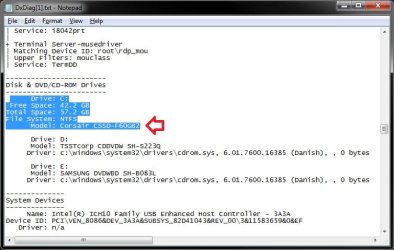
I have this force drive of 60 GB from corsair and it's not regonized by my windows 7 system as a ssd,, I don't what to do, need some help
 

Attachments

My Computer

Computer Manufacturer/Model Number
N/A
OS
Windows 7 Ultimate x64
CPU
Intel E8400
Motherboard
Asus P5Q
Memory
Kingston DDR2 4 GB
Graphics Card(s)
GTX 260
Sound Card
N/A
Monitor(s) Displays
Samsung P2450H
Screen Resolution
1920x1080
Hard Drives
Western Digital caviar green 500 GB, 32 MB
PSU
NorthQ 600 Watt
Case
Alienware
Cooling
N/A
Keyboard
Old microsoft one
Mouse
logitech something
Internet Speed
6 Mb
Hello Samuel,

I'm not sure what you mean. Looking at your TXT file, it shows your Corsair SSD listed with the proper model number. Where does it not show that it's a SSD drive?

SSD.jpg

Do you have the latest Intel 9.​1.​1.​1025 chipset driver installed?
 

My Computer

Computer type
PC/Desktop
Computer Manufacturer/Model Number
Self built custom
OS
64-bit Windows 11 Pro for Workstations
CPU
Intel i7-8700K OC'd to 5 GHz
Motherboard
ASUS ROG Maximus XI Formula Z390
Memory
64 GB (4x16GB) G.SKILL TridentZ RGB DDR4 3600 MHz
Graphics Card(s)
ASUS ROG-STRIX-GTX1080TI-O11G-GAMING
Sound Card
Integrated
Monitor(s) Displays
2 x Samsung Odyssey G7 27"
Screen Resolution
2560x1440
Hard Drives
1TB Samsung 990 PRO M.2,
4TB Samsung 990 PRO PRO M.2,
TerraMaster F8 SSD Plus NAS
PSU
Seasonic Prime Titanium 850W
Case
Thermaltake Core P3
Cooling
Corsair Hydro H115i
Keyboard
Logitech wireless K800
Mouse
Logitech MX Master 4
Internet Speed
2 Gb/s Download and 100 Mb/s Upload
Antivirus
Malwarebyte Anti-Malware Premium
Browser
Google Chrome
Other Info
Logitech Z625 speaker system,
Logitech BRIO 4K Pro webcam,
HP Color LaserJet Pro MFP M477fdn,
APC SMART-UPS RT 1000 XL - SURT1000XLI,
Galaxy S23 Plus phone
I'm not sure what you mean. Looking at your TXT file, it shows your Corsair SSD listed with the proper model number. Where does it not show that it's a SSD drive?

Do you have the latest Intel 9.​1.​1.​1025 chipset driver installed?

It doesn't show anywhere, but that's not the problem. The problem is that I'm able to run defrag on it. SSD's are not surposed to be defragged. And no I haven't installed that driver, but isn't that driver supposed for 5,4,3,900 chipsets?
 

My Computer

Computer Manufacturer/Model Number
N/A
OS
Windows 7 Ultimate x64
CPU
Intel E8400
Motherboard
Asus P5Q
Memory
Kingston DDR2 4 GB
Graphics Card(s)
GTX 260
Sound Card
N/A
Monitor(s) Displays
Samsung P2450H
Screen Resolution
1920x1080
Hard Drives
Western Digital caviar green 500 GB, 32 MB
PSU
NorthQ 600 Watt
Case
Alienware
Cooling
N/A
Keyboard
Old microsoft one
Mouse
logitech something
Internet Speed
6 Mb
You do not have the full model number of your Asus P5Q motherboard, but it will be either a X48 or P48 chipset (Intel 4 series chipset), so it will work for your motherboard and may be able to allow Windows 7 to recognize the SSD better.
 

My Computer

Computer type
PC/Desktop
Computer Manufacturer/Model Number
Self built custom
OS
64-bit Windows 11 Pro for Workstations
CPU
Intel i7-8700K OC'd to 5 GHz
Motherboard
ASUS ROG Maximus XI Formula Z390
Memory
64 GB (4x16GB) G.SKILL TridentZ RGB DDR4 3600 MHz
Graphics Card(s)
ASUS ROG-STRIX-GTX1080TI-O11G-GAMING
Sound Card
Integrated
Monitor(s) Displays
2 x Samsung Odyssey G7 27"
Screen Resolution
2560x1440
Hard Drives
1TB Samsung 990 PRO M.2,
4TB Samsung 990 PRO PRO M.2,
TerraMaster F8 SSD Plus NAS
PSU
Seasonic Prime Titanium 850W
Case
Thermaltake Core P3
Cooling
Corsair Hydro H115i
Keyboard
Logitech wireless K800
Mouse
Logitech MX Master 4
Internet Speed
2 Gb/s Download and 100 Mb/s Upload
Antivirus
Malwarebyte Anti-Malware Premium
Browser
Google Chrome
Other Info
Logitech Z625 speaker system,
Logitech BRIO 4K Pro webcam,
HP Color LaserJet Pro MFP M477fdn,
APC SMART-UPS RT 1000 XL - SURT1000XLI,
Galaxy S23 Plus phone
Well, I can still defrag it,,
 

My Computer

Computer Manufacturer/Model Number
N/A
OS
Windows 7 Ultimate x64
CPU
Intel E8400
Motherboard
Asus P5Q
Memory
Kingston DDR2 4 GB
Graphics Card(s)
GTX 260
Sound Card
N/A
Monitor(s) Displays
Samsung P2450H
Screen Resolution
1920x1080
Hard Drives
Western Digital caviar green 500 GB, 32 MB
PSU
NorthQ 600 Watt
Case
Alienware
Cooling
N/A
Keyboard
Old microsoft one
Mouse
logitech something
Internet Speed
6 Mb
I had that issue with an older SSD that I use to have, and just had to manually turn off the defrag schedule for it. :(
 

My Computer

Computer type
PC/Desktop
Computer Manufacturer/Model Number
Self built custom
OS
64-bit Windows 11 Pro for Workstations
CPU
Intel i7-8700K OC'd to 5 GHz
Motherboard
ASUS ROG Maximus XI Formula Z390
Memory
64 GB (4x16GB) G.SKILL TridentZ RGB DDR4 3600 MHz
Graphics Card(s)
ASUS ROG-STRIX-GTX1080TI-O11G-GAMING
Sound Card
Integrated
Monitor(s) Displays
2 x Samsung Odyssey G7 27"
Screen Resolution
2560x1440
Hard Drives
1TB Samsung 990 PRO M.2,
4TB Samsung 990 PRO PRO M.2,
TerraMaster F8 SSD Plus NAS
PSU
Seasonic Prime Titanium 850W
Case
Thermaltake Core P3
Cooling
Corsair Hydro H115i
Keyboard
Logitech wireless K800
Mouse
Logitech MX Master 4
Internet Speed
2 Gb/s Download and 100 Mb/s Upload
Antivirus
Malwarebyte Anti-Malware Premium
Browser
Google Chrome
Other Info
Logitech Z625 speaker system,
Logitech BRIO 4K Pro webcam,
HP Color LaserJet Pro MFP M477fdn,
APC SMART-UPS RT 1000 XL - SURT1000XLI,
Galaxy S23 Plus phone
I had that issue with an older SSD that I use to have, and just had to manually turn off the defrag schedule for it. :(

How did you TRIM it? Well,, I mean, these drives gets slow if you don't TRIM them
By the way, do you know if indexing isn't needed with ssd?
I did a defrag analyse by mistake on the drive,, do you think it has taken any damage?
 

My Computer

Computer Manufacturer/Model Number
N/A
OS
Windows 7 Ultimate x64
CPU
Intel E8400
Motherboard
Asus P5Q
Memory
Kingston DDR2 4 GB
Graphics Card(s)
GTX 260
Sound Card
N/A
Monitor(s) Displays
Samsung P2450H
Screen Resolution
1920x1080
Hard Drives
Western Digital caviar green 500 GB, 32 MB
PSU
NorthQ 600 Watt
Case
Alienware
Cooling
N/A
Keyboard
Old microsoft one
Mouse
logitech something
Internet Speed
6 Mb
Last edited:

My Computer

Computer type
PC/Desktop
Computer Manufacturer/Model Number
Self built custom
OS
64-bit Windows 11 Pro for Workstations
CPU
Intel i7-8700K OC'd to 5 GHz
Motherboard
ASUS ROG Maximus XI Formula Z390
Memory
64 GB (4x16GB) G.SKILL TridentZ RGB DDR4 3600 MHz
Graphics Card(s)
ASUS ROG-STRIX-GTX1080TI-O11G-GAMING
Sound Card
Integrated
Monitor(s) Displays
2 x Samsung Odyssey G7 27"
Screen Resolution
2560x1440
Hard Drives
1TB Samsung 990 PRO M.2,
4TB Samsung 990 PRO PRO M.2,
TerraMaster F8 SSD Plus NAS
PSU
Seasonic Prime Titanium 850W
Case
Thermaltake Core P3
Cooling
Corsair Hydro H115i
Keyboard
Logitech wireless K800
Mouse
Logitech MX Master 4
Internet Speed
2 Gb/s Download and 100 Mb/s Upload
Antivirus
Malwarebyte Anti-Malware Premium
Browser
Google Chrome
Other Info
Logitech Z625 speaker system,
Logitech BRIO 4K Pro webcam,
HP Color LaserJet Pro MFP M477fdn,
APC SMART-UPS RT 1000 XL - SURT1000XLI,
Galaxy S23 Plus phone
How about the intel matrix storage manager then? Does this software/driver need to be uninstalled?
 

My Computer

Computer Manufacturer/Model Number
N/A
OS
Windows 7 Ultimate x64
CPU
Intel E8400
Motherboard
Asus P5Q
Memory
Kingston DDR2 4 GB
Graphics Card(s)
GTX 260
Sound Card
N/A
Monitor(s) Displays
Samsung P2450H
Screen Resolution
1920x1080
Hard Drives
Western Digital caviar green 500 GB, 32 MB
PSU
NorthQ 600 Watt
Case
Alienware
Cooling
N/A
Keyboard
Old microsoft one
Mouse
logitech something
Internet Speed
6 Mb
It should be updated when the other drivers above are installed.
 

My Computer

Computer type
PC/Desktop
Computer Manufacturer/Model Number
Self built custom
OS
64-bit Windows 11 Pro for Workstations
CPU
Intel i7-8700K OC'd to 5 GHz
Motherboard
ASUS ROG Maximus XI Formula Z390
Memory
64 GB (4x16GB) G.SKILL TridentZ RGB DDR4 3600 MHz
Graphics Card(s)
ASUS ROG-STRIX-GTX1080TI-O11G-GAMING
Sound Card
Integrated
Monitor(s) Displays
2 x Samsung Odyssey G7 27"
Screen Resolution
2560x1440
Hard Drives
1TB Samsung 990 PRO M.2,
4TB Samsung 990 PRO PRO M.2,
TerraMaster F8 SSD Plus NAS
PSU
Seasonic Prime Titanium 850W
Case
Thermaltake Core P3
Cooling
Corsair Hydro H115i
Keyboard
Logitech wireless K800
Mouse
Logitech MX Master 4
Internet Speed
2 Gb/s Download and 100 Mb/s Upload
Antivirus
Malwarebyte Anti-Malware Premium
Browser
Google Chrome
Other Info
Logitech Z625 speaker system,
Logitech BRIO 4K Pro webcam,
HP Color LaserJet Pro MFP M477fdn,
APC SMART-UPS RT 1000 XL - SURT1000XLI,
Galaxy S23 Plus phone
Have you ran WEI?

After WEI, the test results will let Windows know more of whats going on. At that point, Defrag will be disabled on drives that are SSDs, and it may also disable Superfetch. I would also turn off the drive indexing on the SSD. It is not needed. But you can leave it on for the spinning drives if you so choose.
(I would turn SF back on though if it were me. The writes it does do are insignificant, and SF still benefits SSDs. RAM is still faster)

Windows Defrag is BAD though. if you wish to defrag a SSd on occasion, only use something like Perfect Disk Consolodate or Disk Keeper Hyperfast. They can help a bit if used in moderation (once or twice a month) and are designed for SSDs.
These are the only 2 Im aware of however that are safe.

TRIM should be supported for the SSd with Win7s default AHCI driver, as well as the newer Intel drivers.

 

My Computer

Computer Manufacturer/Model Number
Custom (Self Build)
OS
Windows 7 Home Premium 64bit
CPU
Intel Core i7 2700k
Motherboard
eVGA P67 SLI
Memory
8GB Mushkin Redline Ridgebacks @1866
Graphics Card(s)
EVGA GTX570 SC
Sound Card
XiFi Titanium HD
Monitor(s) Displays
LG W2453V
Screen Resolution
1920x1080
Hard Drives
Intel 320 80GB -- Intel X25-V 40GB --WD Black 1TB x2 -- WD Blue 640GB
PSU
Seasonic x750
Case
Corsair 600T SE White
Cooling
eVGA Superclocked CPU Cooler
Keyboard
Saitek Cyborg
Antivirus
Kaspersky
Browser
IE
Other Info
LG BD/DVD

My Computer

Computer Manufacturer/Model Number
N/A
OS
Windows 7 Ultimate x64
CPU
Intel E8400
Motherboard
Asus P5Q
Memory
Kingston DDR2 4 GB
Graphics Card(s)
GTX 260
Sound Card
N/A
Monitor(s) Displays
Samsung P2450H
Screen Resolution
1920x1080
Hard Drives
Western Digital caviar green 500 GB, 32 MB
PSU
NorthQ 600 Watt
Case
Alienware
Cooling
N/A
Keyboard
Old microsoft one
Mouse
logitech something
Internet Speed
6 Mb

My Computer

Computer type
PC/Desktop
Computer Manufacturer/Model Number
Self built custom
OS
64-bit Windows 11 Pro for Workstations
CPU
Intel i7-8700K OC'd to 5 GHz
Motherboard
ASUS ROG Maximus XI Formula Z390
Memory
64 GB (4x16GB) G.SKILL TridentZ RGB DDR4 3600 MHz
Graphics Card(s)
ASUS ROG-STRIX-GTX1080TI-O11G-GAMING
Sound Card
Integrated
Monitor(s) Displays
2 x Samsung Odyssey G7 27"
Screen Resolution
2560x1440
Hard Drives
1TB Samsung 990 PRO M.2,
4TB Samsung 990 PRO PRO M.2,
TerraMaster F8 SSD Plus NAS
PSU
Seasonic Prime Titanium 850W
Case
Thermaltake Core P3
Cooling
Corsair Hydro H115i
Keyboard
Logitech wireless K800
Mouse
Logitech MX Master 4
Internet Speed
2 Gb/s Download and 100 Mb/s Upload
Antivirus
Malwarebyte Anti-Malware Premium
Browser
Google Chrome
Other Info
Logitech Z625 speaker system,
Logitech BRIO 4K Pro webcam,
HP Color LaserJet Pro MFP M477fdn,
APC SMART-UPS RT 1000 XL - SURT1000XLI,
Galaxy S23 Plus phone
Hasn't worked, I'm still able to defrag the ssd
 

Attachments

  • winsat.log
    winsat.log
    14.8 KB · Views: 8
  • WEI.jpg
    WEI.jpg
    50.1 KB · Views: 67

My Computer

Computer Manufacturer/Model Number
N/A
OS
Windows 7 Ultimate x64
CPU
Intel E8400
Motherboard
Asus P5Q
Memory
Kingston DDR2 4 GB
Graphics Card(s)
GTX 260
Sound Card
N/A
Monitor(s) Displays
Samsung P2450H
Screen Resolution
1920x1080
Hard Drives
Western Digital caviar green 500 GB, 32 MB
PSU
NorthQ 600 Watt
Case
Alienware
Cooling
N/A
Keyboard
Old microsoft one
Mouse
logitech something
Internet Speed
6 Mb

My Computer

Computer type
PC/Desktop
Computer Manufacturer/Model Number
Self built custom
OS
64-bit Windows 11 Pro for Workstations
CPU
Intel i7-8700K OC'd to 5 GHz
Motherboard
ASUS ROG Maximus XI Formula Z390
Memory
64 GB (4x16GB) G.SKILL TridentZ RGB DDR4 3600 MHz
Graphics Card(s)
ASUS ROG-STRIX-GTX1080TI-O11G-GAMING
Sound Card
Integrated
Monitor(s) Displays
2 x Samsung Odyssey G7 27"
Screen Resolution
2560x1440
Hard Drives
1TB Samsung 990 PRO M.2,
4TB Samsung 990 PRO PRO M.2,
TerraMaster F8 SSD Plus NAS
PSU
Seasonic Prime Titanium 850W
Case
Thermaltake Core P3
Cooling
Corsair Hydro H115i
Keyboard
Logitech wireless K800
Mouse
Logitech MX Master 4
Internet Speed
2 Gb/s Download and 100 Mb/s Upload
Antivirus
Malwarebyte Anti-Malware Premium
Browser
Google Chrome
Other Info
Logitech Z625 speaker system,
Logitech BRIO 4K Pro webcam,
HP Color LaserJet Pro MFP M477fdn,
APC SMART-UPS RT 1000 XL - SURT1000XLI,
Galaxy S23 Plus phone
Yes I've updated the drivers, is that a mistake? Should I have ran this WEI with default win driver first?
 

Attachments

Last edited:

My Computer

Computer Manufacturer/Model Number
N/A
OS
Windows 7 Ultimate x64
CPU
Intel E8400
Motherboard
Asus P5Q
Memory
Kingston DDR2 4 GB
Graphics Card(s)
GTX 260
Sound Card
N/A
Monitor(s) Displays
Samsung P2450H
Screen Resolution
1920x1080
Hard Drives
Western Digital caviar green 500 GB, 32 MB
PSU
NorthQ 600 Watt
Case
Alienware
Cooling
N/A
Keyboard
Old microsoft one
Mouse
logitech something
Internet Speed
6 Mb
No, you would have wanted to updated those drivers.

Not sure why Windows 7 didn't automatically turn of Disk Defrag for your SSD then, but you can always just manually turn it off yourself by unchecking the SSD in the Disk Defrag Schedule settings. Plus, not to select it when you defrag the other drives.
 

My Computer

Computer type
PC/Desktop
Computer Manufacturer/Model Number
Self built custom
OS
64-bit Windows 11 Pro for Workstations
CPU
Intel i7-8700K OC'd to 5 GHz
Motherboard
ASUS ROG Maximus XI Formula Z390
Memory
64 GB (4x16GB) G.SKILL TridentZ RGB DDR4 3600 MHz
Graphics Card(s)
ASUS ROG-STRIX-GTX1080TI-O11G-GAMING
Sound Card
Integrated
Monitor(s) Displays
2 x Samsung Odyssey G7 27"
Screen Resolution
2560x1440
Hard Drives
1TB Samsung 990 PRO M.2,
4TB Samsung 990 PRO PRO M.2,
TerraMaster F8 SSD Plus NAS
PSU
Seasonic Prime Titanium 850W
Case
Thermaltake Core P3
Cooling
Corsair Hydro H115i
Keyboard
Logitech wireless K800
Mouse
Logitech MX Master 4
Internet Speed
2 Gb/s Download and 100 Mb/s Upload
Antivirus
Malwarebyte Anti-Malware Premium
Browser
Google Chrome
Other Info
Logitech Z625 speaker system,
Logitech BRIO 4K Pro webcam,
HP Color LaserJet Pro MFP M477fdn,
APC SMART-UPS RT 1000 XL - SURT1000XLI,
Galaxy S23 Plus phone
Okay, but how do I TRIM it,, with programs that wishmaster mentioned?
 

My Computer

Computer Manufacturer/Model Number
N/A
OS
Windows 7 Ultimate x64
CPU
Intel E8400
Motherboard
Asus P5Q
Memory
Kingston DDR2 4 GB
Graphics Card(s)
GTX 260
Sound Card
N/A
Monitor(s) Displays
Samsung P2450H
Screen Resolution
1920x1080
Hard Drives
Western Digital caviar green 500 GB, 32 MB
PSU
NorthQ 600 Watt
Case
Alienware
Cooling
N/A
Keyboard
Old microsoft one
Mouse
logitech something
Internet Speed
6 Mb
Windows 7 will do the TRIM for you since your SSD supports it in Windows 7. No need to do anything else for TRIM. :)
 

My Computer

Computer type
PC/Desktop
Computer Manufacturer/Model Number
Self built custom
OS
64-bit Windows 11 Pro for Workstations
CPU
Intel i7-8700K OC'd to 5 GHz
Motherboard
ASUS ROG Maximus XI Formula Z390
Memory
64 GB (4x16GB) G.SKILL TridentZ RGB DDR4 3600 MHz
Graphics Card(s)
ASUS ROG-STRIX-GTX1080TI-O11G-GAMING
Sound Card
Integrated
Monitor(s) Displays
2 x Samsung Odyssey G7 27"
Screen Resolution
2560x1440
Hard Drives
1TB Samsung 990 PRO M.2,
4TB Samsung 990 PRO PRO M.2,
TerraMaster F8 SSD Plus NAS
PSU
Seasonic Prime Titanium 850W
Case
Thermaltake Core P3
Cooling
Corsair Hydro H115i
Keyboard
Logitech wireless K800
Mouse
Logitech MX Master 4
Internet Speed
2 Gb/s Download and 100 Mb/s Upload
Antivirus
Malwarebyte Anti-Malware Premium
Browser
Google Chrome
Other Info
Logitech Z625 speaker system,
Logitech BRIO 4K Pro webcam,
HP Color LaserJet Pro MFP M477fdn,
APC SMART-UPS RT 1000 XL - SURT1000XLI,
Galaxy S23 Plus phone
Okay, so the drive itself will do this automatically when needed? how about the chdsk function in win, is that okay to use with ssd?
 

My Computer

Computer Manufacturer/Model Number
N/A
OS
Windows 7 Ultimate x64
CPU
Intel E8400
Motherboard
Asus P5Q
Memory
Kingston DDR2 4 GB
Graphics Card(s)
GTX 260
Sound Card
N/A
Monitor(s) Displays
Samsung P2450H
Screen Resolution
1920x1080
Hard Drives
Western Digital caviar green 500 GB, 32 MB
PSU
NorthQ 600 Watt
Case
Alienware
Cooling
N/A
Keyboard
Old microsoft one
Mouse
logitech something
Internet Speed
6 Mb
Back
Top