

Since building my system, I've been reading a lot about SSDs and their projected evolution - yes, I did it backwards and should have done my homework prior to the build. Fortunately, my SSDs are MLC/TRIM enabled and allow me to RAID0 them - making them exceptionally fast. The configuration and drive selection was based on topical numbers, nothing as in-depth as the controller type or TRIM support. I just got lucky.
New technology is tough. A few of you that bought HD-DVD players (or going back to BETA-MAX) understand this problem. With Vista, Microsoft wasn't prepared to implement native SSD support. Instead, they gave us ReadyBoost, the neat little feature that creates additional RAM out of a USB stick. Although a neat gimmick, it's essentially useless and a cheap attempt at any real SSD support.
With Windows 7, they finally got on-board (relatively) early and implemented native support for SSDs. Beginning with the first betas, for both SLC and MLC - and more importantly, native TRIM support. That support will continue to evolve, as quoted early on from a senior MS developer;
It's important to note here that, at the time that comment was made, USB sticks did not - and still don't support TRIM. This will change as SSDs get smaller, for now, we are going to have to rely on 'decent' speeds from our trusty sticks until they get their own controllers.
For our conventional SSDs, TRIM support is essential. With Windows 7, the OS/file system will determine if your drive has native TRIM support and configure it accordingly;
Good to know. From the get-go, W7 will take advantage of a SSD/TRIM-enabled drive and configure it for you. While I personally disable the pagefile entirely, those who still use it will benefit significantly by keeping it on your SSD.
To determine if your SSD supports TRIM, open a console as Admin;
If the console returns a '0', your drive supports TRIM and it is ENABLED.
If it returns '1', the file system has disabled TRIM for your drive. This means your drive's controller does not support TRIM.
Don't fret.
A firmware upgrade may correct the problem as more and more SSD manufacturers are now implementing this essential feature in the form of BIOS updates for older drives and natively in new drives. Check your drive's site for possible upgrades. While, forcing TRIM is possible, it is not recommended.
So why do you care? Anandtech summarized this well;
This is crucial for a number of reasons. Users of SSDs have long complained that long-term usage of SSDs created lag, they get progressively slower as they're used. The reason for this is lack of TRIM support on older SSDs. On a conventional spindle drive, when the file system removes a file, it simply removes the header. This is efficient for both the OS and the drive itself. The problem with this is that the file can easily be recovered - this is how 'undelete' software is possible. The problem also affects SSDs but for different reasons.
You could think of TRIM as real-time defragmentation for your SSD. TRIM allows the drive to perform at its optimal levels, issuing 'clean up' commands that will later improve additonal write commands - the area where SSDs are weakest. There's an added benefit; a traditional format will not restore your SSD to a pristine state. Instead, you can use a few utilities out there, again, refer to Anandtech on some additional info on this. The process described here will 'reset' all the cells on your SSD to their original state - something a traditional format will not do.
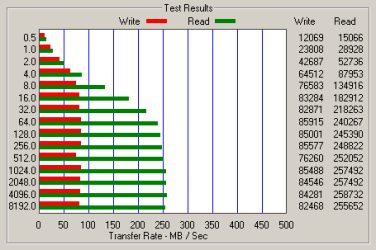
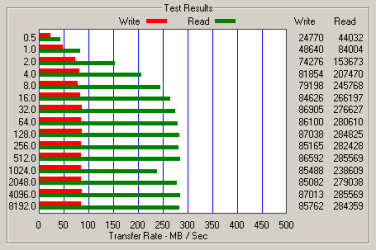
Provided your motherboard supports it, added performance gains can be had by using AHCI for your SSD, as demonstrated in the included screenshots below.
As controllers on SSDs continue to improve, additional features to improve write performance will only get better. With write caches, enhanced controllers and continued support in Windows 7, the days of conventional HDD's are numbered. Ensuring your SSD has the latest BIOS will ensure you're getting the most out of your drive.
Update - June 11, 2010
Originally, I pointed out that TRIM support on the controller was 'on the horizon'. Well, it's been a longer horizon than I would have expected, but it looks like it's finally here. Or is it?
Until now, if you ran a RAID, you give up TRIM support for performance. Sources now say the latest Intel RAID software update lifts that limitation, but it ain't so.
Here's what Intel said before the update hit the web last Friday:
Translation: if your Intel storage controller is set to RAID mode, you'll now be able to benefit from your solid-state drive's TRIM functionality when running it alongside a RAID array comprised of mechanical drives. TRIM isn't supported for SSDs participating in a RAID array, however. Intel may add that feature in the future, but it hasn't committed to doing so.
1) There is currently no way to pass the TRIM instruction to a drive that is a member of a RAID array. Intel's latest RAID drivers allow you to TRIM non-member RAID disks, but not an SSD in a RAID array.
2) Giving up TRIM support means that you need a fairly resilient SSD, one whose performance will not degrade tremendously over time. On the bright side, with the exception of the newer SandForce controllers, we've not seen a controller as resilient as Intel's.
Until this catches on, I suspect more than a few people will brick their SSDs with a ROM upgrade. Still, prices on SSDs have dropped so radically that a pair of Kingston SSDNow 64GB SSDs won't set you back much at all.
Captain Zero
for SevenForums.com
Sources:
Early MS Presentation on SSD and its Possible Implementation in W7:
http://209.85.173.132/search?q=cach...rim&cd=2&hl=en&ct=clnk&gl=us&client=firefox-a
Original document: http://download.microsoft.com/download/5/E/6/5E66B27B-988B-4F50-AF3A-C2FF1E62180F/COR-T558_WH08.pptx
HDDERACE 3.3:
http://redirectingat.com/?id=267X417&url=http%3A//pcper-articlecontent.s3.amazonaws.com/HDDErase_3.3.zip
MSDN Blog:
Engineering Windows 7 : Support and Q&A for Solid-State Drives
SanDISK Press Release (3rd Generation SSD):
Sandisk Unleashes World's Fastest MLC SSD Family
Anandtech SSD Anthology:
AnandTech: The SSD Anthology: Understanding SSDs and New Drives from OCZ
Windows 7 gets SSD Friendly:
Windows 7 gets SSD-friendly
Super Talent Announces Upgrades:
HEXUS.net - News :: Super Talent launches fix for SSD performance degredation : Page - 1/1
Thunk:
Should Filesystems Be Optimized for SSD’s? | Thoughts by Ted
SSD: Pros and Cons;
How Windows 7 will -- and won't -- work better with SSDs
New technology is tough. A few of you that bought HD-DVD players (or going back to BETA-MAX) understand this problem. With Vista, Microsoft wasn't prepared to implement native SSD support. Instead, they gave us ReadyBoost, the neat little feature that creates additional RAM out of a USB stick. Although a neat gimmick, it's essentially useless and a cheap attempt at any real SSD support.
With Windows 7, they finally got on-board (relatively) early and implemented native support for SSDs. Beginning with the first betas, for both SLC and MLC - and more importantly, native TRIM support. That support will continue to evolve, as quoted early on from a senior MS developer;
This is quite remarkable since MS would, in the past, relegate new technology support in the form of service packs and not the main RTM. Time's are changing. Fast.I'm not an expert on our storage drivers (I deal mainly at the file system level), but it appears that our ATA port driver (ataport) does implement trim support. This means that SSD drives which present themselves as ATA drives (which I think most if not all do), can support trim provided the drive itself also supports trim. Non-ATA devices -- including USB drives and SCSI drives -- don't yet have the ability to support trim, since our other port drivers don't implement trim. This may change as the market evolves. I don't know if any 3rd-party storage drivers implement trim as of yet, but yes, they would have to implement it for it to work.
It's important to note here that, at the time that comment was made, USB sticks did not - and still don't support TRIM. This will change as SSDs get smaller, for now, we are going to have to rely on 'decent' speeds from our trusty sticks until they get their own controllers.
For our conventional SSDs, TRIM support is essential. With Windows 7, the OS/file system will determine if your drive has native TRIM support and configure it accordingly;
MSDN Blog said:Windows 7 will disable disk defragmentation on SSD system drives. Because SSDs perform extremely well on random read operations, defragmenting files isn’t helpful enough to warrant the added disk writing defragmentation produces.
By default, Windows 7 will disable Superfetch, ReadyBoost, as well as boot and application launch prefetching on SSDs with good random read, random write and flush performance. These technologies were all designed to improve performance on traditional HDDs, where random read performance could easily be a major bottleneck.
Since SSDs tend to perform at their best when the operating system’s partitions are created with the SSD’s alignment needs in mind, all of the partition-creating tools in Windows 7 place newly created partitions with the appropriate alignment.
Good to know. From the get-go, W7 will take advantage of a SSD/TRIM-enabled drive and configure it for you. While I personally disable the pagefile entirely, those who still use it will benefit significantly by keeping it on your SSD.
To determine if your SSD supports TRIM, open a console as Admin;
Code:
fsutil behavior query DisableDeleteNotifyIf it returns '1', the file system has disabled TRIM for your drive. This means your drive's controller does not support TRIM.
Don't fret.
A firmware upgrade may correct the problem as more and more SSD manufacturers are now implementing this essential feature in the form of BIOS updates for older drives and natively in new drives. Check your drive's site for possible upgrades. While, forcing TRIM is possible, it is not recommended.
So why do you care? Anandtech summarized this well;
Anandtech said:...a TRIM-supporting OS queries the hard drive for its rotational speed. If the drive responds by saying 0, the OS knows it’s a SSD and turns off features like defrag. It also enables the use of the TRIM command.
When you delete a file, the OS sends a trim command for the LBAs covered by the file to the SSD controller. The controller will then copy the block to cache, wipe the deleted pages, and write the new block with freshly cleaned pages to the drive.
Now when you go to write a file to that block you’ve got empty pages to write to and your write performance will be closer to what it should be.
This is crucial for a number of reasons. Users of SSDs have long complained that long-term usage of SSDs created lag, they get progressively slower as they're used. The reason for this is lack of TRIM support on older SSDs. On a conventional spindle drive, when the file system removes a file, it simply removes the header. This is efficient for both the OS and the drive itself. The problem with this is that the file can easily be recovered - this is how 'undelete' software is possible. The problem also affects SSDs but for different reasons.
Anandtech said:If you are doing a clean setup of your machine and want to restore your drive to its native state you’ll have to perform a secure erase. Intel distributed a tool with the first X25-M review kits called HDD ERASE. This tool will take any SSD and free every last page on the drive. Obviously you’ll lose all of your data but your drive will be super fast again!
You could think of TRIM as real-time defragmentation for your SSD. TRIM allows the drive to perform at its optimal levels, issuing 'clean up' commands that will later improve additonal write commands - the area where SSDs are weakest. There's an added benefit; a traditional format will not restore your SSD to a pristine state. Instead, you can use a few utilities out there, again, refer to Anandtech on some additional info on this. The process described here will 'reset' all the cells on your SSD to their original state - something a traditional format will not do.
Provided your motherboard supports it, added performance gains can be had by using AHCI for your SSD, as demonstrated in the included screenshots below.
As controllers on SSDs continue to improve, additional features to improve write performance will only get better. With write caches, enhanced controllers and continued support in Windows 7, the days of conventional HDD's are numbered. Ensuring your SSD has the latest BIOS will ensure you're getting the most out of your drive.
Update - June 11, 2010
Originally, I pointed out that TRIM support on the controller was 'on the horizon'. Well, it's been a longer horizon than I would have expected, but it looks like it's finally here. Or is it?
Until now, if you ran a RAID, you give up TRIM support for performance. Sources now say the latest Intel RAID software update lifts that limitation, but it ain't so.
Here's what Intel said before the update hit the web last Friday:
The latest: Intel® RST 9.6 will be released this week which includes TRIM support for SSDs. It will support TRIM with SSDs in an AHCI configuration, or with the RAID controller enabled and the SSD is used as a pass through device. An example of this use case is for users that want to use the SSD as a boot drive but still be able to RAID multiple HDDs together to allow for large protect data storage – a great use for the home theater PC. TRIM support for SSDs in a RAID configuration is under investigation and is not included in Intel® RST 9.6.
1) There is currently no way to pass the TRIM instruction to a drive that is a member of a RAID array. Intel's latest RAID drivers allow you to TRIM non-member RAID disks, but not an SSD in a RAID array.
2) Giving up TRIM support means that you need a fairly resilient SSD, one whose performance will not degrade tremendously over time. On the bright side, with the exception of the newer SandForce controllers, we've not seen a controller as resilient as Intel's.
Until this catches on, I suspect more than a few people will brick their SSDs with a ROM upgrade. Still, prices on SSDs have dropped so radically that a pair of Kingston SSDNow 64GB SSDs won't set you back much at all.
Captain Zero
for SevenForums.com
Sources:
Early MS Presentation on SSD and its Possible Implementation in W7:
http://209.85.173.132/search?q=cach...rim&cd=2&hl=en&ct=clnk&gl=us&client=firefox-a
Original document: http://download.microsoft.com/download/5/E/6/5E66B27B-988B-4F50-AF3A-C2FF1E62180F/COR-T558_WH08.pptx
HDDERACE 3.3:
http://redirectingat.com/?id=267X417&url=http%3A//pcper-articlecontent.s3.amazonaws.com/HDDErase_3.3.zip
MSDN Blog:
Engineering Windows 7 : Support and Q&A for Solid-State Drives
SanDISK Press Release (3rd Generation SSD):
Sandisk Unleashes World's Fastest MLC SSD Family
Anandtech SSD Anthology:
AnandTech: The SSD Anthology: Understanding SSDs and New Drives from OCZ
Windows 7 gets SSD Friendly:
Windows 7 gets SSD-friendly
Super Talent Announces Upgrades:
HEXUS.net - News :: Super Talent launches fix for SSD performance degredation : Page - 1/1
Thunk:
Should Filesystems Be Optimized for SSD’s? | Thoughts by Ted
SSD: Pros and Cons;
How Windows 7 will -- and won't -- work better with SSDs
Attachments
Last edited:
My Computer
At a glance
Windows 7 Home Premium x64Intel QX9650 Extreme 4.0 GHz8GB (4x2) Corsair Dominator DDR32x Radeon R390X [8GB]
- Computer type
- PC/Desktop
- Computer Manufacturer/Model Number
- Custom Build/Mod
- OS
- Windows 7 Home Premium x64
- CPU
- Intel QX9650 Extreme 4.0 GHz
- Motherboard
- ASUS Rampage Extreme Rev2
- Memory
- 8GB (4x2) Corsair Dominator DDR3
- Graphics Card(s)
- 2x Radeon R390X [8GB]
- Sound Card
- SupremeFX X-Fi
- Monitor(s) Displays
- Dell 2408WFP 26" Panel
- Screen Resolution
- 1920x1200
- Hard Drives
- 4x WD 2TB (8TB+ Total)
2x Crucial SSD 128GB (RAID-0)
1x LG Blu-ray read/write
1x Phillips LightScribe DVD read/write
- PSU
- Corsair HX1000
- Case
- CoolerMaster - Cosmos S
- Cooling
- Custom Liquid - 320mm rad w/ 3x 80mm fans, CPU/NB/SB Blocks
- Keyboard
- Logitech Illuminater Pro
- Mouse
- Logitech
- Internet Speed
- Fractional T1 - 125Mbps
- Antivirus
- ESET Security Suite / Microsoft Security Essentials
- Browser
- Cyberfox Intel x64
- Other Info
- OC'd to 5.0GHz @ 44c under full load


