Windows 7 Forums Search
Welcome to Windows 7 Forums. Our forum is dedicated to helping you find solutions with any problems, errors or issues you are experiencing with Windows 7. The Windows 7 forum also covers news and updates and has an extensive Windows 7 tutorial section that covers a wide range of tips and tricks.


Windows 7 - Windows 7 32bit Hard drive issue...

 
08-20-2010   #1


Windows 7 32bit


Windows 7 32bit Hard drive issue...

After finally upgrading to windows 7, I am having a issue with a IDE drive. Everything is up and running just fine but when I try to hook up a old ide drive with lots of "stuff" on it, windows 7 won't load correctly. It will just get stuck at the load screen and never get to the desktop.


Any suggestions!?! Thanks!

My System SpecsSystem Spec
08-20-2010   #2


Systems 1 and 2: Windows 7 Enterprise x64, Win 8 Developer


Welcome to SF, Squizzel. Please fill in your system specs. Is this an internal drive? Is it trying to load on the "stuff" drive, or the operating system drive? Is your bios set correctly for two drives? Is your other drive an IDE?
My System SpecsSystem Spec
08-20-2010   #3
whs


Vista and Windows7, sometimes Ubuntu and Fedora


Try an external enclosure and attach it via USB.
My System SpecsSystem Spec
.


08-20-2010   #4


Windows 7 32bit


Thanks! I updated my stats..

It is a internal drive and it is set to be the last drive to boot so it should never boot from it.

What do you mean about the bio's set for 2 drives??

My other drives are sata!

Thanks!
My System SpecsSystem Spec
08-20-2010   #5


Systems 1 and 2: Windows 7 Enterprise x64, Win 8 Developer


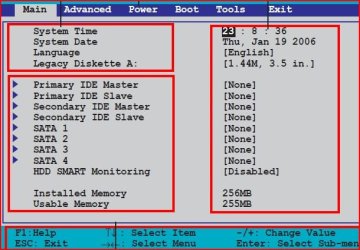
Congratulation. You have an Asus mobo. Just like me!
Here is your manual: http://static.compusa.com/pdf/Asus_P5N-E_SLI_Manual.pdf

In order to get into your bios, hit the DEL key while the computer is booting up. If it starts Windows, you are too late. Just tape the DEL key every two seconds.

Your primary drive is sata, the other is ide.

Your bios attachment will look like the following. Make the appropriate changes for sata and bios:
Attached Thumbnails
Windows 7 32bit Hard drive issue...-asus-bios.jpg  
My System SpecsSystem Spec
08-20-2010   #6


MS Windows 7 Ultimate SP1 64-bit


Quote   Quote: Originally Posted by Squizzel View Post
After finally upgrading to windows 7, I am having a issue with a IDE drive. Everything is up and running just fine but when I try to hook up a old ide drive with lots of "stuff" on it, windows 7 won't load correctly. It will just get stuck at the load screen and never get to the desktop.


Any suggestions!?! Thanks!
Welcome to SevenForums.

If you are still having problems, then:
Make a System Repair Disc (this you should do regardless),
Insert the System Repair Disc.
Shutdown your computer completely.
Remove power cord
Reattach power cord (this makes sure you really shutdown)
PowerUp your computer, booting from the CD. (make bios change if needbe)
Go to a command prompt (I'll give link for this)
enter following commands,
Diskpart
list disk

for each disk shown, and one at a time,
select disk N where N is a numeral
detail disk

Does the drive that you think you are booting from, show as Boot Disk: Yes when you gave the detail disk command?

exit your way out.
System Recovery Options
My System SpecsSystem Spec
08-21-2010   #7


Windows 7 (7600) x86


I assume the drive uses jumpers to select between Master and Slave like most old IDE drives do.
Do you have the jumper set to Slave?
My System SpecsSystem Spec
08-21-2010   #8


Windows 7 32bit


I am trying some of the suggestions above today, thanks for everyone's input. It is set to master, I am going to switch it right now.
My System SpecsSystem Spec
Reply

 Windows 7 32bit Hard drive issue... problems?


Thread Tools


Similar Threads for: Windows 7 32bit Hard drive issue...
Thread Forum
Windows 7 Problem or Hard Drive issue? Hardware & Devices
Post-cloning of OS hard drive Windows Genuine nag screen issue General Discussion
Backup 32bit external hard drive to 64 Backup and Restore
hard drive issue Hardware & Devices
XP > Windows 7 hard drive issue. Installation & Setup


All times are GMT -5. The time now is 06:11 AM.


Windows 7 Forums is an independent web site and has not been authorized,
sponsored, or otherwise approved by Microsoft Corporation.
"Windows 7" and related materials are trademarks of Microsoft Corp.
© Designer Media Ltd
  

1 2 3 4 5 6 7 8 9 10 11 12 13 14 15 16 17 18 19 20 21 22 23 24 25 26 27 28 29 30