
Have been on my PC for a few hours today and i got a windows message saying 'windows detected a hard disk problem'.
I am in the process of backing up my hard drive now.
Do i need to replace my hard drive straight away or do i have a while to gather funds?
Also this is my hard drive with Windows Vista on.
If i were to change the hard drive, can i go ahead and put the disk image onto the new hard drive and just boot up vista again? Or will vista be lost forever?
Any help will be greatly appreciated.
Many thanks in advance.
Rossy87
I am in the process of backing up my hard drive now.
Do i need to replace my hard drive straight away or do i have a while to gather funds?
Also this is my hard drive with Windows Vista on.
If i were to change the hard drive, can i go ahead and put the disk image onto the new hard drive and just boot up vista again? Or will vista be lost forever?
Any help will be greatly appreciated.
Many thanks in advance.
Rossy87
My Computer
At a glance
Windows 7 Professional x64Intel Pentium D 2.8ghz2gb DDR2 266mhzATI Radeon HD4760
- Computer Manufacturer/Model Number
- Custom Built
- OS
- Windows 7 Professional x64
- CPU
- Intel Pentium D 2.8ghz
- Motherboard
- MSI Cuba ms-7301
- Memory
- 2gb DDR2 266mhz
- Graphics Card(s)
- ATI Radeon HD4760
- Sound Card
- Realtek HD Audio Onboard
- Monitor(s) Displays
- Samsung 19" Widescreen
- Screen Resolution
- 1600x900
- Hard Drives
- Seagate 250Gb
Western Digital 320Gb External
Western Digital Caviar 500 GB
- PSU
- EZcool 700w PSU
- Case
- Coolermaster Elite 334
- Cooling
- Coolermaster Hyper TX3
- Keyboard
- Logitech G11
- Mouse
- Logitech Wireless Laser
- Internet Speed
- 9.8mbps

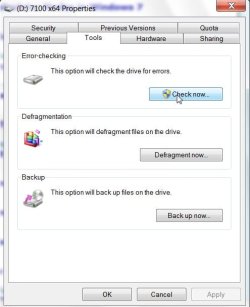

 .
.
 I am going to go back to Vista or Xp.
