- Local time
- 7:01 AM
- Messages
- 715
I am running Win 7 Pro with 4gb or memory.
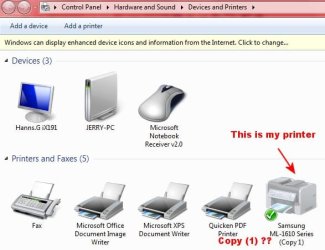
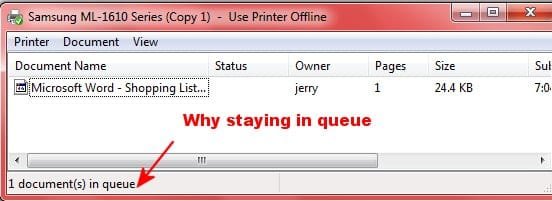
In the last few days something has changed and when I try to print a txt or word doc file. It will not print, but sends the file to queue. It has only been a few days since I last used the printer.
The printer is a Samsung ML-1610 that I installed the the Vista drivers for Win 7. It has been working perfectly up until now.
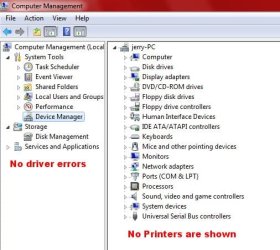
In the Device Manager there are no driver errors showing but at the same time no printers are shown either. I have no idea if printers ever showed.
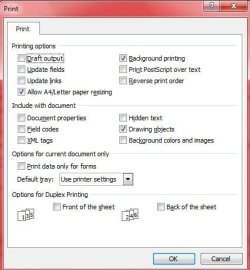
Here are the printer options which have never been changed since I initally installed the drivers.
One thing that is also weird; I have Win XP Pro installed on a second hard drive which I can boot into. It does exactly the same thing.
Since the last time I used the printer I can only think of two things that may have caused this problem.
I installed Xilisoft Video Editor (seems to work fine) and also installed about 35 fonts. I installed the fonts by copying them and pasteing into Windows Fonts Folder.
If anyone has a clue I would appreciate some help.
In the last few days something has changed and when I try to print a txt or word doc file. It will not print, but sends the file to queue. It has only been a few days since I last used the printer.
The printer is a Samsung ML-1610 that I installed the the Vista drivers for Win 7. It has been working perfectly up until now.
In the Device Manager there are no driver errors showing but at the same time no printers are shown either. I have no idea if printers ever showed.
Here are the printer options which have never been changed since I initally installed the drivers.
One thing that is also weird; I have Win XP Pro installed on a second hard drive which I can boot into. It does exactly the same thing.
Since the last time I used the printer I can only think of two things that may have caused this problem.
I installed Xilisoft Video Editor (seems to work fine) and also installed about 35 fonts. I installed the fonts by copying them and pasteing into Windows Fonts Folder.
If anyone has a clue I would appreciate some help.
My Computer
At a glance
Windows 7 ProIntel(R) Pentium(R) Duel CPU E2200 2.20 Ghz4 gb 2.96 UsableOnboard
- OS
- Windows 7 Pro
- CPU
- Intel(R) Pentium(R) Duel CPU E2200 2.20 Ghz
- Motherboard
- GA-G41M-ES2L
- Memory
- 4 gb 2.96 Usable
- Graphics Card(s)
- Onboard
- Sound Card
- Onboard
- Hard Drives
- 2 - 1TB WD Sata Drives